
7 Best Usb Charger

7 Best Usb Charger Article updated:

Quick guide: match the charging profile and shared power

Choose around your devices’ documented charging inputs, not only the charger’s headline wattage. USB-C is a connector, and USB Power Delivery support does not establish every output profile or PPS feature. For multiport use, check the manufacturer’s simultaneous allocation table. Match cables to the required charging capability, keep equipment dry and uncovered, and follow the exact model’s instructions.
1
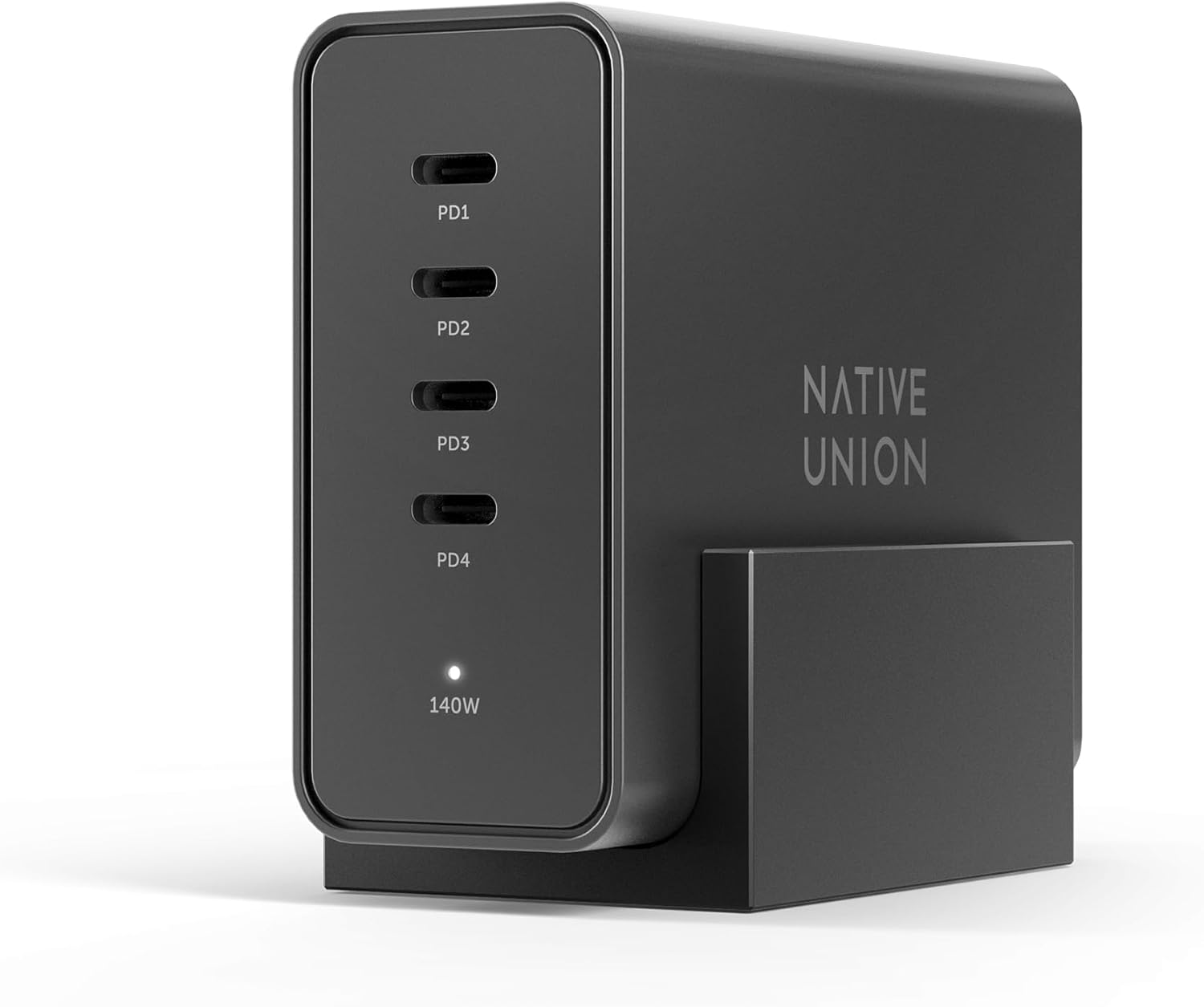
Fast GaN 140W Four-Port USB Charger
Brand: Native Union
Features / Highlights
  • Delivers up to 140W power for demanding USB-C laptops.
  • Four charging ports power several devices from one station.
  • USB Power Delivery 3.1 supports modern high power charging.
  • GaN technology enables powerful charging in a compact desktop design.
  • - Included desk stand keeps the charging station neatly positioned.
Our Score
9.80
CHECK PRICE

The 140W output is enough to make this a proper laptop charger

The Native Union Fast GaN Charger is a 140W desktop charging station built for people who have moved beyond charging only a phone and earbuds. When comparing the best USB charger options, its combination of USB Power Delivery 3.1, four charging ports and enough output for demanding USB-C laptops makes it useful as a central charging point rather than another small adapter occupying a wall outlet.

The headline figure is 140W, and that level of USB-C power matters for larger devices. Modern laptops can require substantially more power than phones and tablets, particularly when the computer is being used heavily while charging.

A lower powered charger may technically charge a compatible laptop but struggle to replenish the battery quickly during demanding work. In some situations, battery percentage can rise very slowly because the computer is consuming a significant portion of the power being supplied.

This Native Union unit is designed around higher power USB-C charging. 140W gives demanding laptops meaningful charging headroom, while still allowing the same charging station to serve smaller devices.

Power Delivery 3.1 is important here because it supports the higher power capabilities required by newer USB-C equipment. The connected device and cable still need to support the appropriate charging standard before the full available power can be used.

Four ports can remove several chargers from the desk

The four port configuration is one of the biggest practical advantages of this charger. A modern desk can easily have a laptop, phone, tablet and another accessory all requiring power during the same working day.

Without a multiport charger, that often means several separate power adapters spread across the floor or occupying every available socket on a power strip. One desktop charging station can consolidate those connections into a much cleaner setup.

Imagine arriving at a desk with a MacBook Pro that needs power, an iPad sitting at 20 percent and a phone that needs charging before leaving later in the afternoon. Multiple ports let one charger handle the desk instead of forcing the user to rotate devices through a single USB-C adapter.

The included desk stand is useful for the same reason. Rather than leaving a heavy charger loose behind the monitor or allowing cables to pull it around the desk, the stand gives the charging station a defined position.

GaN technology also helps make high output chargers more manageable in size. Gallium nitride power electronics can support efficient high power designs that are more compact than older charger architectures delivering similar levels of output.

There is an important detail with any multiport charger, though. The advertised maximum wattage describes the charger's overall capability, and available power can be distributed differently when several devices are connected at once.

That means users should choose ports intelligently when charging a high power laptop alongside smaller electronics. Power distribution matters when every port is occupied, particularly if one connected computer expects significantly more wattage than everything else.

The USB-C cable matters too. A cable that is not rated for the required power can prevent a compatible laptop from receiving the charger's highest supported output, even when both the charger and computer support it.

Why we believe this charger deserves our number one position

The Native Union Fast GaN Charger earns our top position because it works as more than a phone charger. The 140W maximum output, four port configuration and Power Delivery 3.1 support make it capable of serving as the primary charging station for a modern USB-C workspace.

The high output is particularly important for users with powerful laptops. One charger can cover laptops and mobile devices, reducing the number of separate power bricks that need to remain around the desk.

The four ports also give the charger longer term usefulness. Even if somebody currently needs only two connections, tablets, wireless accessories and other USB-powered equipment have a habit of gradually filling available charging space.

The desk stand is a smaller feature, but it improves daily use. A high power multiport charger works better as a desktop hub when it stays in one predictable location and the connected cables can be routed cleanly.

There are still limitations worth understanding. Connecting several demanding devices at once can change how the available wattage is distributed, so users should not assume every port can simultaneously deliver the charger's full 140W maximum.

It is also more charger than somebody needs for a single phone. If the only goal is overnight smartphone charging, a smaller USB-C adapter will take less space and provide plenty of power for that much simpler job.

The value becomes clearer when a laptop enters the setup. Add a tablet and phone as well, and consolidating several charging adapters into one high output station starts to make practical sense.

Using suitable cables is essential. Check the power rating of USB-C cables used with high wattage devices, particularly when trying to achieve the fastest supported charging rate on a laptop.

That is why we believe the Native Union Fast GaN Charger deserves the number one position in our Best USB Charger ranking. Its 140W Power Delivery 3.1 output, four port design, GaN technology and included desktop stand create a strong combination for users who want one organized charging station capable of powering everything from phones and tablets to demanding USB-C laptops.


2
Nexode 500W Six-Port Desktop USB Charger
Brand: UGREEN
Features / Highlights
  • Massive 500W total output handles several power hungry devices.
  • Six charging ports consolidate laptops, tablets, and phones together.
  • Single USB-C port can deliver up to 240W power.
  • GaN technology supports high output in a desktop friendly design.
  • - Intelligent power distribution manages charging across multiple connected devices.
Our Score
9.67
CHECK PRICE

The 500W total output changes what a desktop charger can actually handle

The UGREEN Nexode 500W is a six port desktop charging station designed for people who regularly have several high power USB devices sitting on the same desk. When comparing the best USB charger options, its headline 500W total output immediately separates it from ordinary phone chargers because this is built to handle laptops, tablets, smartphones and other USB-powered hardware at the same time.

The most interesting number is not just the 500W total. A single USB-C connection can provide up to 240W under compatible conditions, giving the charger enough individual port capacity for devices that demand far more power than a typical phone or tablet.

That matters as USB-C moves further into high performance laptops and other larger electronics. A charger that tops out at phone level wattage may work technically, but it can charge a power hungry computer slowly or struggle to keep up while that machine is under a heavy workload.

The Nexode is designed for a very different scenario. Up to 240W from one USB-C port gives it unusually high charging headroom when paired with compatible hardware and the correct cable.

The device being charged still decides how much power it actually accepts. Connecting a 30W phone to a 240W capable port does not force 240W into the phone, because USB Power Delivery negotiation determines the appropriate supported charging level.

Six ports can replace a surprising number of power bricks

The Nexode 500W provides six charging ports, which is where the large total power budget starts becoming practical. One station can handle several pieces of equipment rather than forcing every device to have its own adapter connected somewhere underneath the desk.

Consider a workspace with two USB-C laptops, a tablet, two phones and another rechargeable accessory. That kind of setup can normally consume most of a power strip just through separate charging adapters.

A high capacity desktop charger consolidates those connections. Six ports make multi-device charging much cleaner, particularly for people using several computers or managing a desk shared between work and personal electronics.

The 500W total output also provides more breathing room when several larger devices are connected simultaneously. Lower powered multiport chargers often work well until a second laptop is plugged in, at which point the available wattage has to be divided much more aggressively.

Power distribution still matters here. The exact output available from each connection can change depending on which ports are occupied and what the connected devices request.

Users with one especially demanding laptop should pay attention to port selection. High power devices belong on the highest output ports, while phones, earbuds and smaller accessories can use connections with lower available wattage.

Cable choice is equally important. Achieving very high USB-C power levels requires a cable designed and electronically rated for the appropriate charging specification.

A cheap or lower rated cable can become the bottleneck. The charger may support very high output and the laptop may support fast charging, but neither can overcome a cable that is not designed to carry the required power.

Why the Nexode 500W takes our number two position

The UGREEN Nexode 500W is one of the most capable options in this ranking from a pure power perspective. A 500W total budget, six charging ports and up to 240W from a single USB-C connection create a serious charging station for demanding desktop setups.

The high total wattage is particularly useful for people with multiple laptops. This charger is built for heavy multi-device setups, rather than simply giving somebody a convenient place to charge a phone and smartwatch overnight.

GaN technology helps make that kind of power delivery practical in a desktop charger. Gallium nitride based power electronics allow manufacturers to build high output chargers more efficiently and compactly than older designs with comparable capability.

The reason we place the Nexode at number two rather than number one is that the Native Union 140W charger above it offers a more balanced package for the typical user in our Best USB Charger ranking. Its four port configuration, Power Delivery 3.1 support and included desk stand provide enough power for a strong laptop focused setup without pushing into such an extreme total wattage category.

The UGREEN is considerably more powerful, but not everybody needs 500W. Someone with one laptop, one phone and a tablet may never take meaningful advantage of the additional capacity.

It also requires a little more attention to power distribution. With six ports and several high power devices connected, understanding which connection provides the desired charging level becomes more important than it is with a basic single port adapter.

For users who actually have the hardware to justify it, though, those are minor considerations. Multiple laptops, tablets and phones can all be centralized around one charging station instead of spreading power bricks across several outlets.

Using properly rated USB-C cables remains essential. High wattage charging is a complete chain involving the charger, cable and receiving device, and the maximum speed is determined by what that entire chain supports.

That is why we believe the UGREEN Nexode 500W deserves the number two position in our Best USB Charger ranking. It falls just behind our first choice in everyday simplicity and balanced desktop usability, but its enormous 500W total output, six port configuration, GaN technology and up to 240W single port capability make it an exceptional option for power users who want to consolidate several demanding USB-C devices onto one serious desktop charging station.


3
P3 100W Four-Port GaN USB Charger
Brand: MINIX
Features / Highlights
  • 100W maximum output provides enough power for compatible USB-C laptops.
  • Four charging ports handle several everyday devices simultaneously.
  • GaN technology delivers high output from a compact charger.
  • USB-C Power Delivery supports fast charging for compatible electronics.
  • - Multi-device compatibility covers laptops, tablets, phones, and accessories.
Our Score
9.26
CHECK PRICE

The 100W output hits a useful middle ground for everyday charging

The MINIX P3 is a compact multiport GaN charger designed to handle laptops, tablets, smartphones and smaller USB devices from one power adapter. When comparing the best USB charger options, its 100W maximum output makes sense for users who need substantially more power than a basic phone charger but do not necessarily require a huge 300W or 500W desktop charging station.

A 100W power budget is particularly useful for USB-C laptops. Many thin and light notebooks can charge comfortably within this range, while phones and tablets generally request considerably less power.

The important detail is that connected devices negotiate the power they need. Plugging a phone into a high wattage USB-C charger does not automatically force the charger's maximum output into that device.

That makes one charger useful across very different categories of electronics. 100W provides useful laptop charging capability, while still making sense for smaller devices such as phones, tablets and rechargeable accessories.

Actual charging speed depends on the device, charging protocol and cable. The charger can provide available power, but the receiving hardware ultimately determines how much of that power it will accept.

Four ports are enough for a realistic travel or desk setup

The four port layout is one of the strongest practical reasons to choose this MINIX. A laptop, phone, tablet and another USB accessory can all need power during the same day, and carrying four individual chargers is unnecessary when one multiport unit can cover the job.

This becomes particularly noticeable during travel. Hotel rooms often provide fewer conveniently located outlets than expected, especially once a bedside lamp and other equipment are already connected.

A multiport charger can turn one available outlet into a central charging point. Four ports reduce the number of adapters required, which means fewer bulky power bricks competing for space inside a travel bag.

GaN technology helps with the physical size of the charger too. Gallium nitride power electronics allow manufacturers to build high output chargers in more compact packages than many older silicon based designs with similar charging capability.

That does not mean all four ports can each deliver 100W simultaneously. The total available output is distributed according to the charger's port configuration and the devices connected at the time.

This matters when a laptop is connected alongside several smaller devices. Multiport charging changes how power gets distributed, so the highest output USB-C connection should generally be reserved for the device that needs the most power.

Cable quality matters as well. A USB-C cable rated for lower power can prevent a laptop from reaching the charging speed supported by both the charger and computer.

For high wattage charging, check the cable specification rather than assuming every USB-C cable is electrically identical. The connectors may look the same while their supported power and data capabilities differ substantially.

Why the P3 takes our number three position

The MINIX P3 earns a strong position because its specifications fit a broad range of real world charging setups. A 100W maximum output and four ports provide enough flexibility for a laptop centered workspace without creating an unnecessarily large charging station.

The compact GaN design is particularly valuable for travel. High output in a smaller charger saves space, which matters when the same bag already contains a laptop, phone, tablet, cables and other accessories.

Four ports also provide a useful balance. There are enough connections for a typical collection of personal electronics without turning the charger into a much larger piece of permanent desktop equipment.

The reason we place the MINIX at number three is that the chargers above it offer substantially greater power capability. Our number one Native Union model provides up to 140W with Power Delivery 3.1, giving it more headroom for demanding USB-C laptops.

The UGREEN Nexode at number two goes much further, with a 500W total power budget and up to 240W available from a single USB-C connection under compatible conditions. That makes it better suited to several high power computers sharing one charging station.

The MINIX P3 is more modest, but that can actually make it the sensible choice for many users. Someone charging one laptop plus a phone and tablet may never benefit from the enormous total wattage of a larger desktop charger.

The main consideration is understanding the 100W limit and how power is divided when several devices are connected. Users expecting maximum laptop charging speed while simultaneously charging three other devices should pay attention to the charger's port allocation behavior.

Proper cables remain important too. Use a suitably rated USB-C cable with the laptop, particularly when trying to take advantage of the highest supported Power Delivery output.

That is why we believe the MINIX P3 deserves the number three position in our Best USB Charger ranking. It falls behind our first two choices in maximum output and heavy multi-device capacity, but its 100W charging capability, four port configuration, GaN technology and compact construction make it a strong positive choice for users who want one practical charger for a laptop, tablet, phone and everyday USB accessories.


4
RAPID Pro 140W Multi-Device USB Charger
Brand: EcoFlow
Features / Highlights
  • 140W maximum charging output supports demanding compatible USB-C laptops.
  • Multi-device charging reduces the need for separate power adapters.
  • GaN technology delivers strong output from a compact charger body.
  • USB-C fast charging supports laptops, tablets, phones, and accessories.
  • - Intelligent power distribution manages output across multiple connected devices.
Our Score
8.96
CHECK PRICE

The 140W output makes this useful well beyond phone charging

The EcoFlow RAPID Pro is a high output multi-device charger designed for USB-C laptops, tablets, smartphones and smaller rechargeable electronics. When comparing the best USB charger options, its 140W maximum output matters because a modern charger often needs to replace several different adapters rather than simply charge one phone overnight.

A laptop is where that extra wattage becomes useful. Higher performance USB-C notebooks can demand considerably more power than phones, particularly when they are running demanding applications while connected to the charger.

A lower powered adapter might still charge the computer, but it can do so slowly when the laptop is active. In demanding situations, much of the incoming power may be consumed immediately by the computer rather than quickly replenishing its battery.

The EcoFlow provides considerably more charging headroom. 140W supports demanding USB-C charging workloads, provided the connected device and cable are compatible with the required Power Delivery specification.

The charger does not simply push its maximum wattage into every connected product. Compatible USB charging protocols allow devices to negotiate an appropriate power level, so smaller electronics only request the charging profile they support.

Multi-device charging is where a high power adapter starts earning its space

A high output charger becomes much more useful when several pieces of equipment need power at the same time. A typical work setup can include a laptop, tablet, phone and another USB accessory before the day has properly started.

Using individual adapters for every device quickly fills a power strip. It also means more chargers and cables need to be packed whenever the same equipment leaves the office.

A multi-device charger can centralize those connections. One charging point can simplify the entire desk, particularly for users who move between home, office and travel setups with the same collection of electronics.

GaN technology helps make this level of power more practical in a relatively compact form. Gallium nitride based power electronics can deliver high output efficiently while allowing charger designs to remain smaller than many older high wattage adapters.

This matters when the charger needs to travel. A compact high power unit can replace several lower wattage adapters inside a laptop bag, reducing the number of individual power bricks somebody needs to remember.

Power distribution still needs to be understood. When several devices are connected simultaneously, the available total power can be divided between ports according to the charger's allocation rules.

A high power laptop should therefore use the connection intended for the highest output. Port selection matters during simultaneous charging, especially when a laptop is connected alongside a tablet and several smaller electronics.

The cable is part of the charging system too. A lower rated USB-C cable can prevent a laptop from reaching the maximum charging speed supported by both the charger and the computer.

Why the RAPID Pro takes our number four position

The EcoFlow RAPID Pro has the kind of output that makes it suitable as a primary charger rather than an accessory used only for smartphones. Its 140W capability gives it enough headroom for many demanding USB-C laptops while still supporting smaller everyday devices.

The multi-device design is another major advantage. High output works best when several devices share it, allowing one charging station to reduce the number of separate adapters occupying outlets around a desk.

GaN technology also strengthens the package. High wattage is more convenient when the charger remains reasonably compact, especially for users who carry their charging equipment between workspaces.

The reason we place the EcoFlow at number four is the strength of the three products above it. The Native Union charger at number one combines 140W Power Delivery 3.1 charging with four ports and an included desktop stand, giving it an especially polished permanent desk setup.

The UGREEN Nexode at number two provides an enormous 500W total power budget and up to 240W from a single USB-C connection under compatible conditions. That makes it particularly capable when several high power computers need to charge together.

The MINIX model at number three provides a more modest 100W maximum but packages its charging capability into a compact four port design that fits everyday travel particularly well. It offers a straightforward balance for users who do not require extreme total wattage.

The EcoFlow sits between those use cases. Its 140W output is substantial, but the final value depends on how many devices the user actually needs to charge and how its power allocation fits those devices.

Users should also avoid judging performance from the charger alone. Fast USB-C charging requires a compatible device, the correct port and a properly rated cable, so every part of the connection needs to support the intended power level.

That is why we believe the EcoFlow RAPID Pro deserves the number four position in our Best USB Charger ranking. It falls behind our higher ranked choices in overall port flexibility and extreme multi-device capacity, but its 140W output, GaN technology, intelligent power distribution and broad USB-C device compatibility make it a strong positive choice for users who want one powerful charger for laptops and everyday mobile electronics.


5
317 100W Compact USB-C Charger
Brand: Anker
Features / Highlights
  • 100W USB-C output supports fast charging for compatible laptops.
  • Compact charger body works well for travel and commuting.
  • Power Delivery supports MacBook, Pixelbook, and other USB-C devices.
  • Single port design provides straightforward high power laptop charging.
  • - Broad USB-C compatibility covers phones, tablets, and notebooks.
Our Score
8.75
CHECK PRICE

The 100W output is useful when you want one simple laptop charger

The Anker 317 is a compact 100W USB-C charger built around a very straightforward idea: provide enough power for compatible laptops without turning the charger into a large multiport desktop station. When comparing the best USB charger options, that simplicity can be useful for someone who mainly needs to charge one high power device at a time.

The 100W maximum output puts this well beyond ordinary phone charging territory. Compatible MacBook, Pixelbook and other USB-C laptops can take advantage of substantially more power than a basic smartphone adapter provides.

This becomes important when a laptop is being used while charging. A lower wattage adapter may slowly increase the battery level, but demanding applications can consume a significant part of the incoming power at the same time.

The Anker provides considerably more headroom for compatible computers. 100W is practical for USB-C laptop charging, particularly for users who want a replacement or secondary adapter without carrying a larger charging station.

The device still determines how much power it accepts. A phone connected to the charger will negotiate an appropriate supported charging level rather than simply receiving the full 100W output.

The single port design is simple, but you need to know what you are giving up

The Anker 317 uses a single USB-C charging port. That makes the workflow very simple because there is no need to think about how a total power budget is divided between several connected devices.

Plug in a compatible laptop and the available output is focused on that connection. For somebody who travels with a laptop charger and charges their phone separately, this may be exactly what they need.

The compact format also helps with portability. A smaller charger takes less travel space, which matters when a laptop bag already contains cables, adapters, storage devices and other accessories.

The limitation appears when several devices need power at the same time. A laptop, tablet and phone cannot all connect directly to this charger simultaneously because there is only one available port.

That can become frustrating in a hotel room with limited outlets. The laptop may need charging for tomorrow morning while the phone also needs to be connected overnight, leaving the user to switch devices or find another adapter.

This is where multiport chargers have a clear advantage. One port means one directly connected device, regardless of how much unused charging capacity might otherwise be available.

Cable choice also matters for 100W charging. Not every USB-C cable supports the same maximum power, even when the connectors look physically identical.

Use a suitably rated USB-C cable when trying to achieve high power laptop charging. A lower rated cable can limit charging performance even when both the charger and computer support higher wattage.

Why the Anker 317 takes our number five position

The Anker 317 does its main job well. It provides up to 100W through USB-C in a compact form that makes sense as a laptop charger for home, office or travel.

The simple single port configuration can actually be an advantage for some users. There is no complicated power sharing to manage, because the charger is focused entirely on whichever device is connected.

Its broad USB-C compatibility also makes it useful beyond laptops. Phones and tablets can use the same charger when needed, provided they support compatible USB charging standards.

The reason we place the Anker at number five is that the four chargers above it provide more flexibility for multi-device setups. Our number one Native Union model offers 140W output across four ports, making it better suited to a permanent desktop charging station.

The UGREEN Nexode at number two goes much further with six ports and a 500W total power budget. That model is designed for users who may have several laptops and other high power devices charging simultaneously.

The MINIX and EcoFlow models above the Anker also provide multi-device charging capability. Their additional ports make them more convenient when a laptop, phone and tablet all need power during the same period.

The Anker 317 is therefore more specialized. It makes the most sense for somebody who wants a compact high wattage USB-C adapter and does not need one charger to power the entire desk.

For travel, that simplicity may be appealing. If the primary requirement is keeping one laptop charged and another small charger already handles the phone, carrying a compact 100W adapter can be easier than packing a larger desktop station.

That is why we believe the Anker 317 deserves the number five position in our Best USB Charger ranking. It falls behind our higher ranked choices in multi-device charging and overall port flexibility, but its 100W USB-C output, compact construction, straightforward single port design and broad laptop compatibility make it a positive option for users who mainly want reliable high power charging for one device at a time.


6
Magcube 140W Three-Port GaN USB Charger
Brand: AOHI
Features / Highlights
  • 140W maximum output supports demanding compatible USB-C laptops.
  • Three charging ports power several everyday devices simultaneously.
  • GaN technology combines high output with compact construction.
  • USB-C fast charging works with MacBook and other compatible devices.
  • - Intelligent power distribution manages output between connected electronics.
Our Score
8.55
CHECK PRICE

The 140W output gives this compact charger proper laptop capability

The AOHI Magcube 140W is a three port high power charger designed for laptops, tablets, phones and other USB devices that need considerably more energy than a basic smartphone adapter can provide. When comparing the best USB charger options, its combination of 140W maximum output and a compact multiport format makes it particularly relevant for people who want laptop level charging without carrying several separate power adapters.

The 140W maximum is the specification that matters most for demanding USB-C hardware. Larger laptops can require much more power than a phone, particularly when the computer is running processor intensive software while its battery is being charged.

A low wattage charger may still work with a compatible laptop, but charging can become frustratingly slow during active use. Part of the incoming power is immediately consumed by the computer, leaving less available to replenish the battery.

The AOHI provides much more charging headroom. 140W gives compatible laptops substantial charging power, assuming the computer and USB-C cable support the appropriate high wattage charging standard.

Smaller electronics do not simply receive 140W because they are connected to a high output charger. Compatible USB charging protocols negotiate an appropriate power level based on what the connected device supports.

Three ports cover a realistic laptop, phone and tablet setup

The three port configuration is a practical middle ground. There are enough connections to handle the main devices most people carry without turning the charger into a large permanent desktop station.

A laptop can occupy the primary high output connection while a phone and tablet use the remaining ports. For travel, that can replace several individual wall adapters with one charger.

This becomes useful in hotel rooms where conveniently located outlets can be limited. Three ports reduce the number of chargers required, leaving more available outlets for lamps, travel equipment and other electronics.

GaN technology helps keep the charger relatively compact despite its high power capability. Gallium nitride based components allow high output power supplies to be designed more efficiently and in smaller packages than many older charging technologies.

That matters when the charger lives in a laptop bag. Saving a little space on one adapter seems minor until the bag also contains a computer, tablet, phone, cables, storage drives and several other accessories.

Power sharing needs to be understood when several ports are used simultaneously. The maximum advertised output does not mean every connected device receives 140W at the same time.

The available power is distributed according to the charger's port configuration and the requirements of the connected devices. Simultaneous charging can change individual port output, so users should place the most demanding device on the connection intended for maximum power.

Cable specifications matter too. A USB-C cable that is not rated for the required wattage can limit charging performance even when the charger and laptop are both capable of higher power.

Why the Magcube 140W takes our number six position

The AOHI Magcube has a strong fundamental specification. A 140W maximum output gives it enough power for demanding compatible laptops, while three ports provide room for additional mobile electronics.

Its compact GaN construction is another advantage. High wattage in a travel friendly format makes more sense than carrying a large desktop charging station when the charger regularly moves between locations.

The three port design also fits common everyday setups well. A laptop, phone and tablet can all have a dedicated connection without requiring a separate adapter for each device.

The reason we place the AOHI at number six is the stronger overall flexibility offered by the chargers above it. Our number one Native Union model combines 140W Power Delivery 3.1 charging with four ports and an included desktop stand.

The UGREEN Nexode at number two provides a massive 500W total output across six ports, with up to 240W available from one USB-C connection under compatible conditions. That makes it much better suited to users running several power hungry devices from one station.

The MINIX and EcoFlow options above the AOHI also provide strong combinations of output and multi-device usability. The Anker 317 takes a simpler single port approach, but its straightforward 100W design fits users who mainly want a dedicated compact laptop charger.

The AOHI sits somewhere between those approaches. It provides more connectivity than a single port adapter but fewer connections than the larger multi-device charging stations higher in our ranking.

For someone who regularly carries exactly three main devices, that may actually be a good balance. There is little reason to carry a six port charger if most of those connections will remain empty.

That is why we believe the AOHI Magcube 140W deserves the number six position in our Best USB Charger ranking. It falls behind our higher ranked choices in overall port count and desktop charging flexibility, but its 140W maximum output, three port configuration, compact GaN construction and strong laptop compatibility make it a positive option for users who want powerful multi-device charging without moving up to a much larger desktop station.


7
Nexode 200W Six-Port Desktop USB Charger
Brand: UGREEN
Features / Highlights
  • 200W total charging output supports multiple power hungry devices.
  • Six ports provide convenient charging for a complete desktop setup.
  • GaN technology combines strong output with compact desktop construction.
  • USB-C fast charging supports laptops, tablets, phones, and accessories.
  • - Intelligent power distribution manages output across several connected devices.
Our Score
8.06
CHECK PRICE

The six-port layout is useful when everything on your desk needs power

The UGREEN Nexode 200W is a six port desktop charging station designed for users who want laptops, tablets, phones and smaller USB accessories connected to one central power source. When comparing the best USB charger options, its combination of 200W total output and six charging ports makes it much more capable than a basic wall adapter, particularly for a permanent home office setup.

The 200W total power budget gives the charger enough capacity to handle several devices at once. That matters because a modern desk can easily have two computers, a phone, tablet and several smaller accessories requiring power during the same working day.

Using individual chargers for all of them can occupy most of a power strip. The cables also end up running in several directions because every adapter needs its own outlet.

A centralized station changes that setup. Six ports can consolidate an entire charging area, allowing several devices to connect through one desktop charger instead of several separate power bricks.

The total 200W specification still needs to be understood correctly. It represents the overall power capability of the charging station rather than 200W being available independently from every port at the same time.

Power distribution matters more when all six ports are occupied

A multiport charger has to divide its available power between connected equipment. If only one high power laptop is connected, the charger can allocate power differently than it does when two laptops, a tablet and three phones are all charging together.

This means port selection is important. The highest power USB-C connections should generally be reserved for laptops and other demanding electronics, while lower power devices can use the remaining ports.

That arrangement helps make better use of the charger's total capacity. High power devices need the strongest USB-C ports, particularly when several other products are charging at the same time.

The six port layout is particularly useful for a shared desk. Two people can leave their primary charging cables connected rather than repeatedly unplugging adapters whenever somebody else needs an available outlet.

It can work well for families too. Phones, tablets and rechargeable accessories can have a central charging location instead of being spread across different rooms.

GaN technology helps keep a high output charger manageable in size. Gallium nitride based power electronics allow manufacturers to produce efficient, high wattage chargers without relying on the much larger enclosures associated with some older power supply designs.

Cables still matter, especially for laptop charging. The wrong cable can limit charging performance, even when the charger and connected computer are both capable of operating at a higher wattage.

Users should check the power rating of USB-C cables intended for demanding devices. Two cables can use physically identical USB-C connectors while supporting very different maximum power levels.

Why the Nexode 200W finishes our list at number seven

The UGREEN Nexode 200W provides a useful combination of total power and connectivity. Six ports make it suitable for a desk where several devices remain connected throughout the day, while 200W provides considerably more capacity than a typical phone charger.

The six port design is its biggest practical advantage. Multiple devices can share one organized charger, reducing the number of adapters required around a permanent workstation.

The 200W total output also gives it enough capacity for a mixed collection of laptops and smaller mobile electronics. For many users, that is already substantially more charging capability than they actually need.

The reason we place this model at number seven is mainly the strength of the alternatives higher in our ranking. UGREEN's own Nexode 500W at number two offers a massive 500W total power budget and up to 240W from one USB-C connection under compatible conditions.

Our number one Native Union charger provides 140W Power Delivery 3.1 charging in a polished four port desktop format with an included stand. That combination fits the typical laptop, tablet and phone setup particularly well.

The MINIX, EcoFlow and AOHI models also offer compelling high power options in more travel friendly formats. Their smaller port counts can actually make them easier to carry when six simultaneous connections are unnecessary.

This 200W UGREEN therefore sits in an unusual position. It has more ports than many compact chargers, but users with several genuinely high power devices may prefer the much larger total output of the 500W Nexode.

That does not make the 200W model a weak charger. For a desk containing one or two laptops plus several phones, tablets and accessories, its output and six port layout can be a very practical match.

That is why we believe the UGREEN Nexode 200W deserves the number seven position in our Best USB Charger ranking. It falls behind our higher ranked choices in maximum high power charging capacity and portability balance, but its 200W total output, six port configuration, GaN technology and flexible USB-C charging make it a positive final option for users who want one organized desktop station for a large collection of everyday devices.

Choose a USB charger around your devices, not the biggest number

A useful USB charger is one that meets your ordinary charging routine without creating a tangle of adapters or unclear port assignments. Start with the devices you actually use: a phone overnight, a tablet during meetings, a laptop while working, or several accessories between trips. Record each device’s recommended charging input from its manufacturer. Then compare those requirements with the exact charger’s output profiles, rather than treating the large total wattage on a listing as a promise for every socket.

Make a short distinction between essential and occasional loads. If the laptop must keep charging while a phone is connected, that two-device combination is the purchase requirement. If the tablet only needs a refill after work, a simpler charger may fit better than a large multiport unit. You are choosing a charging arrangement, not collecting unused ports. Include the cable length, socket location and space behind furniture in that decision; even a technically suitable charger can be awkward when its body blocks a neighboring outlet.

Keep your existing manufacturer charger available while evaluating a replacement. It gives you a known starting point when a device charges slowly or reports an unsupported accessory. Compare the new arrangement under similar conditions, and change one component at a time. A charger cannot correct a worn device battery, an unsuitable cable or a connector obstructed by debris.

Read USB-C, Power Delivery and output profiles separately

USB-C describes a connector shape; it does not by itself establish the charging power or charging protocol available through a particular port. USB Power Delivery, often shortened to USB PD, is a negotiation system used by compatible equipment. The charger offers supported combinations and the device requests an appropriate one. A charger’s headline maximum therefore is not a command to push that power into every connected device, nor proof that every device will use the same charging mode.

Look for the manufacturer’s output table for the exact model and region. Compare the voltage and current combinations with your device requirements. Where a device depends on a specific feature such as PPS, check that feature explicitly instead of assuming every PD charger includes it. Proprietary fast-charging modes can have their own restrictions; a broadly compatible connection may charge without reaching the advertised proprietary rate. Avoid converting connector appearance or marketing language into an unsupported compatibility claim.

For laptop use, read the laptop manufacturer’s guidance about supported charging inputs and power adapters. Some systems can charge through selected USB-C ports, while others use different arrangements. A phone charger with the right plug is not automatically a satisfactory working-power source for a laptop. During testing, watch whether the battery actually gains charge during your normal workload, not only whether a charging symbol appears while the machine is idle.

Unplugged USB wall charger and coiled USB-C cable beside a closed laptop and smartphone
Conceptual editorial illustration; not a photograph or performance test of a ranked product.

Treat a multiport charger as a shared power budget

A multiport charger can make a desk simpler, but its total rating needs context. The exact port allocation may change when another device is connected. One USB-C port might receive a different limit in single-port use than when a second USB-C or USB-A port is occupied. Manufacturers sometimes publish several allocation combinations; read the one that matches your intended layout. Do not divide the headline total equally unless the manual explicitly says the charger behaves that way.

Write a small connection plan before purchase. Name the laptop port, phone port and any accessory port, then check the documented combined output. If the available information only describes single-port maximums, ask the manufacturer about the simultaneous arrangement rather than filling the gap with arithmetic. A collection of individually impressive figures does not prove that those figures are available together.

Also check whether the manual describes power renegotiation when cables or devices are added. Some charging arrangements can briefly reconnect while allocations change. That matters if a device is expected to run continuously from the charger rather than simply refill a battery. Test the actual sequence you use: connect the laptop, add the phone, remove the phone and reconnect an accessory. Observe the device, not just the charger’s indicator.

Put convenience alongside capacity. Ports should remain easy to identify and reach without bending cables sharply. A clearly documented two-port charger may be a better choice than a crowded unit whose combined-use behavior remains unclear. The goal is a predictable routine rather than maximum socket count.

Make the cable part of the specification

The cable is part of the charging system, not an interchangeable decoration. Check its stated power capability, connector type and the manufacturer’s requirements for your intended PD mode. Some higher-power arrangements require a suitably rated electronically marked cable. Do not infer those capabilities from thickness, a braided jacket or a connector that looks identical to another cable. Retain the packaging or product record so that the cable’s specification remains identifiable later.

Charging capability and data-transfer capability are separate questions. A cable that meets a charging requirement may not support the data speed or display function you expect. If the same cable will connect a laptop to accessories, make those requirements explicit too. Our external SSD guide for Mac mini M4 discusses why matching connectors alone does not establish a storage connection’s capabilities. Keep charging and storage cables distinguishable when their supported functions differ.

Choose length around the real socket position. A short lead can leave a phone dangling or pull a laptop connector sideways; an excessively long lead can create a snagging loop across the desk. Route cables with gentle bends and enough slack for ordinary movement. Avoid pinching them behind furniture or trapping them under chair wheels. Inspect connectors and insulation periodically, and stop using a damaged cable rather than trying to compensate with a more powerful charger.

Plan safe placement at home and while traveling

Follow the exact charger’s instructions for ventilation, handling and permitted operating conditions. Keep it on an appropriate dry, accessible arrangement rather than buried under bedding, clothing or packed accessories. Do not cover the charger to make a desk look neater. Keep drinks and other liquids away from powered equipment, and use intact sockets that securely support the plug. If a connection becomes loose, damaged or unreliable, stop using that arrangement and obtain qualified help where needed.

A compact charger can be convenient for travel, but plug shape and electrical input specifications still need checking. A mechanical travel adapter changes the physical connection; it does not automatically establish voltage compatibility or convert an unsuitable electrical supply. Read the input label and the instructions for both charger and adapter. Avoid making assumptions from a destination country or a universal-looking adapter alone.

Pack the charger only after disconnecting it and allowing it to cool as instructed. Keep exposed prongs and connector ends from damaging other belongings. A pouch can organize accessories during transport, but it should not become an enclosure for a charger in use. If you also carry a laptop audio setup, the portable laptop speaker guide is useful for distinguishing an accessory’s USB power lead from its audio connection. Count all required leads before leaving home.

Unplugged multiport wall charger with three separate coiled cables, tablet, phone and closed laptop
Conceptual editorial illustration; not a photograph or performance test of a ranked product.

Test the arrangement with an ordinary charging routine

Use your device’s manufacturer guidance and the charger manual to set up a sensible first test. Begin with one device and the intended cable, then add the other devices in the combination you plan to use. Keep the devices in normal operating conditions and note the starting battery state. Charging behavior varies with battery level, temperature, workload and device settings, so a brief impression is not a universal speed measurement.

For a laptop, run the sort of task that represents your day. For a phone or tablet, verify a reliable connection without repeatedly disturbing the cable. Check whether adding another device changes the behavior. Where the operating system provides charging information, treat it as one observation alongside actual battery progress and stability. Do not promise a precise refill time from an isolated result or compare times gathered under different battery conditions.

If charging disappoints, simplify the setup. Disconnect other loads, try the documented primary port and use a known suitable cable. Confirm the device supports the intended input before replacing hardware. Avoid inserting improvised electrical measurement tools or opening the charger. Persistent unusual heat, odor, noise, visible damage or erratic behavior calls for stopping use and following the manufacturer’s support and safety instructions, not experimenting with different combinations until the symptom disappears.

Compare the whole ownership cost, not just the charger price

A low purchase price is less attractive if the charger needs extra cables, a different adapter or a second charger to cover normal use. Compare the complete arrangement you will actually buy. Check the current seller, the exact model identifier, the regional plug, what is included in the box, warranty terms and return conditions. Do not assume a listing photograph establishes included accessories or that a family name identifies the particular port configuration being sold.

Clear documentation is valuable after the purchase too. Save the manual, output allocation table and cable specifications in a place you can find. If you later add a tablet or change laptops, revisit that record before assuming the old arrangement still fits. For a home office with shared equipment, label cable roles without covering ventilation openings or important manufacturer labels. This prevents a suitable charging cable from being mistaken for a high-speed data cable.

Choose portability only when it solves a real need. A charger that remains on one desk can prioritize accessible ports and stable placement; a travel charger can prioritize packed dimensions and a manageable number of leads. Neither needs to be described as universally better. Your decision becomes easier when the comparison follows your routine rather than an abstract maximum-power contest.

Unplugged charger and two USB-C cables beside an open accessory pouch, notebook and smartphone
Conceptual editorial illustration; not a photograph or performance test of a ranked product.

A practical USB charger purchase checklist

Before ordering, confirm the device input requirements, the charger’s exact output profiles and the simultaneous-port allocation. Check any protocol-specific requirement, including PPS where relevant. Match each cable to the required charging capability and any separate data function. Verify the plug, electrical input specification, physical clearance and manufacturer handling instructions. Record the current seller and return terms so that the evaluation window is clear.

After delivery, inspect the equipment without powering damaged items. Set up on a dry, suitable surface, test one device first and then your ordinary shared combination. Confirm stable connections and practical cable routing. Keep the original adapter available for comparison, and document the arrangement that works. A well-chosen USB charger should simplify a repeatable routine; its printed maximum alone cannot establish compatibility, simultaneous output or real-world charging time.

USB charger FAQs

Does USB-C mean a charger supports every fast-charging mode?

No. USB-C describes the connector. Check the exact charger’s protocols and output profiles against the device manufacturer’s requirements, including PPS where relevant.

Can every port deliver the charger’s full advertised wattage?

Do not assume that. A multiport charger may share its total power differently depending on the occupied ports. Use the exact model’s allocation table for your intended combination.

Will a higher-rated charger force too much power into my phone?

Compatible charging equipment negotiates an appropriate supported mode, but the headline rating alone does not establish compatibility. Follow the phone and charger manufacturers’ guidance and use a suitable cable.

Does any USB-C cable support the charging power I need?

No. Verify the cable’s stated power capability and any electronically marked cable requirement for the intended charging mode. Charging capability does not also prove high-speed data support.

Can I keep a charger inside a pouch while it is charging?

Use the charger only as instructed by its manufacturer, with the required ventilation and clearances. A travel pouch is for disconnected storage, not an assumed operating enclosure.

What should I check if charging becomes slow or unstable?

Simplify to one device, confirm the documented port and input requirements, and try a known suitable cable. Stop using damaged equipment or equipment showing unusual heat, odor or erratic behavior, and follow manufacturer support guidance.


Back to blog