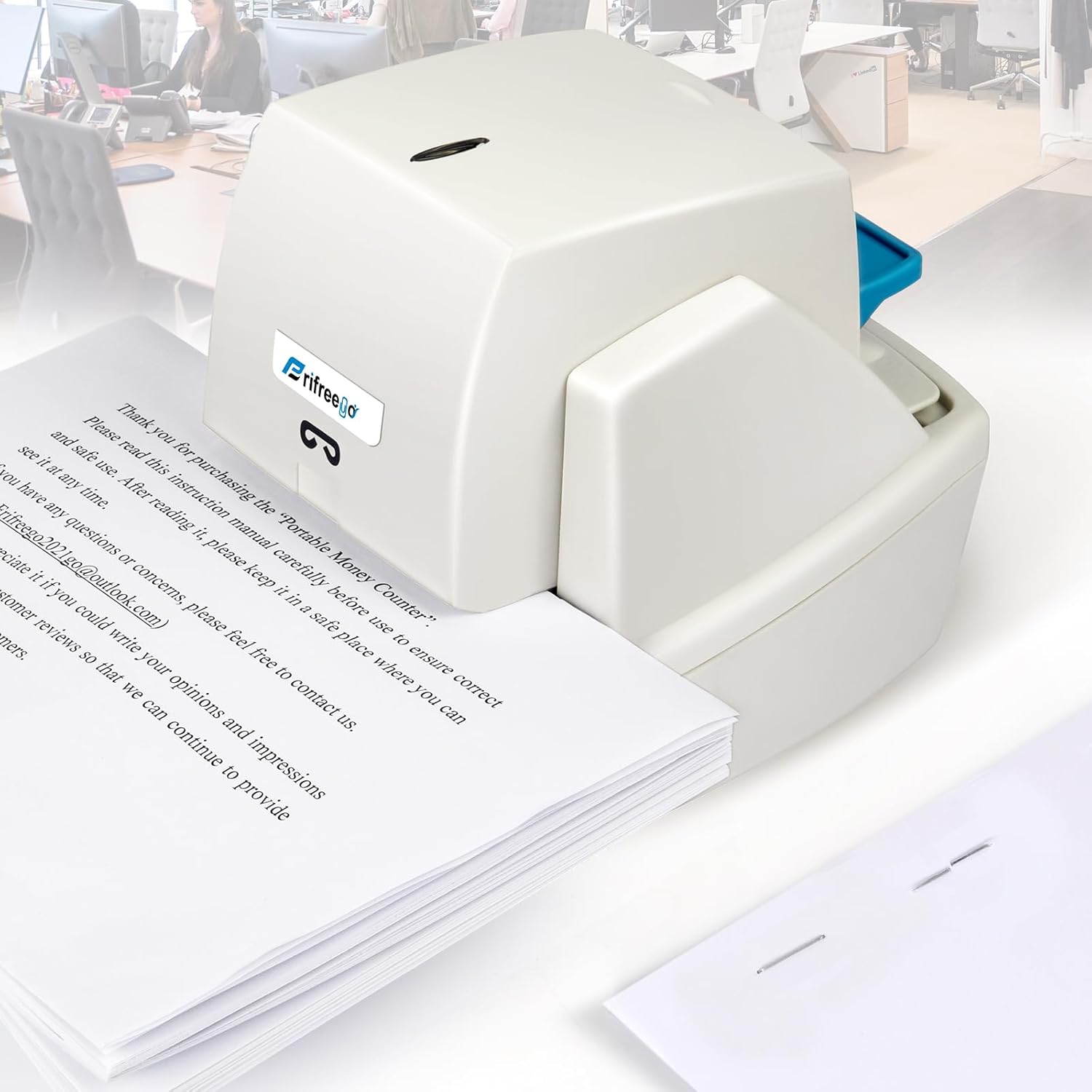
- Staples up to 70 sheets of 60gsm paper.
- Automatic electric operation reduces repetitive manual stapling effort.
- Includes 5,500 staples for substantial use after setup.
- Heavy-duty design handles thicker reports and document packets.
- Adjustable stapling position helps maintain consistent document presentation.
Seventy sheets changes what an electric stapler can realistically handle
The Ejoyous Pro70 takes the number one position in our best electric stapler comparison because it combines automatic operation with a heavy-duty capacity that goes well beyond ordinary desktop paperwork. The product is rated for stacks of up to 70 sheets of 60gsm paper, making it useful for offices that regularly staple reports, training documents, proposals, manuals, contracts, and other substantial paper packets.
That 70-sheet specification needs some context. Paper weight matters just as much as the number of sheets, so 70 sheets of 60gsm paper create a different stack thickness from 70 sheets of heavier 80gsm or 100gsm stock.
Still, the capacity gives this machine useful headroom. Thicker documents can be stapled automatically rather than forcing employees to lean on a conventional manual stapler every time a larger report needs fastening.
The electric mechanism is especially useful when the workload becomes repetitive. One thick report is not a major problem manually, but preparing dozens of document packets during an administrative shift can mean hundreds of repeated pressing movements.
The automatic mechanism matters most when the office gets busy
An electric stapler removes much of the physical action from the process. Position the document correctly in the stapling area and the powered mechanism drives the staple rather than requiring the user to press a large handle manually.
Imagine an office preparing 80 training packets before a morning session. If each packet contains several dozen pages, manually stapling every one becomes repetitive quickly, particularly when the paper stack is thick enough to require substantial pressure.
With automatic operation, the machine supplies the stapling force. The employee can concentrate more on aligning each packet and maintaining a consistent staple position.
This is also useful for reception desks, schools, accounting departments, copy rooms, administrative teams, and other workplaces where paperwork is assembled throughout the day. The value is not merely speed. It is reducing repeated hand effort while keeping the fastening process consistent.
The included 5,500 staples are another practical advantage. A high-capacity electric stapler can consume supplies quickly in a busy office, so having a substantial quantity included means the machine can be put into regular use without immediately ordering another box.
Staple compatibility still matters once those supplies eventually run out. Do not purchase replacement staples based only on appearance because heavy-duty staplers can require specific staple dimensions to match different document thicknesses.
A staple that is too short may pass through only part of a thick document. Correct staple length matters for thick stacks because the legs need enough length to penetrate the pages and form properly underneath.
An excessively long staple can also produce a poor result. The legs may fold awkwardly underneath a thinner document, leaving an untidy finish and potentially making the packet uncomfortable to handle.
Match the staple to the document thickness and the manufacturer's specifications. That is particularly important when switching between small office packets and documents approaching the stapler's maximum capacity.
Paper alignment deserves attention too. Before inserting a thick stack, tap the bottom and side edges against a flat surface so all of the sheets are square.
Once an electric stapler fires through a large document, correcting a crooked staple is annoying. Removing it can leave large holes through dozens of pages, and then the complete stack needs to be aligned and stapled again.
Good alignment prevents avoidable restapling, especially with client presentations or reports where the final appearance actually matters.
Why we believe the Pro70 deserves the number one position
The adjustable stapling position is useful when different document types need different staple depths. A small memo may need a staple close to the upper corner, while a thicker report can look cleaner with a more deliberate and consistent inset from the paper edge.
Consistency becomes important when several copies of the same document are being produced. If ten presentation packets are being handed to clients, staples sitting at noticeably different positions make the final preparation look careless.
Set the position before beginning the full batch. A repeatable staple position improves presentation and also makes high-volume document assembly easier because the operator does not need to estimate placement every time.
The 70-sheet capacity should not be treated as permission to force every stack into the machine. Remember that the rating is associated with 60gsm paper, and heavier paper reaches the same physical thickness with fewer sheets.
If the stapler sounds strained or fails to drive the staple cleanly through the complete document, reduce the stack. Trying to exceed the practical capacity can create bent staples, incomplete fastening, or jams.
This is one of the most common mistakes with heavy-duty staplers. Users see the maximum sheet number and ignore the paper specification attached to it.
Presentation stock, coated sheets, divider pages, and covers can all increase document thickness quickly. Actual stack thickness is what matters mechanically, so test unusual paper before processing a complete batch.
Jam handling also requires some discipline. If the machine fails to staple normally, do not repeatedly trigger the electric mechanism in the hope that another staple will push the damaged one through.
That can make a simple jam more difficult to remove. Disconnect power when appropriate and follow the manufacturer's procedure for accessing and clearing the staple channel.
After removing a jam, inspect the remaining staple strip before restarting. A bent or badly seated strip can immediately create another problem.
Safety is more important with an automatic machine than with a normal lightweight desk stapler. The mechanism is designed to drive metal through a substantial paper stack, and the electric motor supplies the force without requiring the user to press a handle.
Keep fingers away from the staple exit and triggering area. The powered mechanism can activate quickly, so document positioning should always be done using the paper rather than reaching into the stapling channel.
The machine also makes the most sense at a permanent workstation. Unlike a small manual stapler that can be thrown into a drawer or moved between desks constantly, a heavy-duty electric model benefits from a stable location near document preparation equipment.
A copy room is a good example. Put the electric stapler near the printer or copier, keep compatible replacement staples beside it, and employees can finish larger reports immediately after printing.
That workflow reduces unnecessary movement around the office. Printed pages come out, get aligned, stapled, and distributed from the same document preparation area.
Electric staplers also need a reliable power setup. Automatic operation depends on available power, which is one of the few areas where a traditional manual heavy-duty stapler remains simpler.
If the office frequently moves the stapler between rooms, power requirements can become inconvenient. For a fixed desk or copy station, however, that limitation is much less important.
The included staple supply also helps establish the correct consumable from the beginning. Keep the packaging or staple specification somewhere accessible so replacement supplies can be matched later rather than guessed.
Routine cleaning is worthwhile as well. Small paper fragments and staple debris can accumulate around the working area over time, particularly when the machine processes large volumes of documents.
Disconnect the unit before cleaning around the stapling mechanism. Remove loose paper fragments according to the manufacturer's instructions rather than inserting tools into the machine while it is powered.
So why do we believe the Ejoyous Pro70 deserves the number one ranking out of seven? The combination of automatic electric operation, heavy-duty 70-sheet capacity with 60gsm paper, adjustable positioning, and 5,500 included staples addresses both high-capacity and repetitive office stapling.
Some electric staplers are convenient but limited to relatively small paper stacks. Others handle thicker documents but require more manual involvement. This model brings substantial document capacity into an automatic workflow.
That combination is particularly valuable in offices that regularly assemble reports rather than stapling only occasional two-page forms. High capacity and automatic operation work together to reduce physical effort while keeping document production moving.
The 70-sheet figure still needs to be respected correctly, especially when heavier paper is involved, and users need to maintain proper staple compatibility and alignment. Those are normal requirements for any heavy-duty stapling system rather than major drawbacks.
For administrative departments, schools, copy rooms, accounting offices, and businesses processing larger document packets, the Pro70 provides the right kind of capability. Use appropriate staples, stay within the practical paper thickness, align documents carefully, and this heavy-duty electric stapler can turn a repetitive office task into a much faster and easier process.
- Staples up to 70 sheets of 60gsm A4 paper.
- Light-sensitive automatic operation completes stapling in under one second.
- Flat-clinch mechanism can reduce document filing thickness by 25 percent.
- Jam-resistant metal mechanism supports frequent heavy-duty office stapling.
- Includes 5,500 staples for substantial use before restocking.
The flat-clinch result is what makes this more interesting than a basic automatic stapler
The Frifreego ZCQ-43 takes the number two position in our best electric stapler comparison because it combines serious paper capacity with automatic operation and a flat-clinch mechanism. It can staple up to 70 sheets of standard 60gsm A4 paper at once, which puts it well beyond the small electric staplers designed mainly for short invoices and five-page document sets.
The automatic system uses light-sensitive detection to recognize when paper enters the stapling area. Frifreego states that the binding action takes less than one second, so there is no manual handle to press when working through repeated document packets.
That becomes useful in a busy administrative office. Automatic stapling reduces repetitive hand effort when an employee has 50 reports waiting beside the printer and each one needs to be aligned, stapled, and distributed.
The 70-sheet figure does need to be read correctly. It is based on 60gsm paper, so thicker 80gsm office paper, cardstock, covers, or coated sheets will reach the machine's practical thickness limit with fewer pages.
Flat clinching makes a real difference once documents start piling up
Traditional staples usually curve their legs underneath the document, creating a small raised section at every stapled corner. That does not matter much for one report, but stack dozens of reports in a filing drawer and those raised corners start adding thickness.
The Frifreego uses flat-clinch technology to flatten the staple legs more closely against the rear of the paper. The manufacturer claims this can save around 25 percent filing space compared with conventional stapling.
That is particularly useful in accounting departments, schools, legal offices, medical administration, or anywhere large quantities of stapled documents remain physically archived. The flatter result also helps document packets sit more evenly on top of one another.
Imagine filing 100 individually stapled reports in the same drawer. With traditional staples, the upper-left corner can gradually become noticeably thicker than the rest of the stack because every document has raised metal underneath it.
Flat clinching reduces that buildup. It also produces a cleaner underside, which can make documents easier to handle when they are moved between folders, filing trays, and storage boxes.
The automatic operation is another major advantage. Once paper enters the detection area correctly, the stapler provides the driving force rather than relying on the user to press down hard enough to penetrate a thick stack.
This makes the result more consistent during repetitive work. One employee may naturally press a manual stapler harder than another, but an electric mechanism applies its stapling action mechanically each time.
The jam-resistant construction uses metal components and springs intended to reduce interruptions. That matters more on a heavy-duty electric model because a jam in the middle of a large document batch can stop the entire workflow.
Jam resistance does not mean jams are impossible, though. Incorrect staples, overloaded paper stacks, damaged staple strips, or badly positioned documents can still cause trouble.
If the mechanism suddenly stops operating normally, do not repeatedly insert the document hoping another cycle will clear the problem. Repeated activation can worsen a staple jam, particularly if a second staple feeds behind the first damaged one.
Stop the machine and follow the manufacturer's jam-clearing procedure. Check that the staple supply is seated correctly before returning to normal operation.
The included 5,500 staples are useful because this machine is designed for higher-volume work. An electric stapler capable of processing thick packets can consume supplies quickly when it becomes the shared stapler beside a busy printer.
Why this Frifreego earns second place instead of taking our top spot
The paper capacity is one of the strongest reasons this model ranks so highly. Up to 70 sheets of 60gsm paper covers considerably thicker documents than many ordinary automatic staplers can handle.
That makes it useful for training packs, examination papers, financial reports, contracts, presentation documents, internal manuals, and other jobs where the finished packet contains more than a handful of sheets.
But paper weight changes everything. Maximum sheet count is not universal, and trying to push 70 heavy sheets through a machine rated around thinner 60gsm stock is the wrong way to interpret the specification.
If you regularly use 80gsm or heavier paper, start with a smaller stack. Check whether the staple penetrates cleanly and whether the flat-clinch legs form correctly underneath.
If the document comes out partially fastened or the mechanism sounds unusually strained, reduce the number of pages. Saving one extra stapling cycle is not worth damaging a finished report or causing a jam.
Alignment matters even more as documents become thicker. Tap the bottom and side edges against a flat desk before inserting the packet so every sheet is square.
An electric mechanism works quickly, which means there is little opportunity to correct the document once the sensor has triggered. Align the pages before inserting them, not while the stapling mechanism is already activating.
This is especially important with client-facing reports. Removing a badly positioned heavy-duty staple can leave large holes through dozens of pages and may require reprinting the cover or complete document.
The light-sensitive trigger also changes how repetitive stapling should be performed. Frifreego notes that for continuous stapling, the paper should be removed from the binding area and inserted again for the next cycle.
That creates a simple rhythm for batch work. Align the packet, insert it, allow the machine to staple, remove it fully, then move to the next document.
Quiet operation is another useful characteristic in a shared office. An electric stapler will always create some mechanical sound when metal is being driven through a stack of paper, but keeping the activation quick reduces how long each interruption lasts.
That is useful around reception desks or open-plan offices. Someone can process a stack of paperwork without repeatedly slamming a large manual stapler against the desk.
The machine weighs around 5.7 pounds, or approximately 2.6 kilograms. That gives it more substance than a lightweight personal stapler and makes sense for a unit intended to remain at a document preparation station.
Put it on a stable, flat surface near the printer or copier. A dedicated document station improves workflow because printed pages can be collected, aligned, stapled, and filed without carrying large paper stacks around the office.
The heavy-duty capacity also means safety deserves attention. Keep fingers away from the stapling opening because the electric mechanism supplies the force automatically once the paper is detected.
This is not a manual stapler where the user controls the exact moment of activation by pushing a handle. Automatic sensing makes the process faster, but it also means the stapling area needs to remain clear of fingers and loose objects.
Staple compatibility is important when the included supply eventually runs out. Replacement staples should match the specifications required for this Frifreego electric stapler rather than being selected because they happen to fit loosely inside the cartridge.
The wrong staple dimensions can produce poor penetration, malformed clinching, or repeated jams. Correct staples protect consistent operation, particularly when the machine is working close to its higher paper capacity.
The flat-clinch design also deserves proper expectations. Its main advantage is creating a flatter finished document, not magically increasing the number of pages that can be stapled regardless of paper thickness.
For filing-heavy offices, however, that flatter result can be more valuable than it first appears. Large stacks remain more even, folders close more easily, and the stapled corner does not build up as dramatically.
So why does this model finish at number two rather than taking the top position? Our number one choice edges ahead because of the overall balance we gave it for heavy-duty electric document handling, while this Frifreego remains very close in maximum capacity and adds an excellent flat-clinch system.
The Frifreego is also fairly specialized. Its approximately 5.7-pound construction and high-capacity design make more sense beside a printer than on a tiny personal desk where somebody staples only a few pages each week.
For that lighter workload, a smaller electric stapler would be easier to justify. For a busy office, though, heavy-duty capacity becomes genuinely useful, and the automatic sensor can remove a lot of repetitive manual work.
That is why we believe the Frifreego ZCQ-43 deserves the number two position out of seven. Its combination of up to 70-sheet capacity with 60gsm paper, sub-one-second automatic activation, flat-clinch fastening, jam-resistant construction, quiet operation, and 5,500 included staples gives it the features needed for serious office document preparation.
Use the correct staples, reduce the sheet count for heavier paper, align every packet before insertion, and remove each document fully between cycles. Used properly, this Frifreego can handle thick reports quickly while producing flatter, cleaner document stacks that are easier to file and store.
- Staples up to 50 sheets for thicker office documents.
- Automatic sensor operation staples paper without manual handle pressing.
- Adjustable stapling depth provides better control over staple placement.
- Heavy-duty mechanism supports repetitive document preparation in busy offices.
- Included staple supply makes the machine ready for immediate use.
The adjustable staple position makes this more useful than a basic automatic model
The Frifreego Pro50 takes the number three position in our best electric stapler comparison because it combines automatic stapling with a useful 50-sheet capacity and adjustable staple positioning. That puts it in a good middle ground for offices that need more than a lightweight desktop stapler but do not necessarily need the 70-sheet capacity of our first two choices.
The automatic operation is the main convenience. Instead of positioning a document and pressing down on a manual handle, the machine detects the paper in the stapling area and completes the fastening action electrically.
That matters when the same task is repeated throughout the day. Automatic stapling reduces repeated hand movement, especially when an administrative employee is preparing reports, invoices, training packets, meeting documents, or other paperwork in batches.
The 50-sheet capacity also gives it considerably more range than small electric staplers intended mainly for short document sets. A 30-page report does not require switching to a separate heavy-duty manual stapler just because the document has become thicker.
Adjustable depth solves a problem you notice when documents need to look consistent
Staple placement is easy to ignore until several copies of the same report are placed next to one another. If one staple sits close to the edge and another is noticeably farther inward, the documents look inconsistent even though they are technically fastened correctly.
The adjustable stapling position helps control how deeply the paper enters before the staple is driven. This is useful when moving between small document packets and thicker reports where a different staple position may look or handle better.
For repeated office jobs, consistent staple placement improves presentation. Set the depth before starting a large batch and each packet can be inserted to approximately the same position rather than estimating the staple location every time.
This is particularly helpful with client reports or presentation material. Twenty copies prepared for a meeting look much cleaner when the staple placement remains consistent from one document to the next.
Automatic sensing also speeds up that repetitive workflow. Align the pages, insert the packet to the chosen position, allow the machine to staple, then remove the document completely before moving to the next one.
Paper alignment should happen before insertion. Tap the bottom and side edges of the stack against a flat desk so the pages sit square rather than trying to straighten them after the sensor has already detected the document.
This matters more as the stack gets thicker. A crooked staple is difficult to correct when it has already passed through several dozen printed pages.
Removing a heavy-duty staple can leave noticeable holes through the entire packet. If the first page is a printed cover, the mistake may even require replacing part of the document.
The 50-sheet rating should also be treated as a maximum under the appropriate paper conditions, not as a universal number for every material. Paper weight changes the physical thickness and resistance of the stack.
Fifty sheets of ordinary office paper are not equivalent to fifty sheets of heavy presentation stock. Cardstock, laminated sheets, dividers, and coated covers can push the mechanism much harder with fewer actual pages.
If you are using thicker material, reduce the number of sheets and test the result. Actual paper thickness determines stapling difficulty, so forcing the maximum page count with unusually heavy stock can create poor fastening or jams.
Check the finished staple underneath the document. The staple legs should penetrate the complete stack and form correctly rather than remaining partly open.
If penetration is incomplete, do not keep processing the rest of the batch in exactly the same way. Reduce the stack or verify that the correct staple type is installed.
Why the Pro50 takes third place rather than moving into our top two
Staple compatibility is particularly important with a higher-capacity electric stapler. Different document thicknesses can require appropriate staple dimensions, and using the wrong supplies can affect penetration and clinching.
A staple that is too short may not pass through a thick stack completely. One that is unsuitable for the mechanism can bend, feed incorrectly, or contribute to repeated jams.
Keep the specifications from the included staple supply for future reference. Correct replacement staples help prevent jams and make it easier to maintain consistent performance once the original supply runs out.
Jam handling needs some patience too. If the machine stops during a stapling cycle, repeatedly triggering the mechanism is not a good way to clear the obstruction.
A second staple can feed into the same area and make the blockage worse. Disconnect the machine when appropriate and follow the manufacturer's procedure for opening and clearing the staple channel.
After clearing it, inspect the remaining staple strip. Make sure it is straight and seated correctly before processing another important document.
The electric mechanism is most useful when document volume is reasonably high. If someone staples three small packets per week, the time saved over a manual stapler is fairly small.
A busy office is different. Repeated document preparation is where automation helps, because every manual press removed from a large batch reduces physical effort and makes the workflow more consistent.
Imagine an administrative team preparing 60 training documents containing 35 pages each. A conventional desktop stapler may struggle with that thickness, while a manual heavy-duty model requires the employee to apply force for every packet.
An automatic 50-sheet machine is much better suited to that situation. The operator handles the page alignment and positioning while the stapler supplies the driving force.
The machine should ideally have a permanent position near the printer or copier. That creates a simple document workflow where pages are printed, collected, aligned, stapled, and distributed from the same general area.
Keep replacement staples nearby as well. A shared electric stapler is much less useful when it runs empty halfway through a large job and nobody knows where the correct supplies are stored.
Safety matters because activation is automatic. Keep fingers away from the stapling opening and use the paper itself to position the document rather than reaching into the sensor or staple exit area.
The mechanism is designed to drive metal through thick paper stacks quickly. Treating it like a lightweight manual stapler is unnecessary and potentially unsafe.
Routine cleaning can help keep the working area reliable. Small paper fragments and occasional staple debris can accumulate around a machine that processes large quantities of documents.
Disconnect power before cleaning near the stapling mechanism. Follow the manufacturer's maintenance instructions rather than inserting tools or fingers into the machine while it remains powered.
So why does the Frifreego Pro50 finish behind our first two choices? The clearest reason is maximum document capacity.
Our number one and number two products can handle up to 70 sheets under their specified paper conditions. The Pro50 tops out at a lower capacity, which becomes relevant for offices regularly assembling very thick reports.
Our second-ranked Frifreego also adds a flat-clinch system designed to produce flatter finished document stacks. That can reduce the raised thickness created around stapled corners when large quantities of paperwork are stored together.
The Pro50 is more conventional in that respect. Its advantage is providing a strong automatic stapling workflow with adjustable depth without necessarily requiring the larger footprint or capacity of a 70-sheet model.
For many offices, 50 sheets is already enough. Reports, invoices, meeting packets, contracts, course material, and ordinary administrative documents often remain comfortably below that limit.
This is why third place remains a strong position. The machine loses some points for having less maximum capacity than our leaders, but its automatic sensor, adjustable staple position, heavy-duty construction, and useful 50-sheet range cover the needs of a large portion of office users.
That balance is why we believe the Frifreego Pro50 deserves the number three ranking out of seven. It is powerful enough for substantial everyday documents while remaining focused on the features that make electric stapling worthwhile: less manual effort, repeatable placement, and faster processing of document batches.
Use the correct staples, reduce the sheet count when working with heavier paper, align each packet before triggering the sensor, and clear jams properly instead of forcing the mechanism. For offices that regularly staple medium to thick documents, the Pro50 provides a practical automatic setup without requiring the maximum capacity of the larger models above it.
- Staples up to 30 sheets for everyday office documents.
- High-capacity staple cartridge reduces frequent refilling during large jobs.
- Automatic electric operation eliminates repeated manual stapler pressing.
- Adjustable paper guide helps maintain consistent staple positioning.
- Designed for high-volume office and shared workspace stapling.
The cartridge system is what makes this Swingline useful for repetitive office work
The Swingline 69008 takes the number four position in our best electric stapler comparison because it approaches high-volume stapling differently from the heavy-duty models above it. Instead of concentrating on extremely thick documents, it combines automatic electric operation with a high-capacity staple cartridge designed to keep routine office paperwork moving with fewer interruptions.
The stapler handles up to 30 sheets at a time, which covers a large percentage of everyday business documents. Invoices, meeting packets, contracts, reports, handouts, forms, and presentation material often stay comfortably inside that range.
The real advantage appears when there are many separate packets rather than one enormous document. High-volume stapling is where this design works, particularly when an employee needs to process dozens or hundreds of similar document sets during the day.
Automatic operation removes the need to press a handle for every packet. Position the paper correctly and the powered mechanism performs the stapling action, reducing repetitive hand movement compared with a conventional desktop stapler.
A large staple cartridge means fewer interruptions halfway through a job
The cartridge system is one of the defining features of this Swingline. Traditional desktop staplers hold relatively short strips of staples, which means they need to be opened and refilled more frequently during sustained office work.
A high-capacity cartridge changes that workflow. The user can process a much larger number of document packets before stopping to replace the staple supply.
That matters in a copy room or administrative department. Fewer staple changes save real working time when someone is preparing hundreds of reports rather than stapling two documents before lunch.
Imagine a school office preparing enrollment packets for several hundred students. Each packet may contain only 10 or 15 sheets, so a 70-sheet heavy-duty stapler provides capacity that is rarely being used.
The bigger problem is repetition. Every few packets need another staple, and stopping frequently to reload the stapler interrupts what should be a simple production process.
This is where the Swingline's cartridge-based approach makes sense. It focuses on keeping the machine supplied for a longer run of ordinary office documents rather than maximizing the thickness of each individual packet.
The 30-sheet capacity still provides reasonable flexibility. A document can grow from a five-page form to a 20-page report without forcing the user to switch immediately to a separate heavy-duty stapler.
Paper thickness needs to be considered, though. Thirty sheets is not one universal thickness, because ordinary copier paper, presentation stock, coated paper, and cardstock all behave differently.
If the document contains unusually heavy pages, reduce the sheet count and test the result. The staple should penetrate the complete packet and clinch correctly underneath without leaving partially open legs.
Do not force a thick stack into the machine simply because the page count remains below 30. Physical thickness and resistance are what the stapling mechanism actually has to overcome.
The adjustable paper guide is another practical feature during batch work. Once the guide is set, documents can be inserted to a repeatable depth so the staple sits in approximately the same position on every packet.
This is useful when preparing material for clients or meetings. Consistent staple placement looks more professional than a batch where every packet has the staple sitting at a noticeably different distance from the corner.
Run one test packet before processing the full job. Check the staple location, paper alignment, and finished clinch, then make any necessary adjustments before continuing with the remaining documents.
Why the Swingline 69008 lands at number four
The automatic mechanism is particularly useful for employees who staple throughout the day. A manual stapler requires physical pressure for every document, and the effort becomes more noticeable as the number of packets increases.
An electric stapler supplies that force consistently. The user handles alignment and insertion while the machine handles the actual driving action.
That makes repetitive document assembly much less physical. Reception desks, accounting departments, schools, copy rooms, mailrooms, and administrative teams are the environments where this advantage becomes most obvious.
Alignment still matters because automation does not correct crooked paper. Before inserting a larger packet, tap the side and bottom edges against a flat surface so every page sits square.
Once the machine fires, the staple has already passed through the complete stack. Removing a badly positioned staple can leave visible holes through every page and may damage a printed cover.
Automatic stapling also requires more attention around the trigger area. Keep fingers away from the staple exit and use the paper to position the packet rather than reaching into the mechanism.
The machine supplies the driving force electrically, so the stapling area should stay clear whenever power is connected. This matters even more in shared offices where several people may use the same equipment.
Jam prevention is another part of maintaining a high-volume stapler. Cartridge loading needs to be done correctly, and replacement cartridges should match the machine's specified consumables.
Using the wrong staple supply can lead to feeding problems, malformed staples, or jams. Keep the cartridge model information near the machine so office staff do not order supplies based only on visual similarity.
If a jam does occur, repeatedly triggering the stapler is not the right response. A second staple can feed into the obstruction and make the problem more difficult to clear.
Stop the machine and follow Swingline's jam-clearing procedure. Clear the obstruction before restarting, then inspect the cartridge and paper path before processing another important document.
The electric design works best as part of a permanent document station. Put it near the office printer or copier where printed packets naturally arrive for finishing.
Keep replacement cartridges nearby too. A high-capacity stapler loses much of its convenience when the current cartridge finally empties and nobody knows where the replacement supplies are stored.
The main reason the Swingline ranks below our first three products is maximum document capacity. The heavy-duty electric staplers above it can process considerably thicker stacks, including models rated for 50 or 70 sheets under their specified paper conditions.
The Swingline's 30-sheet limit is more restrictive. Thick reports may exceed its intended capacity, particularly when heavier paper or covers are involved.
Our second-ranked Frifreego also provides flat-clinch stapling, which can reduce the raised thickness around stapled corners when many documents are stored together. That is a useful advantage for filing-heavy offices.
The third-ranked Frifreego provides around 50-sheet capacity and adjustable positioning, giving it more flexibility when document thickness varies substantially throughout the week.
The Swingline takes a different approach. It is less about handling the thickest packet in the office and more about processing a large number of moderate-size documents efficiently.
That distinction is important. Capacity and volume are not the same thing, and an office that staples 500 ten-page packets may benefit more from a large staple cartridge than from a machine capable of fastening 70 pages once.
Maintenance should remain fairly simple. Keep paper fragments and staple debris away from the working area, inspect the cartridge when feeding becomes inconsistent, and disconnect power before cleaning near the mechanism.
Do not allow the machine to become buried under paperwork either. A dedicated open position makes document insertion easier and keeps the stapling area visible.
So why do we believe the Swingline 69008 deserves the number four ranking out of seven? Its 30-sheet maximum capacity is lower than our top three choices, and that limits it when an office regularly prepares very thick reports.
But the automatic operation and cartridge system give it a different strength. For repeated moderate-size packets, fewer staple refills can be more useful than having unused heavy-duty sheet capacity.
That is why this remains a strong electric stapler for high-volume administrative work. The cartridge system supports repetitive workflows, while automatic activation removes much of the manual effort associated with processing document after document.
For schools, offices, copy rooms, reception areas, and departments that staple many documents but rarely exceed 30 sheets per packet, the Swingline 69008 makes practical sense. Use the correct cartridges, set the paper guide before a large batch, stay within the realistic paper thickness, and it can provide fast, consistent stapling without constant reloading.
- Staples up to 30 sheets for everyday office paperwork.
- Automatic electric operation reduces repetitive manual stapling effort.
- High-capacity staple supply supports longer document preparation sessions.
- Adjustable paper guide provides more consistent staple positioning.
- Designed for frequent use in busy shared office environments.
This Swingline makes the most sense when the documents keep coming
The Swingline 69001 takes the number five position in our best electric stapler comparison because it is designed around repetitive office work rather than extreme document thickness. Its 30-sheet capacity covers many everyday reports, contracts, meeting packets, invoices, forms, and presentation documents, while the electric mechanism removes the repeated pressing required by a manual stapler.
Thirty sheets is enough for a surprising amount of normal administrative work. Many offices rarely need to staple 50 or 70 sheets together, but they may need to staple hundreds of smaller packets during a busy week.
That is where this design starts making sense. Automatic operation saves repeated hand movement, especially when the stapler sits beside a copier or printer and gets used throughout the working day.
Instead of pressing a handle every time, the user aligns the document and positions it in the stapling area. The electric mechanism provides the force needed to drive the staple through the paper.
The 30-sheet capacity works well when volume matters more than thickness
There is an important difference between document capacity and document volume. A 70-sheet stapler is useful for very thick reports, but an office processing 300 ten-page packets has a completely different problem.
That workload is about repetition. The employee needs a machine that can staple ordinary document sets consistently without requiring hundreds of manual presses.
The Swingline 69001 fits that kind of workflow well. Thirty sheets covers common office packets while automatic stapling takes care of the physical action each time another document is inserted.
Imagine an administrative team preparing material for a company training day. There may be 100 participant packets, each containing 15 or 20 pages, and every packet needs to be assembled before the morning session.
A manual stapler can complete the job, but the repeated pressing becomes unnecessary work. With an electric model, the employee can concentrate on checking page order and aligning the stack rather than applying stapling force over and over.
Paper alignment still matters. Automatic stapling does not straighten pages before the staple enters them, so tap the bottom and side edges of each packet against a flat surface first.
This becomes increasingly important as the stack approaches the upper end of the machine's capacity. Thicker packets need careful alignment first because removing a misplaced staple from several dozen sheets can leave visible holes through the complete document.
The adjustable paper guide is useful for maintaining consistent placement. Set the guide once for a batch of similar documents and each packet can enter to approximately the same depth.
That produces a more uniform result when several copies are placed together. Client reports and meeting packets look cleaner when the staple does not shift noticeably from one document to the next.
Run one test document before processing a large batch. Check the staple depth, corner position, and finished clinch underneath the pages, then make any adjustment before continuing.
Paper weight also affects the practical 30-sheet capacity. Thirty sheets of standard copier paper create less resistance than the same number of sheets made from heavy presentation stock.
Cardstock, divider sheets, coated paper, and heavy covers increase physical thickness quickly. Sheet count should not be treated blindly, so reduce the number of pages when unusual materials are being stapled.
If the machine sounds strained or the staple does not penetrate completely, stop and reduce the stack. Forcing another identical packet through the mechanism is unlikely to improve the result.
Why the Swingline 69001 earns fifth place in our comparison
The electric mechanism is the main reason to choose this over a conventional office stapler. For occasional use, pressing a manual stapler is hardly difficult, but the calculation changes when someone staples documents continuously.
Reception areas, accounting departments, schools, administrative offices, and copy rooms can generate large quantities of paper packets. Repetitive office stapling benefits from automation because the machine provides consistent force regardless of who is using it.
That can also help employees who find heavy manual staplers uncomfortable. A thicker document requires more mechanical force than a three-page memo, and an electric mechanism removes much of that physical requirement from the user.
The high-capacity staple supply is another useful part of a machine intended for repeated work. Frequent refilling interrupts document preparation, particularly when the stapler is shared between several employees.
Keep the correct replacement staples near the machine. Do not wait until the supply runs out during a large project and then assume any staple that looks approximately the right size will work.
Staple dimensions affect feeding and fastening. Correct staples help prevent feeding problems, malformed clinching, and unnecessary jams inside the electric mechanism.
If a jam occurs, do not repeatedly activate the stapler. Another staple can feed behind the obstruction and turn a simple jam into a more complicated blockage.
Disconnect the machine when appropriate and follow the manufacturer's jam-clearing procedure. Once the damaged staple is removed, inspect the remaining staple supply and make sure everything is seated correctly before restarting.
Safety deserves more attention with an electric model as well. Keep fingers away from the staple exit and automatic activation area while the machine is powered.
The mechanism supplies the force needed to drive metal through a 30-sheet paper stack. Keep hands outside the stapling path and position documents using the paper itself rather than reaching into the opening.
The Swingline works particularly well as a permanent desk or copy-room machine. Place it near the printer where completed documents naturally arrive for assembly.
This creates a simple workflow. Print the document, check the page sequence, square the stack, staple it, and move the completed packet to the finished pile.
Keep the surrounding area clear enough for larger documents. If folders, loose paper, cables, and office supplies crowd the stapling area, accurate positioning becomes unnecessarily difficult.
Routine cleaning can also help with long-term operation. Paper fragments accumulate during repeated stapling, and small pieces of debris should not be allowed to collect around the working mechanism indefinitely.
Disconnect power before cleaning near moving components. Follow the manufacturer's maintenance instructions rather than pushing tools into the stapling channel while the unit is active.
The main reason the Swingline 69001 lands at number five is its 30-sheet capacity. Our first three choices provide significantly more headroom for thick document packets, including electric staplers rated around 50 or 70 sheets under their specified paper conditions.
That difference matters for legal reports, large training manuals, financial packets, and other documents that regularly exceed 30 sheets. An office dealing with those workloads would otherwise need to split the packet or use another heavy-duty stapler.
Our higher-ranked Frifreego models also provide features such as greater capacity and, on one model, flat-clinch fastening. Flat clinching can reduce filing thickness when large quantities of stapled paperwork are stored together.
The Swingline is more conventional. Its strength is processing normal office documents automatically and repeatedly rather than handling the thickest possible stack.
That distinction is important because not every office needs maximum sheet capacity. If most documents contain 10 to 25 pages, a 70-sheet machine may provide capability that rarely gets used.
In that situation, the Swingline's focus on repeatable electric stapling can be entirely appropriate. The 30-sheet range still covers reports substantially thicker than basic two-page forms and invoices.
The machine also benefits from Swingline's long-standing focus on office fastening products. For a shared workspace, familiarity with the stapling format and replacement supplies can make ongoing use easier than working with an obscure proprietary system.
So why do we believe the Swingline 69001 deserves the number five ranking out of seven? It falls behind the leaders because its maximum capacity is lower and it lacks some of the specialized heavy-duty features available higher in our list.
But it remains a useful electric stapler for the workload it is designed around. Automatic operation, a 30-sheet capacity, adjustable document positioning, and a high-capacity staple system create a practical combination for frequent everyday paperwork.
For an office, school, reception area, accounting department, or copy room that processes many moderate-size packets, this Swingline still makes practical sense. Use the correct staples, align documents before insertion, reduce the sheet count for heavier paper, and keep the stapling area clear, and the 69001 can make repetitive document preparation noticeably easier.
- Staples up to 45 sheets for substantial office documents.
- Automatic electric operation reduces repetitive manual stapling effort.
- Impulse Drive technology provides fast stapling for repeated paperwork.
- NoJam technology helps reduce interruptions during busy office use.
- Adjustable paper guide supports consistent staple placement across documents.
Forty five sheets gives this Bostitch more muscle than a basic desk stapler
The Bostitch Impulse 45 takes the number six position in our best electric stapler comparison because it combines automatic electric operation with a useful 45-sheet capacity. That puts it well above lightweight electric staplers designed for short invoices and small document sets, while still keeping the machine focused on ordinary office use rather than extremely thick 70-sheet packets.
The 45-sheet capacity is useful for reports, contracts, training material, presentation packets, financial documents, and other paperwork that regularly grows beyond what a conventional desktop stapler handles comfortably. For an office that usually works somewhere between 10 and 40 sheets, that range makes sense.
The electric mechanism is the bigger everyday advantage. Automatic stapling removes repeated hand pressure, which becomes noticeable when somebody is preparing dozens of document packets beside a copier or printer.
Bostitch's Impulse Drive system is designed around fast electric stapling. Instead of pressing a manual handle and waiting for the mechanism to reset, the user can focus on positioning the next packet and maintaining a consistent workflow.
The speed becomes useful when there are fifty reports waiting beside the printer
One electric staple does not save much effort. The difference appears when an administrative employee has a large stack of documents that all need to be finished before a meeting, training session, or mailing deadline.
Imagine 60 reports containing 30 pages each. A normal stapler requires a physical press for every packet, and a heavy-duty manual stapler requires even more force as the document becomes thicker.
The Impulse 45 handles the driving action electrically. The machine supplies consistent stapling force, leaving the operator responsible mainly for organizing, aligning, and inserting each packet.
This can also improve consistency between users. One employee may naturally press a manual stapler harder than another, but the electric mechanism performs the stapling action mechanically each time.
Bostitch's NoJam technology is another useful feature in a shared office. Staple jams interrupt document preparation and become particularly frustrating when a large batch has to be completed quickly.
No jam-resistant design should be interpreted as physically impossible to jam, though. Incorrect staples, damaged staple strips, overloaded paper, or badly positioned packets can still cause feeding problems.
If the mechanism does stop unexpectedly, do not repeatedly activate it. Repeated triggering can worsen a jam if another staple feeds behind one that is already bent inside the channel.
Stop, disconnect power when appropriate, and follow the manufacturer's instructions for clearing the mechanism. Afterward, inspect the staple supply and make sure everything is seated properly before processing another document.
The 45-sheet rating should also be treated sensibly. Paper weight changes the actual thickness of a document, so 45 sheets of ordinary office paper are not physically equivalent to 45 sheets of cardstock or heavy presentation stock.
If your packet contains covers, coated paper, dividers, or heavier sheets, reduce the page count. Actual stack thickness matters more than numbers when the mechanism is trying to drive a staple through the complete document.
Test one packet before starting a large batch. Look underneath and confirm that the staple has passed through all of the pages and clinched properly.
If the legs remain partially open or the staple does not penetrate cleanly, do not continue processing identical stacks. Reduce the thickness or verify that the correct staple type is installed.
The adjustable paper guide helps with another problem: inconsistent placement. Set the guide to the desired depth and similar documents can be inserted to the same position throughout a batch.
This matters for client-facing reports. Consistent staple placement improves document presentation, particularly when several copies are stacked together on a conference table.
Before inserting the packet, tap the paper edges against a flat surface. Electric stapling is fast, which means there is little opportunity to straighten a crooked document after it reaches the activation area.
Why the Impulse 45 finishes sixth despite its strong capacity
The 45-sheet capacity actually compares well with many ordinary electric staplers. It gives the Bostitch enough headroom for medium-thickness reports without requiring a separate manual heavy-duty machine every time a document grows beyond 20 or 30 pages.
But our top-ranked products go farther. The first two machines in this comparison can handle up to 70 sheets under their specified paper conditions, while our third-ranked model provides around 50-sheet capacity.
That additional capacity matters in offices where thick reports are common. The Bostitch has less maximum headroom, so a 55-page packet may need another stapling solution even though the difference does not sound large on paper.
Our second-ranked Frifreego also uses flat-clinch technology. That creates a flatter staple underneath the document, helping reduce the raised corner thickness that develops when many stapled packets are stored together.
The Bostitch is more conventional in that respect. Its strengths are fast electric operation, NoJam technology, reasonable heavy-duty capacity, and straightforward office usability rather than specialized flat filing.
For many workplaces, 45 sheets is still a very useful range. Most invoices, contracts, meeting packets, classroom handouts, and administrative reports will never approach the limit.
This makes the machine particularly suitable for a shared copy room. Put it beside the printer, keep compatible staples nearby, and employees can finish documents immediately after printing.
A permanent document station saves unnecessary movement around the office. Pages can be printed, checked, squared, stapled, and placed into a finished pile in one area.
Staple compatibility should not be treated casually. Electric staplers rely on the staple dimensions matching the feed mechanism, and the wrong supplies can create inconsistent fastening or repeated jams.
Keep the correct staple specification near the machine or with the replacement supplies. This is especially helpful in shared workplaces where the person ordering stationery may not be the person who uses the stapler every day.
Safety is another consideration because the mechanism is powered. Keep fingers away from the staple exit and activation area while the machine is connected to power.
The Impulse 45 is designed to drive a staple through a substantial stack quickly. The automatic mechanism deserves basic caution, particularly around a shared office where different employees may use it without reading the instructions each time.
Routine maintenance is straightforward but worthwhile. Small paper fragments and occasional staple debris can collect around the working area after repeated use.
Disconnect the machine before cleaning near the stapling mechanism. Do not insert tools into the staple path while the unit remains powered.
Electric operation also means the Bostitch works best in a fixed location. A manual stapler can move between desks without thinking about power, while an electric model is more convenient when it remains set up and ready.
That is not much of a drawback in a copy room or administrative area. In those environments, the whole point is to have a reliable stapling station available whenever printed documents need finishing.
The 45-sheet capacity also creates a nice middle position between lightweight and true high-capacity staplers. It handles thicker everyday reports comfortably without necessarily requiring the larger mechanism associated with the highest-capacity machines.
For a smaller office, that may actually be enough. There is little reason to prioritize a 70-sheet specification if virtually every document produced by the business contains fewer than 40 pages.
So why do we believe the Bostitch Impulse 45 deserves the number six ranking out of seven? It offers fast electric stapling, NoJam technology, adjustable paper positioning, and a useful 45-sheet capacity, but the products above it provide greater capacity or additional document-finishing features.
That makes the ranking more about comparative capability than a major flaw in the Bostitch itself. It remains substantially more capable than a basic low-capacity automatic stapler and can handle the majority of ordinary office document packets.
The positive part is straightforward. The Impulse 45 gets the fundamentals right: automatic operation, enough capacity for medium-thick reports, fast stapling, jam-reduction technology, and repeatable paper positioning.
For offices, schools, reception areas, administrative departments, and copy rooms that regularly staple documents but rarely exceed 45 sheets, it remains a practical option. Use the correct staples, align each packet before insertion, reduce the page count for unusually heavy paper, and clear jams properly rather than forcing the mechanism, and the Impulse 45 can make repetitive office stapling much easier.
- Automatic electric operation staples documents without manual handle pressing.
- Compact portable design fits smaller desks and workspaces.
- Adjustable stapling depth helps create more consistent document placement.
- Simple automatic triggering speeds up repetitive everyday office paperwork.
- Suitable for lighter stapling jobs in offices and classrooms.
The BH-11F is more about convenient everyday stapling than heavy-duty capacity
The RAYSON BH-11F takes the number seven position in our best electric stapler comparison because it focuses on compact automatic stapling rather than the heavy-duty document capacity offered by the machines higher in this ranking. For ordinary office paperwork, school documents, invoices, short reports, and forms, that simpler approach can still be useful.
The main advantage is automatic operation. Instead of positioning the paper and manually pressing a stapler handle, the electric mechanism performs the fastening action after the document is placed into the stapling area.
That reduces repeated hand movement during larger paperwork sessions. Automatic stapling makes repetitive jobs easier, even when the individual documents themselves are fairly thin.
The compact format is another practical feature. Heavy-duty electric staplers can occupy a substantial amount of space beside a printer, while the BH-11F is better suited to smaller desks where there is already a monitor, keyboard, phone, notebooks, and other office equipment competing for room.
The automatic trigger is most useful when you have lots of smaller packets
An electric stapler does not need a huge sheet capacity to save time. Imagine an office preparing 100 short invoice packets containing eight pages each.
A manual stapler can handle those documents easily, but somebody still has to press the mechanism 100 separate times. With an automatic model, the user can concentrate on aligning and feeding each packet instead.
That is where electric operation becomes genuinely convenient. The workload comes from repetition rather than from the thickness of each individual document.
This can work well at reception desks, classrooms, small offices, administrative counters, and home workspaces. These environments often process plenty of paperwork but do not necessarily produce 50-page reports every few minutes.
Alignment is still important. The electric mechanism cannot tell whether the document has been inserted crooked, so straighten the pages before putting the packet into the stapling area.
Tap the bottom and side edges of the paper against a flat desk. This squares the stack and reduces the chance of fastening pages at noticeably different angles.
Once the stapler activates, correcting the position means removing the staple and doing the job again. Good alignment prevents unnecessary restapling, particularly when the first page contains printed information that you do not want damaged.
The adjustable stapling depth is useful for creating a more repeatable result. Rather than estimating how far each document should enter the machine, the guide can help maintain a similar staple position throughout a batch.
This matters when several copies of the same document are being distributed. A set of reports looks cleaner when every staple sits approximately the same distance from the edge.
Run a test packet before processing an important batch. Check where the staple lands and make any adjustment before feeding the remaining documents through the machine.
Paper thickness also needs to be considered. A stapler's practical capacity changes when ordinary copier paper is replaced by heavy presentation stock, coated sheets, or cardstock.
Heavier paper reaches the limit faster, even when the actual page count seems modest. If the mechanism struggles or the staple does not clinch properly underneath, reduce the stack rather than repeatedly trying the same thickness.
The finished staple should pass through the complete packet and form securely underneath. Partially open staple legs are a sign that something needs checking before continuing with the rest of the batch.
Why the BH-11F finishes seventh in our electric stapler comparison
The biggest reason for the number seven position is straightforward. The products above it offer considerably more heavy-duty capability for offices that need to process thick document packets.
Our top-ranked model can handle up to 70 sheets of 60gsm paper, while the second-ranked Frifreego also reaches the 70-sheet range and adds flat-clinch fastening. Those machines are much better suited to thick financial reports, training packs, manuals, and other substantial documents.
The third-ranked Frifreego provides around 50-sheet capacity, while the Bostitch Impulse 45 higher in the list handles medium-thick packets as well. The BH-11F is aimed at lighter work, so it naturally loses points when maximum capacity is part of the comparison.
That does not mean every office needs the largest machine. If most of your documents contain fewer than 20 pages, paying for a huge 70-sheet stapler may provide capacity that sits unused almost every day.
The smaller RAYSON can make more sense when desktop space matters and the main requirement is automating ordinary paperwork. It provides the electric stapling convenience without turning the desk into a heavy-duty document finishing station.
Portability is useful here too. A smaller electric stapler is easier to position on a reception counter, teacher's desk, administrative workstation, or home-office table.
That flexibility is different from a large high-capacity machine that is usually best left permanently beside a copier. The compact size suits smaller work areas, which is one of the BH-11F's clearest advantages.
Automatic operation also requires basic safety awareness. Keep fingers away from the staple exit and activation area while the machine is powered.
A powered mechanism activates differently from a manual stapler where you decide exactly when to press the handle. Position documents using the paper itself rather than reaching into the opening.
Staple compatibility matters as well. Do not assume every small office staple will feed correctly simply because it looks similar to the original supply.
The staple dimensions need to match the mechanism. Correct staples help prevent unnecessary jams, feeding problems, and poorly formed staples underneath the document.
Keep the original staple specification somewhere accessible. When replacements are needed months later, that is much easier than trying to identify the correct supply by looking at an empty staple tray.
If a jam does occur, do not repeatedly trigger the electric mechanism. Another staple may feed behind the damaged one and make the obstruction more difficult to remove.
Disconnect power when appropriate and follow the manufacturer's jam-clearing instructions. After the obstruction is removed, check that the staple strip is straight and seated properly before continuing.
Routine cleaning can help too. Paper dust, small fragments, and staple debris gradually collect around equipment that handles documents every day.
Keep the stapling area clean and clear, but disconnect the unit before working close to the mechanism. Do not insert tools into the staple path while the machine remains powered.
Placement can make the BH-11F easier to use. Leave enough clear desk space in front of the stapling opening for larger sheets to sit flat rather than bending upward around keyboards, notebooks, or other office supplies.
This helps documents enter straight. It also makes the automatic trigger easier to use consistently when processing several packets one after another.
For high-volume work, keep replacement staples nearby. Even a lower-capacity stapler can consume a substantial number of staples if it becomes the main automatic machine in a busy office.
The BH-11F's limitation is therefore not that automatic stapling is ineffective. The issue is that the higher-ranked models offer greater versatility when document thickness varies throughout the week.
An office might staple ten-page invoices in the morning and then need to fasten a 45-page report later. A higher-capacity model can handle both workloads without switching machines.
The RAYSON is more specialized toward everyday lighter packets. That narrower operating range is why it receives fewer points in a seven-product comparison focused on finding the best overall electric stapler.
There is still a positive reason to choose it. A compact automatic machine can be easier to justify for a personal desk than a large heavy-duty electric stapler designed around copy-room workloads.
If you mainly staple invoices, forms, classroom material, short reports, receipts, and administrative paperwork, the extra capacity of a 70-sheet machine may simply not matter. What matters more is quick automatic operation and a machine that fits comfortably into the available workspace.
That is why we believe the RAYSON BH-11F deserves the number seven ranking out of seven. It falls behind the other products because they provide stronger heavy-duty capacity or more advanced document-finishing features, but the BH-11F remains a useful compact choice for lighter automatic stapling.
Use the correct staples, align each document before insertion, set the stapling depth before processing a large batch, and reduce the stack when heavier paper is involved. For smaller offices, classrooms, reception counters, and personal workstations, the BH-11F can still remove much of the repetitive effort from everyday stapling while occupying relatively little desk space.