7 Best Mechanical Keyboard for Typing

7 Best Mechanical Keyboard for Typing Article updated:

Quick Buying Guide

Choose the layout first, then the switch type and connection method.
For shared rooms, prioritize predictable acoustics, stable key feel, and a return policy that permits a real typing trial.
Verify the exact variant’s size, operating-system support, keycap layout, cable or wireless requirements, warranty, and included accessories before ordering.

1
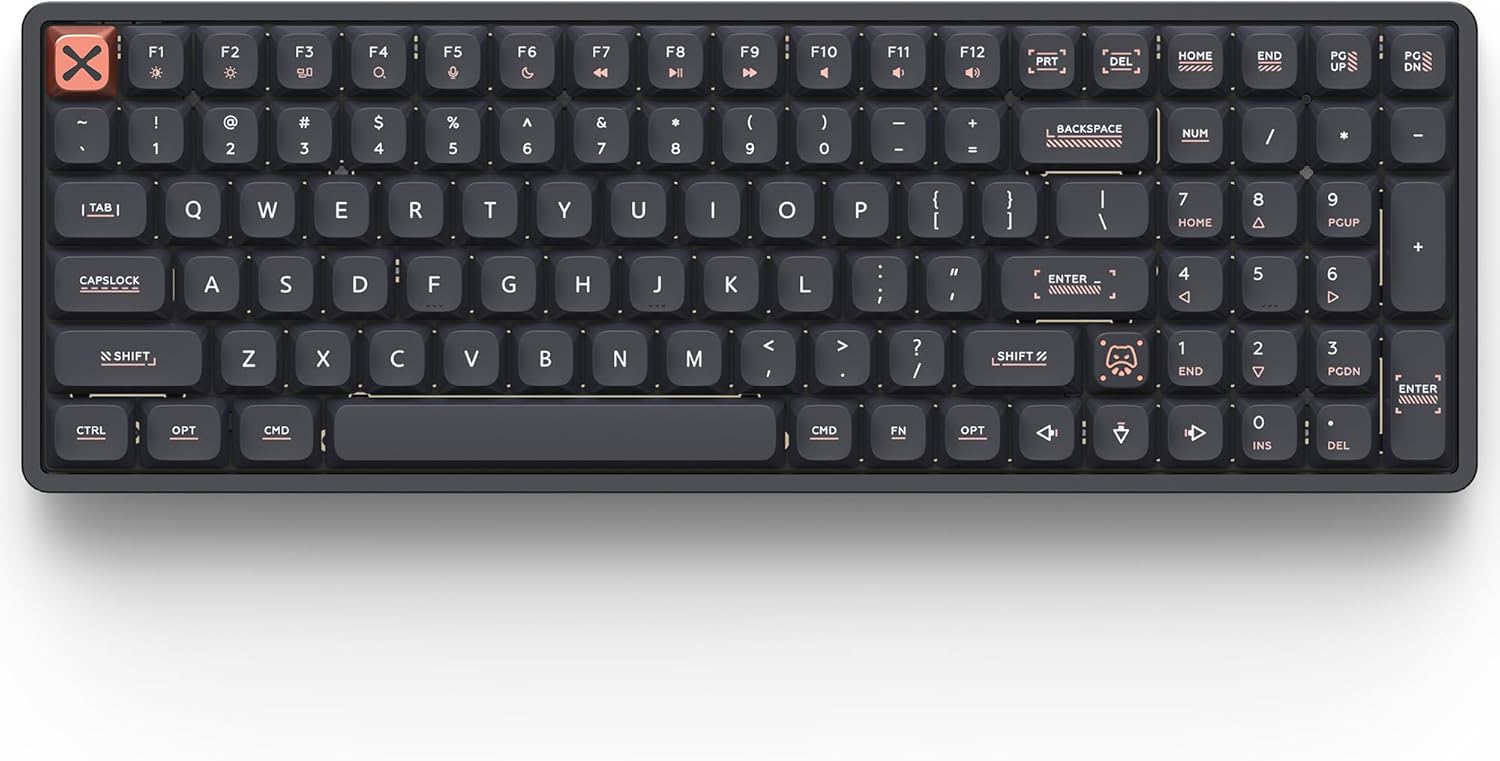
Magi96 Mechanical Keyboard Low Profile Wireless
Brand: IQUNIX
Features / Highlights
  • Full 100-key layout maximizes productivity and workflow efficiency
  • Low-profile hot-swappable switches deliver comfortable typing experience
  • Premium CNC aluminum body provides exceptional durability and stability
  • Tri-mode connectivity supports Bluetooth, 2.4GHz, and USB-C devices
  • VIA customization enables advanced key remapping and macros
Our Score
9.79
CHECK PRICE

This keyboard feels built for people who type all day instead of just showing off on a desk

The IQUNIX Magi96 is designed for professionals who spend hours writing, programming, editing documents, or managing spreadsheets while wanting a premium mechanical keyboard that remains comfortable over long sessions. Its low-profile switches, aluminum construction, full-size layout, and extensive customization create a typing experience that feels refined from the first keystroke.

Finding the Best Mechanical Keyboard for Typing means paying attention to much more than switch type alone. Layout efficiency, typing comfort, build quality, connectivity, and long-term reliability all contribute to whether a keyboard remains enjoyable after months of everyday use.

The Magi96 uses a compact 100-key layout that preserves the number pad while reducing the overall footprint compared with traditional full-size keyboards. Professionals who regularly work with spreadsheets or accounting software often appreciate keeping the numpad without sacrificing valuable desk space.

An accountant entering hundreds of financial records each day, for example, benefits from retaining dedicated number keys while allowing the mouse to remain positioned slightly closer to the keyboard.

The compact full layout improves professional typing efficiency, especially for productivity-focused workflows.

The typing experience remains comfortable for long work sessions

The low-profile mechanical switches help reduce finger travel while maintaining the satisfying feel expected from a premium mechanical keyboard. Combined with the low front height, many users can type comfortably without requiring a wrist rest.

The CNC-machined aluminum body gives the keyboard a solid feel with very little flex. A rigid chassis also contributes to a more stable typing experience while reducing hollow resonance during everyday use.

The premium aluminum construction enhances typing stability. Small details like structural rigidity often become more noticeable after several hours of continuous typing.

Hot-swappable switches allow users to customize the typing feel later without replacing the entire keyboard. VIA compatibility also provides advanced key remapping, macros, and workflow customization that many programmers, writers, and productivity users appreciate.

Tri-mode connectivity supports Bluetooth, 2.4 GHz wireless, and USB-C wired operation, making it easy to move between desktops, laptops, tablets, and different operating systems. Mac, Windows, and Linux compatibility further increases its flexibility for modern work environments.

The RGB backlighting remains fully customizable without becoming distracting during normal office use. Many users simply choose subtle white lighting or low-brightness effects that improve visibility during evening work.

Using VIA to create custom shortcuts for repetitive software commands can noticeably improve productivity throughout the workday.

Maintaining proper wrist position while typing also helps maximize comfort regardless of which keyboard is being used.

This deserves the number one position because it balances everything exceptionally well

We ranked the IQUNIX Magi96 first because it combines premium build quality, outstanding typing comfort, versatile connectivity, and extensive customization into one exceptionally complete keyboard. It performs equally well for programming, writing, business productivity, and creative work while maintaining an elegant professional appearance.

The premium typing experience supports demanding professional workflows. Software developers, accountants, writers, engineers, analysts, designers, and business professionals can all benefit from its balanced design and refined construction.

The low-profile switches reduce typing fatigue, the aluminum chassis delivers exceptional durability, and the compact full-size layout maximizes workspace efficiency without sacrificing productivity. Combined with hot-swappable switches and VIA support, the keyboard also continues adapting as user preferences evolve. Community reviews consistently praise its build quality and smooth typing feel, although some users note the premium price and occasional wireless setup quirks.

The keyboard performs exceptionally well for document creation, coding, financial work, presentations, spreadsheets, research, and general office productivity. Its refined feel becomes increasingly appreciated the longer it is used.

Developing healthy typing habits further improves long-term comfort. Proper desk height, monitor positioning, and relaxed wrist posture work together with a quality keyboard to support better ergonomics.

The understated industrial design also fits naturally into both professional offices and modern home workspaces without appearing overly decorative.

Overall, we believe the IQUNIX Magi96 fully deserves its number one ranking because it provides an exceptional balance of typing comfort, premium craftsmanship, and professional versatility. For anyone searching for the Best Mechanical Keyboard for Typing, it stands out as one of the most complete keyboards currently available.

2
MX Mechanical Mechanical Keyboard Low Profile Wireless
Brand: Logitech
Features / Highlights
  • Low profile mechanical switches deliver fast and comfortable typing
  • Smart backlighting automatically adjusts to surrounding lighting conditions
  • Connects to three devices using Bluetooth or Logi Bolt receiver
  • Premium aluminum top plate provides excellent durability and stability
  • Long battery life supports weeks of productivity between charges
Our Score
9.59
CHECK PRICE

This keyboard gets almost everything right for everyday professional typing

The Logitech MX Mechanical was built with productivity in mind. It combines low profile mechanical switches, intelligent wireless connectivity, premium construction, and thoughtful ergonomic design to create a keyboard that feels equally comfortable during quick emails or eight-hour workdays.

Anyone searching for the Best Mechanical Keyboard for Typing usually wants a keyboard that remains comfortable after thousands of keystrokes, not just one that sounds satisfying. The MX Mechanical focuses on reducing fatigue while still delivering the precise feedback that mechanical keyboard users appreciate.

The full-size layout includes a dedicated number pad, navigation cluster, and function row without unnecessary design distractions. Professionals working with spreadsheets, accounting software, engineering applications, or databases benefit from having every key immediately available without relying on shortcuts.

A financial analyst entering hundreds of values throughout the day, for example, saves time simply because the number pad remains within easy reach. Small workflow improvements like this become surprisingly valuable after months of daily work.

The low profile mechanical switches support comfortable all day typing, allowing fingers to travel a shorter distance while maintaining satisfying tactile feedback.

The thoughtful features quietly improve productivity every day

The MX Mechanical uses low profile mechanical switches that require less finger movement than traditional full-height switches. Many users notice reduced typing fatigue during long writing sessions while still enjoying the accuracy associated with mechanical keyboards.

The smart illumination system automatically activates when hands approach the keyboard and adjusts brightness according to surrounding light levels. This helps conserve battery life while ensuring key legends remain easy to read during evening work.

The intelligent backlighting adapts naturally to changing environments. Instead of constantly adjusting lighting manually, users can remain focused on their work.

Wireless connectivity supports Bluetooth and the Logi Bolt receiver while allowing pairing with up to three devices. Switching between a desktop computer, laptop, and tablet takes only a button press, making the keyboard particularly useful for professionals working across multiple systems.

The aluminum top plate gives the keyboard excellent rigidity while creating a refined premium feel. A stable chassis also improves typing consistency because there is very little flex even during fast typing sessions.

Battery life is another strength. With backlighting disabled, many users can work for weeks before needing to recharge, reducing interruptions throughout busy schedules.

The keyboard performs exceptionally well for coding, document writing, presentations, email management, financial work, spreadsheet editing, and general office productivity.

Maintaining proper wrist position and keeping elbows at roughly ninety degrees further improves long-term typing comfort regardless of keyboard quality.

Second place is still an outstanding result

We ranked the Logitech MX Mechanical second because it delivers one of the most refined typing experiences available for professionals. Its comfortable low profile switches, intelligent wireless features, premium construction, and excellent software integration make it an outstanding choice for productivity.

The premium wireless design delivers dependable professional performance. Writers, programmers, engineers, accountants, business analysts, remote workers, and office professionals will all appreciate how balanced this keyboard feels throughout a normal workday.

The only reason it falls just behind our number one choice is overall customization. The IQUNIX Magi96 offers hot-swappable switches, VIA programming support, a CNC aluminum chassis, and broader enthusiast-level customization that appeals to users wanting maximum flexibility and long-term personalization.

The MX Mechanical instead focuses on simplicity, reliability, and polished software integration. Many business users will actually prefer that approach because everything works consistently right out of the box.

The keyboard remains one of the strongest options available for professional typing, coding, spreadsheet work, document editing, and multitasking across multiple devices. Its combination of comfort and productivity continues to make it a favorite in many office environments.

Building an ergonomic workstation also involves proper chair height, monitor placement, and regular movement throughout the day. A high-quality mechanical keyboard becomes even more effective when combined with healthy workstation habits.

The understated appearance fits naturally into corporate offices, home workspaces, creative studios, and executive desks without drawing unnecessary attention.

Overall, we believe the Logitech MX Mechanical fully deserves its second-place ranking because it delivers excellent typing comfort together with exceptional wireless productivity. For anyone looking for the Best Mechanical Keyboard for Typing, it remains one of the safest and most dependable premium keyboards currently available.

3
IQUNIX MQ80 Low Profile Wireless Mechanical Keyboard
Brand: IQUNIX
Features / Highlights
  • Low-profile wireless mechanical keyboard in a CNC aluminum chassis
  • VIA support enables compatible key remapping and customization
  • Tri-mode connectivity supports Bluetooth, 2.4 GHz, and USB-C
  • Hot-swappable low-profile switches support compatible switch changes
  • RGB backlighting is included on the verified listing
Our Score
9.32
CHECK PRICE

This feels like a keyboard built for people who spend hours typing

The IQUNIX MQ80 immediately stands out because it focuses on typing quality instead of chasing unnecessary features. It combines a CNC aluminum chassis, low profile mechanical switches, hot swappable sockets, tri mode wireless connectivity, RGB lighting, and VIA support into a compact package that feels purpose built for productivity.

When searching for the best mechanical keyboard for typing every day, build quality matters just as much as switch choice. A rigid aluminum frame reduces flex across the keyboard, creating a more consistent keypress whether you are writing reports, programming software, or answering emails throughout the day.

Low profile mechanical switches also change the typing experience. Because the keys travel a shorter distance than traditional mechanical switches, many users find they can maintain a comfortable typing rhythm while reducing finger movement during long work sessions.

I kept noticing the small details that actually improve daily work

One of the strongest features is the tri mode connectivity. You can connect using USB C, Bluetooth, or a 2.4GHz wireless receiver, making it easy to move between a desktop computer, laptop, and tablet without replacing your entire workspace.

That flexibility becomes useful in real situations. Someone working from home may type on a desktop during the morning, switch to a laptop for meetings, then continue editing documents on a tablet during travel without constantly reconnecting cables.

The hot swappable switch design is another practical advantage. If a switch eventually wears out or you simply decide you prefer a different typing feel, individual switches can be replaced without soldering the entire keyboard.

Hot swappable mechanical switches give owners more flexibility than permanently soldered keyboards. Instead of replacing the whole keyboard after years of use, many users simply upgrade the switches and continue using the same board.

VIA support is another feature that deserves attention. Power users can remap keys, create custom shortcuts, and build productivity focused layouts that reduce repetitive hand movement throughout the day.

This becomes especially valuable for programmers, writers, video editors, and spreadsheet users. Having commonly used commands mapped exactly where you want them can save thousands of unnecessary key presses over months of work.

Why this earned our number 3 ranking

Typing comfort is influenced by much more than switch type alone. Keyboard stability, keycap quality, layout, wireless reliability, firmware customization, and battery performance all contribute to the overall experience.

The MQ80 performs well across nearly every category. Its aluminum construction provides a premium feel, the low profile design encourages faster typing for many users, and the combination of wireless options with VIA customization makes it suitable for both office work and home setups.

The overall feature set delivers excellent long term value for professionals who type every day. The keyboard feels thoughtfully designed instead of relying only on appearance.

We ranked this keyboard at number 3 instead of number 1 because it targets a more premium audience. The higher price may place it outside the budget of many buyers, and some typists still prefer the deeper travel and sound profile of traditional full height mechanical switches instead of low profile designs.

Even with those tradeoffs, this remains one of the strongest choices for anyone looking for the best mechanical keyboard for typing. Its premium construction, flexible connectivity, customization options, and refined typing experience make it an excellent investment for users who spend hours at a keyboard every day.

4
Air75 V3 Mechanical Keyboard with Tri Mode Wireless
Brand: NuPhy
Features / Highlights
  • Ultra slim low profile mechanical design provides comfortable extended typing sessions.
  • Tri mode connectivity supports USB C, Bluetooth, and 2.4GHz wireless devices.
  • QMK and VIA compatibility enables powerful keyboard customization and key remapping.
  • Premium PBT keycaps resist shine while maintaining consistent typing texture.
  • High polling rate and responsive switches deliver accurate everyday performance.
Our Score
9.02
CHECK PRICE

I could tell this keyboard was designed with typing in mind first

The NuPhy Air75 V3 is one of those keyboards that immediately feels refined once your hands are on it. Instead of focusing purely on gaming aesthetics, it puts attention into typing comfort, wireless flexibility, and long term durability, making it a strong option for anyone searching for the best mechanical keyboard for typing.

This 75 percent layout strikes a practical balance between saving desk space and keeping the navigation keys that many professionals rely on every day. Writers, programmers, students, and office workers can move between documents without feeling cramped or sacrificing productivity.

One of the first things you'll notice is the low profile design. The shorter switch travel and reduced keyboard height can create a more natural wrist position, which helps many people stay comfortable during long typing sessions without needing an additional wrist rest.

The features actually solve problems people run into every day

The Air75 V3 supports wired USB C, Bluetooth, and 2.4GHz wireless connectivity. That means you can switch between multiple computers with very little interruption, which becomes incredibly useful if your work setup includes a desktop, laptop, and tablet.

Imagine writing reports on your desktop during the day, then switching to your laptop for meetings before finishing emails on a tablet later that evening. Instead of keeping multiple keyboards on your desk, one keyboard handles every device with only a quick connection change.

The flexible wireless connectivity makes daily workflows much easier for people who constantly move between devices. It removes unnecessary clutter while keeping the typing experience consistent regardless of which computer you're using.

The keyboard also supports QMK and VIA firmware, giving advanced users a significant amount of customization. Individual keys can be remapped, shortcuts can be created, and macros can automate repetitive tasks that normally require multiple keystrokes.

That flexibility is particularly valuable for software developers, content writers, accountants, and video editors. Small workflow improvements repeated hundreds of times every day eventually become meaningful productivity gains.

The included PBT keycaps are another highlight that often gets overlooked. Unlike cheaper ABS plastic, PBT keycaps are more resistant to developing a shiny surface after months or years of regular use, helping the keyboard maintain both its appearance and consistent typing texture.

High quality PBT keycaps improve long term durability while also providing a more solid feel beneath your fingertips. Many people underestimate how much keycap material contributes to overall typing satisfaction.

Low profile mechanical switches also have practical advantages. Because the keys travel a shorter distance before actuating, many users can maintain a faster typing rhythm while reducing unnecessary finger movement across thousands of keystrokes each day.

Of course, choosing the correct switch type still matters. Some people naturally prefer tactile feedback for writing, while others enjoy smoother linear switches for speed. Selecting a switch that matches your typing style often has a bigger impact than simply buying the most expensive keyboard available.

Why we placed this keyboard at number 4

The NuPhy Air75 V3 delivers an impressive balance of premium construction, modern wireless connectivity, customization features, and excellent everyday typing comfort. It competes well with many higher priced mechanical keyboards while remaining practical for both office work and home use.

The overall typing experience feels polished and thoughtfully engineered from the first day of use. Every major feature contributes to making daily work easier rather than simply adding marketing bullet points.

We placed this keyboard at number 4 because its low profile design will not appeal to everyone. Some typists still prefer the deeper key travel, heavier switches, and fuller sound signature that traditional mechanical keyboards provide, especially during extended writing sessions.

The compact 75 percent layout may also require a short adjustment period for users coming from a full size keyboard with a dedicated number pad. While most people adapt quickly, heavy spreadsheet users may still prefer a larger layout.

Even with those considerations, the NuPhy Air75 V3 remains an outstanding choice for anyone looking for the best mechanical keyboard for typing. Its premium build quality, customizable firmware, reliable tri mode connectivity, durable PBT keycaps, and comfortable low profile design make it a keyboard that performs consistently for years of everyday use.

5
Magi65 Low Profile Mechanical Keyboard Wireless
Brand: IQUNIX
Features / Highlights
  • Premium CNC aluminum chassis provides exceptional rigidity and premium typing stability.
  • Triple connectivity supports USB C, Bluetooth, and fast 2.4GHz wireless operation.
  • Hot swappable low profile switches allow effortless customization without soldering required.
  • Compact 65 percent layout maximizes desk space while keeping essential navigation keys.
  • RGB backlighting and programmable features enhance productivity and personalized workflows.
Our Score
8.82
CHECK PRICE

This keyboard feels surprisingly premium the moment you start typing

The IQUNIX Magi65 focuses on delivering a refined typing experience instead of simply adding features for marketing purposes. With its CNC aluminum construction, low profile mechanical switches, compact 65 percent layout, and tri mode wireless connectivity, it checks many of the boxes people look for when searching for the best mechanical keyboard for typing.

The first thing that stands out is the solid aluminum chassis. A rigid keyboard reduces flex while typing, helping every keystroke feel more consistent whether you're writing documents, coding software, or spending hours responding to emails.

Many budget keyboards develop small amounts of movement over time, especially when typing quickly. A stronger frame helps prevent that, making long work sessions feel more stable and predictable.

The design choices actually improve real everyday typing

The Magi65 uses a compact 65 percent layout that removes unnecessary keys while keeping the most important navigation functions. This creates additional desk space without forcing users to completely relearn their keyboard layout.

That extra room becomes surprisingly useful if you work with a mouse throughout the day. Your hands stay closer together, reducing shoulder movement during long editing sessions or extended spreadsheet work.

The compact layout creates a cleaner and more efficient workspace while still maintaining practical everyday usability. It is a design that many professionals eventually grow to appreciate after only a few days.

Another major advantage is the low profile mechanical switch design. Shorter key travel allows many typists to maintain a faster rhythm because each key requires less finger movement before actuating.

This can make a noticeable difference for writers producing thousands of words each day. Less movement over countless keystrokes often translates into reduced finger fatigue by the end of a long work session.

The keyboard also supports USB C, Bluetooth, and 2.4GHz wireless connectivity. Switching between multiple computers becomes quick and convenient, especially for people who regularly move between a desktop computer, work laptop, and tablet.

Imagine spending the morning writing reports on your office desktop, joining meetings from your laptop in the afternoon, then reviewing documents on a tablet later that evening. One keyboard handles each device without constantly plugging and unplugging cables.

Multiple wireless connection options provide excellent daily flexibility for modern work environments. It keeps the typing experience consistent regardless of which device you're currently using.

Hot swappable switches add another layer of long term value. If your preferences change later, or a switch eventually wears out after years of use, replacing individual switches becomes much easier than replacing the entire keyboard.

This is a feature that many first time buyers overlook. Mechanical keyboards often last for many years, so having the ability to customize or repair the switch configuration extends the useful life of the keyboard considerably.

RGB lighting is included as well, although it serves more than just appearance. Adjustable lighting improves key visibility in dim environments and allows users to personalize the keyboard without affecting its professional functionality.

Why we ranked this keyboard at number 5

The IQUNIX Magi65 delivers an impressive combination of premium materials, wireless flexibility, compact design, and customizable mechanical switches. It feels significantly more refined than many keyboards in its category and performs well for both productivity and casual use.

The premium aluminum construction gives every keystroke a reassuring feel that many plastic keyboards simply cannot replicate. Combined with reliable wireless connectivity and hot swappable switches, it offers excellent long term ownership.

We placed this keyboard at number 5 because the compact 65 percent layout may not suit everyone. Users who frequently rely on dedicated function keys, navigation clusters, or a number pad may require additional time to adapt, and some buyers still prefer the deeper travel of traditional full height mechanical switches over a low profile design.

Those tradeoffs are relatively minor when viewed alongside the overall package. The IQUNIX Magi65 remains an excellent option for anyone looking for the best mechanical keyboard for typing, offering premium craftsmanship, dependable wireless performance, and a comfortable typing experience that easily supports hours of productive work every day.

6
Magi65 Mechanical Keyboard with Aluminum Wireless
Brand: IQUNIX
Features / Highlights
  • Premium CNC aluminum case delivers outstanding durability and typing stability.
  • Triple mode connectivity supports USB C, Bluetooth, and 2.4GHz wireless devices.
  • Hot swappable mechanical switches allow effortless future customization and maintenance.
  • Compact 65 percent layout saves valuable desk space for productivity.
  • Solid internal construction produces a smooth and satisfying typing experience.
Our Score
8.51
CHECK PRICE

This one gets the fundamentals right before anything else

The IQUNIX Magi65 is built for people who care more about how a keyboard feels than how many flashy features it can advertise. With its CNC aluminum chassis, compact layout, wireless connectivity, and hot swappable switches, it delivers many of the qualities that make up the best mechanical keyboard for typing.

The keyboard follows a 65 percent layout, keeping the keys most people use every day while eliminating unnecessary bulk. This creates more room for your mouse and allows your hands to stay closer together, something many office workers and programmers appreciate after long hours at a desk.

The aluminum construction immediately gives the keyboard a more premium feel than typical plastic alternatives. A rigid frame minimizes flex while typing, helping each keypress remain consistent even during fast typing sessions.

You notice the practical benefits after using it for a few days

The Magi65 supports three connection methods including USB C, Bluetooth, and 2.4GHz wireless. This flexibility makes it simple to move between multiple computers without constantly reconnecting cables.

For example, someone working remotely may spend the morning writing documents on a desktop computer, switch to a company laptop for meetings, then continue reviewing files on a tablet later in the evening. One keyboard handles every device without interrupting the workflow.

Triple mode wireless connectivity improves everyday productivity because it removes unnecessary interruptions between devices. Once you become accustomed to switching instantly, it becomes difficult to return to a wired only keyboard.

The hot swappable switch design is another feature that adds long term value. Mechanical switches eventually wear with enough use, but replacing individual switches is far easier than replacing the entire keyboard.

This also allows users to experiment with different switch types over time. Some typists discover they enjoy tactile switches for writing, while others eventually prefer smoother linear switches for faster typing.

Hot swappable switches make long term ownership much easier because the keyboard can evolve with your preferences. It also reduces maintenance costs over the life of the product.

The compact layout encourages better desk organization. Keeping the mouse closer to the keyboard reduces unnecessary arm movement, which can become noticeable after spending several hours editing documents, programming, or answering emails.

Another benefit comes from the solid internal construction. A well built keyboard reduces unwanted vibration and creates a more refined typing sound, something many enthusiasts consider just as important as switch choice.

People often spend significant time comparing switch specifications while overlooking keyboard construction. In reality, the case material, mounting system, and internal stability all contribute to the overall typing experience.

Why this keyboard earned the number 6 position

The IQUNIX Magi65 delivers premium materials, dependable wireless connectivity, and a comfortable typing experience that feels far more expensive than many mainstream keyboards. The build quality is one of its strongest advantages and should easily satisfy users looking for long term reliability.

The premium construction creates a noticeably refined typing experience that many users immediately appreciate. Combined with hot swappable switches and wireless flexibility, it offers excellent long term usability.

We ranked this keyboard at number 6 because its compact 65 percent layout is not the most versatile choice for every buyer. Users who frequently work with spreadsheets, dedicated function keys, or navigation clusters may find larger layouts more convenient, while some typists still prefer the deeper travel offered by traditional full height mechanical keyboards.

Its premium construction also places it in a higher price category than many competing models. Buyers looking strictly for maximum value may find other keyboards offer a broader feature set for similar money.

Even so, the IQUNIX Magi65 remains an excellent recommendation for anyone searching for the best mechanical keyboard for typing. Its durable aluminum construction, flexible wireless connectivity, hot swappable switches, and comfortable typing feel make it a dependable keyboard that is built to deliver years of productive daily use.

7
Alto Keys K98M Mechanical Keyboard with Wireless
Brand: Logitech
Features / Highlights
  • UniCushion gasket mount reduces vibration for smoother and quieter typing.
  • Triple connectivity supports Bluetooth, Logi Bolt, and USB C charging.
  • Hot swappable Marble mechanical switches allow future customization and maintenance.
  • Compact 98 key layout includes a number pad while saving desk space.
  • White backlit durable keycaps improve visibility during low light work.
Our Score
8.07
CHECK PRICE

This keyboard feels built for comfort before anything else

The Logitech Alto Keys K98M takes a different approach from many mechanical keyboards. Instead of focusing on flashy RGB lighting or gaming aesthetics, it concentrates on delivering a comfortable typing experience through thoughtful engineering, making it a worthy contender for anyone searching for the best mechanical keyboard for typing.

The keyboard uses a compact 98 key layout, sometimes called an 1800 layout, which keeps the number pad while reducing the overall footprint. This gives spreadsheet users and office professionals the convenience of a full keyboard without taking up as much desk space as a traditional 104 key model.

One of its standout features is Logitech's UniCushion gasket mounting system. By absorbing vibration beneath each keystroke, it creates a softer and more refined typing feel while reducing unwanted resonance that can develop during fast typing sessions.

Some of the smaller features make a bigger difference than expected

The Alto Keys K98M supports Bluetooth, the Logi Bolt wireless receiver, and USB C charging. That flexibility makes it easy to switch between multiple computers throughout the day while maintaining a reliable wireless connection.

Imagine working on a desktop computer during the morning, moving to a laptop for meetings, then answering emails on a tablet later in the evening. Having one keyboard paired with multiple devices saves both time and desk space.

The multiple wireless connection options simplify everyday productivity for users who regularly work across different computers. It creates a smoother workflow without constantly reconnecting cables.

The keyboard also includes hot swappable Marble mechanical switches. If your preferences change over time or a switch eventually wears out, replacing individual switches is far easier than replacing the entire keyboard.

This flexibility is especially useful for people who are new to mechanical keyboards. Many users discover that their preferred switch type changes after months of daily use, making hot swappable sockets a valuable long term feature.

The durable keycaps include white backlighting that improves visibility without becoming distracting. Unlike bright RGB lighting, the simple white illumination fits naturally into professional workspaces while remaining useful during evening work sessions.

The compact layout keeps essential productivity keys within easy reach while still preserving valuable desk space. Many users appreciate having a number pad without the larger footprint of a traditional full size keyboard.

The keyboard is also compatible with Logitech Options Plus software, allowing users to customize shortcut keys and assign productivity functions. Creating dedicated shortcuts for frequently used applications can reduce repetitive mouse movement throughout the day.

Choosing a mechanical keyboard involves more than simply selecting a switch type. Build quality, wireless stability, keycap durability, software support, and overall ergonomics all contribute to how comfortable the keyboard feels after several hours of continuous typing.

Why we ranked this keyboard at number 7

The Logitech Alto Keys K98M delivers a comfortable typing experience with several thoughtful features, including vibration absorbing gasket construction, hot swappable switches, customizable shortcuts, and dependable wireless connectivity. It clearly prioritizes productivity and everyday comfort over unnecessary visual effects.

The typing experience feels refined and well suited for office environments where comfort matters more than aggressive gaming features. Logitech's software ecosystem also adds useful customization for professional users.

We placed this keyboard at number 7 because some competing keyboards in this roundup offer more enthusiast focused customization, premium materials such as full aluminum construction, or more advanced firmware support through platforms like VIA or QMK. Buyers looking for maximum modification potential may find those options better suited to their preferences.

The compact 98 key layout may also feel unfamiliar for users who have spent years using a traditional full size keyboard. While the learning curve is generally short, it remains something worth considering before purchasing.

Despite its ranking, the Logitech Alto Keys K98M remains a solid recommendation for anyone looking for the best mechanical keyboard for typing. Its comfortable gasket mounted design, reliable wireless connectivity, customizable software features, and practical layout make it an enjoyable keyboard that is well equipped for everyday work, writing, and long productivity sessions.

1. Start With Layout, Workload, and the Keys You Actually Use

A mechanical keyboard should fit the work before it fits an aesthetic. Begin by listing the keys used during an ordinary week. A full-size board keeps a dedicated number pad and is convenient for sustained numeric entry, but it occupies more desk width. A tenkeyless layout removes that pad while retaining the function row and navigation cluster. Smaller formats can save space, although they may move arrows, navigation commands, or function keys behind shortcuts. That trade can be efficient after practice and frustrating when a missing key interrupts frequent work.

Do not treat percentage labels as exact standards. Two boards described as 75 percent can place keys differently, use different right-shift sizes, or include different navigation keys. Study a clear layout diagram for the exact regional version. Users who alternate between spreadsheets, prose, editing, and code should count real commands rather than assume smaller is better. Our guides to mechanical keyboards for office typing and mechanical keyboards for typists offer adjacent category comparisons, but the final decision still depends on the required keys and workspace.

Measure the usable desk area, including the mouse zone, monitor stand, notebook, and any desk edge or tray. A narrower board can move the pointing device closer to the body, but only if its compact layers remain practical. Left-handed users or people who enter numbers occasionally might prefer a separate number pad that can be moved to either side. Shared computers need an arrangement every regular user can understand.

Consider operating-system conventions and language layout at the same stage. Printed legends do not guarantee that software will produce those symbols, and remapping cannot create a physically missing key. Confirm ANSI, ISO, or other regional geometry, modifier legends, firmware support, and whether configuration software runs on the computers involved. If the main concern is changing hand position rather than switch feel, compare ergonomic keyboards for office productivity separately; mechanical and ergonomic describe different characteristics.

Compact and full-size unbranded mechanical keyboards on a wooden desk
Choose a layout by mapping real tasks and available desk width before comparing switch names or lighting.

2. Understand Switch Feel Without Treating Labels as Guarantees

Mechanical switches are commonly grouped as linear, tactile, or clicky. Linear switches are designed to travel without a deliberate tactile bump; tactile switches add a change in resistance around actuation; clicky switches add a distinct click mechanism as well as tactile feedback. These families describe an intention, not a complete typing experience. Spring weight, travel, lubrication, housing, plate, keycaps, stabilizers, case construction, and manufacturing variation all influence the final feel and sound.

Color names are not universal specifications. A “brown,” “red,” or “blue” switch from one maker may differ from another with the same color. Compare published actuation force, bottom-out force when available, pre-travel, total travel, and switch construction for the exact variant. Even then, numbers cannot show whether a bump shape or spring progression suits a person. A tester can narrow preferences, but a few loose switches do not reproduce the acoustics or flex of an assembled keyboard.

For long typing sessions, avoid assuming that the lightest switch always reduces fatigue or that a heavy switch always prevents errors. Very light springs may register unintended presses for some typists; heavier springs may require more effort. Technique, key spacing, work duration, and adaptation matter. If possible, type representative prose, shortcuts, repeated modifiers, and correction sequences. Notice whether keys actuate predictably without requiring forceful bottoming out. No keyboard can promise a typing-speed increase, pain relief, or error reduction for every user.

Hot-swap sockets allow compatible switches to be removed without soldering, but compatibility has boundaries. Check pin format, north- or south-facing orientation where relevant, low-profile versus standard construction, and the manufacturer’s removal instructions. Repeated careless changes can bend pins or damage sockets. A soldered board can be perfectly reasonable for a stable setup, while hot-swap is useful when serviceability or experimentation is genuinely planned.

Published switch life is usually a laboratory rating under stated conditions, not a warranty that every complete keyboard will remain unchanged for that number of presses. Stabilizers, sockets, controller electronics, cables, batteries, and keycap legends have separate wear paths. Evaluate the complete product, not a switch headline alone.

Mechanical keyboard with exposed switches, blank keycaps, and three loose switch types
Switch category is a starting point; the assembled board determines the combined feel, pitch, and stability.

3. Evaluate Sound for the Room, Not From a Short Recording

Keyboard sound is contextual. A clicky mechanism can be clear and satisfying to its user yet disruptive in a call, library, classroom, or shared office. Tactile and linear switches are not automatically quiet: bottoming out, key return, large-key stabilizers, a hollow case, and a resonant desk can all be audible. “Silent” switches generally reduce impact noise but do not eliminate every sound. Confirm workplace rules and ask nearby users before selecting a conspicuous acoustic profile.

Online sound tests are limited by microphone position, gain, room treatment, compression, desk surface, and playback speakers. Use them to identify broad character, not to predict exact volume at your workstation. The same board can sound sharper on a hard hollow desk and more subdued on a dense mat. A comparison is most useful when several boards are recorded under the same controlled setup and the presenter states the switch, keycap, plate, and modifications.

Case foam, switch pads, lubrication, damped switches, and desk mats can alter sound, but each modification has tradeoffs. Added material may reduce resonance while changing flex or creating clearance issues. Lubrication applied incorrectly can make a switch inconsistent or contaminate electrical contacts. Modifications may affect warranty coverage. Start with placement, typing force, and the manufacturer-supported configuration before opening a new board.

A broad surface can influence both sound and pointer movement. Readers considering that route can compare leather desk mats, while those who mainly want forearm support should assess the surface height and edge rather than assume any mat is ergonomic. Keep ventilation openings and wireless charging zones unobstructed, and follow cleaning directions for both the keyboard and desk covering.

During a return period, test morning and evening typing, calls with the actual microphone, and the quietest period in the room. Ask another person to type while you listen from the neighboring seat. This reveals sound transmission that the typist may overlook. If acoustics are a firm constraint, choose conservatively rather than purchasing a loud board with the assumption that extensive modification will solve it.

4. Compare Wired, Wireless, Firmware, and Device Switching

A wired connection is straightforward when the cable, port, and keyboard implementation are sound. Detachable cables simplify replacement, but connector shape does not guarantee that every cable supports the required data and power. Check whether the keyboard works through the intended dock, KVM, or hub, and whether it can operate before the operating system loads if firmware access is important.

Connection Verify before buying Practical limitation
Wired Data-capable cable, port fit, dock or KVM behavior Cable routing and available ports
Bluetooth Supported devices, pairing slots, wake behavior Reconnection and firmware vary
USB receiver Receiver storage, replacement policy, compatibility Occupies a port; small receiver can be lost

Wireless models may use Bluetooth, a proprietary receiver, or both. Bluetooth can reduce dongles and support several devices, but wake behavior, pairing limits, latency, and firmware vary. A dedicated receiver can offer a different connection profile while consuming a USB port and creating a small component to store. Product pages sometimes group wired-only and wireless variants, so verify the exact model number. The guide to wireless keyboards for productivity covers that category in more depth.

Battery claims depend on lighting, connection mode, sleep settings, polling behavior, and test conditions. Treat an advertised duration as a stated test result, not a personal guarantee. Check whether the battery is replaceable or serviceable, whether the board can type while charging, how charge status is displayed, and what happens after long storage. Recharge lithium batteries according to the manufacturer’s instructions and stop using a device that swells, overheats, leaks, or is physically damaged.

Configuration software deserves equal attention. Confirm supported operating systems, whether settings are saved to onboard memory, and which functions require an account or background process. Browser-based and open firmware options can be convenient, but support differs by board revision. Download tools only from the manufacturer or a trusted project source. Never flash firmware for a similar-looking model, and do not disconnect power during an instructed update.

Device switching should be tested with the actual computers, tablets, or phones. Confirm how the shortcut is invoked, how long reconnection takes, whether modifier mapping changes correctly, and whether sleep disrupts the first keystroke. If a laptop is elevated on a stand intended to improve screen position, an external keyboard and pointing device are usually needed so the display and hands can be positioned independently.

5. Check Keycaps, Stabilizers, Build, and Repair Boundaries

Keycap material and legend method influence texture, appearance, and wear, but simple rankings are unreliable. ABS can develop visible shine with use; PBT is often more resistant to shine but can vary in texture, warping, and color. Double-shot legends use separate material for the legend, while dye sublimation and printed methods behave differently. None of these terms alone guarantees straight keys, uniform legends, or compatibility with lighting.

Replacement keycaps must match more than the stem. Check the physical layout, spacebar and bottom-row sizes, right-shift length, enter-key geometry, keycap profile, and interference with switch orientation. Low-profile boards frequently use proprietary or less common parts. North-facing lighting can matter for some keycap and switch combinations, but the practical effect depends on construction. If customization is important, confirm a complete compatible set before assuming it can be purchased later.

Large keys rely on stabilizers. During a trial, press the center and edges of space, enter, backspace, and shift. Listen for pronounced rattle or ticking and check that each key returns consistently. Sound preference is subjective, but sticking or unreliable return is a functional concern. Do not inject lubricant or bend components before documenting a defect and reviewing return terms; a modification can complicate support.

Case weight is not equivalent to quality. A heavy metal case may remain stable and feel substantial, but it is less convenient to move and can transmit impact differently. A lighter plastic case can be practical and durable when well designed. Look for even feet, a non-twisting cable connection, secure switches or keycaps, readable indicators, and a stable typing angle. Adjustable feet should lock positively and remain supported on the desk.

A wrist rest may help some users during pauses, but it should not force the wrists upward or become a hard pressure point while typing. Compare models sold with an integrated rest against the broader guide to mechanical keyboards with wrist rests for programming and the overview of memory-foam rests for keyboards and mice. Comfort claims remain individual, and persistent numbness, weakness, or pain warrants professional advice rather than a product promise.

Mechanical keyboard, wrist rest, mouse, monitor, and office chair arranged at a wooden desk
Assess the keyboard as one system: keycaps, stabilizers, case, feet, connection, and desk position all contribute.

6. Set Up Height, Tilt, Mouse Reach, and Cable Routing

A keyboard cannot compensate for a desk that places the hands far above or below a comfortable working level. Start with a supported seat and relaxed shoulders. Bring the keyboard close enough that the upper arms can remain near the torso, then place the mouse alongside it rather than forward or beyond a wide number pad. The wrists should not be held at an extreme angle. Avoid treating one prescribed posture as a position to freeze all day; supported variation and ordinary movement remain useful.

Positive keyboard feet raise the rear edge and may increase wrist extension for some users. Test the lowest stable angle first, then compare alternatives while typing real material. A low-profile board may reduce overall height, but switch and keycap geometry still matter. If desk height cannot be changed, adjustable keyboard trays or an under-desk keyboard tray with a mouse platform may provide another working level. Verify knee clearance, load limits, mounting requirements, and desk compatibility before drilling or clamping.

Freestanding supports introduce similar questions. An adjustable ergonomic keyboard stand must remain stable during key presses and should not create a sharp front edge. Do not stack improvised objects that can slide. Measure the combined height of board, keycaps, pad, and support rather than evaluating each item alone.

Mouse placement affects the benefit of a narrower layout. A suitable option from the wireless mouse guide for ergonomic comfort can reduce cable clutter, while an ergonomic mouse pad with wrist support changes surface height and contact. Neither category automatically fits every hand. Keep enough movement area for the selected sensitivity and task.

Route a detachable keyboard cable with a gentle bend and enough slack for height changes. Do not pinch it under monitor feet or run it where chair casters cross. The guide to office-desk cable management covers common routing choices, and under-desk cable trays can hold adapters away from the floor. Keep power components ventilated and separate easy-to-remove peripherals from fixed mains wiring.

Finally, align the display with the work rather than moving the keyboard around an inconvenient monitor base. An adjustable monitor riser can create keyboard storage and alter screen height, but verify load capacity and footprint. A nearby desk-clamp headphone holder with cable clips may free surface area if its clamp fits without damaging the desk.

7. Use a Structured Typing Trial and Ownership Check

A short display-unit test can identify a layout problem, but it rarely captures a full workday. Keep packaging, protective pieces, accessories, and proof of purchase until the return conditions are understood. Photograph the exact model and serial label without posting that information publicly. Before changing settings, test the factory configuration so a functional fault is not confused with an experimental remap.

Build a representative trial. Type prose for at least one normal work block, enter numbers if relevant, use every frequent shortcut, edit text, navigate a spreadsheet, and switch devices if that feature matters. Check the first keystroke after sleep and all large stabilized keys. Note accidental presses, missed inputs, uncomfortable reaches, case movement, connection drops, and noise. Make one adjustment at a time so the cause of a change remains clear.

Separate adaptation from incompatibility. A slightly unfamiliar key spacing may become routine, while the absence of a required key or unsupported operating system will not. Do not force a trial through increasing discomfort. Return to the previous setup and reassess. Keyboard recommendations are purchasing guidance, not medical treatment, and symptom claims should not determine a purchase without appropriate clinical advice.

Review warranty and return terms for the exact seller and variant. Confirm coverage for the keyboard, battery, cable, and accessories; shipping responsibility; modification exclusions; and availability of proprietary receivers or keycaps. Save the seller name, model number, layout, switch, connection type, and deadline shown at checkout, then compare the delivered label before use.

  1. Test all keys with trusted local software and remove any sensitive text afterward.
  2. Pair every intended device and verify modifier behavior.
  3. Listen from both the typing seat and the neighboring workspace.
  4. Check cable strain, charging, sleep, indicators, and onboard profiles.
  5. Repeat the test during the normal workload before the return deadline.
Mechanical keyboard with brush, pullers, cable, cloth, and blank replacement keycaps
Document the trial first; clean, open, or modify the keyboard only within the maker’s instructions and return terms.

8. Final Mechanical Keyboard Buying Checklist

Use this final checklist only after narrowing the category. Verify every specification against current documentation for the exact model, regional layout, switch option, and wired or wireless variant. Retail pages can combine reviews and descriptions for several versions, and a familiar product name may cover meaningful revisions.

  • The physical layout contains every key needed for routine tasks.
  • Desk width leaves a comfortable, unobstructed mouse area.
  • Regional geometry and operating-system modifier behavior are correct.
  • The exact switch option has an acceptable feel and room-appropriate sound.
  • Switch force and travel are specifications, not promises about comfort or speed.
  • Wired ports, wireless modes, receivers, docks, and device switching match the setup.
  • Battery, charging, sleep, and service information are clear for wireless use.
  • Configuration software supports the intended systems and saves settings as needed.
  • Keycap sizes, profile, legends, and replacement availability meet ownership plans.
  • Spacebar, enter, shift, and backspace return consistently across their width.
  • The board sits level and its selected feet or supports remain stable.
  • Keyboard height and tilt do not force an extreme wrist angle.
  • Mouse, monitor, notebook, microphone, and cable routes remain practical.
  • Warranty exclusions, seller identity, return deadline, and return costs are understood.
  • The package can be retained during a representative typing and acoustic trial.

The strongest choice is not necessarily the board with the most switches, the thickest case, or the longest feature list. It is the verified variant whose layout supports actual work, whose feel and sound suit the user and room, and whose connection and software behave reliably with the intended devices. Conservative selection also means accepting when a simpler wired board, a familiar full-size layout, or a quieter non-mechanical keyboard better fits the constraints.

After purchase, save the model information, receipt, key combination reference, firmware source, and final remapping profile. Recheck the setup when changing desks, chairs, monitor stands, or pointing devices. Clean and service the board only as instructed, disconnect power before removing components when required, and stop using damaged cables or swelling batteries. A careful setup and documented trial provide more useful evidence than generalized claims about what every typist should prefer.

Frequently Asked Questions

Which mechanical switch type is best for typing?
There is no universal best switch. Linear, tactile, and clicky designs provide different feedback, while spring force, travel, keyboard construction, technique, noise limits, and personal preference affect the result. Test the exact assembled keyboard when possible.
Are mechanical keyboards always loud?
No. Sound varies with switch design, typing force, keycaps, stabilizers, plate, case, desk, and room. Clicky switches deliberately add sound, but linear and tactile boards can also be audible when keys bottom out or return.
Is a full-size or tenkeyless keyboard better for typing?
Choose according to the keys you use. Full-size boards retain a dedicated number pad; tenkeyless boards save width while keeping the function row and navigation cluster. Neither layout is inherently better for every workload.
Do lighter switches reduce typing fatigue?
Not necessarily. Very light switches may cause unintended presses for some users, while heavier springs may require more effort. Comfort also depends on layout, height, technique, duration, and the individual, so avoid relying on force alone.
Is a hot-swappable keyboard more durable?
Hot-swap sockets make compatible switch replacement possible without soldering, but they do not guarantee greater overall durability. Sockets can be damaged by bent pins or careless removal, and other keyboard components have separate wear paths.
Should I use the feet on the back of a mechanical keyboard?
Use the lowest stable angle that feels workable, then test alternatives. Raising the rear can increase wrist extension for some people, so the appropriate setting depends on keyboard height, desk level, and typing position.
What should I test before the keyboard return period ends?
Test every key, frequent shortcuts, large stabilized keys, sleep and wake behavior, all intended devices, wired or wireless connections, charging, software, noise in the real room, desk fit, and a representative typing workload.
Back to blog