

Quick Buying Guide: The best mechanical keyboard for programmers should support long typing sessions, frequent shortcuts, and the layout your tools require. Decide whether you need function keys, navigation clusters, or a numpad before choosing a compact board. Compare switch weight and sound, stabilizer quality, keycap legends, and front height. Programmable layers and remapping can improve workflows if the software is dependable and works on your operating system. Check connectivity, repairability, and replacement switch support, then test the keyboard with real coding and editing tasks.
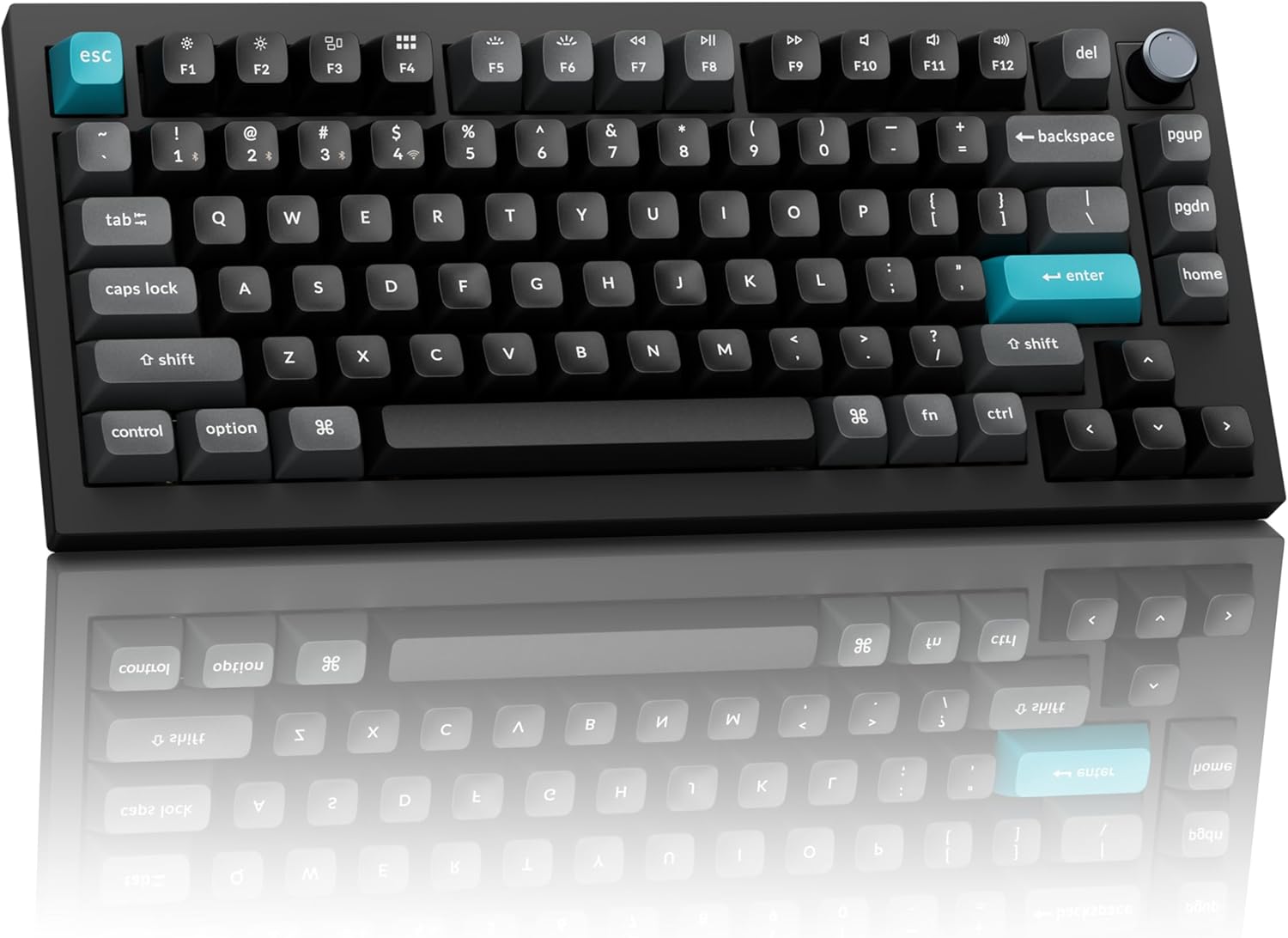
- Compact 75% layout keeps essential programming keys within easy reach
- 8000Hz polling works through both wired and 2.4GHz connections
- Hot-swappable sockets support extensive mechanical switch customization without soldering
- Bluetooth 5.3 connects with three devices for multi-system workflows
- CNC aluminum construction and layered acoustic treatment create premium typing

This is the kind of 75% layout that makes sense for someone coding all day
The Keychron Q1 Ultra 8K earns our number one position for Best Mechanical Keyboard For Programmers because it gets the practical layout right before getting into the enthusiast features. You have a compact 75% mechanical keyboard layout that keeps dedicated arrow keys, function keys, navigation controls, and a programmable knob while removing the large numeric keypad that many programmers rarely need.
That smaller width has a real desk benefit. Your mouse can sit closer to the main typing area, which reduces the amount of lateral movement needed when switching between code, documentation, browser windows, terminals, and debugging tools.
The Q1 Ultra 8K measures about 327.6 mm wide and 145 mm deep. It is considerably narrower than a full-size keyboard, but it does not shrink everything into layers the way a 60% board does.
Dedicated arrow keys still matter for programming. Moving through source code, navigating command history, selecting text, and stepping through interfaces becomes annoying quickly if basic navigation requires a function-layer combination every time.
The function row remains available too. That is useful for IDE shortcuts, debugging commands, browser development tools, media controls, and application-specific bindings.
This is why 75% is such a useful middle ground. You save meaningful desk space without turning routine development work into a memorization exercise.
The customization is where programmers can really make this keyboard their own
The Q1 Ultra 8K is hot-swappable and supports most 3-pin and 5-pin MX-style mechanical switches. You can replace switches without soldering, which means the typing feel does not have to remain exactly as it arrived from the factory.
The Amazon configuration uses a tactile switch option, which makes sense for programming. A tactile switch provides physical feedback during the keystroke without necessarily producing the sharp audible click associated with traditional clicky switches.
That can be useful when writing code for hours. You get a noticeable actuation feel while keeping the keyboard more reasonable in a shared office or home workspace.
Switch preference is personal, though. A developer who types lightly may prefer something smoother or lighter, while somebody who constantly triggers keys accidentally may want a more deliberate tactile response.
Hot swapping gives the keyboard a long upgrade path. If your preferences change after six months, you can change the switches rather than replacing an expensive aluminum keyboard.
This is also useful if one switch develops a problem. A replaceable switch is much easier to deal with than treating the entire keyboard as disposable hardware.
Keychron uses screw-in PCB stabilizers for larger keys including the space bar, Shift, Enter, and Delete. Stable large keys matter because programmers use several of these constantly.
Think about the space bar alone. It may receive tens of thousands of presses during long writing and coding sessions, so excessive wobble becomes noticeable quickly.
The board uses double-shot PBT keycaps as well. PBT keycaps hold up well under heavy typing, resisting the shiny worn appearance that can develop on softer ABS caps after extended use.
The legends are formed through the double-shot construction rather than simply being printed onto the surface. For a keyboard intended to remain on a developer's desk for years, durability matters.
The CNC aluminum chassis is another major part of the experience. Keychron lists the Q1 Ultra 8K at approximately 1,724 grams, so this is a substantial keyboard rather than a lightweight plastic board.
That weight keeps it planted on the desk. It is not going to slide around when somebody types quickly or reaches aggressively for a shortcut.
The aluminum body feels deliberately permanent. The downside is obvious if you commute with your keyboard every day because nearly 1.7 kg is a lot of hardware to put into a backpack.
For a fixed programming workstation, the weight is mostly an advantage. Put it on the desk and it stays there.
Keychron also uses multiple internal acoustic layers including sound-absorbing foam, IXPE foam, PET film, a latex bottom pad, bottom-case acoustic foam, and additional PET film. These layers are intended to control resonance and improve the sound of each keystroke.
That matters more than it initially seems during long typing sessions. A controlled typing sound is less distracting than a hollow aluminum case producing sharp resonance every time a key bottoms out.
The polycarbonate plate contributes to the typing character too. It gives the board a different feel from a rigid metal plate and works with the internal mounting and acoustic design.
None of this makes code compile faster. But when the keyboard is being used for several hours every day, physical feel and sound stop being minor details.
The Q1 Ultra 8K also supports Keychron Launcher, the company's browser-based customization environment. You can remap keys, create macros, configure shortcuts, and customize keyboard behaviour without treating the stock layout as permanent.
Remapping is genuinely useful for development workflows. A programmer might assign a macro for a frequently used command, move Caps Lock to Control, create easier navigation shortcuts, or dedicate keys to actions inside an IDE.
The best approach is not to customize everything immediately. Use the keyboard normally first and notice which commands repeatedly interrupt your hand position.
If you perform one awkward shortcut 300 times every working day, that is a good candidate for remapping. A shortcut used once every three weeks probably is not.
Why the Q1 Ultra 8K deserves our number one ranking
Connectivity is unusually complete. The keyboard supports 2.4GHz wireless, Bluetooth 5.3, and USB-C wired operation.
The 2.4GHz and wired modes can run at an 8000Hz polling rate. The 8K connection provides extremely fast input reporting, although programming itself does not require anything close to competitive gaming latency.
For coding, the practical benefit is simply that the keyboard feels immediate. There is no reason for a premium wireless mechanical keyboard to introduce noticeable input delay when moving quickly between terminal commands, shortcuts, and text entry.
The 8K capability becomes more valuable if the same computer is also used for gaming. You can have one premium keyboard for development during the day and high-performance gaming later without swapping peripherals.
Bluetooth runs at a lower 125Hz polling rate, but it provides a different advantage. The Q1 Ultra 8K can pair with up to three Bluetooth devices.
Three-device Bluetooth is excellent for developers who regularly move between a desktop, work laptop, test machine, tablet, or another computer.
A developer might keep the 2.4GHz receiver attached to the primary workstation and Bluetooth pairings assigned to a MacBook and secondary system. Switching machines does not require moving the keyboard or reconnecting a cable.
The keyboard supports macOS, Windows, and Linux, which is particularly relevant to programming. Development environments are often mixed.
Someone may write code on macOS, deploy to Linux, and maintain a Windows machine for testing. A keyboard intended for programmers should not become awkward simply because the operating system changes.
Keychron includes system-specific keycaps and hardware support for those workflows. Cross-platform compatibility is a real development feature, not just another line on the specification sheet.
The Q1 Ultra 8K uses a 4000 mAh rechargeable battery. Keychron rates wireless runtime at up to 660 hours with the backlight disabled and up to around 200 hours with RGB at its lowest brightness, depending on operating conditions.
Those numbers make the keyboard practical as an actual wireless work device rather than something that needs to be charged every few days. At five hours of daily use, Keychron estimates the maximum backlight-off runtime at roughly four months.
Long battery life matters during development work because the keyboard should disappear into the workflow. Constant charging becomes another interruption nobody needs during a long coding session.
You can continue using the keyboard while it charges through USB-C. So even when the battery eventually runs down, the keyboard does not become unusable.
RGB lighting is included with south-facing LEDs and extensive lighting control. It looks good, but programmers should treat RGB as secondary to layout, switches, keycaps, programmability, and typing comfort.
The south-facing orientation is useful for switch and keycap compatibility. It also reduces some of the interference issues associated with north-facing LEDs and certain Cherry-profile keycaps.
RGB is optional rather than essential. Turning it off also dramatically increases battery runtime.
The programmable knob is more interesting for productivity. It can be used for volume by default, but customization opens the possibility of assigning it to other actions depending on the workflow.
A programmer could use available remapping options to make frequently adjusted functions more accessible. Creative developers working with audio, video, or graphics applications may find the rotary control particularly useful.
The 8000Hz polling rate is powered by a controller with 1 MB of flash memory. Keychron uses ZMK on the Q Ultra series rather than the QMK implementation found on some previous Q-series models.
ZMK helps deliver strong wireless efficiency, which is part of how the board reaches its unusually long claimed battery runtime while retaining advanced programmability.
Some experienced Keychron users may specifically prefer QMK or VIA because they already know that ecosystem. That is worth understanding before buying if your workflow depends on a particular firmware environment.
For most users who primarily want remapping, macros, shortcuts, and normal keyboard customization, Keychron Launcher keeps the process accessible. You do not need to become a firmware developer just to change a key.
Typing angle also deserves attention during long programming sessions. The Q1 Ultra 8K has a fixed angle around 5.3 degrees, with a front height of about 20.7 mm before keycaps.
This is not an ultra-low-profile keyboard. A palm rest may improve long-session comfort depending on your desk and hand position.
A common mistake is placing the wrists directly on the desk edge while typing on a tall mechanical keyboard. That can create an awkward upward wrist angle.
Adjust chair height, keyboard position, and palm support so the hands approach the keys naturally. Do not assume a premium keyboard automatically creates a good ergonomic setup.
The 75% width helps here because the mouse can sit closer to the keyboard. That reduces the distance the right arm travels every time you switch from typing to pointing.
Programmers make that transition constantly. Write several lines, test something, move to a browser, inspect documentation, return to the editor, open a terminal, click another window.
A narrower keyboard reduces unnecessary mouse reach, particularly compared with a full-size board where the number pad permanently occupies several extra inches on the right.
The missing number pad is the obvious tradeoff. If your programming work includes heavy numerical data entry, accounting software, or repeated numeric input, you may prefer a larger layout.
Most software development workflows do not need a dedicated number pad enough to justify the extra width. The top number row remains available when numbers are needed.
N-key rollover is supported in both wired and wireless modes. That means simultaneous keypresses can register correctly without ordinary combinations being dropped.
This is more important for gaming than writing code, but it also means complex keyboard shortcuts are not constrained by a basic key matrix. The keyboard handles multi-key commands reliably.
The Q1 Ultra 8K is not inexpensive, and that is its most obvious disadvantage. You are paying for a CNC aluminum chassis, premium keycaps, hot-swappable sockets, wireless hardware, acoustic treatment, long battery life, programmability, and extremely high polling performance.
If you only want a keyboard for writing Python scripts twice per week, much cheaper mechanical keyboards can do the job. This model makes more sense for somebody whose keyboard is a primary professional tool.
The weight is another drawback. At around 1.7 kg, this is not our first choice for a programmer carrying a keyboard between home and the office every day.
The Q1 Ultra 8K belongs on a serious workstation. Its metal construction makes more sense as a permanent desk centerpiece than a travel peripheral.
The tactile switch configuration is also not automatically ideal for everyone. Some programmers prefer linear switches because they feel smoother during rapid typing, while others prefer stronger tactile feedback.
Hot swapping solves most of that concern. If the included switch is not right, change it.
This ability to evolve is a big part of why the Q1 Ultra 8K ranks first. The chassis, PCB, stabilizers, keycaps, firmware, switches, connectivity, and internal construction are designed around long-term ownership rather than treating the keyboard as a sealed appliance.
You can tune the keyboard around your workflow. That matters for programmers because workflows themselves change.
You might use VS Code today, move to JetBrains tools later, add a Linux workstation, start using Vim more heavily, or build a different macro setup. The keyboard can adapt without being replaced.
The final reason for rank one is balance. There are faster keyboards, smaller keyboards, cheaper keyboards, and keyboards with more unusual ergonomic layouts.
But the Q1 Ultra 8K combines a very programmer-friendly 75% layout with premium mechanical construction, hot-swappable switches, three-mode connectivity, cross-platform support, serious programmability, durable PBT keycaps, long battery life, and exceptionally responsive wireless performance.
It covers both coding and enthusiast requirements without making the layout difficult to learn. That is a valuable combination for someone who types professionally but also cares about how the keyboard feels.
We therefore give the Keychron Q1 Ultra 8K our number one rank out of seven. Its compact 75% layout, CNC aluminum body, hot-swappable MX-style switch support, tactile switch option, double-shot PBT keycaps, screw-in stabilizers, layered acoustic treatment, 8000Hz wired and 2.4GHz polling, Bluetooth 5.3 with three-device pairing, 4000 mAh battery, up to 660 hours of rated wireless runtime, programmable knob, ZMK foundation, and Keychron Launcher customization create an unusually complete programming keyboard.
For someone searching for the Best Mechanical Keyboard For Programmers, the Q1 Ultra 8K deserves first place because it is compact without sacrificing the navigation keys developers actually use, customizable without requiring soldering, and equally comfortable moving among macOS, Windows, and Linux systems. It is expensive and heavy, but for a programmer who spends hours at the keyboard every day and wants one premium board that can be tuned over time, the Q1 Ultra 8K is an exceptionally strong long-term choice.
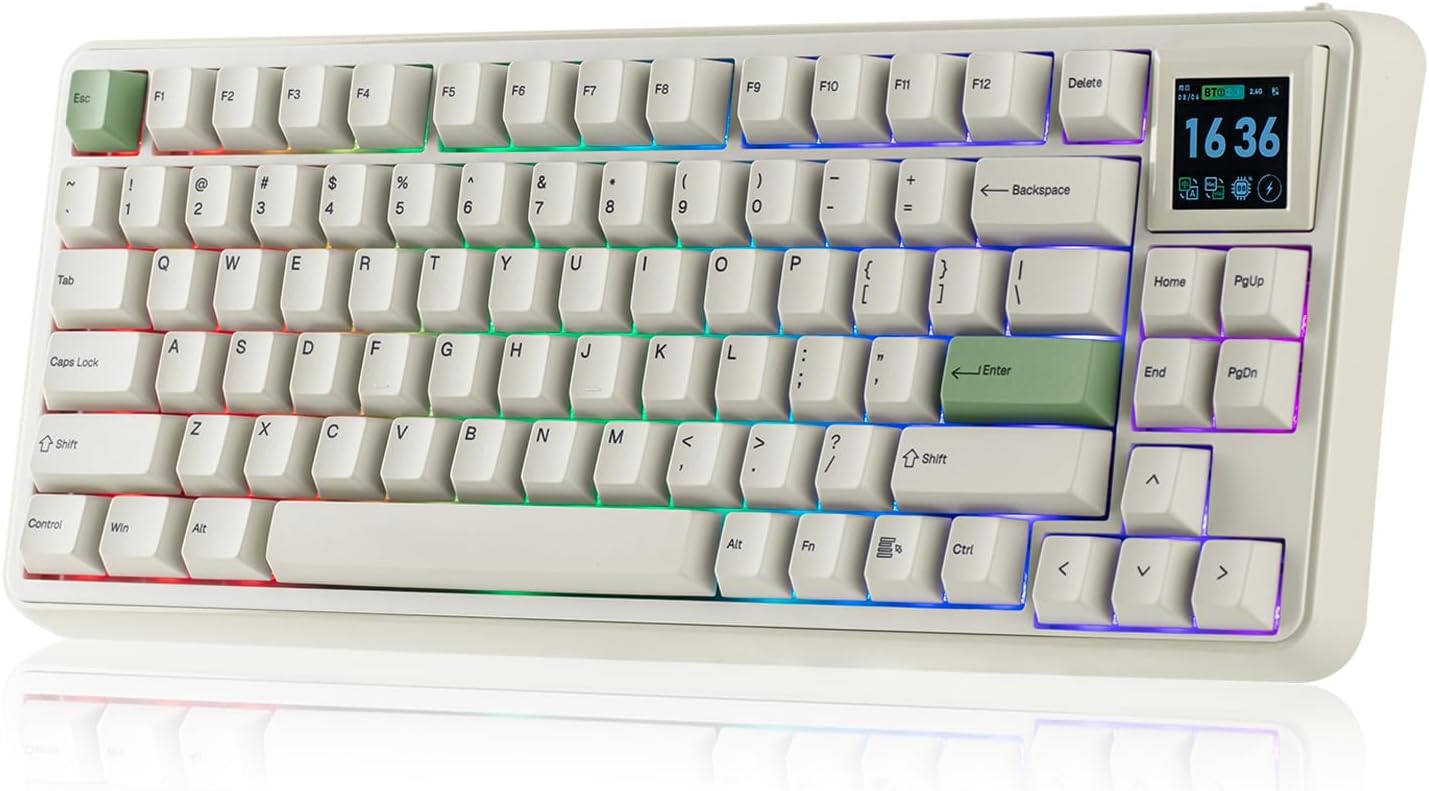
- Compact 75% layout keeps essential programming keys within comfortable reach
- Detachable 1.54-inch TFT screen can swap for four physical keys
- Hot-swappable PCB supports both 3-pin and 5-pin mechanical switches
- Gasket mounting and six dampening layers create softer controlled typing
- Tri-mode wireless connectivity supports flexible multi-computer programming setups
The 75% layout feels almost made for a programming desk
The EPOMAKER RT75 earns our number two position for Best Mechanical Keyboard For Programmers because it gets the basic working layout right before adding the unusual extras. You get a compact 75% mechanical keyboard layout with dedicated arrow keys, a function row, useful navigation controls, hot-swappable switches, tri-mode connectivity, and a modular screen area.
That 75% format is particularly sensible for programming. It removes the large numeric keypad that many developers rarely touch, but it does not force important controls such as the arrow keys onto awkward secondary layers.
The board measures roughly 352 by 142 by 45 mm and weighs about 1165 grams. It is compact enough to free useful desk space while still feeling substantial rather than like a tiny travel keyboard.
Keeping the mouse closer to the keyboard matters when your day constantly alternates between typing and pointing. A programmer might write code, move to browser documentation, return to the IDE, inspect a terminal, open a debugger, and repeat that pattern hundreds of times.
A full-size keyboard pushes the mouse farther outward because of the dedicated number pad. Removing that section can make the whole workstation feel tighter and more efficient without sacrificing the keys developers regularly need.
The function row remains available across the top. That is useful for debugging shortcuts, browser development tools, IDE commands, media controls, and any custom bindings you use throughout the day.
The arrow cluster is also physically separated enough to find quickly. Dedicated navigation keys are valuable for coding because cursor movement, command history, text selection, and moving through source files happen constantly.
This is where the RT75 has a practical advantage over very small 60% mechanical keyboards. Those boards may save another inch or two, but they often make basic navigation dependent on function combinations.
That can be fine for an enthusiast who has memorized every layer. For someone switching among several programming environments all day, the RT75 asks for much less adaptation.
The hot-swap screen is unusual, but the typing hardware matters more
The most obvious unusual feature is the detachable 1.54-inch TFT screen. It can display things such as images, GIFs, a clock, and system information, but the screen module can also be replaced with four keys.
That modular approach is much more interesting than permanently sacrificing keys for a display. If you enjoy the screen on a personal setup, leave it installed.
If four physical controls are more useful for your coding workflow, swap the screen out. Those extra keys could make more sense for macros, application commands, or other frequently used functions depending on how you configure the board.
The hot-swappable PCB is even more important for long-term ownership. The RT75 supports compatible 3-pin and 5-pin mechanical switches, so you can change switch feel without soldering.
EPOMAKER currently offers configurations including Creamy Jade linear switches and Crystal silent tactile switches. The linear option uses a trigger force around 45 gf, while the silent tactile option is lighter at roughly 35 gf for actuation.
For programming, the silent tactile configuration is particularly interesting if you share an office. You still get tactile feedback while reducing the amount of mechanical keyboard noise transmitted across the room.
A linear switch can work just as well for another programmer. Some people prefer a smooth uninterrupted keypress when typing quickly, especially if they already use linear switches for gaming.
Switch preference becomes important after thousands of keystrokes. The wrong switch can feel fine for ten minutes and tiring after several hours.
That is why hot swapping is genuinely useful instead of being an enthusiast novelty. If you decide later that you want a lighter switch, stronger tactile bump, or quieter design, the keyboard does not need to be replaced.
The RT75 also uses a gasket-mounted internal structure with a polycarbonate plate. Rather than fixing the plate rigidly against the case, the gasket design allows a somewhat softer typing response.
EPOMAKER adds several internal sound-control layers including PORON foam, switch socket pads, PET material, acoustic foam, and bottom silicone. The layered construction reduces hollow case resonance, which becomes noticeable when a keyboard is used continuously in a quiet working space.
Sound does not affect programming performance, obviously. But a harsh hollow board can become irritating during a five-hour coding session, especially if every large key produces a different rattle.
The stabilizers are plate mounted and tuned for the larger keys. That matters for the space bar, Enter, Shift, and other controls programmers press constantly.
The Cherry-profile PBT keycaps are another solid productivity choice. PBT generally resists developing the smooth shiny appearance that can happen after prolonged use of softer keycap materials.
Durable keycaps matter on a daily work keyboard. If the keyboard is used professionally for several years, the keys will see millions of presses.
The legends use dye sublimation rather than simple surface printing. Combined with the PBT material, that should suit a board expected to remain in regular use rather than being treated as a temporary peripheral.
Why the RT75 takes second place instead of beating our Keychron
The RT75 supports USB-C wired operation, 2.4GHz wireless, and Bluetooth. This is exactly the connectivity mix we like for programmers who use more than one computer.
Tri-mode connectivity suits mixed development environments where a desktop may handle the main workload while a laptop or secondary test machine sits nearby. The 2.4GHz mode provides the faster wireless connection, while Bluetooth works well when convenience matters more.
Wired and 2.4GHz modes support up to a 1000Hz polling rate. EPOMAKER lists latency around 4 ms when wired, 8 ms over 2.4GHz, and 16 ms over Bluetooth.
Those figures are already more than responsive enough for programming. Typing source code does not need an 8000Hz keyboard.
Where the Keychron Q1 Ultra 8K ranked first goes further is performance headroom. It offers substantially higher polling, a much more premium CNC aluminum chassis, and a more enthusiast-grade overall construction.
The RT75 uses an ABS plastic case. That is one major reason it sits in second place, because the Keychron simply feels like the more permanent premium workstation when comparing construction directly.
The EPOMAKER weighs over a kilogram anyway, so it does not feel flimsy. But there is still a physical difference between a well-built plastic case and a heavy machined aluminum chassis.
The RT75 counters with a much more accessible feature mix and that unusual modular display. Some programmers may actually prefer the EPOMAKER because it offers customization without the weight and cost associated with the Q1 Ultra.
The 5000mAh battery is another strong point. It gives the wireless design enough capacity for regular desk use rather than treating wireless connectivity like an occasional backup mode.
A large battery reduces charging interruptions, which is useful when the keyboard remains wireless throughout the working week. If the battery becomes low, USB-C remains available for wired operation.
The RT75 supports Windows, macOS, Android, and the current official specifications also reference broad cross-platform use. Mac modifier keycaps are included, which is useful if your development setup moves between operating systems.
This matters more for programmers than many other buyers. A developer may use macOS for local development, Linux remotely, and Windows for another part of the testing workflow.
The keyboard also supports N-key rollover. Complex combinations should register correctly instead of hitting the limitations found on cheaper keyboard matrices.
Reliable shortcut recognition is useful in an IDE, particularly when you have commands involving Control, Shift, Alt, or several modifiers at once. It is also useful if the same keyboard doubles as your gaming board after work.
The RT75 uses EPOMAKER's software and web configuration tools for customization. Keys, macros, and lighting can be adjusted to better match a personal workflow.
Programming is one of the situations where macro support can actually save repeated effort. The useful approach is to identify commands you repeat constantly rather than turning every key into something unfamiliar.
A developer might remap Caps Lock to Control, assign an application command to a spare key, or create a shortcut for a repetitive IDE action. High-frequency commands are the best remapping targets.
If you use a command twice per month, there is little reason to dedicate prime keyboard space to it. If you invoke it 200 times each day, moving it closer can be worthwhile.
The screen module has the same rule. Do not keep it installed purely because it looks interesting if four extra keys would improve your workflow.
The RT75's fixed typing angle is about 5.8 degrees, with a front height around 20.6 mm. It is not a particularly low-profile keyboard.
For very long programming sessions, a properly sized wrist or palm rest may help depending on your desk height and typing posture. Avoid resting the wrists against a sharp desk edge while reaching upward toward the keycaps.
Chair height matters too. If the desk is too high, the shoulders may remain slightly elevated regardless of how comfortable the keyboard itself feels.
Mechanical keyboard ergonomics involves more than switch feel. Keyboard height, desk position, mouse distance, chair adjustment, and the amount of continuous typing all contribute.
The compact 75% width helps because the mouse can remain close. That is one practical ergonomic advantage the layout provides without requiring an unusual split keyboard.
The biggest limitation is still the fixed physical layout. A programmer who needs a full number pad or a highly specialized ergonomic split design will need something different.
Some developers work heavily with numerical datasets and may genuinely benefit from a numpad. In that situation, a separate number pad is one possible compromise because it can be moved away when it is not needed.
The detachable display also adds complexity that a pure productivity keyboard does not strictly require. Some buyers will love the customization, while others may use it for a week and then forget it exists.
Fortunately, being able to replace it with four actual keys prevents the display from becoming permanently wasted space. That modularity is why we view it more positively than a decorative screen that cannot be removed.
The EPOMAKER software ecosystem is another place where the Keychron has an edge for more demanding keyboard enthusiasts. Keychron's broader customization approach and premium Q-series hardware make the first-place model more compelling for users who want maximum long-term control.
The RT75 is easier to justify on value. It delivers most of the practical features a programmer needs without asking you to pay mainly for a metal chassis and extreme polling performance.
You still get hot-swappable switches, PBT keycaps, gasket mounting, sound treatment, fast wireless connectivity, Bluetooth, USB-C, RGB lighting, a large battery, and a compact layout.
That is a very complete package. More importantly, none of those features force you to sacrifice the navigation controls developers depend on.
The Creamy Jade switches also arrive factory lubricated, as do the other supported factory switch options. That saves some of the preparation associated with enthusiast mechanical keyboard builds.
You can take the keyboard out, connect it, and use it immediately. Customization remains optional rather than mandatory.
This matters because programmers may enjoy configurable hardware without wanting the keyboard itself to become another engineering project. Sometimes the keyboard simply needs to work while the actual project is on the screen.
We place the EPOMAKER RT75 at number two because it comes remarkably close to our first-place Keychron in practical programming usefulness. The 75% layout is excellent, the hot-swap system gives it longevity, and the wireless options work naturally with modern multi-computer desks.
It loses first place mainly because the Q1 Ultra 8K provides a more premium aluminum construction, stronger enthusiast customization, and substantially higher performance specifications. Those advantages make the Keychron the more complete flagship keyboard.
But the difference does not make the RT75 a weak second choice. For many programmers it may offer better overall value, especially if a compact wireless layout, softer gasket typing, quiet switch options, and modular TFT screen are more useful than an extremely heavy metal chassis.
We therefore give the EPOMAKER RT75 our number two rank out of seven. Its 75% layout, detachable 1.54-inch TFT screen, optional four-key replacement module, 5000mAh battery, tri-mode connectivity, 1000Hz wired and 2.4GHz polling, hot-swappable 3-pin and 5-pin switch support, gasket mounting, multi-layer acoustic treatment, Cherry-profile PBT keycaps, N-key rollover, south-facing RGB, and programming-friendly compact footprint create a very strong productivity keyboard.
For someone searching for the Best Mechanical Keyboard For Programmers, the RT75 is an excellent second-place choice because it keeps the important navigation keys, saves valuable desk width, works across wired and wireless setups, and can be modified as typing preferences change. It ranks behind the Keychron mainly on premium materials and extreme performance, but for actual day-to-day coding, the EPOMAKER RT75 provides almost everything a programmer needs in a compact and highly customizable package.
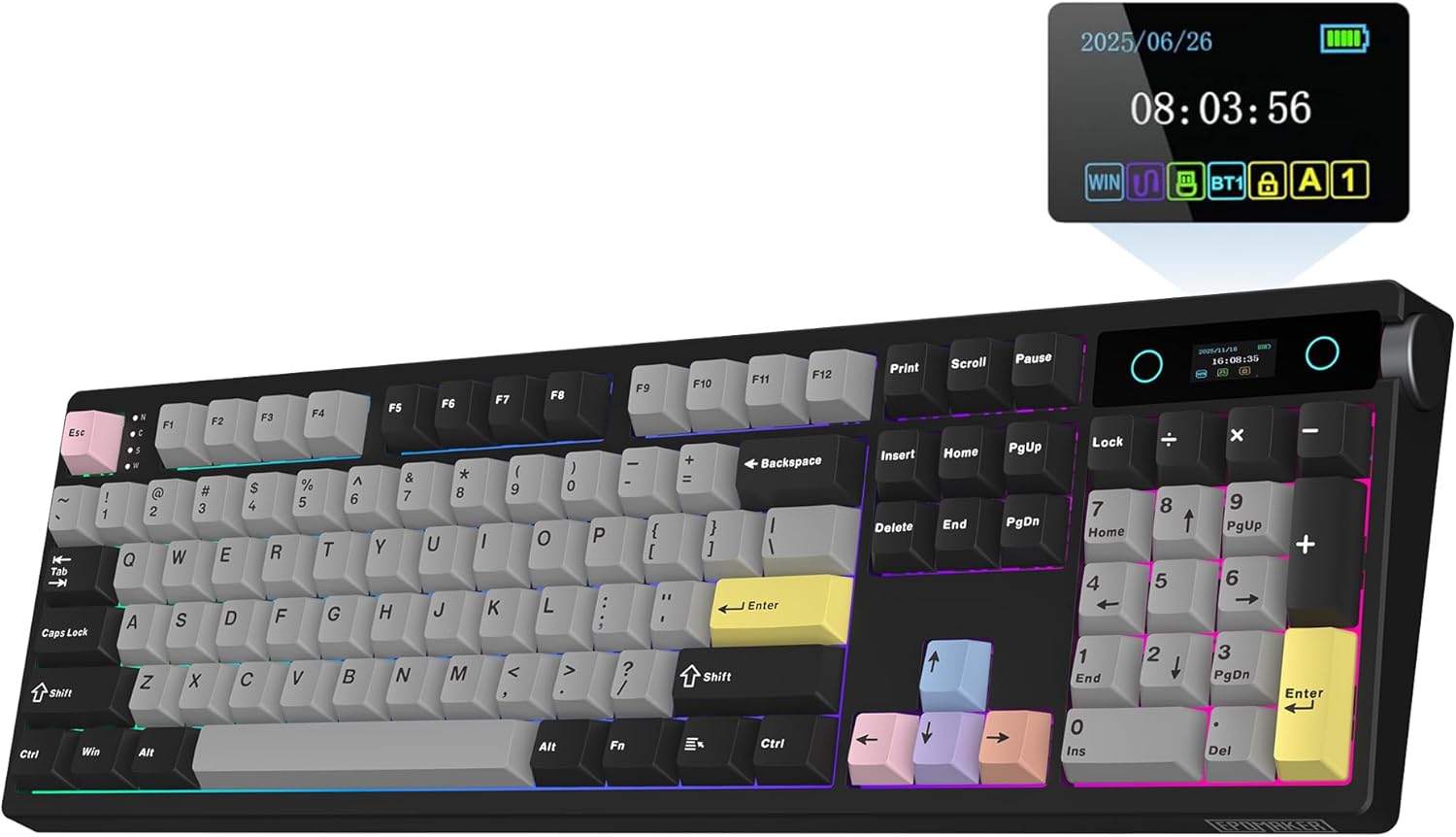
- Full-size 104-key layout includes dedicated numpad and navigation controls
- Massive 10000mAh rechargeable battery supports extended wireless programming sessions
- Hot-swappable PCB accepts 5-pin mechanical switches without soldering
- Five internal dampening layers create quieter controlled mechanical typing
- Tri-mode connectivity supports Bluetooth, 2.4GHz wireless, and USB-C
This is the full-size option for programmers who actually use the numpad
The EPOMAKER TH108 PRO earns our number three position for Best Mechanical Keyboard For Programmers because it takes a very different route from the compact boards ranked above it. Instead of removing keys to save desk space, it gives you a complete 104-key full-size layout with a dedicated number pad, function row, arrow cluster, and navigation controls.
That makes sense for programmers whose work includes databases, numerical datasets, finance applications, spreadsheets, IP addresses, measurements, or repeated numeric input. A separate number pad is not necessary because everything is already built into the board.
The tradeoff is width. The TH108 PRO measures roughly 445 mm across, which means your mouse sits farther to the right than it would beside a 75% keyboard.
For someone who codes mostly in text and rarely touches the numpad, that extra width may feel unnecessary. But for a developer constantly entering numbers, having dedicated numeric keys saves repeated top-row reaching and keeps data entry much faster.
The board contains 104 keys and uses a traditional full-size arrangement. There is almost no learning curve if you are coming from a standard office keyboard.
That familiarity has value in a work environment. You do not need to memorize layers just to reach Home, End, Page Up, Page Down, Insert, or the function row.
The typing hardware is much better than a normal full-size office keyboard
The TH108 PRO uses a gasket-mounted internal structure with a polycarbonate plate and flex-cut PCB. The gasket mount gives each keystroke a softer response than the hard bottom-out feeling common on inexpensive mechanical keyboards.
EPOMAKER also places five separate sound-dampening layers inside the case. These include PORON sandwich foam, an IXPE switch pad, sound-enhancement PET, EPDM switch socket foam, and bottom silicone.
Those layers matter during long programming sessions because they reduce hollow case resonance and unwanted vibration. A keyboard used for eight hours in a quiet office can become irritating if every space-bar press produces a sharp plastic echo.
The TH108 PRO instead aims for a more controlled mechanical sound. Cleaner acoustics make extended typing less distracting, especially if you choose the quieter Sea Salt Silent V2 switch configuration.
EPOMAKER offers factory-lubed switch options including Creamy Jade and Sea Salt Silent V2 switches. Both are linear switches, although the Sea Salt version is specifically designed around quieter operation.
The Creamy Jade has a trigger force of roughly 45 gf, a bottom-out force around 50 gf, and 3.6 mm of total travel. That gives it a light enough feel for rapid typing without requiring excessive finger force.
The Sea Salt Silent V2 also uses about 45 gf of trigger force but reduces total travel slightly to around 3.5 mm. The quieter switch makes sense for shared programming offices, late-night coding, or meetings where keyboard noise can easily reach a microphone.
Switch feel is personal, though. Some programmers prefer a tactile bump because it confirms actuation, while others type faster on smooth linear switches.
The good news is that the TH108 PRO is hot-swappable. It accepts compatible 5-pin mechanical switches, so you are not permanently locked into the factory configuration.
Hot swapping gives the keyboard long-term flexibility. If you decide six months later that you want tactile switches, heavier linears, or something quieter, you can change the switches without soldering.
This also makes repairs easier. If one switch develops chatter or stops working correctly, replacing one switch is much simpler than replacing the entire keyboard.
The keycaps are Cherry-profile double-shot PBT. That is a strong choice for heavy daily use because PBT generally holds texture longer than softer ABS keycaps.
Programmers can put an enormous number of keystrokes onto common keys such as Control, Shift, Enter, Backspace, brackets, semicolon, and the space bar. Durable PBT keycaps suit professional daily typing much better than thin inexpensive caps that become shiny quickly.
The stabilizers are plate-mounted and arrive tuned from the factory. Larger keys therefore have better support and less wobble than you might expect from a standard mass-market office keyboard.
The full-size space bar gets especially heavy use. Stable large keys become more noticeable after several thousand lines of code than they do during a five-minute keyboard test.
Why the TH108 PRO finishes third rather than taking the top position
Connectivity is one of the TH108 PRO's strongest features. You can use Bluetooth, 2.4GHz wireless, or a USB-C wired connection depending on the workstation.
Tri-mode connectivity works well for development desks where several computers may be present. A programmer could use 2.4GHz on the primary workstation, Bluetooth on another system, and USB-C whenever wired operation is preferred.
Wired and 2.4GHz modes support a 1000Hz polling rate. EPOMAKER lists latency around 2 ms for USB and roughly 5 ms for 2.4GHz wireless.
Bluetooth runs at 125Hz with higher latency, which is expected. That mode is still perfectly adequate for ordinary coding and writing.
There is no practical programming need for an 8000Hz polling rate. Still, the Keychron Q1 Ultra ranked first offers much greater performance headroom, which gives it an advantage if the keyboard also doubles as a high-end gaming board.
The TH108 PRO remains extremely responsive for coding. A 1000Hz wireless mechanical keyboard is already far beyond what is required to type commands into a terminal or navigate an IDE.
The battery is unusually large at 10000mAh. That capacity gives the board much more wireless endurance potential than keyboards using small internal cells.
This matters on a permanent wireless desk. You do not want to discover halfway through debugging that your keyboard needs another charge because the RGB was running all week.
A larger battery also makes Bluetooth and 2.4GHz more practical as primary modes rather than occasional conveniences. The 10000mAh battery suits long work sessions and reduces how frequently the USB cable needs to come out.
The board supports Windows, macOS, and Android according to EPOMAKER's current specifications. That covers most common development environments, although Linux users should verify the specific key mapping and software functions they need.
For programming, cross-platform behavior matters. Many developers use one operating system locally and another through remote machines, virtual environments, or secondary hardware.
The TH108 PRO also supports N-key rollover and anti-ghosting. This ensures complex key combinations register correctly rather than running into the limited key matrix found on inexpensive membrane keyboards.
Reliable modifier combinations matter in programming, where shortcuts often involve Control, Shift, Alt, function keys, and other keys simultaneously.
The keyboard offers south-facing per-key RGB lighting. RGB itself is not particularly important for programming, but the south-facing LED orientation works well with Cherry-profile keycaps and broader aftermarket compatibility.
You can turn the lighting down or off if you prefer a cleaner office setup. Doing so also helps preserve wireless battery life.
The TH108 PRO has a two-stage adjustable kickstand. This provides three typing angles of approximately 6, 8, and 10.5 degrees.
That flexibility sounds useful, but programmers should be careful about automatically choosing the steepest angle. A steeper keyboard can increase wrist extension if your desk and chair are not positioned appropriately.
Start with the lowest angle. If your wrists feel neutral and your fingers reach the keys comfortably, there is no requirement to raise the back of the board.
The front of the keyboard is around 28 mm high including keycaps, while the rear reaches about 42 mm. A wrist or palm rest may therefore improve comfort for some users during long sessions.
Mechanical keyboard ergonomics is not just about switches. Desk height, chair adjustment, keyboard angle, palm support, and mouse position all influence how a workstation feels after six hours.
The biggest ergonomic drawback of this model is its full-size width. The built-in numpad pushes the mouse farther outward, particularly for right-handed users.
If you constantly use the number pad, that compromise can be worthwhile. If you use it once per week, a 75% board with a separate optional numpad may create a better everyday desk layout.
This is one reason the Keychron Q1 Ultra and EPOMAKER RT75 rank above it. Their 75% layouts retain the navigation keys programmers use while keeping the mouse closer to the typing area.
The TH108 PRO takes the opposite position. It prioritizes complete key access over compactness.
That can make it the better keyboard for someone writing software that involves numerical analysis or spreadsheets. Full-size layouts still have a legitimate programming use case, even though compact mechanical keyboards receive more attention.
Imagine a data engineer entering large amounts of numerical information while moving between SQL, Python, spreadsheets, and database administration tools. The dedicated number pad may save far more time than a narrower keyboard would save in mouse reach.
A front-end developer working almost entirely in VS Code and a browser may feel differently. For that person, the 75% boards above it are probably more efficient.
The TH108 PRO weighs approximately 1.12 kg. That gives it a solid feel on the desk without reaching the extreme weight of the CNC aluminum Keychron Q1 Ultra.
The case itself is thick ABS plastic rather than aluminum. This is another reason it sits below the Keychron in our overall ranking.
The Keychron feels more premium and permanent as a workstation centerpiece. But the TH108 PRO remains substantial enough that it does not feel like a flimsy office keyboard.
Its polycarbonate plate and gasket construction also matter more to typing feel than simply using metal everywhere. Sometimes a slightly more flexible internal structure is preferable to maximum chassis rigidity.
The keyboard software can be used to customize supported functions and lighting. For programmers, remapping is particularly useful if your workflow includes repetitive keyboard commands.
You might map a rarely used key to a debugging shortcut, terminal command, or IDE action. Macros make sense when they remove genuinely repeated work.
Do not create dozens of macros immediately. Use the keyboard for several days and identify the commands that actually interrupt your workflow.
A shortcut repeated hundreds of times every day is worth optimizing. Something used once every month does not need prime keyboard space.
The number pad can itself become a programmable productivity area depending on the available software and workflow. Developers who do not enter many numbers could potentially repurpose some of that physical space for useful commands.
That is one way to make a full-size board more interesting for programming. The keys are already there, so use them deliberately.
The silent switch option is particularly attractive for programmers working in shared spaces. Mechanical keyboards have a reputation for being loud, but switch choice and case construction make an enormous difference.
A loud clicky board in an open office can become irritating very quickly. A well-dampened keyboard with silent linears is a completely different experience.
The five dampening layers help reduce internal resonance, while the silent switch itself addresses the keypress noise. Together, they make the TH108 PRO suitable for environments where ordinary mechanical keyboard noise might be a problem.
The board supports Cherry-profile keycaps, and the south-facing LEDs make aftermarket replacement easier. This matters if you eventually want a different legend set or keycap material.
Hot-swappable switches and replaceable keycaps also mean the board can evolve. You can change the typing experience without replacing the keyboard.
That is one of the big reasons mechanical keyboards make sense for professional programmers. A quality keyboard can remain on the desk through several computer upgrades.
The TH108 PRO ranks third because it is excellent at what it chooses to be, but its priorities are narrower. The full-size design is less desk-efficient, the plastic chassis is less premium than our Keychron, and it lacks the modular screen concept of the second-place RT75.
On the other hand, neither of those keyboards gives you this combination of 104 physical keys and a huge 10000mAh battery. That matters to the right person.
This is the strongest full-size option in our top three. If you need a dedicated numpad, the ranking gap becomes much smaller.
We therefore give the EPOMAKER TH108 PRO our number three rank out of seven. Its full-size 104-key layout, 10000mAh battery, tri-mode connectivity, 1000Hz wired and 2.4GHz polling, hot-swappable 5-pin PCB, gasket mounting, flex-cut polycarbonate plate, five-layer acoustic treatment, double-shot PBT keycaps, adjustable typing angles, N-key rollover, per-key RGB, and factory-lubed switch choices create a very complete programming workstation keyboard.
For someone searching for the Best Mechanical Keyboard For Programmers, the TH108 PRO is an excellent third-place choice if complete key access and a dedicated number pad matter more than compact desk width. It ranks behind our 75% Keychron and RT75 because those boards are more space-efficient for typical coding workflows, but for programmers handling heavy numerical input, databases, spreadsheets, or data work, the TH108 PRO may actually be the more practical keyboard.
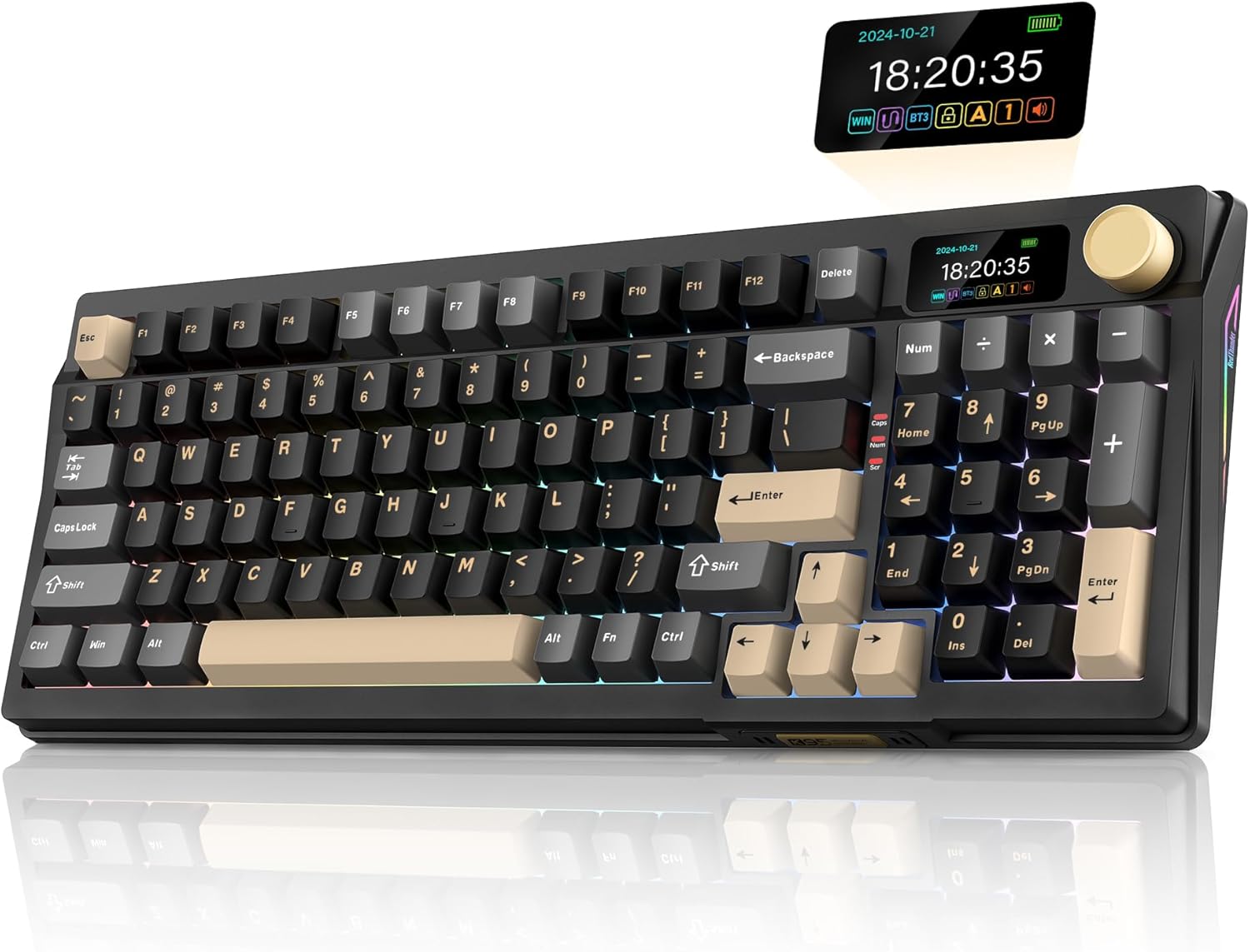
- Compact 90% layout retains a number pad while saving desk space
- Hot-swappable mechanical switches allow easier typing feel customization
- Gasket-style construction provides a softer and more controlled keystroke
- RGB backlighting offers extensive lighting customization for darker workspaces
- Dedicated volume knob provides convenient media control during daily work
The 90% layout is a clever compromise when you still need numbers
The RedThunder K95 earns our number four position for Best Mechanical Keyboard For Programmers because its layout sits somewhere between a compact programming keyboard and a conventional full-size board. You get a space-saving 90% mechanical keyboard layout that retains a dedicated number pad while tightening the navigation area and removing some of the empty space found on traditional 104-key keyboards.
That balance is useful for programmers who actually enter numbers. Data analysis, database work, finance software, IP addresses, measurements, spreadsheets, and numerical testing can all make a number pad worth keeping.
At the same time, the K95 does not spread those controls across a huge chassis. The compressed arrangement leaves more room for the mouse than a conventional full-size keyboard would.
Keeping the numpad without excessive width is the K95's strongest layout advantage. It is particularly useful for developers who looked at a 75% keyboard and immediately wondered where all their dedicated numerical keys went.
The compromise is that the key groups sit closer together. If you are accustomed to large physical gaps between arrows, navigation controls, and the number pad, there is an adjustment period.
Give the layout a few days before judging it. Muscle memory tends to search for Home, End, Delete, and arrow keys based on the spacing of your previous keyboard rather than the labels themselves.
The hot-swappable switches make this much easier to keep long term
The K95 uses mechanical switches and a hot-swappable design. Hot swapping lets you change switch feel without desoldering components from the keyboard PCB.
That matters for programming because switch preference often changes after extended use. A switch that feels satisfying during a ten-minute typing test can feel heavy after several hours of continuous coding.
Some programmers prefer tactile switches because the bump provides physical confirmation during each keypress. Others prefer linear switches because the movement feels smoother when typing quickly.
The important part is that the K95 does not permanently lock you into one factory choice. If you want something lighter, quieter, or more tactile later, compatible switches can be installed.
Replaceable switches also improve repairability. If one frequently used key begins double-registering or stops working correctly, replacing an individual switch is much more sensible than throwing away the entire keyboard.
This becomes especially relevant for programmers because certain keys receive enormous amounts of use. Control, Shift, Enter, Backspace, brackets, semicolon, space, and modifier keys can accumulate millions of presses over a keyboard's working life.
The K95 also uses a gasket-style internal design intended to provide a less rigid typing response. Rather than every keystroke immediately meeting a completely hard internal structure, the mounting system introduces some cushioning into the typing feel.
A softer typing response can feel better during long sessions, particularly for users who tend to bottom out mechanical switches firmly.
This does not mean you should hammer the keys because the keyboard has internal cushioning. Try typing with enough force to actuate the switch rather than driving every key aggressively into the bottom of its travel.
Typing force adds up. Someone writing code, documentation, emails, commit messages, and terminal commands may produce tens of thousands of keystrokes during a working day.
The K95 also includes sound-dampening treatment intended to reduce some of the hollow resonance common in inexpensive mechanical keyboards. That is useful in an office where mechanical keyboard sound needs to remain controlled.
Case acoustics matter during continuous typing. A keyboard that sounds amusingly loud for five minutes can become irritating after several hours, especially to coworkers sitting nearby.
Switch choice affects this even more. If the keyboard is going into a shared workspace, consider quieter linear or tactile switches rather than intentionally loud clicky ones.
The keycaps and overall mechanical construction give the K95 a more substantial typing experience than a basic membrane office keyboard. You get defined individual switches rather than one large rubber membrane underneath the entire key field.
This also makes customization easier. Keycaps can be changed later if you want a different profile, texture, or visual style.
Mechanical keyboards can evolve with your preferences, which is one reason they make sense for programmers who spend years working from the same desk.
Why the RedThunder K95 lands at number four in our ranking
The dedicated volume knob is a simple but useful addition. A physical knob makes volume changes immediate without reaching for function combinations or opening software controls.
That is handy when programming with headphones. A notification, video tutorial, meeting, or suddenly loud browser tab can be adjusted without leaving the current window.
The K95 also includes RGB backlighting. Lighting is not what makes a keyboard good for programming, but illuminated keys can be useful in a dim office or late-night workspace.
Do not judge the board primarily by RGB effects. Layout, switch feel, key stability, programmability, and typing comfort matter much more after the novelty of the lighting wears off.
Backlighting is useful when kept practical. A simple static setting can improve key visibility without turning the desk into a distraction.
The compact full-key approach is more important. Compared with the EPOMAKER TH108 PRO ranked third, the RedThunder gives up some of the spacious traditional full-size arrangement in exchange for a smaller footprint.
That can actually be preferable for many programmers. Your right hand does not need to travel as far when switching between the keyboard and mouse.
Think about how often that happens during development. You type a command, move to documentation, select something, return to the terminal, inspect a browser window, then go back to the editor.
Reducing mouse distance improves desk efficiency, particularly over an eight-hour working day. The 90% layout offers some of that advantage without eliminating the numpad.
The K95 still cannot match the compactness of the 75% Keychron Q1 Ultra or EPOMAKER RT75 ranked above it. Those keyboards are better choices for programmers who rarely use dedicated numerical input.
A 75% board simply puts the mouse closer. It also creates more open desk space for notebooks, tablets, audio equipment, or another computer.
The RedThunder is therefore aimed at a slightly different user. It makes more sense when the numpad matters but a traditional full-size keyboard feels unnecessarily wide.
The K95 also lacks some of the premium construction found in our number one Keychron. You are not getting the same heavy CNC aluminum chassis or enthusiast-level internal engineering.
That difference is noticeable in long-term refinement. The Keychron feels more like a permanent premium workstation component.
The EPOMAKER models above the K95 also offer stronger wireless and customization ecosystems. That is another reason the RedThunder settles into fourth rather than challenging the first three positions.
Fourth place reflects overall refinement rather than poor typing. The K95 still gives you a mechanical switch platform, hot-swap capability, a useful compact full-size layout, RGB, and dedicated physical controls.
For a programmer who wants a lot of keys without paying premium enthusiast-board prices, that is a sensible combination.
The 90% arrangement does require attention when setting up shortcuts. Because some navigation keys may occupy positions different from a conventional full-size board, check where your most frequently used controls are before building new muscle memory.
Programmers rely heavily on shortcuts. Control, Alt, Shift, function keys, arrows, Home, End, Page Up, Page Down, and Delete can all become part of daily IDE navigation.
Learn the physical layout before remapping everything. Changing a dozen keys on the first day can make it harder to determine whether the layout itself works for you.
After a week, identify the controls that consistently interrupt your workflow. Those are the keys worth moving or assigning to easier combinations if the available software supports the change.
The number pad can also serve more than one purpose. Even if you only enter numbers occasionally, dedicated keys can become useful for application shortcuts or macros depending on the software support available.
A developer working with Blender, CAD, spreadsheets, or financial tools may get much more use from the numpad than a front-end developer living primarily inside VS Code and Chrome.
Your programming discipline should influence keyboard size. There is no universal best layout for every developer.
Desk ergonomics deserves attention too. A mechanical keyboard can have excellent switches and still become uncomfortable if it sits too high.
Keep your shoulders relaxed and avoid placing the keyboard so high that the wrists remain bent upward while typing. Adjust chair height or desk position where possible.
A wrist or palm rest may help depending on the front height of the keyboard and your typing posture. It should support a comfortable approach to the keys rather than force the wrists into another awkward angle.
Do not rest hard on the wrists while actively typing. The hands should be able to move across the keyboard rather than remaining anchored against the desk edge.
The 90% width helps with mouse placement compared with a conventional full-size keyboard, but the numpad still occupies meaningful space. Keep the mouse immediately beside the keyboard rather than leaving an unnecessary gap.
If your shoulder has to move outward every time you reach the mouse, bring the pointing device closer. Small desk-layout changes can matter after thousands of transitions.
Mechanical switch force matters too. If you find your fingers becoming tired after long sessions, a lighter compatible switch may be worth trying.
Hot swapping makes experimentation much easier. You can test a small set of switches before replacing the whole board.
Some enthusiasts even use different switches on specific keys. A heavier switch on the space bar and lighter switches on letters can create a different typing balance.
You do not need to go that far. The useful point is simply that the keyboard is not permanently fixed to one switch feel.
Keep the board clean as well. Dust, hair, and debris naturally accumulate between mechanical keycaps over time.
Remove keycaps carefully when deeper cleaning becomes necessary and follow appropriate maintenance methods. Avoid pouring cleaning liquids directly into the switch area.
Basic maintenance helps switches remain consistent, especially on a keyboard used every day for professional work.
The K95's Black-Gold styling is more visually distinctive than the restrained office designs some programmers prefer. That is subjective rather than a functional disadvantage.
If your workspace is personal, the design may be appealing. In a conservative corporate office, a simpler lighting configuration can tone things down.
The keyboard can also serve gaming use after work, which gives its mechanical switches and RGB lighting another purpose. That dual-use role may make it easier to justify than buying separate work and gaming keyboards.
A good programming keyboard can serve multiple roles as long as the layout remains practical for the work that occupies most of the day.
Where the K95 loses most clearly to the Keychron Q1 Ultra is premium construction, connectivity performance, and deeper enthusiast customization. The Keychron is simply the more complete high-end board.
The EPOMAKER RT75 at number two is more compact and brings tri-mode wireless plus its modular screen concept. The TH108 PRO at number three offers a traditional full-size layout, enormous battery, sophisticated acoustic treatment, and a more polished productivity feature set.
The RedThunder K95 therefore takes fourth place as the practical middle option. It retains lots of physical keys, keeps the footprint more controlled than a standard full-size board, and provides mechanical customization without moving into the highest price tier.
Its 90% layout is the main selling point. Programmers who need a number pad but dislike oversized keyboards have a good reason to consider it.
For purely text-based programming, we would still lean toward the 75% models above it. The smaller footprint and closer mouse position are simply more useful when the number pad is rarely touched.
But data-heavy programming changes that calculation. If you regularly enter numerical values, the dedicated numpad can save a surprising amount of time.
The fourth-place ranking therefore depends on workflow. The K95 is less universally suited to programmers than the compact boards above it, but it can be better for a specific kind of programmer.
The keyboard balances key access and desk space well. That is not an easy compromise to get right.
We give the RedThunder K95 our number four rank out of seven because its compact 90% layout, dedicated number pad, mechanical switch design, hot-swappable sockets, gasket-style construction, sound dampening, RGB backlighting, volume knob, dedicated arrow keys, and space-efficient arrangement create a useful programming and productivity keyboard.
For someone searching for the Best Mechanical Keyboard For Programmers, the K95 is a positive fourth-place choice if you want dedicated numerical input without giving a traditional full-size keyboard quite so much desk space. It lacks the premium materials, wireless flexibility, and deeper customization of our top three, but the combination of a compact full-key layout, hot-swappable switches, useful physical controls, and mechanical typing makes it a practical option for coding, data work, spreadsheets, and general productivity.

- Compact 96% layout keeps the numpad while reducing overall width
- Massive 10000mAh battery supports extended wireless programming sessions
- Hot-swappable PCB allows easy mechanical switch changes without soldering
- Gasket-mounted construction and dampening layers improve typing acoustics
- Tri-mode connectivity supports Bluetooth, 2.4GHz wireless, and USB-C
The 96% layout makes more sense than full size for a lot of programmers
The EPOMAKER TH99 PRO earns our number five position for Best Mechanical Keyboard For Programmers because its 96% layout solves a fairly specific problem. It keeps a dedicated number pad and navigation controls, but compresses them into a keyboard that takes up less desk space than a traditional full-size mechanical board.
That matters if your programming work regularly crosses into spreadsheets, numerical datasets, database administration, finance applications, measurements, or repeated number entry. You keep direct access to the numpad without dedicating quite as much desk width to it.
The tradeoff is tighter spacing between key groups. Someone coming from a conventional 104-key keyboard may initially reach for an arrow key or navigation command and hit something beside it.
That normally improves after a few days. The compact full-key layout needs some adaptation, but it avoids the deeper function-layer learning curve of 60% and some 75% keyboards.
For programming, having physical arrow keys still matters. So do Delete, Page Up, Page Down, function keys, and the other navigation controls that appear constantly in IDE shortcuts and text editing.
The numpad is the bigger question. If you never use it, the TH99 PRO is wider than necessary and one of the 75% keyboards ranked above it will probably make more sense.
If you enter numerical data every day, the calculation changes. A data engineer working between Python, SQL, spreadsheets, and database tools can get genuine value from having those number keys immediately available.
The 96% format balances access and desk space better than a traditional full-size design. It is not as compact as our top choices, but it does not feel unnecessarily oversized either.
The hot-swap and gasket design make this much more than an ordinary office keyboard
The TH99 PRO uses a hot-swappable mechanical PCB, allowing compatible mechanical switches to be replaced without soldering. This is one of the features that makes it particularly interesting as a long-term programming keyboard.
Switch preference becomes important when somebody types for hours rather than minutes. Hot swapping lets you change the typing feel if the original switches eventually feel too heavy, too light, too loud, or simply wrong for your hands.
A programmer who works in a shared office may decide to install quieter switches. Someone working alone may prefer a more noticeable tactile response because they like feeling the actuation point while typing.
Linear switches can make rapid typing feel smooth. Tactile switches introduce a physical bump, while silent switch designs can substantially reduce the amount of noise reaching coworkers or a nearby microphone.
The useful part is not having to make that decision permanently when buying the keyboard. The switch platform can change with your preferences.
Hot swapping is useful for repairs too. Programming tends to concentrate enormous use on particular keys including Enter, Backspace, Control, Shift, space, brackets, and punctuation.
If one switch eventually develops inconsistent input, replacing an individual switch is far more practical than discarding the keyboard. That is one of the less glamorous benefits of a modular mechanical board.
The TH99 PRO also uses a gasket-mounted internal structure. This separates the typing assembly from a completely rigid case connection and gives keystrokes a slightly more cushioned response.
Gasket mounting can soften hard bottom-outs, which is useful for people who naturally type with more force. It also changes the sound compared with a basic tray-mounted mechanical keyboard.
EPOMAKER uses multiple internal dampening materials to control unwanted resonance. The goal is a cleaner mechanical sound rather than the hollow plastic echo that cheaper keyboards can produce.
That becomes surprisingly important in programming work. Ten minutes of loud keyboard noise may be entertaining, but several hours beside a resonant space bar is different.
If the keyboard is used in an open office, switch choice matters even more. Quiet switches plus case dampening work well together when mechanical typing needs to remain reasonably controlled.
The keycap material is also important for a work keyboard. PBT keycaps generally resist surface shine better than inexpensive ABS caps after extended use.
A professional programming keyboard can receive millions of keystrokes over its working life. Durable keycaps are not just cosmetic when the same board stays on the desk for several years.
The mechanical construction also gives each key an individual switch rather than using the shared rubber membrane found in basic office keyboards. That creates a more defined typing feel and makes switch replacement possible.
Mechanical switches make the keyboard easier to personalize. You can tune sound, force, travel feel, and feedback instead of accepting one permanent factory configuration.
Why the TH99 PRO ends up at number five in this ranking
One of the TH99 PRO's strongest specifications is its 10000mAh rechargeable battery. That is a large battery for a mechanical keyboard and makes wireless operation much more practical for an everyday workstation.
The large battery reduces charging interruptions, particularly if you use 2.4GHz wireless throughout the working day. RGB brightness and connection mode will still affect actual runtime, so turning unnecessary lighting down can extend the interval between charges.
The keyboard supports three connection approaches: Bluetooth, 2.4GHz wireless, and USB-C wired operation. That is exactly the kind of flexibility we like on a programming keyboard.
A desktop can use the 2.4GHz receiver for a responsive wireless connection. A laptop can use Bluetooth, while USB-C remains available when you want a straightforward wired setup.
This becomes useful for developers with several machines on one desk. Tri-mode connectivity suits multi-system development workflows where switching computers is part of normal work rather than an occasional event.
For example, your main development environment might run on a desktop while a laptop handles communication or testing. A second machine could be used for another operating system.
Keeping the same keyboard across those environments avoids constantly changing typing feel. That consistency is useful when keyboard shortcuts and muscle memory are central to the work.
The 2.4GHz mode is also preferable to Bluetooth when you want the most responsive wireless connection. For actual programming, Bluetooth latency is rarely a major problem, but faster wireless feels more immediate.
Programming does not require extreme polling rates. The 8000Hz capability of our first-place Keychron is technically impressive, but source code does not appear faster because a keyboard reports thousands of additional times each second.
Where those specifications become relevant is dual-use. If the same keyboard is also used for competitive gaming, high polling performance has more value.
The TH99 PRO is much more productivity-oriented. Its strongest performance features are the practical ones: complete key access, mechanical switches, wireless flexibility, and long battery endurance.
The compact 96% layout is also more desk-friendly than EPOMAKER's TH108 PRO. You still have the numpad, but the board occupies less horizontal space.
A narrower keyboard brings the mouse closer, and that matters over a long workday. Programmers repeatedly switch between keyboard and mouse while moving among code editors, terminals, documentation, browsers, and debugging tools.
The farther the mouse sits from the main typing area, the farther your arm travels every time. A few inches sounds minor until the movement happens hundreds of times.
The TH99 PRO still cannot match a 75% board here. Removing the number pad entirely saves substantially more space.
That is one reason the Keychron Q1 Ultra and EPOMAKER RT75 remain higher in our ranking. Their 75% layouts are better for text-heavy programming when dedicated numerical input is rarely required.
The TH99 PRO is better understood as the middle choice. You want nearly every physical key, but you do not want the width of a conventional full-size keyboard.
This also means the board can transition easily from a standard office keyboard. Most important keys remain physically present rather than hidden behind function layers.
That is useful when several people use the same workstation. A highly customized 60% keyboard can be extremely efficient for its owner and completely confusing to everybody else.
The TH99 PRO remains relatively familiar, which can be an advantage in shared offices, labs, classrooms, and development workstations.
RGB backlighting is included, although we would not make a programming keyboard decision around lighting effects. Static illumination can be useful in a darker room, while elaborate animations are mostly personal preference.
Reducing or disabling RGB can also improve battery endurance. If the board is used wirelessly for professional work, that may be a more useful benefit than having maximum brightness all day.
Keyboard angle deserves some attention as well. Mechanical keyboards tend to be taller than laptop keyboards and many low-profile office boards.
Do not automatically raise the rear feet simply because they are available. A steep positive angle can increase wrist extension depending on desk and chair height.
Start with the keyboard relatively flat. If another angle feels more natural, change it deliberately rather than assuming steeper means more ergonomic.
A palm rest may help some users because of the keyboard's front height. The important part is keeping the hands in a comfortable relationship with the keycaps rather than resting hard pressure directly on the wrists while typing.
Chair height matters too. If the desk is high enough that your shoulders rise while typing, no switch upgrade will solve that.
The entire workstation affects typing comfort. Keyboard height, desk position, chair adjustment, mouse distance, monitor placement, and break frequency all contribute.
The TH99 PRO's number pad can be useful beyond entering numbers. Depending on available remapping and software options, extra keys can become shortcuts for repetitive development commands.
A programmer could potentially dedicate keys to macros, application navigation, or frequently used actions. The best targets are commands repeated many times per day.
Do not build an elaborate custom layer before learning the standard layout. Use the keyboard normally first and identify where the real friction occurs.
Remap repeated problems rather than random keys. A shortcut used 300 times each day deserves attention; something used twice per month probably does not.
The same logic applies to switch changes. Do not replace every switch immediately because another person online prefers something different.
Use the factory configuration long enough to understand what you actually want to change. Maybe you want less force, less sound, more tactile feedback, or simply a different space-bar switch.
Hot swapping makes those experiments relatively easy later. That flexibility is a meaningful advantage over sealed office keyboards.
Where the TH99 PRO begins losing ground in our ranking is overall refinement compared with the products above it. The Keychron offers more premium construction, while the higher-ranked EPOMAKER boards have layouts or feature combinations that fit a broader range of programmers.
The RT75 is considerably more compact and includes its unusual modular display system. The TH108 PRO gives users who genuinely want full size a more traditional layout without the compressed key arrangement.
The RedThunder K95 at number four also competes directly in the compact-with-numpad space. Its particular 90% arrangement gives it a slight ranking advantage in our comparison for programmers who want maximum space savings while retaining numerical input.
The TH99 PRO sits just behind those options because its strengths are balanced rather than exceptional in one specific area. It does many important things well, but the four products above it each have a clearer reason to lead for a particular programming workflow.
That does not make number five a weak result. A 96% hot-swappable wireless mechanical keyboard with a 10000mAh battery is a very capable work device.
In fact, somebody who needs a numpad and dislikes charging peripherals may prefer this model over several keyboards ranked above it. Rankings describe overall comparison, not a universal answer for every desk.
The TH99 PRO also makes sense for someone moving away from a standard office keyboard for the first time. You get the mechanical typing experience without losing most familiar physical controls.
The learning curve is much smaller than compact layouts. You can concentrate on choosing switches and setting up wireless connections rather than memorizing where half the missing keys went.
Maintenance is straightforward. Keep debris out of the switches and clean between the keycaps periodically, particularly if the keyboard sits on the same desk every day.
Mechanical keycaps can be removed for deeper cleaning, but use an appropriate keycap puller and avoid forcing switches unnecessarily. If a switch is removed, make sure its pins are straight before reinstalling it.
A bent switch pin is a common hot-swap mistake. Pushing harder is not the solution.
Check switch pins before applying pressure. A properly aligned switch should seat without excessive force.
Wireless users should also keep the 2.4GHz receiver somewhere sensible. Tiny receivers are easy to lose when a desk is reorganized.
If the keyboard remains at one workstation, use a consistent USB port or receiver extension position. Stable placement can also reduce wireless interference in crowded setups.
The 10000mAh battery gives you plenty of capacity, but rechargeable batteries still benefit from sensible use. Do not leave RGB at maximum brightness purely because the option exists if wireless endurance matters more.
For programming at night, moderate static lighting is usually enough. Functional backlighting is more useful than elaborate effects during actual work.
We give the EPOMAKER TH99 PRO our number five rank out of seven because its compact 96% layout, dedicated number pad, 10000mAh rechargeable battery, Bluetooth and 2.4GHz wireless connectivity, USB-C wired operation, hot-swappable mechanical PCB, gasket-mounted structure, sound-dampening layers, PBT keycaps, RGB lighting, and broad physical key access create a strong programming and productivity keyboard.
For someone searching for the Best Mechanical Keyboard For Programmers, the TH99 PRO is a positive fifth-place choice if you need a dedicated numpad but still want to recover some desk space compared with a conventional full-size board. It ranks below our top four because those keyboards provide stronger premium construction, more compact programming layouts, or more distinctive feature combinations, but the TH99 PRO remains particularly appealing for programmers who want nearly every key available, excellent wireless flexibility, hot-swappable switches, and an unusually large battery for long-term desk use.
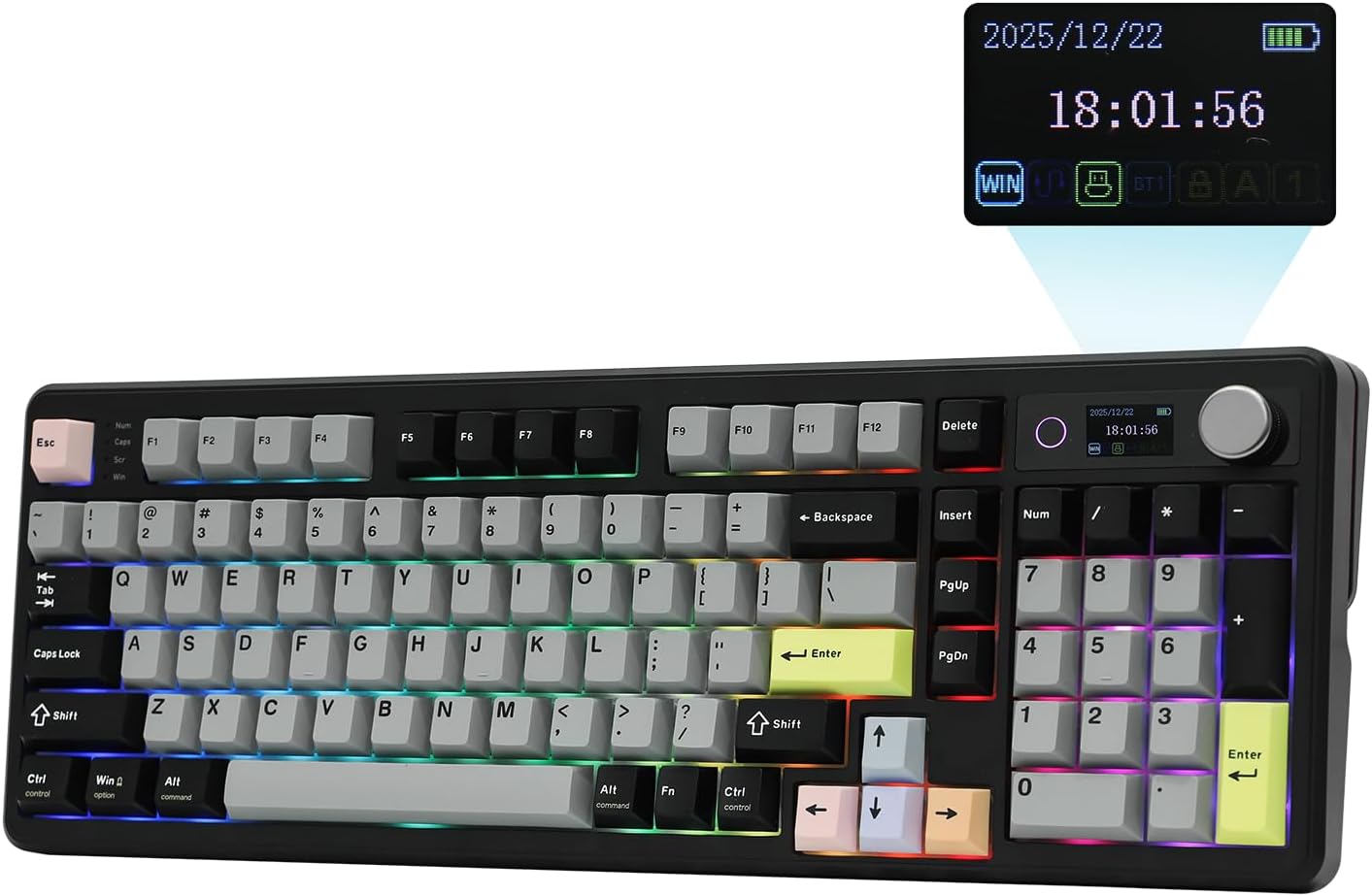
- Compact 96% layout retains dedicated numerical keys while saving space
- Large 10000mAh battery supports extended wireless programming and productivity
- Hot-swappable mechanical sockets make changing switch feel much easier
- Gasket-mounted construction provides a softer and more controlled keystroke
- Bluetooth, 2.4GHz, and USB-C support flexible multi-device workstations
The TH99 PRO gives you nearly every key without going fully oversized
This EPOMAKER TH99 PRO configuration earns our number six position for Best Mechanical Keyboard For Programmers because it offers a compact 96% mechanical keyboard layout that keeps a dedicated number pad while reducing some of the unused spacing found on a traditional full-size board. It is a useful compromise for programmers who want physical access to almost everything but still care about desk space.
The 96% format is particularly relevant for data-heavy development work. If your day includes SQL, Python, spreadsheets, numerical datasets, finance software, server addresses, or repeated numerical entry, having the numpad available can save time.
The drawback is that it remains wider than a 75% programming keyboard. Your mouse sits farther from the main typing area, and that difference becomes noticeable when you switch between keyboard and mouse hundreds of times during a working day.
The layout makes sense when numbers matter. If you rarely use a numpad, one of the more compact boards ranked above it will probably create a cleaner programming workstation.
The arrangement is also tighter than a traditional 104-key keyboard. Arrow keys, navigation controls, and the numpad are packed more closely together to reduce the overall footprint.
That can require a short adjustment period. Someone with years of full-size muscle memory may initially reach for Delete, Home, End, or an arrow key based on physical spacing rather than looking at the keycap.
The hot-swap design means you can change the keyboard instead of replacing it
The TH99 PRO uses a hot-swappable mechanical PCB, allowing compatible switches to be removed and replaced without soldering. Hot swapping gives programmers much more control over how the keyboard feels after weeks, months, or years of use.
Switch preference is difficult to judge from specifications alone. A switch that feels excellent during a five-minute test can become tiring when you spend an afternoon writing code, documentation, terminal commands, and messages.
Some programmers prefer linear switches because the keypress feels smooth from top to bottom. Others prefer tactile switches because the physical bump gives feedback around the actuation point.
Quiet switches can make more sense in shared offices. If your microphone picks up every keypress during meetings, a quieter mechanical switch can also improve the experience for people on the other side of the call.
The useful part is being able to change later. You do not have to predict your permanent switch preference before buying the keyboard.
Hot swapping also helps with repairs. If a heavily used Enter or Control switch eventually becomes inconsistent, replacing one switch is far cheaper and easier than replacing an entire keyboard.
The TH99 PRO uses a gasket-mounted internal design as well. This creates a less rigid relationship between the typing assembly and outer case compared with a basic hard-mounted keyboard.
Gasket mounting gives the keystroke some cushioning, particularly when keys are pressed firmly to the bottom of their travel. For long programming sessions, that softer response can feel more pleasant than an extremely rigid plate.
There are also internal dampening materials designed to control resonance and unwanted case noise. This is useful because the sound of a mechanical keyboard changes dramatically depending on what happens underneath the switches.
A cheap hollow case can amplify every keypress. A dampened structure generally produces a more controlled sound with less empty plastic resonance.
This matters more in a work environment than many specifications do. Typing sound becomes noticeable after several hours, particularly in a quiet office where several people are concentrating.
The keycaps are another part of long-term durability. PBT material is generally well suited to a professional keyboard because it resists developing a smooth shiny surface as quickly as cheaper ABS keycaps.
Programmers put enormous wear on a fairly predictable group of keys. Control, Shift, Enter, Backspace, brackets, semicolon, space, arrows, and function keys can receive constant use.
Durable keycaps make sense for professional typing. A work keyboard should still feel decent after millions of keystrokes rather than looking worn after a few months.
The mechanical switch platform also gives you the option of experimenting gradually. You do not need to buy a complete set of switches immediately.
Buy a small switch tester or a handful of compatible switches first. Try them on frequently used keys and see how they feel during real work.
That is more useful than relying entirely on online descriptions such as creamy, smooth, crisp, or deep. Those words do not tell you how your fingers will feel after four hours.
Why this TH99 PRO configuration takes sixth place
The 10000mAh rechargeable battery is one of the strongest specifications here. A 10000mAh battery suits serious wireless use rather than treating wireless mode as something you use occasionally before reaching for the charging cable again.
Actual battery life depends on connection mode, RGB brightness, sleep behaviour, and daily use. Turning the lighting down or off is an easy way to extend the interval between charges.
The TH99 PRO supports Bluetooth, 2.4GHz wireless, and USB-C wired operation. This tri-mode setup is useful for programmers because development desks frequently contain more than one computer.
You might use 2.4GHz on the primary workstation, Bluetooth with a secondary laptop, and USB-C when charging or when a wired connection is preferable. Three connection methods make the keyboard adaptable instead of tying it to one particular computer.
For programming, 2.4GHz is particularly attractive because it combines wireless convenience with a more responsive connection than ordinary Bluetooth. Bluetooth remains useful for devices where keeping USB ports free matters more.
USB-C provides the simplest fallback. Plug it in and continue typing while the battery charges.
This flexibility is useful in mixed operating-system environments too. Developers frequently move among Windows, macOS, Linux-based systems, remote environments, and secondary testing hardware.
A keyboard should not become the difficult part of that setup. Consistent hardware helps maintain shortcut muscle memory when the computer underneath it changes.
The 96% layout gives you direct access to function keys and arrow keys, which is valuable for programming. Very small keyboards can move those commands onto secondary layers.
That may be efficient after enough practice, but it creates a learning curve. The TH99 PRO remains much closer to a conventional keyboard.
This can be especially useful if the workstation is shared. Another employee can sit down and understand the layout without needing a diagram of custom layers.
Physical navigation keys remain useful for developers. Moving through source code, terminal history, spreadsheets, text selections, and debugging interfaces involves them constantly.
The number pad can also be repurposed for shortcuts if your configuration and software allow it. Someone who only occasionally enters numbers might assign less-used keys to macros or development commands.
Do this after learning the standard layout. Remapping everything immediately creates unnecessary confusion.
The best macro candidates are actions you repeat constantly. A command used 200 times every day deserves an easier position.
Repeated workflow friction is worth automating. A shortcut used once every few months is not.
RGB lighting is included, although it should not drive the buying decision for a programming keyboard. Static illumination can help when working in a darker room.
Animated lighting effects are mostly preference. If battery endurance matters, reduce the brightness or turn RGB off.
The board's height also deserves consideration during long sessions. Mechanical keyboards are generally taller than laptop keyboards and low-profile office boards.
Keep your wrists in a comfortable position rather than automatically raising the rear feet to their steepest setting. More keyboard angle is not automatically better ergonomically.
A palm rest can help some users approach a taller keyboard comfortably. The goal is not to press the wrists firmly into the rest while typing, but to avoid an awkward transition from a low desk surface to high keycaps.
Chair height matters as well. If your desk is too high, your shoulders may remain elevated while typing regardless of switch quality.
The keyboard should sit where the elbows and shoulders can remain relatively relaxed. Good switches cannot fix poor desk height.
Mouse position is another reason we generally prefer 75% layouts for programmers. The TH99 PRO's numpad still occupies horizontal space on the right.
If you are right-handed, that pushes the mouse farther away from the main letter keys. The shoulder and arm travel farther every time you leave the keyboard.
For a developer who constantly switches between VS Code and browser documentation, those transitions happen repeatedly. A narrower keyboard reduces the distance.
The numpad needs to justify the extra width. If you genuinely use it, the compromise is sensible.
If you do not, a compact keyboard is usually more efficient. That is one of the reasons this configuration ranks sixth rather than challenging our 75% leaders.
Another issue is that this ASIN represents a configuration of the same TH99 PRO platform already appearing elsewhere in our seven-product comparison. The underlying chassis, 96% concept, large battery, hot-swap system, and connectivity are therefore not bringing an entirely different design to the ranking.
Configuration differences can still matter. Switch choice and colorway affect how the keyboard feels and fits into a workspace.
But when ranking seven distinct recommendations, repeating the same platform reduces differentiation. That contributes to this particular version landing below the other TH99 PRO configuration.
The higher-ranked Keychron Q1 Ultra offers a substantially more premium aluminum chassis, extremely fast wireless performance, and a more compact 75% programming layout. It feels more like a flagship workstation keyboard.
The EPOMAKER RT75 is also 75%, giving it a more desk-efficient layout while adding the unusual removable TFT screen module. That makes it more distinctive.
The TH108 PRO ranked third goes in the opposite direction and provides a conventional full-size experience for users who want complete physical separation between key groups. The RedThunder K95 offers another compact-with-numpad interpretation.
This TH99 PRO sits between those approaches. It is compact compared with full size but not truly compact compared with 75%.
That middle ground is still useful. A lot of programmers want exactly this combination.
Data analysts are an obvious example. You may spend one hour writing Python and the next working through a spreadsheet with hundreds of numerical entries.
Database administrators may appreciate the same thing. So may programmers working in finance, engineering, scientific computing, or analytics.
Numerical workflows make the 96% layout valuable. Purely text-heavy development makes it less compelling.
The large battery also gives this keyboard an advantage for people who hate charging peripherals. Keep RGB modest and the board is well suited to remaining wireless for long stretches.
Wireless keyboards also make desk management easier. There is no cable running permanently across the back of the keyboard unless you choose wired mode.
Keep the 2.4GHz receiver somewhere safe. Tiny USB receivers have an impressive ability to disappear during desk reorganizations.
If the keyboard remains on one desk, choose a consistent receiver location. Stable receiver placement can improve wireless reliability, especially around crowded USB hubs and other wireless equipment.
Cleaning is straightforward but worth doing periodically. Dust and debris accumulate between keycaps, particularly on a keyboard used every working day.
Use an appropriate keycap puller when deeper cleaning is necessary. If you remove switches, inspect the metal pins before reinstalling them.
Bent pins are one of the most common hot-swap mistakes. If a switch does not seat properly, stop and inspect it instead of forcing it downward.
Hot-swap sockets should not require excessive force. Correct alignment matters more than pressure.
The TH99 PRO can also be tuned gradually rather than rebuilt immediately. Start with the factory switches and keycaps.
After several weeks, decide what you actually dislike. Maybe the switches are too loud, the space bar feels too heavy, or you want a different keycap profile.
Changing components based on real experience produces a better result than replacing everything on day one because another enthusiast recommended it.
Customization works best when it solves a problem. Otherwise it becomes another project rather than improving the keyboard you use for actual projects.
That distinction is relevant for programmers. It is easy to spend an evening modifying the keyboard instead of writing the software you originally sat down to work on.
The TH99 PRO is useful because customization remains optional. It works as a complete keyboard immediately, and the hot-swap platform is there when you eventually need it.
Our sixth-place ranking therefore comes down to competition and duplication rather than a major weakness. The core TH99 PRO platform is strong.
You get a large battery, mechanical hot-swap switches, gasket construction, multiple wireless modes, a numpad, dedicated navigation keys, and a layout smaller than traditional full size. Those are meaningful programming features.
It simply does not distinguish itself as strongly as the products above it in this particular seven-keyboard comparison. The compact boards are more efficient for general coding, while the higher-ranked numpad options have clearer positioning.
We give this EPOMAKER TH99 PRO configuration our number six rank out of seven because its compact 96% layout, dedicated numpad, 10000mAh rechargeable battery, hot-swappable mechanical switches, gasket-mounted construction, acoustic dampening, Bluetooth connectivity, 2.4GHz wireless mode, USB-C wired operation, RGB backlighting, and broad physical key access make it a capable programming and productivity keyboard.
For someone searching for the Best Mechanical Keyboard For Programmers, this TH99 PRO remains a positive sixth-place choice if you need numerical keys, strong wireless flexibility, and a large battery without committing to a conventional full-size chassis. It ranks lower mainly because the products above it offer more distinctive layouts, more premium construction, or stronger overall differentiation, but for data-heavy programming and multi-device productivity, the TH99 PRO platform remains genuinely useful.

- Full-size 104-key layout includes dedicated numpad and navigation controls
- Hot-swappable PCB supports both 3-pin and 5-pin mechanical switches
- Smart TFT display shows battery, connection mode, and custom graphics
- Tri-mode connectivity includes Bluetooth 5.0, 2.4GHz, and USB-C
- Large 8000mAh battery supports up to 200 hours wireless use
The S104 gives you every key, but that full-size footprint is the tradeoff
The RK ROYAL KLUDGE S104 earns our number seven position for Best Mechanical Keyboard For Programmers because it is a very complete full-size mechanical keyboard, but it is not the most space-efficient choice for coding. You get a traditional 104-key full-size layout, dedicated numpad, navigation cluster, function row, hot-swappable switches, tri-mode wireless connectivity, a TFT display, and an 8000mAh battery.
For programmers who regularly enter numbers, the numpad can be genuinely useful. Data analysts, database administrators, finance developers, engineers, and anyone spending a lot of time in spreadsheets may prefer this arrangement over a compact board.
The downside is simple. At roughly 16.63 inches wide, the S104 takes up considerably more desk space than the 75% and 96% keyboards ranked above it.
The wider layout pushes the mouse farther away, especially for right-handed users. That matters when you move between an IDE, browser, terminal, documentation, and debugging tools hundreds of times during a normal workday.
If you rarely touch the numpad, you are carrying around a large block of keys that mostly increases the distance between your typing position and your mouse. That is one of the main reasons the S104 lands at number seven rather than higher.
For someone who genuinely uses the numpad every day, though, the layout makes more sense. You get direct numerical input without layers, shortcuts, or a separate external number pad.
The mechanical hardware is actually quite strong for the price
The S104 uses a fully hot-swappable PCB that supports both 3-pin and 5-pin mechanical switches. You can change switches without soldering, which gives the keyboard much more long-term flexibility than a sealed office board.
RK offers pre-lubed linear Cream switches and lighter Silent switches. The Cream switch uses around 45 gf operating force, while the Silent option is lighter at roughly 37 gf.
That difference matters during long programming sessions. A heavier switch can feel satisfying at first but become tiring after thousands of keystrokes if you naturally type with more force.
The Silent switch is particularly interesting for shared offices. Quiet switches can reduce keyboard noise substantially, especially when combined with the S104's internal dampening layers.
The board uses a top-mounted structure with five layers of sound treatment. RK describes two sound-absorbing foams, an IXPE switch pad, PET sounding material, and silicone dampening.
This is designed to reduce hollow case resonance and make the keyboard sound more controlled. For programming, that is useful because a keyboard used all day should not become distracting to you or everyone around you.
The S104 also uses double-shot PBT keycaps on its standard configurations. PBT is a good material for a work keyboard because it generally resists becoming shiny as quickly as cheaper ABS keycaps.
Durable keycaps matter after millions of keystrokes. Programmers repeatedly hit the same keys, including Control, Shift, Enter, Backspace, brackets, semicolon, arrows, and space.
The keyboard weighs about 1.52 kg, so it feels substantial on the desk. It is not a board you are likely to slide around accidentally while typing.
That weight also means it is not especially portable. If you carry a keyboard between home and office every day, a lighter compact model will be easier to live with.
The hot-swap design helps with maintenance too. If one switch eventually develops chatter or stops registering correctly, you can replace that individual switch instead of replacing the entire keyboard.
Repairability is a real long-term advantage, particularly for professional users who want one keyboard to survive several computer upgrades.
RK includes spare switches and a combined keycap and switch puller in the box. That makes basic maintenance easier without immediately buying extra tools.
Why it finishes seventh even though the feature list is impressive
The S104 supports Bluetooth 5.0, 2.4GHz wireless, and USB-C wired operation. Tri-mode connectivity works well for multi-device desks, which is common among programmers using a desktop, laptop, and secondary test machine.
The 2.4GHz connection is the better wireless choice when responsiveness matters. Bluetooth is convenient when you want to keep USB ports free.
USB-C gives you the simplest fallback and allows wired operation when preferred. This flexibility is useful in mixed work environments.
The 8000mAh battery is also substantial. RK rates the keyboard for up to 200 hours with the RGB lighting turned off and around 63 hours with RGB enabled.
The large battery makes wireless use practical rather than something you only use occasionally. If you work five days per week, turning RGB down can noticeably extend the time between charges.
The smart TFT display is another distinctive feature. It can show battery level, connection mode, operating-system layout, date information, and custom images or GIFs.
The screen is paired with a control knob that can adjust volume, lighting brightness, lighting speed, RGB effects, and other settings. This is convenient, but it is not essential for programming.
A programmer will probably get more everyday value from the volume knob than the animated GIF support. The display is useful but not a core productivity feature.
The RK web-based software allows key remapping, macros, RGB customization, and uploading content to the TFT display. Macro support can be useful when it solves a repetitive task.
For example, you might assign a frequently used IDE action or repeated command to an easier key combination. Do not map everything immediately.
The best customization usually comes after several days of normal use. Identify which commands interrupt your workflow repeatedly and address those first.
Frequent shortcuts are worth remapping, while rare commands usually are not.
The S104 supports Windows and macOS layouts. That is useful for developers who move between systems, although users relying heavily on Linux-specific workflows should verify the exact software and remapping functions they need.
The full function row is present, along with a complete navigation cluster. That means you do not need to use layers for Home, End, Page Up, Page Down, Insert, Delete, or function keys.
This can be valuable in IDEs and terminals. Many programming shortcuts depend on combinations involving these physical controls.
Full physical key access reduces layer learning, which is one of the main benefits of staying with a full-size layout.
The tradeoff is that all those keys occupy permanent desk space even when they are not being used. That is where the S104 loses ground against our higher-ranked options.
The Keychron Q1 Ultra at number one uses a 75% layout and puts the mouse much closer to the typing position. It also offers a CNC aluminum chassis and much higher polling performance.
The EPOMAKER RT75 at number two provides a similarly compact programming layout with wireless connectivity and modular screen functionality. The TH108 PRO gives full-size users a more refined productivity-focused package with a larger 10000mAh battery.
The RedThunder K95 and TH99 PRO models also reduce keyboard width while keeping most or all of the useful physical keys. The S104 is simply the least desk-efficient option in this seven-product group.
That does not make it a bad keyboard. It just makes it more specialized for users who genuinely need a full-size board.
Desk ergonomics is another reason width matters. With the numpad on the right, your mouse sits several inches farther away from the central letter keys.
If you are right-handed, that can increase lateral arm movement. A compact keyboard can reduce that distance without changing your mouse settings.
Keep the S104 and mouse as close together as practical. Do not leave unnecessary empty space between them, because the full-size chassis already creates enough width.
Keyboard height should be considered too. Mechanical keyboards are usually taller than laptop keyboards, and raising the rear feet can increase wrist extension.
Start with a flatter position. If the board feels too tall, a properly sized palm rest may help create a smoother transition from the desk to the keycaps.
Do not press your wrists firmly against the desk while typing. The hands should be able to move freely across the keyboard.
Typing posture matters during long coding sessions, regardless of how expensive the switches are.
The pre-lubed linear switches should feel fairly smooth from the factory. Users who want more tactile feedback can take advantage of the hot-swap sockets and install a different switch type.
Test a handful of switches before replacing all 104. Buying an entire set based solely on online descriptions can get expensive quickly.
Try new switches on common letters and modifier keys first. That gives you a better sense of how they feel during actual coding.
Switch preference becomes clearer through real work, not by pressing one switch ten times in your hand.
The five-layer dampening is also useful if you bottom out aggressively. It cannot remove all mechanical keyboard noise, but it reduces some of the case resonance that makes cheaper boards sound hollow.
The Silent switch configuration is the stronger choice for office environments. The lower 37 gf operating force may also appeal to lighter typists.
The Cream switch at around 45 gf provides a more conventional linear resistance. Neither is objectively better.
The number pad is where this keyboard can still win for a specific programmer. If you work in financial technology, data science, engineering, or database administration, the dedicated numerical block may outweigh the desk-space disadvantage.
Numerical work changes the value of full size. Entering hundreds of values through the top number row is slower and less comfortable for many users.
A separate external numpad is another option, but that means managing another device. The S104 keeps everything in one chassis.
The TFT display also shows battery and connection information at a glance. That is more useful than decorative animations because you can see whether the keyboard is on Bluetooth, 2.4GHz, or another mode without guessing.
The knob provides similarly practical feedback. Volume control during meetings or video tutorials is immediate.
RGB lighting offers 19 effects according to RK. Again, it is secondary for programming, but a simple static backlight can make keys easier to identify in a dark workspace.
Keep lighting functional if battery matters. The difference between approximately 200 hours with RGB off and around 63 hours with it on is substantial.
One common mistake with wireless keyboards is assuming poor performance means the board itself is faulty. Receiver placement and interference can affect 2.4GHz performance.
If the connection becomes inconsistent, move the receiver away from crowded USB hubs or other wireless devices before assuming there is a hardware problem.
Keep the keyboard clean as well. Full-size boards have a lot of surface area where dust and debris can collect between the keycaps.
Use the included puller for deeper cleaning. If you remove switches, inspect the pins before pressing them back into the hot-swap sockets.
Never force a misaligned switch into place. Bent pins are a common hot-swap mistake and are usually preventable.
The S104's large chassis also means it is best suited to a permanent workstation. At 1.52 kg, moving it regularly is possible but not particularly convenient.
That is fine if your programming desk rarely changes. The weight keeps the board stable and gives it a more substantial feel.
Our seventh-place ranking therefore comes mostly from layout efficiency and competition. The feature list itself is actually strong.
You get hot-swappable switches, PBT keycaps, tri-mode connectivity, five-layer dampening, a TFT screen, knob control, RGB, an 8000mAh battery, and a full navigation layout. There is very little missing functionally.
The problem is that the higher-ranked keyboards package similar or better functionality into layouts that fit programming desks more efficiently. For most developers, that matters more than having every possible physical key permanently present.
We give the RK ROYAL KLUDGE S104 our number seven rank out of seven because its 104-key full-size layout, hot-swappable 3-pin and 5-pin switch support, pre-lubed linear switch options, double-shot PBT keycaps, top-mounted structure, five-layer sound dampening, Bluetooth 5.0, 2.4GHz wireless, USB-C wired mode, smart TFT display, control knob, RGB lighting, web-based customization, and 8000mAh battery create a feature-rich mechanical workstation keyboard.
For someone searching for the Best Mechanical Keyboard For Programmers, the S104 is a positive seventh-place option if full-size key access and a dedicated numpad are more important than maximizing desk space. It ranks last because the six boards above it provide more compact programming layouts, more premium materials, or stronger overall workstation efficiency, but for numerical programming, spreadsheets, office development, and users who simply refuse to give up a full-size keyboard, the S104 remains a capable and highly customizable choice.