

Quick Buying Guide: Choosing the best led lamp for desk means matching the light pattern to your work surface rather than chasing maximum brightness. Look for even illumination, adjustable color temperature, dimming that does not visibly flicker, and a head or arm that positions light without screen glare. Check base footprint or clamp compatibility, control accessibility, and memory settings. Good color rendering helps art and document work. Measure available space, confirm the power cable reaches safely, and place the lamp opposite your writing hand to reduce shadows.

- 800-lumen output provides bright illumination across a working desk
- CRI 97+ full-spectrum LEDs reproduce colors with impressive accuracy
- Three color temperatures and seven brightness levels offer flexible lighting
- RG0-rated flicker-free lighting and anti-glare diffusion prioritize visual comfort
- Adjustable 180-degree arm and head provide precise workspace illumination

The H6 gets the important part right: the light itself is genuinely good
The Honeywell H6 earns our number one position for Best Led Lamp For Desk because it does more than provide a bright patch of light beside a laptop. It combines 800 lumens of full-spectrum illumination, 108 Sunturalux LED beads, CRI 97+ color rendering, three color temperatures, seven brightness levels, an ambient light sensor, touch controls, a timer, and a highly adjustable metal design.
The 18W lamp gives you 21 basic lighting combinations before the automatic sensor even comes into the discussion. Choose between 3000K warm light, 4000K natural light, and 5000K white light, then select brightness from 15%, 30%, 45%, 60%, 75%, 90%, or 100%.
That range is useful because desk lighting is not one fixed task. Reading printed documents at 9 AM, editing images in the afternoon, and answering emails late at night do not necessarily need the same brightness or color temperature.
The H6 lets you change the light rather than changing your entire room. Simple idea, but useful every day.
The CRI 97+ output is especially useful when colors actually matter
Honeywell equips the H6 with 108 Sunturalux full-spectrum LED beads and rates the lamp at a Color Rendering Index of at least 97. High CRI lighting reproduces colors more accurately than ordinary lower-CRI desk lighting, which matters for artwork, photography, design work, crafts, makeup, and anything involving visual color decisions.
A low-quality light source can make colors appear slightly dull or distorted. That might not matter while answering emails, but it becomes irritating when comparing printed samples or deciding whether two similar colors actually match.
Imagine someone illustrating at a desk in the evening. Under poor lighting, subtle differences between warm gray, neutral gray, and slightly blue gray can become harder to judge.
The H6's high CRI does not replace a properly calibrated monitor, obviously. But accurate desk illumination gives physical objects, paper, materials, and printed references a much better lighting environment.
The lamp also uses RG0-rated eye-caring LEDs, which indicates the lowest photobiological blue-light hazard classification under the applicable standard. Honeywell pairs that with flicker-free and double anti-glare lighting intended for longer work and study sessions.
That does not mean a lamp can prevent every cause of eye fatigue. Screen brightness, viewing distance, dry eyes, room lighting, and spending hours focusing at one distance all matter too.
Still, avoiding obvious glare and poor-quality flicker is sensible when a lamp sits in your field of view for several hours every day. The H6's three-dimensional diffuser is designed to spread light more evenly rather than creating one harsh concentrated point.
The lamp head emits light through its diffuser while the wide design covers a useful portion of the desk. That is helpful when your work involves more than a keyboard.
For example, somebody studying may have a laptop in the middle, textbook on the left, and handwritten notes on the right. Wide illumination helps cover the working area rather than forcing the user to constantly drag materials underneath a narrow beam.
The 800-lumen maximum output provides plenty of flexibility for normal desk work. You can run the lamp brightly for detailed tasks and reduce it substantially when the surrounding room is darker.
Using maximum brightness all the time is not necessarily better. A desk that is dramatically brighter than everything around it can create an uncomfortable contrast between the work surface and surrounding room.
Adjust brightness to the environment. That is where having seven steps from 15% through 100% becomes more useful than a basic high and low switch.
Why the Honeywell H6 deserves our number one ranking
The built-in ambient light sensor is one of the H6's more practical convenience features. It can detect surrounding brightness and adjust the lamp output automatically rather than requiring constant manual changes as daylight changes.
Picture a home office beside a large window. The room is bright at noon, noticeably darker at 4 PM, then dependent almost entirely on artificial lighting after sunset.
Automatic brightness adjustment reduces repeated fiddling with the lamp during that transition. You can still use the manual controls whenever you prefer a specific setting.
The three color temperatures also serve different situations. The 5000K white setting is useful when you want a crisp, alert working environment for detailed tasks.
The 4000K natural setting provides a more neutral middle ground. It can work well for general office use, reading, writing, and long periods at a computer.
The 3000K warm setting produces a softer appearance for evening use. Someone reading or journaling late at night may prefer that to a cooler white desk light.
There is also a 45-minute timer. The timer is useful for focused work sessions, short study periods, or situations where you tend to leave the lamp running after walking away.
The adjustable structure is another reason the H6 ranks first. Its arm and head offer up to 180 degrees of movement vertically and horizontally, giving you much more control over where the light actually lands.
That matters for avoiding monitor glare. A powerful lamp positioned badly can reflect directly from a glossy display and make the screen harder to see.
Instead of lowering brightness unnecessarily, reposition the lamp head. Aim the illumination toward the working surface while keeping direct reflections away from the monitor.
This becomes even more important in a dual-monitor setup. Good positioning prevents unnecessary screen reflections while still illuminating documents and the keyboard below.
The sturdy metal base helps keep the tall lamp stable during adjustment. Honeywell uses aluminum, metal, and other durable materials rather than building the entire structure like a lightweight plastic reading lamp.
The H6 is not particularly tiny, so desk dimensions should be checked before purchase. A substantial lamp works best when there is enough surface area for the base without crowding the keyboard, monitor stand, or other equipment.
The foldable construction helps when the lamp is not needed. You can lower the arm and reduce its visual footprint rather than leaving a tall fixed structure permanently extended over the workspace.
Honeywell rates the LEDs for more than 30,000 hours of operation. A 30,000-hour rated LED lifespan means there should be no routine bulb-changing process like an old conventional desk lamp.
At five hours of use per working day, 30,000 hours represents many years of theoretical operating time. Actual product lifespan can depend on electronics, operating conditions, and other components, but the LED rating itself is substantial.
The H6 also makes sense for video calls. A desk lamp positioned correctly can add useful illumination to the face and surrounding workspace during meetings.
It is not a dedicated studio key light, so expectations should remain sensible. But the adjustable color temperature and brightness make it considerably more flexible for webcam lighting than a fixed warm desk lamp.
Content creators can use the same flexibility for small tabletop recordings. A product, notebook, keyboard, or other object being filmed on the desk benefits from the H6's high color rendering and adjustable direction.
Students get a different benefit. One lamp adapts to several study tasks, moving from bright textbook reading to softer evening note-taking without changing fixtures.
There are a few common setup mistakes worth avoiding. The first is placing the lamp directly in front of your eyes with the LEDs clearly visible.
Use the adjustable arm to illuminate the desk without staring directly into the light source. Diffusion reduces glare, but physical positioning still matters.
The second mistake is illuminating only the desk while leaving the entire surrounding room completely dark. Extreme brightness contrast can make the visual environment less comfortable.
Use some ambient room lighting when appropriate. Balanced room lighting improves desk comfort, particularly during long computer sessions after sunset.
The third mistake is using the coolest, brightest setting simply because it looks the most powerful. Choose the setting based on the task and surrounding light rather than assuming maximum output is always ideal.
The H6 does have limitations. It offers three preset color temperatures rather than infinitely adjustable color temperature across the entire 2700K to 5000K range.
Some professional photographers or designers may want finer control. For most home-office users, though, 3000K, 4000K, and 5000K cover the most useful working ranges without making the controls unnecessarily complicated.
The 800-lumen maximum is also designed around desk illumination rather than lighting an entire large room. This is a task lamp first, and room lighting should still come from appropriate surrounding fixtures.
That focus is actually part of why we rank it first. The H6 is not trying to replace every light in the office.
It gives the immediate working surface a high-quality, adjustable source with excellent color rendering, sensible brightness control, automatic adjustment, and a strong mechanical design. Those are the features that matter when the lamp gets used every working day.
We therefore give the Honeywell H6 Sunturalux our number one rank out of seven. Its 800-lumen output, 108 full-spectrum LEDs, CRI 97+ rating, RG0 certification, flicker-free anti-glare design, three color temperatures, seven brightness levels, ambient sensor, 45-minute timer, 180-degree adjustment, and 30,000+ hour rated LED lifespan create an unusually complete desk-lighting package.
For someone searching for the Best Led Lamp For Desk and wanting one lamp for computer work, reading, studying, drawing, video meetings, and detailed desk tasks, the H6 is our strongest overall choice. Position it to avoid monitor reflections, select brightness according to the room rather than automatically using 100%, and take advantage of the high-CRI full-spectrum output when accurate, comfortable workspace lighting actually matters.
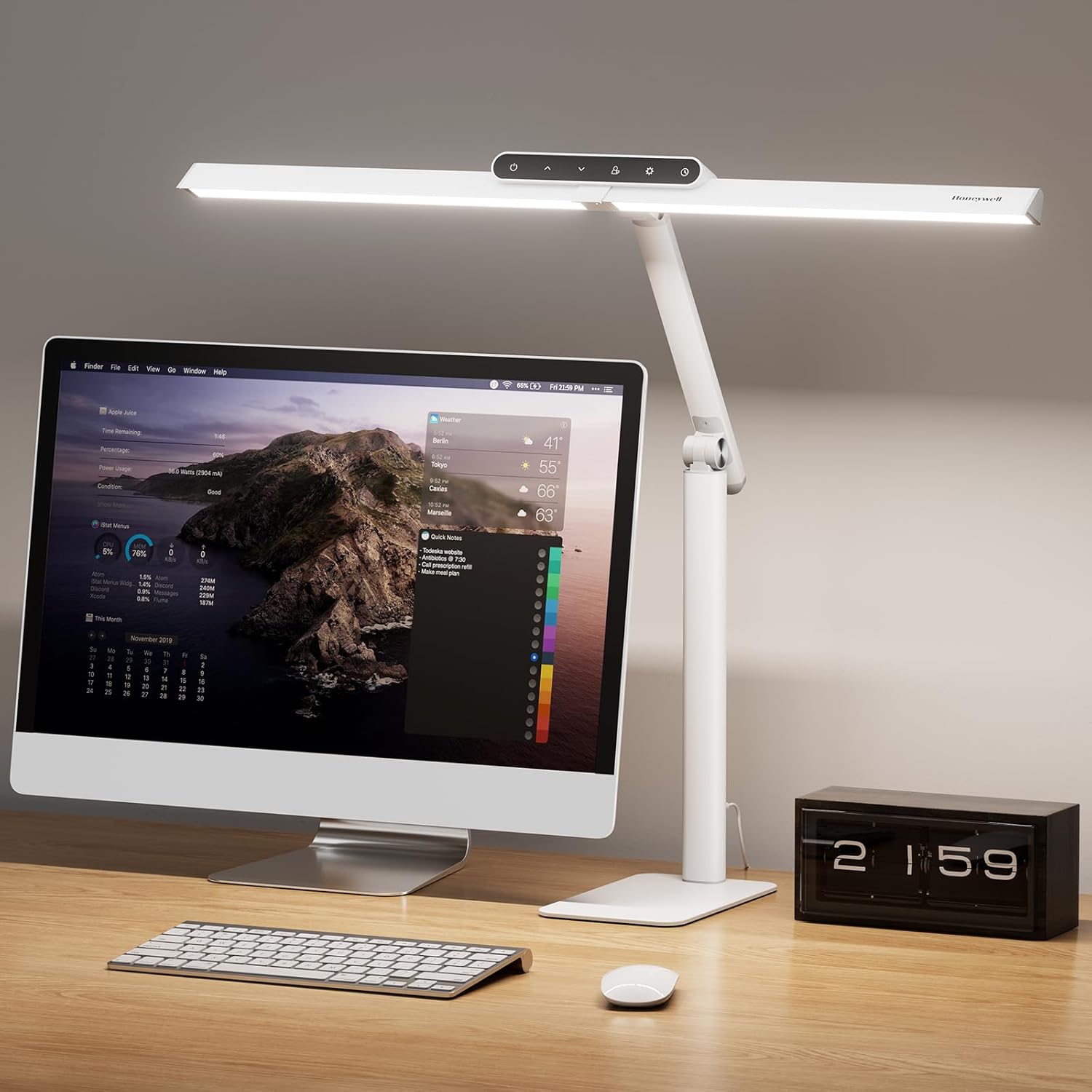
- 1200-lumen output brightly illuminates large desks and work surfaces
- 156 Sunturalux LEDs deliver excellent CRI 97+ color accuracy
- Four color temperatures support reading, computer work, and detailed tasks
- Stepless 10% to 100% dimming provides precise brightness adjustment
- Extra-wide 31.49-inch dual-section head covers large and dual-monitor desks
The 31.5-inch light bar is the feature that immediately makes sense
The Honeywell HJ1WT earns our number two position for Best Led Lamp For Desk because it is designed around a much wider workspace than a traditional small reading lamp. It combines 1200 lumens of wide desk illumination, 156 Sunturalux LED chips, CRI 97+ color rendering, four color temperatures, stepless dimming from 10% to 100%, touch controls, memory functionality, a timer, and a substantial 31.49-inch dual-section lamp head.
That extra width matters if your desk has more than a notebook sitting on it. A modern home office may have two monitors, a keyboard, paperwork, a graphics tablet, phone, and a notebook spread across a large surface.
A narrow desk lamp can create one bright area and leave everything else noticeably darker. The HJ1WT is built to distribute light across a broader working zone.
Honeywell rates the lamp at 1200 lumens, which is considerably brighter than many compact desk lights. You probably will not need maximum brightness constantly, but having the additional output is useful for detailed work and larger surfaces.
The CRI 97+ LEDs are useful when you need to trust what colors look like
The HJ1WT uses 156 Sunturalux LED chips and carries a CRI rating of at least 97. High color rendering improves visual accuracy when working with artwork, photographs, printed documents, fabric, crafts, paint samples, or other materials where subtle color differences matter.
CRI stands for Color Rendering Index. A higher rating generally indicates that colors under the light source appear closer to how they would look under a high-quality reference light.
This is not particularly important when you are typing a spreadsheet. It becomes much more relevant when the desk is being used for drawing, painting, crafting, product photography, or reviewing printed color samples.
Imagine somebody working on an illustration at night. Two similar shades may look nearly identical under poor lighting, then noticeably different the following morning in daylight.
The HJ1WT's high-CRI output gives you a more reliable color environment for those physical materials. A calibrated monitor is still important for professional digital color work, but accurate surrounding light helps too.
The lamp offers four color temperatures, ranging from warm 3000K illumination through to a cooler 5700K setting. That gives you more flexibility than a lamp locked permanently to one white point.
Warm 3000K light works well when the room is being used later in the evening. It creates a softer visual environment for reading, journaling, or less intensive desk tasks.
A neutral setting around 4000K is useful for general office work. It provides a balanced white light that can work well for documents, computer use, writing, and normal daytime productivity.
The cooler settings can be useful when you want a brighter daylight-like appearance for detailed work. Different tasks benefit from different light settings, which is why adjustable color temperature is more useful than simply having a very bright lamp.
The stepless dimming is equally important. Instead of choosing from only three or four fixed brightness steps, the lamp can be adjusted continuously from approximately 10% to 100%.
This allows much finer control over the relationship between desk brightness and surrounding room light. That balance matters more than simply turning everything to maximum.
If the room is already bright during the afternoon, 1200 lumens at full output may be unnecessary. Reduce the lamp until the desk is comfortably illuminated without creating excessive contrast.
At night, do not automatically leave the rest of the room completely dark while blasting the desk at maximum brightness. Balanced ambient lighting improves visual comfort during long computer sessions.
Why the HJ1WT finishes just behind our number one Honeywell H6
The 31.49-inch dual-section head is one of the strongest reasons to buy this model. It can illuminate a broad area rather than creating the narrow cone of light associated with traditional desk lamps.
That is particularly useful with two monitors. Position the lamp so the light reaches the desk surface beneath both screens while avoiding direct reflections from the displays.
The flexible neck and adjustable lamp head help with that positioning. Proper positioning reduces unwanted screen glare without forcing you to lower the lamp until your paperwork becomes difficult to read.
Monitor finish matters too. A glossy screen reflects desk lighting much more visibly than a matte monitor, so spend a few minutes adjusting the lamp rather than accepting the first position.
The weighted aluminum base gives the HJ1WT stability without requiring a desk clamp. That is useful for people who cannot attach a clamp because their desk has drawers, a thick edge, a glass surface, or a wall directly behind it.
The base is approximately 8.3 inches in diameter. Check the available desk space before buying because a stable freestanding base naturally occupies more surface area than a clamp-mounted lamp.
The lamp itself measures roughly 31.49 inches across and reaches around 24 inches high depending on adjustment. This is a substantial task light rather than a tiny bedside lamp.
That size works particularly well on large home-office and workstation desks. On a very small writing desk, the proportions may feel excessive.
Touch controls keep operation straightforward. You can adjust the lighting without reaching for a separate remote that inevitably disappears underneath paperwork.
The memory function is useful because a lamp with numerous settings becomes irritating if it forgets your preferred configuration every time it is switched off. The HJ1WT can retain a preferred working setup for faster daily use.
That sounds minor until you use the same desk every morning. If 4000K at moderate brightness is your normal work setting, repeatedly rebuilding that configuration becomes unnecessary.
The timer adds another convenience feature. Timed lighting works well for focused sessions, particularly for reading, studying, and evening desk work.
A timer can also help when you tend to walk away from the desk and forget the lamp. It is not a major energy concern with efficient LEDs, but automatic shutoff is still useful.
Honeywell describes the light as flicker-free and glare-free, using the Sunturalux system to produce a more comfortable working environment. This matters because a desk lamp may remain on for many hours at a time.
Eye comfort is not determined by the lamp alone, though. Monitor brightness, viewing distance, room humidity, breaks, screen reflections, and focusing continuously at one distance can all contribute to fatigue.
A good lamp improves the lighting side of that equation. Good illumination supports long desk sessions, but it does not replace sensible working habits.
For reading printed material, position the light to avoid casting your writing-hand shadow across the page. Right-handed users will often benefit from placing the main light toward the left, while left-handed users may prefer the opposite side.
For computer work, illuminate the keyboard and desk without aiming the LEDs directly toward your eyes. The adjustable structure gives you enough freedom to experiment.
For drawing and crafts, bring the light closer to the working surface when you need detailed illumination. The high CRI rating becomes particularly useful here.
For video calls, the HJ1WT can provide some additional facial illumination if positioned appropriately. It is not a replacement for a dedicated photography light, but adjustable brightness and color temperature give you useful control.
One mistake is placing the light directly overhead and creating harsh shadows around the eyes. Angle the lamp according to the task rather than assuming the highest position is always best.
Another mistake is using the coolest 5700K setting for everything simply because it appears brightest. A warmer or more neutral color temperature may be more comfortable for long evening sessions.
The lamp is corded rather than battery powered. For a workstation lamp capable of producing 1200 lumens across a wide area, that is not particularly surprising.
It does mean cable management should be considered. Route the power cable behind the desk rather than allowing it to cross the main writing area.
The aluminum construction helps the HJ1WT feel more appropriate for a permanent workstation. This is designed as a serious task lamp, not a small portable light that gets moved between rooms every day.
That is also why it ranks so highly. The wide light head, strong output, high CRI, and fine brightness control address actual desk-lighting problems rather than adding novelty features.
Our number one Honeywell H6 remains slightly ahead because we prefer its overall balance of eye-care features, automatic ambient-light adjustment, brightness control, and general everyday usability. The HJ1WT takes a different approach by emphasizing greater brightness and extremely wide desk coverage.
In fact, somebody with an extra-wide workstation may prefer this second-place model. The 1200-lumen output and 31.49-inch head make a strong argument for dual-monitor setups and large desks.
That is why the ranking should not be treated as an enormous quality gap. The HJ1WT is arguably the more specialized choice for people who need a large illuminated working area.
We therefore give the Honeywell HJ1WT Sunturalux our number two rank out of seven. Its 1200-lumen output, 156 Sunturalux LEDs, CRI 97+ color rendering, four color temperatures, 10% to 100% stepless dimming, 31.49-inch dual-section head, flexible positioning, touch controls, memory function, timer, and weighted aluminum base create an excellent workstation lighting package.
For someone searching for the Best Led Lamp For Desk and using a large desk, dual monitors, drawing equipment, paperwork, or craft materials, the HJ1WT is a very strong second-place choice. Position the wide head to avoid monitor reflections, use the high-CRI light when color accuracy matters, and adjust brightness to match the surrounding room rather than automatically running all 1200 lumens at maximum output.

- 1200 lumen output provides strong illumination across large desk surfaces
- 156 Sunturalux LEDs deliver excellent CRI 97+ color accuracy
- Four preset color temperatures cover focused work and relaxed reading
- Stepless 10% to 100% dimming allows very precise brightness control
- 31.49 inch dual section head covers wide and dual monitor workstations
The extra wide light bar is what makes this one useful on a serious desk
The Honeywell HJ1BK earns our number three position for Best Led Lamp For Desk because it is built for people who need more coverage than a conventional little reading lamp can provide. It combines 1200 lumens of wide task lighting, 156 Sunturalux LED chips, CRI 97+ color rendering, four color temperatures, stepless dimming from 10% to 100%, touch controls, memory functionality, and a wide 31.49 inch dual section head.
That wide head is the first thing that makes sense in a modern workstation. If you have two monitors, a keyboard, paperwork, notebook, graphics tablet, and other equipment spread across the desk, a narrow pool of light becomes annoying very quickly.
The HJ1BK spreads illumination across a much broader working surface. It is particularly useful for wide home office desks, drafting tables, workbenches, gaming setups, and dual monitor arrangements.
Honeywell rates the lamp at 1200 lumens, which gives it plenty of output for detailed work. You will not necessarily want all 1200 lumens every hour of the day, but having that reserve is useful when the room itself is dim.
The CRI 97+ output matters when your desk is used for more than typing
The lamp uses 156 Sunturalux LEDs and carries a CRI rating of at least 97. High CRI lighting keeps colors more accurate, which becomes important for drawing, crafts, design work, photography, print checking, and other visual tasks.
CRI refers to Color Rendering Index. Higher values generally mean objects and colors under the lamp appear closer to how they would look under a high quality reference light.
For an ordinary spreadsheet, that may not change much. For somebody comparing paint samples, editing printed photographs, selecting colored pencils, or working with fabric, it becomes much more useful.
Imagine an illustrator working after sunset. Several similar shades can look closer together under poor lighting than they really are.
The high CRI output gives the physical workspace a more dependable lighting environment. It does not replace a calibrated monitor for professional color work, but accurate surrounding light still matters.
The HJ1BK also provides four preset color temperatures from 3000K up to 5700K. This allows you to change the visual character of the desk depending on the task.
A warm 3000K setting works well for reading, journaling, or less intense evening work. It creates a softer environment when you do not want a very cool white light late at night.
The middle settings are better suited to normal office use. Around 4000K, documents, keyboards, and general desk surfaces look neutral without becoming excessively warm or cool.
The cooler 5700K setting can be useful for focused detailed work. It creates a brighter daylight style appearance when maximum visual clarity is the priority.
Different tasks benefit from different color temperatures, which is one reason adjustable LEDs are more useful than a traditional desk lamp with one fixed bulb.
The stepless dimming system runs from roughly 10% to 100%. That gives you much more control than a lamp with only low, medium, and high settings.
This is particularly useful when daylight changes during the day. A desk beside a window may need very little artificial light at noon and considerably more light at 5 PM.
Rather than accepting an unnecessarily bright desk, you can fine tune the output. The goal should be comfortable contrast between the task surface and surrounding room.
One common mistake is using maximum brightness simply because the lamp can produce it. More brightness is not always more comfortable, especially when the rest of the room is dark.
At night, try keeping some ambient lighting elsewhere in the room. A bright desk floating in an otherwise completely dark room creates a large contrast your eyes repeatedly have to deal with.
Why the HJ1BK sits in third place instead of taking the top spot
The 31.49 inch dual section head is probably the strongest reason to choose this model over a smaller desk lamp. Honeywell designed it to cover roughly twice the area of a conventional single head design.
That is useful when two monitors sit side by side. The lamp can illuminate the keyboard, documents, and surrounding desk area without forcing you to place separate lamps on each side.
The adjustable neck and head allow the light to be aimed more carefully. Good positioning helps reduce monitor reflections, which is especially important with glossy displays.
If you see a bright reflection in the monitor, do not immediately reduce brightness until the desk becomes too dark. Change the angle or height first.
The weighted base helps keep the lamp stable despite the wide light bar. Honeywell also uses an anti slip silicone design to reduce unwanted movement if the desk is bumped.
This is useful for people who cannot use a clamp mounted lamp. Some desks have thick edges, drawers underneath, glass surfaces, or no suitable clamping point at all.
The tradeoff is desk space. A freestanding base occupies more surface area than a clamp, so measure the available area before ordering.
The lamp measures about 31.49 inches wide and approximately 24 inches high depending on adjustment. This is a substantial workstation lamp, not a tiny light intended for a cramped bedside table.
Touch controls make the different settings easier to manage. Brightness, color temperature, and timer functions can be changed directly from the lamp without another remote lying somewhere on the desk.
The memory function is useful too. Once you find a setting you like, the lamp can restore the preferred configuration rather than making you rebuild it every time.
This sounds minor until the lamp is used every working day. If your normal setup is 4000K at moderate brightness, remembering it saves a repeated adjustment every morning.
The one hour timer is another small but practical feature. A timer works well for structured work sessions, reading periods, or situations where you tend to leave the lamp on after walking away.
The HJ1BK is described as flicker free and glare free, with Honeywell positioning Sunturalux as an eye caring lighting system. That is relevant when somebody spends six or eight hours at a computer.
Still, no desk lamp can solve every source of eye fatigue. Screen brightness, viewing distance, dry air, poor posture, reflections, and focusing at one distance for hours all contribute.
Good desk lighting handles the illumination side of the problem. That is important, but it should be combined with sensible monitor settings and regular visual breaks.
For reading, place the lamp so your hand does not cast a large shadow across the page. Right handed users often benefit from lighting from the left, while left handed users may prefer the opposite side.
For computer work, aim the light toward the keyboard and desk rather than directly into your eyes. The LEDs should illuminate the task surface, not become something you stare into throughout the day.
For drawing, model making, crafts, and detailed handwork, the wide coverage becomes especially useful. You can spread tools and materials across the desk without moving everything into one tiny illuminated area.
The CRI 97+ output makes those visual tasks more convincing too. If color judgment matters, high quality light is more useful than simply having lots of lumens.
The lamp can also help with video calls. Adjusting the head and color temperature can provide extra facial illumination when the desk faces a webcam.
It is not a dedicated photography light, so it should not be treated like studio equipment. But the combination of high output, adjustable direction, and multiple white temperatures makes it flexible enough for casual meetings and recordings.
The 1200 lumen maximum output is also worth keeping in perspective. This lamp is designed to illuminate a desk, drafting area, or workstation rather than replace the ceiling lighting for an entire room.
It is a task lamp first, and it works best when the surrounding room has its own appropriate ambient illumination.
The HJ1BK sits behind our first two picks mainly because those models give us slightly stronger overall combinations for everyday desk use. Our number one H6 balances excellent color quality, eye caring features, adjustable lighting, and automatic ambient light sensing particularly well.
Our second ranked Honeywell wide desk model also offers a closely matched feature package. The difference between second and third is relatively small because both are built around the same general idea of broad high CRI workstation lighting.
This HJ1BK still becomes especially attractive for somebody with a wide desk. The 31.49 inch head and 1200 lumen output are genuinely useful specifications rather than decorative additions.
It can also be the better choice for architects, illustrators, gamers, designers, and anyone using a large desk where narrow lamps create dark areas at the edges. Wide distribution is the main advantage here.
Tool free installation is another positive detail. You can assemble the lamp without turning setup into a separate hardware project involving screws and tools.
The aluminum construction also gives it a more permanent workstation feel. It is the kind of lamp you set up beside a main computer and leave there rather than carry from room to room.
We therefore give the Honeywell HJ1BK Sunturalux our number three rank out of seven. Its 1200 lumen output, 156 Sunturalux LEDs, CRI 97+ color rendering, four color temperatures, 10% to 100% stepless dimming, 31.49 inch dual section head, touch controls, memory function, one hour timer, adjustable structure, and weighted aluminum base create an excellent desk lighting package.
For someone searching for the Best Led Lamp For Desk and working on a large workstation, drafting table, dual monitor desk, or creative setup, the HJ1BK remains a very strong third place choice. Position the head to avoid screen reflections, use the high CRI output when color accuracy matters, and adjust brightness to the surrounding room instead of automatically running the full 1200 lumens every time.

- 800-lumen output provides bright illumination for everyday desk work
- CRI 97+ Sunturalux LEDs reproduce colors with excellent visual accuracy
- Multiple color temperatures adapt lighting for work and evening reading
- Adjustable dimming provides comfortable brightness across changing room conditions
- Flicker-free anti-glare lighting supports comfortable extended desk sessions
The H6 keeps the lighting quality high without taking over the whole desk
The Honeywell H6 earns our number four position for Best Led Lamp For Desk because it combines strong everyday task lighting with a compact and highly adjustable design. Its main strengths include 800 lumens of Sunturalux illumination, CRI 97+ color rendering, adjustable brightness, multiple color temperatures, flicker-free lighting, anti-glare diffusion, and a flexible structure that lets you aim the light where the work actually happens.
For a normal home office, 800 lumens is plenty of useful desk illumination. It gives you enough output for reading, writing, computer work, drawing, and detailed paperwork without requiring the physical size of an extra-wide workstation lamp.
That distinction is important in this ranking. Some of the models above the H6 are designed around extremely wide desks and dual-monitor setups, while this one makes more sense when the workspace is reasonably compact.
It still gives you a substantial amount of control. Brightness and color temperature can be changed according to the task rather than accepting one fixed lighting setup from morning until night.
The CRI 97+ output is useful if your desk involves actual visual work
Honeywell's Sunturalux LED system is one of the main reasons this lamp ranks well. CRI 97+ lighting provides accurate color rendering, which becomes useful when working with drawings, printed photographs, crafts, colored documents, fabrics, paint samples, or other physical materials.
CRI means Color Rendering Index. In practical terms, a high rating means colors under the lamp should appear more natural and less distorted than they can under lower-quality lighting.
If you only use the desk for email, the difference may not seem dramatic. If you draw, paint, edit printed images, make models, or compare materials, it becomes much more relevant.
Imagine working on a colored pencil illustration late at night. Under poor lighting, several neighboring shades can appear closer together than they actually are.
The high-CRI output gives you a better physical lighting environment for making those decisions. It does not replace professional display calibration for digital color work, but it helps keep paper and real objects looking more trustworthy.
The H6 also provides different white-light temperatures. Adjustable color temperature changes the working environment without requiring different lamps for daytime and evening use.
A warmer setting works well for reading or journaling later in the evening. It produces a softer appearance when a very cool white light would feel unnecessarily harsh.
A neutral setting is useful for ordinary office work. Documents, notebooks, keyboards, and general desk surfaces remain clear without pushing the workspace too far toward warm or cool light.
A cooler white setting can help with detailed tasks when you want a brighter daylight-style appearance. This can be useful for technical drawing, studying, crafts, and other work where visual clarity matters.
Brightness adjustment is just as important as color temperature. A common mistake is buying a powerful LED lamp and then leaving it at maximum brightness every time it is switched on.
That is not always comfortable. The desk should match the surrounding room rather than becoming an intensely bright island surrounded by darkness.
During the afternoon, natural light may already illuminate much of the workspace. The desk lamp only needs to fill in shadows and maintain consistent task lighting.
After sunset, more artificial light may be needed. Even then, some ambient room lighting is useful so your eyes are not constantly moving between an extremely bright desk and a dark background.
Why this Honeywell H6 settles into fourth place
The H6 uses an eye-caring lighting approach built around flicker-free output and anti-glare diffusion. These features matter because a desk lamp may remain switched on for several hours at a time.
Flicker can be difficult to notice consciously in some lighting products. A well-designed LED driver helps provide more stable illumination rather than rapidly varying output.
Anti-glare design matters in a more obvious way. Direct glare can make long sessions uncomfortable, particularly if the LED source itself sits directly in your normal line of sight.
Positioning is still important, though. Even a well-diffused lamp should be aimed toward the desk rather than directly toward your eyes.
If you use a monitor, watch for reflections. A bright lamp placed at the wrong angle can create a visible reflection across glossy screens and make dark content difficult to see.
Do not immediately solve that by reducing the lamp until the desk becomes too dark. Reposition the head first.
Good lamp positioning reduces monitor glare while preserving enough illumination for the keyboard, notebook, and surrounding work area. The H6's adjustable structure gives you useful flexibility here.
For reading, place the light so your writing hand does not create a large shadow across the page. A right-handed person will often find lighting from the left more convenient, with the opposite arrangement for a left-handed person.
For drawing, angle the lamp across the working surface rather than directly downward if your hand is blocking the light. Small changes in direction can make detailed line work considerably easier to see.
For computer work, the lamp should illuminate the physical desk without competing with the monitor. The screen already produces its own light, so the desk lamp has a different job.
It needs to keep the surrounding workspace visible. Balanced task lighting reduces harsh contrast between the bright monitor and everything around it.
The adjustable arm is useful for this reason. You can raise the lamp when working across a larger surface or bring it closer when doing something detailed.
That flexibility also makes the H6 suitable for crafts and model work. A fixed lamp can become frustrating when a project changes size or position throughout the day.
The compact base is another advantage over some extra-wide desk lamps. A large workstation light can provide enormous coverage, but its base and overall structure may be excessive on a small desk.
The H6 gives you a more traditional freestanding format. That works well on student desks, compact home offices, writing desks, and normal single-monitor workstations.
This is one reason the H6 remains easy to recommend even though it sits fourth in our comparison. Not everyone needs a 30-inch light bar extending across two monitors.
A smaller lamp can actually be easier to position. It also leaves more room for speakers, notebooks, charging stands, and other equipment.
Touch controls simplify daily adjustment. When a lamp offers several brightness and color settings, controls need to be quick enough that people actually use them.
If changing modes requires digging through complicated menus, most users eventually leave the lamp on one setting forever. Direct controls avoid that problem.
Memory functionality is useful for the same reason. Remembering preferred settings saves repeated adjustments when you use the same desk every day.
For example, you may prefer a neutral color temperature and medium brightness for ordinary computer work. Being able to return to that setup quickly makes the adjustable features more practical.
The lamp can also help during video calls. Positioning it slightly toward the front of the desk can provide additional facial illumination compared with relying entirely on a ceiling fixture.
It is not a professional video light, and it should not be treated as one. But adjustable brightness and white temperature provide enough flexibility for ordinary meetings.
Students can use the same lamp differently. A brighter neutral setting can handle textbook reading and handwritten study notes, while a warmer lower setting may feel more comfortable during evening reading.
Artists get more value from the CRI rating. Color accuracy is one of its strongest features, particularly when working with physical media under artificial light.
The H6 also uses efficient integrated LEDs rather than replaceable conventional bulbs. That reduces routine bulb replacement and allows the lighting system to be designed around the lamp's diffuser and controls.
The downside is that integrated LED lamps are generally treated as complete products when the lighting hardware eventually reaches the end of its service life. There is no ordinary screw-in bulb to replace.
For most users, that tradeoff is acceptable because quality LEDs are designed for long operating lives. It also enables the slim adjustable head that makes this type of desk lamp practical.
The reason this particular H6 sits at number four is mainly competition from the models above it. Our higher-ranked Honeywell lamps provide either stronger overall feature combinations or significantly wider 1200-lumen illumination for large workstations.
This H6 is more conventional in scale. Its strength is balanced everyday usability rather than maximum coverage across a huge desk.
If your workstation has two large monitors and a very wide surface, one of the HJ1 models above may be the better choice. Their extra-wide heads distribute illumination across a larger area.
If your desk has one monitor, notebook, keyboard, and normal office accessories, the H6 can actually be easier to live with. You get strong lighting without dedicating as much physical space to the lamp.
That is why fourth place should not be interpreted as a weak result. The product still covers the fundamentals extremely well.
We therefore give this Honeywell H6 Sunturalux our number four rank out of seven. Its 800-lumen output, CRI 97+ Sunturalux LEDs, adjustable color temperatures, dimming control, flicker-free operation, anti-glare design, flexible positioning, and compact freestanding format create an excellent everyday desk-lighting package.
For someone searching for the Best Led Lamp For Desk and wanting a high-quality light for reading, computer work, studying, drawing, or a normal home office, this H6 remains a very positive fourth-place choice. Position it to avoid screen reflections, use the high-CRI output when color accuracy matters, and adjust brightness to the surrounding room rather than automatically using maximum output for every task.

- 1200-lumen output provides bright coverage across large desk surfaces
- Extra-wide dual-section head illuminates dual-monitor and creative workstations
- CRI 97+ Sunturalux LEDs provide highly accurate color rendering
- Multiple color temperatures and dimming levels adapt to different tasks
- Space-saving clamp mount keeps valuable desktop surface completely clear
The clamp is the real advantage here because your desk stays completely usable
The Honeywell HJ1 Clamp earns our number five position for Best Led Lamp For Desk because it takes the broad illumination concept of Honeywell's larger workstation lamps and removes the bulky desktop base. You get 1200 lumens of wide LED illumination, a large dual-section light head, Sunturalux LEDs with CRI 97+ color rendering, adjustable brightness, multiple color temperatures, flexible positioning, and a clamp that attaches directly to the edge of a compatible desk.
That clamp matters more than it sounds. A desk lamp base can easily occupy the exact corner where you wanted to put a speaker, notebook, charging station, audio interface, or another piece of equipment.
With this design, the working surface stays open. The lamp uses the desk edge instead.
This is especially useful on smaller desks that still have large monitors. You get the lighting coverage of a substantial workstation lamp without sacrificing several inches of usable desktop space to a weighted base.
The wide light head makes much more sense once two monitors are involved
The HJ1 family is built around wide illumination rather than a small concentrated reading light. The broad head covers a larger working area, which makes it particularly useful for dual-monitor setups, large keyboards, drawing tablets, paperwork, drafting, and other work that spreads horizontally across the desk.
A conventional small lamp often creates one bright circle. Move a document twenty inches to the side and suddenly you are working in noticeably weaker light.
A wider lamp reduces that problem. The keyboard, notebook, and surrounding desk can remain illuminated at the same time rather than forcing everything underneath one narrow beam.
The 1200-lumen maximum output gives the lamp plenty of brightness for detailed tasks. It is useful for reading small print, technical drawing, crafts, model work, and other activities where weak lighting becomes tiring quickly.
That does not mean 1200 lumens should be used constantly. Maximum brightness is not always comfortable, particularly when the rest of the room is dim.
During daylight hours, the lamp may only need to fill shadows around the desk. After sunset, you can increase the output as the room becomes darker.
The best brightness is the one that makes the work surface easy to see without creating an enormous contrast against everything around it. That is why dimming control matters.
Multiple color temperatures provide another useful adjustment. A warmer light can feel more comfortable for evening reading, while neutral and cooler settings can work better for detailed office tasks.
This changes how one lamp can be used throughout the day. Different color temperatures suit different tasks, rather than forcing somebody to work under the same cool white light at 11 PM that they used at 10 AM.
The Sunturalux LEDs are also rated for CRI 97+ color rendering. That specification becomes particularly relevant when the desk is used for creative work.
CRI refers to Color Rendering Index, which describes how naturally colors appear under a particular light source. A high rating is useful when comparing physical colors rather than simply reading black text on a white screen.
An illustrator working with markers or colored pencils can benefit from that. So can somebody working with fabrics, paint samples, printed photographs, product packaging, or crafts.
High CRI lighting improves color judgment under artificial light. It does not replace a calibrated monitor for professional digital color work, but it makes the physical workspace more dependable.
Imagine reviewing a printed photograph after sunset. Poor lighting can shift how subtle skin tones and neutral colors appear.
A higher-quality light source reduces that problem. This is one reason the HJ1 Clamp is more than simply a bright office lamp.
Why the clamp model finishes in fifth place
The clamp is simultaneously this model's biggest strength and one of its limitations. Clamp mounting saves valuable desk space, but the desk needs to provide a suitable edge for attachment.
Some desks make that difficult. Thick frames, drawers directly underneath the top, enclosed rear panels, unusual bevels, or glass construction may prevent the clamp from attaching properly.
Measure before buying. Do not assume every desk with an edge automatically works with every clamp lamp.
A freestanding lamp is more universal because it can simply sit on any sufficiently large flat surface. That is one reason our base-mounted Honeywell models rank higher overall.
For a compatible desk, however, the clamp can actually be better. It frees the desktop and allows the arm to rise from behind or beside the monitor rather than occupying the main work surface.
This arrangement works particularly well for computer setups. Position the lamp above the monitors and direct the light downward toward the keyboard and surrounding desk.
Be careful with monitor reflections. Angle the lamp to avoid screen glare, especially if you use glossy displays.
A bright reflection across a dark monitor can be more distracting than insufficient desk lighting. Adjust height and angle before reducing the lamp brightness unnecessarily.
For dual-monitor users, the wide head becomes particularly useful. One central light source can cover the desk beneath both displays without requiring separate lamps on each side.
This can make the whole workstation cleaner. Fewer bases, fewer lamp bodies, and less clutter around the monitors.
The adjustable arm also helps when switching between computer work and physical desk tasks. Bring the light closer for detailed drawing or model work, then reposition it higher when the entire workstation needs illumination.
Adjustability makes wide lighting more practical because the same amount of light can be distributed differently depending on the task.
For reading and handwriting, watch where shadows fall. Right-handed users often benefit from placing the main light toward the left side, while left-handed users may prefer the opposite arrangement.
The clamp gives you some flexibility because it can be installed at different points along a compatible desk edge. Try more than one position before deciding where it will remain permanently.
For drawing, the wide head can illuminate both the artwork and reference materials beside it. That is much easier than constantly moving a narrow lamp every time the reference changes position.
For crafts, the broad coverage is useful when tools and materials occupy a large area. Wide illumination helps detailed manual work, especially when small components are spread across the desk.
The lamp also works well for a standing desk. Because it attaches to the desk itself, the light moves with the work surface when the desk height changes.
That is a useful advantage over a floor lamp or wall-mounted fixture. The relationship between the lamp and work surface remains consistent.
Cable routing deserves some attention on an adjustable desk. Leave enough cable slack for the full height range without allowing excess cable to hang into the leg mechanism.
Use cable clips or normal desk cable management where appropriate. A clean installation helps the lamp feel like part of the workstation rather than another loose accessory.
The HJ1 Clamp also makes sense for desks against a wall. The clamp keeps the base off the surface, which can be useful when there is very little depth behind the monitor stand.
But check the gap between the desk and wall. The clamp and arm still need physical room to attach and move properly.
Touch controls make brightness and color adjustment relatively straightforward. This is important because adjustable lighting is only useful if changing settings does not become irritating.
If the controls are simple, users are more likely to lower brightness in the evening or switch color temperature according to the task. Otherwise, the lamp tends to stay on one setting forever.
Memory functionality is useful for a permanent workstation. Your preferred lighting setup can stay consistent rather than requiring repeated adjustments every morning.
For example, somebody may use a neutral white setting at moderate brightness for ordinary computer work. Once that setting is established, there is little reason to rebuild it every day.
Eye comfort is another part of the Sunturalux design. Honeywell emphasizes flicker-free, low-glare illumination intended for longer work and study sessions.
A good desk lamp cannot eliminate every source of eye fatigue. Monitor brightness, viewing distance, dry air, posture, screen reflections, and spending hours focusing at one distance all contribute.
But good lighting removes one avoidable problem. Stable task lighting supports longer desk sessions without introducing obvious glare or a poorly illuminated work surface.
The lamp can also help during video calls if positioned appropriately. A wide desk light can add some facial illumination when the head is angled slightly toward the user.
It is not a dedicated photography light, so do not expect studio-quality facial lighting. Still, adjustable brightness and white temperature make it useful for ordinary meetings.
The HJ1 Clamp ranks fifth because the products above it are easier to recommend across a wider variety of desks. Base-mounted models do not depend on having a compatible edge for installation.
Our top-ranked H6 also provides an excellent balance of high-CRI lighting, eye-care features, compact dimensions, and automatic ambient-light adjustment. That makes it a more universal recommendation.
The HJ1 base models above this clamp version provide similarly broad 1200-lumen illumination while working on desks where clamp mounting is impossible. Installation flexibility affects this ranking, not a major weakness in the actual light quality.
In fact, if your desk accepts the clamp properly, this fifth-place model may be more practical than several products above it. The absence of a large base is a genuine advantage.
This is particularly true for small home offices with large monitors. Desktop space is often more valuable than another few lighting features.
The clamp design also looks cleaner in a permanent workstation. Once installed behind a monitor, much of the support structure disappears from the main work surface.
We therefore give the Honeywell HJ1 Clamp our number five rank out of seven. Its 1200-lumen output, wide dual-section head, CRI 97+ Sunturalux LEDs, adjustable color temperatures, dimming control, flexible positioning, touch controls, memory functionality, and space-saving clamp mount create a very capable workstation lighting package.
For someone searching for the Best Led Lamp For Desk and wanting strong illumination across a dual-monitor setup without sacrificing valuable desktop space, the HJ1 Clamp remains a positive fifth-place choice. Measure the desk edge before ordering, position the wide head to avoid monitor reflections, use the high-CRI output when color accuracy matters, and adjust brightness to match the surrounding room instead of automatically using the full 1200-lumen output.

- 1000 lumen output provides bright illumination across larger desk surfaces
- Dual 30 inch light bars provide extra wide workstation coverage
- 2700K to 6500K adjustment covers warm through cool lighting
- Stepless 10% to 100% dimming provides precise brightness control
- CRI above 90 flicker free LEDs deliver comfortable natural looking light
The dual head design gives this lamp much more coverage than its price suggests
The SIBRILLE YS-TL23065 earns our number six position for Best Led Lamp For Desk because it gives you a surprisingly large lighting area without occupying much of the actual desktop. It combines 1000 lumens of adjustable LED lighting, two rotatable light bars, a 30 inch maximum lighting span, 2700K to 6500K color adjustment, 10% to 100% stepless dimming, CRI above 90 LEDs, memory functionality, and a clamp based installation.
The lamp is rated at 18 watts and 1000 lumens. That is enough output for normal office work, studying, reading, gaming setups, and detailed tasks without needing a second lamp sitting at the opposite side of the desk.
The unusual part is the head. Instead of one fixed horizontal light bar, SIBRILLE uses two sections that can extend outward or rotate inward depending on how much desk area you need illuminated.
Fully extended, the lighting assembly reaches roughly 30 inches across. That is useful on a desk where the keyboard, notebook, paperwork, and monitor setup occupy considerably more space than a conventional reading lamp can comfortably cover.
The 2700K to 6500K range gives you a lot of control over the actual light
The YS-TL23065 offers five quick color temperature settings, while longer control presses allow adjustment across a broader 2700K to 6500K range. That wide color temperature range adds real flexibility because desk lighting does not need to look identical at every hour of the day.
At the warmer end, around 2700K, the light takes on a softer yellow appearance. That can be comfortable for reading, journaling, or lighter evening work when a very cool white desk feels unnecessarily intense.
Move toward the middle of the range and the light becomes more neutral. This is useful for general computer work, studying, paperwork, and everyday home office tasks.
At the cooler end, approaching 6500K, the light becomes much more daylight-like. Some users prefer this appearance for detailed work, technical tasks, or periods when they want a crisp and bright workspace.
You do not have to choose one permanently. The lamp can change with the task, which is much more useful than buying a fixed-temperature LED desk lamp and discovering later that you dislike its particular shade of white.
Brightness can also be adjusted from roughly 10% to 100%. A short press moves through brightness steps, while a longer press provides finer stepless control.
This matters because 1000 lumens is useful to have available, but maximum output is not appropriate in every situation. A desk beside a bright window at noon may need only a small amount of additional task lighting.
At night, the lamp may need to do much more of the work. Even then, it is better to adjust the output to the surrounding environment instead of automatically using 100% brightness.
Good desk lighting should avoid extreme contrast between the work surface and the rest of the room. If your desk is intensely bright while everything behind the monitor is completely dark, adding some ambient room lighting can make the overall environment more comfortable.
The CRI rating is above 90, which is another useful specification. CRI refers to Color Rendering Index and gives an indication of how naturally colors appear under the light.
For normal typing, this is not a major concern. For drawing, crafts, model building, printed photographs, fabric, or color-coded paperwork, more accurate color rendering becomes much more useful.
The lamp is not as strong here as the CRI 97+ Honeywell Sunturalux models higher in our ranking. That difference is one reason the SIBRILLE sits lower despite having excellent adjustment options.
Still, CRI above 90 is good for everyday creative work. It gives you a much more useful visual environment than basic low-quality task lighting.
Why the SIBRILLE lands at number six instead of challenging the Honeywells
The two light bars are the most interesting part of the physical design. They can extend from roughly closed together to a broad 180 degree arrangement, and the lamp heads can also rotate vertically.
This gives you control over both coverage and direction. If you are reading one document, bring the light sections closer together and concentrate illumination around the center.
If the desk is covered with papers, tools, or drawing equipment, open the two bars wider. The adjustable head changes the coverage area rather than forcing you to physically move the whole lamp.
The flexible gooseneck adds another layer of adjustment. It can be bent and repositioned to move the lighting assembly higher, lower, forward, or farther back.
This is useful with monitors because reflections can become a problem. A powerful desk lamp placed at the wrong angle may create a bright reflection directly across a glossy display.
Instead of reducing brightness until the desk becomes difficult to see, change the lamp position first. Raise the head, alter the angle, or move the light slightly forward or backward.
Correct positioning helps prevent monitor glare while keeping the keyboard and surrounding desk properly illuminated. This matters particularly on gaming and dual-monitor setups.
The clamp mounting system is another practical advantage. Rather than placing a weighted base on the desk, the SIBRILLE attaches to the edge of a compatible surface.
That leaves more room for notebooks, speakers, a graphics tablet, microphone equipment, or other accessories. On a smaller home office desk, saving even a few inches can matter.
The clamp supports a working thickness around 2.2 inches according to the product specifications. Measure the desk before ordering rather than assuming the clamp will automatically fit.
Desks with thick frames, drawers directly underneath the top, unusual beveled edges, or enclosed rear panels can create installation problems. Clamp compatibility should be checked first, because a great lamp is not useful if it cannot attach securely.
The built-in recessed power cord is a thoughtful detail. SIBRILLE routes the cable through the structure to keep the workstation cleaner rather than leaving a loose wire hanging around the adjustable arm.
This becomes particularly useful on a standing desk. Cable clutter can become annoying when the desk moves between sitting and standing positions.
Leave enough cable slack for the full movement of the desk. At the same time, keep excess cable away from moving legs and mechanisms.
The memory function remembers the last lighting configuration. That is useful once you settle on a preferred everyday setting.
For example, you may find that a neutral color temperature at 60% brightness works well for normal computer use. Memory saves repeated daily adjustment rather than making you rebuild that setup every time the lamp is switched on.
The lamp is also described as flicker free and designed with reduced blue light hazard. Its frosted shade helps diffuse the LEDs and reduce direct glare.
Those features are useful for people spending several hours at a desk. But no desk lamp can eliminate every source of eye fatigue.
Monitor brightness, viewing distance, screen reflections, dry air, poor posture, and long periods of close focusing all contribute. Lighting is one part of the setup.
For reading, position the lamp so your writing hand does not create a large shadow across the page. Right handed users often benefit from light coming from the left, while left handed users may prefer the opposite arrangement.
For drawing, use the dual heads to reduce hand shadows across the working area. Opening the two light sections can produce more even illumination across a larger sheet or drawing tablet.
For gaming, the lamp can illuminate the keyboard and desk without requiring the room's ceiling light to be extremely bright. Aim the heads away from the monitor surface to minimize reflections.
For video calls, the rotatable bars can provide some additional front-facing light if positioned carefully. It is not a dedicated video lighting system, but the wide color temperature range gives you some useful flexibility.
The 18 watt power consumption is relatively modest considering the 1000 lumen output. SIBRILLE also promotes efficient heat dissipation and long LED service life.
Integrated LEDs mean there is no conventional bulb to replace. That allows the lamp head to remain slim, although it also means the lighting system is built into the product rather than being a standard replaceable bulb.
The YS-TL23065 ranks sixth mainly because the Honeywell models above it provide stronger overall lighting quality for our comparison. The CRI 97+ Sunturalux systems have an advantage when color accuracy and refined eye-care lighting are priorities.
The Honeywell options also feel more specialized around high-quality workstation illumination. That pushes the SIBRILLE lower even though its flexibility is excellent.
Brightness is another consideration. At 1000 lumens, this model sits below the 1200 lumen wide-workstation Honeywell lamps higher in the ranking.
That difference will not matter on every desk. For a normal single-monitor setup, 1000 lumens can be more than enough.
In fact, the SIBRILLE may be more appealing to somebody who values adjustment over maximum specifications. The 2700K to 6500K color range is unusually broad and the two independent light sections give the lamp a lot of physical flexibility.
The space-saving clamp is another major strength. If your desk is already crowded, removing a conventional lamp base can be more valuable than gaining another 200 lumens.
The model also weighs around 1.22 kilograms, so it remains relatively manageable during installation. The buckle-style assembly is designed to reduce the amount of complicated hardware needed during setup.
We therefore give the SIBRILLE YS-TL23065 our number six rank out of seven. Its 1000 lumen output, 18 watt LED system, dual 30 inch light bars, 2700K to 6500K adjustment, 10% to 100% dimming, CRI above 90 LEDs, flicker-free anti-glare diffuser, flexible gooseneck, memory function, recessed cable design, and space-saving clamp create a very capable workstation lamp.
For someone searching for the Best Led Lamp For Desk and wanting wide coverage with extensive color and brightness adjustment without sacrificing desktop space, the SIBRILLE is a positive sixth-place choice. Check that the clamp fits your desk, position the dual heads to avoid monitor reflections, and use the wide 2700K to 6500K range to match the lighting to the actual work you are doing rather than leaving the lamp on one setting permanently.

- 182 Sunturalux LED chips provide broad full-spectrum desk illumination
- 34-inch three-section head covers wide and dual-monitor workstations
- CRI 92+ lighting keeps colors looking natural during detailed work
- Four color temperatures and stepless dimming provide flexible task lighting
- Secure clamp mount fits desktops up to 2.10 inches thick
The three-section head gives this lamp genuinely useful coverage
The Honeywell HJ3B earns our number seven position for Best Led Lamp For Desk, but the actual hardware is still quite capable. It combines 182 Sunturalux full-spectrum LED chips, a 22W lighting system, a three-section adjustable head spanning up to 34 inches, CRI 92+ color rendering, four color temperatures, stepless dimming, and a metal clamp that supports desktops up to 2.10 inches thick.
The wide head is the first feature that makes practical sense. A modern desk can have two monitors, a full-size keyboard, paperwork, a notebook, speakers, and other equipment spread across a large horizontal area.
A conventional small desk lamp often creates one bright patch. The HJ3B is designed to cover much more of the workstation at once.
That makes it particularly useful for dual-monitor setups. You can position the lamp above the screens and direct illumination toward the keyboard, documents, or drawing surface below.
The 34-inch span is especially useful on large desks
The HJ3B uses a three-section lamp head that extends to approximately 34 inches. Wide coverage reduces dark desk areas when your work is spread beyond the center of the desk.
This is useful for somebody working between a monitor and printed documents. Instead of continually moving a narrow lamp from one side to the other, the HJ3B can illuminate both areas together.
Architects and designers can use the same advantage on larger drawings. Crafters can spread tools and materials across the desk without forcing everything underneath one narrow beam.
The light head also has horizontal and vertical rotation points. That allows you to change the direction rather than accepting one fixed downward angle.
This becomes important around monitors. Adjustability helps reduce screen reflections, especially when working with glossy displays or multiple monitors placed at different angles.
If the lamp creates a visible reflection across the screen, move the head before reducing brightness. A lower brightness level may make the desk harder to see while leaving the reflection in roughly the same place.
The HJ3B provides four color temperature options at 3000K, 4000K, 5000K, and 5700K. These cover a useful range from warmer evening light to cooler task-oriented white illumination.
The 3000K setting is useful for reading or less intense work later in the evening. It has a warmer appearance that can feel less clinical when the room itself uses warm lighting.
The 4000K setting is a practical middle ground. Neutral white works well for general office use, including typing, paperwork, studying, and ordinary computer work.
The 5000K and 5700K settings provide cooler illumination. These can work well for detailed visual tasks where you prefer a crisp daylight-style appearance.
Brightness is stepless rather than restricted to a handful of fixed levels. That gives you finer control when the surrounding room changes throughout the day.
A desk beside a window may need very little additional lighting in the afternoon. After sunset, considerably more output may be required.
The goal is not maximum brightness at all times. Match desk brightness to the surrounding room so the workspace feels clear without becoming excessively bright compared with everything behind it.
Honeywell rates the LEDs at CRI 92 or higher. That is respectable for a desk lamp and useful when colors on paper, fabric, drawings, or other physical materials need to look reasonably natural.
CRI stands for Color Rendering Index. A higher rating generally indicates that a light source reproduces colors more faithfully compared with a suitable reference source.
The HJ3B does not reach the CRI 97+ rating of some Honeywell Sunturalux models higher in our comparison. That color-rendering difference partly explains the ranking, particularly for artists and designers.
For ordinary office work, CRI 92+ is still strong. You are unlikely to need laboratory-level color accuracy just to read documents or work in spreadsheets.
Why the HJ3B finishes seventh even though it is still a capable lamp
The clamp design is one of the HJ3B's biggest strengths. It attaches to desks up to approximately 2.10 inches thick, keeping the main work surface free of a large weighted base.
That is useful on small desks. The clamp preserves valuable desktop space for notebooks, audio equipment, speakers, charging stands, or other accessories.
But clamp mounting also introduces a limitation. Your desk needs an exposed edge that is both thin enough and structurally suitable for the clamp.
Desks with drawers directly beneath the top, thick frames, curved edges, glass construction, or enclosed rear panels can be difficult. Measure before ordering rather than assuming it will fit.
The clamp includes protective material intended to reduce damage from clamping pressure. That is useful when attaching the lamp to a finished wood or laminate surface.
Still, tighten it only enough to keep the lamp stable. Excessive force is unnecessary and can potentially mark softer surfaces.
The body uses aluminum alloy, iron, and acrylic components. The metal construction gives useful rigidity to a lamp with a relatively long adjustable span.
This matters because a 34-inch head creates leverage when extended. A weak support arm would become irritating if the lamp slowly sagged out of position during use.
The lamp weighs around 2.7 pounds, so the clamp does not need to support an extremely heavy fixture. At the same time, it feels more substantial than an ultra-light plastic reading lamp.
The 22W power rating is sensible for the amount of illumination and coverage involved. The lamp is corded, which is expected for a workstation light designed for long operating periods.
Cable management still deserves attention. Route the cord along the rear edge of the desk rather than allowing it to hang into the main work area.
This is especially important on standing desks. Leave enough cable slack for height adjustment without allowing the wire to become trapped in moving desk components.
The HJ3B is designed for indoor use. It is not waterproof, so it should remain in a normal office, study, studio, or other dry interior environment.
Honeywell also describes the light as flicker-free and glare-free, with testing around blue-light hazard and visual comfort. That is useful when the lamp remains on throughout a full working day.
No desk lamp can eliminate all eye fatigue, though. Monitor brightness, viewing distance, dry eyes, screen reflections, posture, and long periods of close focusing all contribute.
Quality lighting removes one avoidable problem, but good desk ergonomics still matter. Take regular visual breaks and keep monitor brightness appropriate to the room.
For reading, position the lamp so your hand does not cast a large shadow across the page. Right-handed users often benefit from placing the primary illumination toward the left side.
For drawing, use the wide head to illuminate both the artwork and nearby references. A large coverage area is much more useful when your materials extend beyond one sheet of paper.
For gaming, the lamp can keep the keyboard and surrounding desk visible without requiring a bright overhead ceiling light. Keep direct light away from the monitor surface to avoid distracting reflections in dark scenes.
For video calls, the adjustable head can provide some additional front lighting if angled carefully. It is not a dedicated camera light, but the selectable color temperatures give you more control than a fixed warm lamp.
The 30,000-hour rated LED life is another useful specification. Integrated LEDs remove the need for ordinary bulb replacement and allow the head to remain relatively slim.
The tradeoff is that the light source is part of the lamp rather than a standard replaceable bulb. If the integrated electronics eventually fail years later, the lamp is generally serviced or replaced as a complete unit.
Honeywell backs the product with a two-year warranty. A two-year warranty adds useful reassurance for a lamp designed to become permanent workstation equipment.
The HJ3B takes seventh place mainly because the models above it offer slightly stronger overall packages. Several Honeywell alternatives provide CRI 97+ Sunturalux lighting, stronger brightness specifications, or combinations that we find more refined for color-sensitive work.
The SIBRILLE above it also provides an unusually broad 2700K to 6500K adjustment range. Depending on the user, that extra color-temperature flexibility may be more valuable than the HJ3B's four fixed white-light choices.
The HJ3B fights back with a strong 34-inch three-section design. Its wide coverage remains a major strength, particularly when the desk has two monitors or a large physical work area.
Its lower rank therefore does not mean it is a bad lamp. It means the competition in this seven-product list is strong and several alternatives provide better combinations for our scoring priorities.
Someone with a large desk may actually prefer this model over a smaller higher-ranked lamp. Product rank should always be considered alongside the specific workstation.
We therefore give the Honeywell HJ3B Sunturalux our number seven rank out of seven. Its 22W output, 182 Sunturalux LEDs, CRI 92+ full-spectrum lighting, four color temperatures, stepless dimming, 34-inch three-section head, adjustable rotation points, aluminum construction, and clamp support for desks up to 2.10 inches thick create a genuinely useful workstation package.
For someone searching for the Best Led Lamp For Desk and needing broad illumination over a dual-monitor workstation without sacrificing desktop space, the HJ3B remains a positive seventh-place choice. Measure the desk edge before buying, position the three-section head to avoid screen reflections, and adjust the brightness and color temperature to the actual task rather than leaving the lamp permanently at its brightest setting.