

Quick Buying Guide: The best label maker for home should fit the labels you make most often, from pantry bins to cables and storage boxes. Compare supported tape widths, adhesive types, water resistance, and the cost and availability of refill cartridges. A built-in keyboard is quick for simple labels, while app-connected models offer fonts and templates but add phone and privacy considerations. Check print resolution, automatic cutting, battery options, and wasted tape margins. Choose removable or fabric-specific supplies when permanent adhesive could damage belongings.

- Thermal printing eliminates ongoing ink and toner replacement costs
- Heat shrink tube support makes cable identification much more organized
- Bluetooth app provides flexible label creation directly from smartphones
- Compact portable body stores easily in drawers and cabinets
- Multiple label materials support household, office, and cable organization

The heat shrink tube support is what pushes the G15M beyond a basic home labeler
The SUPVAN G15M earns our number one position for Best Label Maker For Home because it handles ordinary household labels while adding something genuinely useful for cables and electronics. The compact machine combines inkless thermal label printing, Bluetooth app control, portable construction, multiple label materials, and support for heat shrink tubing in one relatively small device.
For normal home organization, that means you can label storage boxes, drawers, pantry containers, office supplies, cables, chargers, craft materials, and other items without keeping a separate ink cartridge around. For electrical organization, the heat shrink tube capability gives the G15M another job entirely.
That combination matters because home labeling rarely stays confined to one cupboard. Once you start organizing properly, labels end up in the kitchen, garage, office, utility room, network cabinet, workshop, and storage areas.
The G15M is small enough to move between those locations rather than becoming another bulky machine that permanently occupies desk space. Put it in a drawer when the labeling project is finished.
Being able to label cables properly solves a surprisingly annoying home problem
The heat shrink tube capability is one of the most interesting features here. Heat shrink labels make cable identification cleaner than wrapping an ordinary adhesive label loosely around a wire.
Think about the cables behind a home office desk. A monitor, computer, printer, speakers, router, charging dock, lamp, and external drives can quickly create a collection of similar black cables.
Disconnect everything for a desk move and suddenly it is not obvious which power adapter belongs to which device. A small cable label can save a lot of unnecessary tracing later.
The same idea works around a home network. Ethernet cables going to different rooms can be identified at both ends so troubleshooting becomes much easier.
Instead of unplugging several cables to find the one going upstairs, you can label them when the network is first installed. Good cable labels save time later, particularly once a setup grows beyond a few devices.
Heat shrink tubing can also be useful around hobby electronics and low-voltage projects where appropriate. The label surrounds the cable rather than depending on a flat adhesive surface staying wrapped around it.
Use the correct tube dimensions for the cable. A tube that is too large may not fit securely after shrinking, while one that is too small may not slide over the connector or wire in the first place.
Plan before shrinking it too. Once a heat shrink label has been installed, changing the text is obviously more involved than peeling an ordinary label from a storage box.
For household containers, regular adhesive labels remain easier. Choose the label material for the job rather than using heat shrink tubing simply because the machine supports it.
The thermal printing system is another major advantage. Thermal label makers create the print through specially designed label material rather than conventional liquid ink.
That means there are no ink cartridges drying out while the label maker sits unused for several months. The main consumable is the compatible label material itself.
This is particularly sensible for home use because labeling tends to happen in bursts. You might organize an entire pantry on Saturday, then not touch the label maker again for six weeks.
An ink-based system can be irritating when infrequent use leads to dried cartridges or maintenance. Thermal printing suits occasional household use because the consumable system is simpler.
Why we believe the SUPVAN G15M deserves rank one
The G15M uses Bluetooth connectivity with a smartphone app for designing and printing labels. That removes the need to fit a large physical keyboard and screen onto the label maker itself.
Your phone becomes the editing interface. You can type text, adjust layouts, and work with the available design tools on a screen that is much larger than the display found on many traditional handheld labelers.
This is useful when creating several labels in one session. Phone based editing makes layout easier, especially when labels contain more than a few characters.
For pantry organization, create a consistent template first. Use the same font size and label style for flour, rice, pasta, sugar, coffee, and other containers.
Consistency makes the finished shelves look cleaner. It also prevents the common situation where every label looks slightly different because it was created from scratch.
The same approach works for storage bins. Create a standard format for seasonal decorations, cables, tools, documents, craft supplies, and household spare parts.
Be specific with the wording. A box labeled "Misc" is technically labeled but still tells you almost nothing about what is inside.
Useful labels should reduce searching time. "USB Cables and Chargers" is much more useful six months later than "Electronics."
Home offices are another good use case. Label document folders, equipment drawers, spare cables, power adapters, external drives, and storage containers.
If several external drives look identical, add labels showing their purpose rather than relying on memory. "Photos Backup" and "Work Archive" are easier to identify than two identical black drives sitting beside each other.
For family storage, labels can also identify ownership. Chargers, school supplies, craft containers, and personal storage bins are much easier to return to the right person when the name is visible.
The portable size helps because these projects happen throughout the house. A compact label maker is easier to actually use when you can carry it to the cupboard or garage instead of bringing every item back to a desk.
That is an underrated advantage. Organization projects become slower when the labeling equipment is inconvenient to move.
Take the G15M directly to the pantry and print labels while checking what is actually stored there. Then move to the office and create cable labels beside the equipment.
This also reduces mistakes. Creating twenty labels from memory in another room can lead to misspellings, incorrect quantities, or labels for containers that no longer exist.
Print while organizing. Label items as they reach their final location rather than producing everything beforehand and hoping the plan stays unchanged.
The G15M also makes sense for craft rooms. Small drawers containing beads, sewing supplies, fasteners, paints, electronic components, and other materials become much easier to navigate when every compartment is identified.
Workshop storage benefits for the same reason. Screws, wall plugs, drill bits, electrical connectors, and spare hardware are much easier to find when bins have clear names.
Do not make the text unnecessarily small just to fit a long description. A label that technically contains all the information but cannot be read quickly has missed the point.
Shorten descriptions when needed. Readable labels are better than crowded labels, particularly on small drawers and cable markers.
Surface preparation matters with adhesive labels. Dust, oil, moisture, and cleaning residue can reduce how well a label sticks.
Wipe dirty containers before applying the label and allow the surface to dry. This is especially important in garages and kitchens where grease and dust accumulate more quickly.
Also think about where the label will be placed. Putting it on a heavily curved or textured surface may reduce adhesive contact.
A flat, clean area is usually better. Good placement improves label durability and makes the finished organization easier to read.
For cables, place identification where it remains visible after the setup is complete. A beautifully printed cable label hidden behind a cabinet is not very useful during troubleshooting.
Labeling both ends of long cables is even better. An Ethernet cable can be identified at the router and again at the wall or device end.
This saves time when changing network equipment later. You do not need to trace the entire cable through furniture or walls just to understand where it goes.
The app based workflow does create one tradeoff. A traditional label maker with a physical keyboard can operate completely independently, while the G15M relies more heavily on the connected phone experience.
Some users may prefer dedicated buttons. App control favors flexibility over standalone operation, and that preference should be considered before buying.
For most households, though, the smartphone interface is familiar. Typing a long label on a phone keyboard is usually faster than navigating a tiny built-in keyboard.
The portable form also reduces the physical complexity of the printer. There is no need for a large keyboard permanently attached to the front.
Another advantage of thermal printing is low maintenance. There are fewer consumable systems to manage compared with conventional printers.
You still need compatible labels and tubes, obviously. Check consumable availability before committing, particularly if you plan to use unusual sizes or colors regularly.
It is worth keeping one spare roll of the label type you use most often. Running out halfway through reorganizing a kitchen or office is unnecessarily frustrating.
Store label supplies together with the machine. A small container holding the G15M, charging cable, adhesive labels, and heat shrink tubes keeps the entire system ready for the next project.
The number one ranking comes from versatility more than any single specification. Many home label makers can print a name for a storage container.
The G15M can do that while also addressing cables, office organization, networking equipment, hobby electronics, workshop storage, and other household identification jobs. That broader usefulness justifies first place in our comparison.
The compact size is another reason. A home organization tool should be easy to store because most people do not need a label printer permanently occupying the kitchen counter or office desk.
Bluetooth editing also makes the machine approachable for people who already know how to use a smartphone. You do not need to learn a strange miniature keyboard layout before creating the first label.
The main limitation is that specialized heat shrink printing will not matter to everyone. If you only want labels for pantry jars, a simpler machine could handle the job.
But the additional capability does not stop the G15M from doing those basic jobs. It simply gives the machine more reasons to remain useful after the pantry project is finished.
We therefore give the SUPVAN G15M our number one rank out of seven. Its compact portable design, inkless thermal printing, Bluetooth app control, support for multiple label materials, and especially its heat shrink tube capability create an unusually versatile labeling system for home organization.
For someone searching for the Best Label Maker For Home and wanting one compact machine for storage bins, pantry containers, office supplies, cables, networking equipment, workshop organization, and general household labeling, the G15M is our strongest overall choice. Use consistent templates, clean surfaces before applying adhesive labels, label both ends of important cables, and choose the correct label material for each job to get the most practical value from the machine.

- Handheld QWERTY keyboard enables quick standalone label creation anywhere
- Five font sizes and seven print styles provide flexible formatting
- Eight box styles help organize different household label categories
- Graphical display previews formatting before labels are actually printed
- Thermal printing requires no ink or toner replacement cartridges
The physical keyboard is still extremely useful when you just want a label now
The DYMO LetraTag 100H earns our number two position for Best Label Maker For Home because it takes a very different approach from app-controlled mini printers. It is a fully standalone handheld label maker with an ABC-style keyboard, graphical display, five font sizes, seven print styles, eight box styles, nine-label memory, date stamping, and support for multiple LetraTag label materials.
There is no need to find your phone, connect Bluetooth, open an app, or wait for another device to communicate with the printer. Pick up the LetraTag, type the label, check it on the display, and print.
That simplicity is useful around a house. Labeling tends to happen while you are already standing beside the cupboard, storage box, drawer, or filing cabinet that needs organizing.
The LetraTag 100H is small enough to carry with you while doing that. It works more like a household tool than a miniature desktop printer.
Standalone printing makes quick household jobs much less complicated
The physical keyboard is the main reason this model remains relevant. You can create labels without another device, which is useful when several family members may need to use the label maker.
Imagine organizing a pantry. You notice that three containers need labels while you are putting groceries away.
With the LetraTag, you can grab the machine and immediately type "Brown Rice," "Bread Flour," and "Oats." There is no account, phone pairing, or app workflow standing between the idea and the finished labels.
This becomes even more useful in a garage or storage room where your phone may not be sitting beside you. A standalone label maker can remain on a shelf with its label cartridges and be ready whenever needed.
The graphical display provides a preview of the text effects before printing. Previewing labels helps reduce wasted tape, particularly when you are experimenting with font sizes, boxes, or formatting.
That matters because label material is the ongoing consumable cost. Printing the wrong layout repeatedly because you cannot see what it will look like gets expensive and irritating.
The LetraTag provides five font sizes and seven print styles. That gives enough flexibility to distinguish a large storage-bin label from a small label used on a drawer.
Eight box styles provide another simple way to create visual categories. You might use one style for pantry storage, another for office folders, and plain text for utility labels.
Do not over-format every label, though. Simple labels are usually easier to read, especially when they are being viewed quickly from across a cupboard or shelf.
A large clean label saying "Winter Clothes" is more useful than a tiny decorative label containing an unnecessarily long description. Organization works best when information can be understood immediately.
The two-line printing capability is useful when one line is not enough. A storage container could have "Christmas Lights" on the first line and "Outdoor" underneath.
That is more readable than forcing both ideas into one extremely small line. Two-line formatting can also work well for children's storage, craft drawers, document archives, and household maintenance items.
The LetraTag also stores up to nine labels in memory. Label memory helps with repeated household categories when the same wording is used more than once.
For example, you might have several containers labeled "Cables," "Photos," or "Tax Documents." Saving frequently used formats can reduce repetitive typing.
Date stamping is another practical feature. It can be useful for storage containers, archived documents, seasonal items, and other situations where knowing when something was packed or organized matters.
This does not replace proper food-date labeling practices where safety is involved. But for general household organization, adding a date can make stored items easier to manage later.
Why the LetraTag 100H sits just behind our number one SUPVAN
The LetraTag uses direct thermal printing, so there are no conventional ink cartridges or toner supplies. Inkless printing keeps maintenance simple, which is particularly useful for a home label maker that may sit unused for weeks between projects.
Traditional ink can dry out during long periods without use. Thermal label systems avoid that specific problem because the printing process works with compatible label material instead.
You still need to keep the correct LetraTag cartridges available. The machine supports paper, plastic, metallic, and iron-on label options, giving it useful flexibility around the house.
Paper labels can work well for simple indoor organization. Plastic labels are generally more appropriate when a tougher surface is useful.
Metallic labels provide a different visual finish. Iron-on labels expand the machine's usefulness into clothing and fabric organization where compatible.
Choosing the right label material matters because not every surface has the same requirements. A filing folder and a frequently handled storage container should not automatically receive the same type of label.
Surface preparation matters too. Adhesive labels stick more reliably when the surface is clean, dry, and reasonably smooth.
Dusty garage bins are a common problem. People print a perfect label, stick it directly over years of dust, then blame the adhesive when the label starts lifting.
Wipe the surface first and let it dry. That takes thirty seconds and can make a significant difference to adhesion.
Kitchen containers can have a similar issue with grease or moisture. Clean surfaces improve label durability, especially around frequently handled storage.
Placement should also be consistent. If every pantry container has its label at a different height and angle, the shelves can still look visually messy despite technically being organized.
Choose a position and repeat it. Consistency makes a large labeling project look much more deliberate.
The LetraTag is useful for home office organization too. File folders, document boxes, charging cables, stationery drawers, and archived paperwork are obvious targets.
Labeling power adapters can save time later. Many black power bricks look almost identical once they have been removed from their original device.
A small label saying "Router," "Monitor," or "External Drive" can prevent a long process of comparing voltage specifications months later. Small labels can prevent annoying mistakes.
The same principle applies to storage boxes. Avoid vague labels such as "Stuff" or "Miscellaneous."
Those labels describe almost nothing. "Camera Cables and Chargers" or "Bathroom Spare Supplies" tells you whether opening the container is worth the effort.
The compact handheld shape makes the LetraTag good for these roaming household jobs. You can take it from the office to the kitchen, then upstairs to a wardrobe without carrying a separate keyboard or computer.
It runs on four AA batteries, which supports that portability. Battery operation keeps the label maker mobile instead of tying it permanently to one outlet.
The downside is that batteries become another consumable. Keeping rechargeable AA batteries can make sense if the label maker is used regularly.
The automatic power-off feature helps prevent unnecessary battery drain. This is particularly useful with a household device that can easily be left sitting on a counter after a quick labeling job.
There are some limitations compared with newer app-based label makers. The display and physical keyboard are practical, but they cannot provide the same visual design flexibility as a modern smartphone screen.
Creating elaborate labels with graphics, unusual layouts, or extensive templates is not the LetraTag's main strength. This machine prioritizes speed and simplicity over sophisticated design.
For many households, that is actually appropriate. Most useful home labels are just a few readable words.
You do not need an elaborate design interface to print "First Aid," "Batteries," "Receipts," or "Winter Gloves." You need the label to be clear and easy to produce.
The LetraTag also has a mature ecosystem of compatible label cartridges. That matters because a label maker is only useful while replacement supplies remain easy to obtain.
Before committing to any labeling system, check the cost and availability of the consumables you expect to use most. Label tape cost matters over time, especially if you plan to organize an entire house.
It can be useful to buy several cartridges at once before a major project. Running out of tape halfway through organizing thirty storage containers creates an unnecessary interruption.
Keep the label maker and spare cartridges together. A small storage basket can hold the LetraTag, replacement labels, batteries, and any frequently used organization supplies.
That makes the system easier to use later. Household tools tend to get ignored when half of their required accessories are stored somewhere else.
For children's rooms, the LetraTag can label toy bins, school-supply containers, drawers, and shelves. Large readable labels can also help children return items to the correct location.
Labels work best when they support a system, rather than simply making containers look organized. The wording should tell everyone in the household where something belongs.
For craft rooms, label drawers by actual contents. "Sewing Needles," "Acrylic Paint," and "Beads" are better than numbering every drawer and expecting everyone to memorize a separate list.
For seasonal storage, include enough detail to avoid opening multiple boxes. "Christmas Tree Lights" is better than simply "Christmas."
The number two ranking comes down to versatility. Our first-ranked SUPVAN G15M provides Bluetooth app editing while also supporting specialized heat shrink tube printing for cables.
That makes the SUPVAN more useful for modern home offices, networking equipment, electronics, and cable organization. The LetraTag has fewer specialized capabilities by comparison.
But the DYMO has an advantage of its own. It does not need a smartphone to perform its basic job.
For somebody who dislikes app-connected household devices, that simplicity may actually make the LetraTag the better purchase. Pick it up, type, preview, print, cut, and move on.
It is also easy to hand to another family member. They do not need your phone or access to a specific app account just to label a storage box.
That independence is why the LetraTag remains so practical despite its older-school interface. Standalone operation is genuinely convenient at home.
We therefore give the DYMO LetraTag 100H our number two rank out of seven. Its handheld standalone design, physical keyboard, graphical display, five font sizes, seven print styles, eight box styles, two-line printing, nine-label memory, date stamping, multiple label materials, thermal printing, and automatic power-off create a very complete household labeling tool.
For someone searching for the Best Label Maker For Home and wanting a straightforward machine for pantry containers, storage bins, office files, children's rooms, craft supplies, cables, and general organization without relying on a smartphone, the LetraTag 100H is a strong second-place choice. Keep spare label cartridges nearby, clean surfaces before applying adhesive labels, use short descriptive wording, and this simple handheld machine can make household storage considerably easier to navigate.

- Physical keyboard and Bluetooth app offer two convenient printing methods
- 1200mAh rechargeable battery supports portable household labeling sessions
- Minimal 5mm margins help reduce wasted label material
- App includes 30+ fonts, 50+ frames, and 660+ icons
- Supports both continuous and fixed-size labels for varied organization tasks
The keyboard and app combination is what makes the E11 easy to live with
The SUPVAN E11 earns our number three position for Best Label Maker For Home because it gives you two completely different ways to create labels. You can use the built-in keyboard for quick labels, or connect through Bluetooth and use the app when you want more control over fonts, borders, icons, templates, and batch printing.
That flexibility is genuinely useful around a house. Sometimes you need one simple label for a storage box and do not want to open an app, while another project might involve twenty matching pantry labels that benefit from a saved template.
The E11 is also compact at roughly 14.5 cm by 7.4 cm by 3.3 cm and weighs about 226 grams. It is easy enough to carry from a kitchen cupboard to a home office, garage, children's room, or craft area instead of bringing every item back to one labeling station.
The rechargeable 1200mAh battery helps with that portability. SUPVAN states that the battery can provide up to around one month of use per charge depending on usage, so this does not have to remain permanently connected to a power cable.
The built-in keyboard saves time on small labeling jobs
The physical keyboard is one of the biggest reasons the E11 works well at home. You can print without relying on your phone, which makes quick labels much faster when the job is simple.
Imagine opening a drawer and realizing the containers for batteries and spare charging cables are impossible to tell apart. You can pick up the E11, type two short labels, print them, and put the machine away.
There is no Bluetooth pairing process required for that basic job. No phone battery to worry about, no app to find, and no need to hand your personal phone to someone else in the household who wants to print a label.
That also makes the E11 practical for shared use. Another family member can print basic text labels without learning the app first.
The Bluetooth app becomes more useful when the project gets more complicated. SUPVAN's editing software provides more than 30 fonts, over 50 frames, and around 660 icons for creating customized layouts.
The app is better for consistent label sets, especially when organizing an entire pantry, office cabinet, classroom, or collection of storage bins. Build the layout once and reuse it instead of manually formatting every label from the keyboard.
This can make a large organization project look much cleaner. Use the same font size, alignment, and border on every container rather than creating each label differently as you go.
The app also supports multiple languages, including English and French among a broader 17-language selection. That can be useful in multilingual households or when labeling materials for different family members.
Templates can be saved locally as well. If you frequently print the same type of label, you do not need to rebuild the layout from scratch every time.
That becomes handy for children's school supplies. Save a name label template once, then print another whenever a lunch container, notebook, or storage box needs replacing.
The E11 supports continuous labels and fixed-size labels. These two formats suit different jobs.
Continuous tape works well when the text length changes frequently. You can create a short label for "Tea" and a much longer one for "USB Cables and Adapters" without forcing both into the same physical label size.
Fixed-size labels make more sense when consistency matters. Storage bins, product tags, office files, or repeated categories can look cleaner when every label has identical dimensions.
Choose label type based on the project rather than automatically buying one style for everything. Home organization covers too many different surfaces and container sizes for one format to always be ideal.
Why the E11 lands at number three in our home label maker ranking
The E11 uses thermal printing, so it does not require conventional printer ink or toner. That keeps the consumable system simple.
This matters for a device that may sit unused for weeks. Ink cartridges can become an annoying maintenance issue in equipment that is only used occasionally, while thermal systems rely on compatible label media instead.
The tradeoff is that you need to keep the correct SUPVAN-compatible labels available. Thermal printing still has consumable costs, they are simply concentrated in the label material rather than ink.
The minimal-margin printing feature is a nice practical detail. SUPVAN specifies margins of about 5mm, which helps reduce unnecessary blank material around the printed content.
That may sound minor on one label. Across dozens or hundreds of labels, wasted margins can consume a noticeable amount of tape.
Imagine labeling every container in a large pantry. A machine that wastes an extra centimetre at both ends of each label can burn through a roll faster than expected.
Smaller margins make label rolls last longer, especially during large household organization projects. This is one of those features that becomes more valuable after repeated use.
Pantry organization is an obvious use for the E11. Flour, rice, pasta, baking ingredients, tea, coffee, spices, and dry goods are much easier to identify when containers are consistently labeled.
Keep the wording short and readable. A label does not need to contain a complete description of the container's history.
The same rule applies to storage bins. "Winter Clothes" is better than "Miscellaneous Clothes From Bedroom Storage."
Good labels should reduce searching time, not create another piece of information you need to stop and decipher.
The home office is another area where this machine works well. Label filing boxes, drawers, external drives, chargers, cables, equipment cases, and spare accessories.
Power adapters are particularly worth labeling. Once several black adapters are removed from their devices, identifying the correct one later can become unnecessarily difficult.
A small "Router" or "Monitor" label prevents that. It takes seconds to print and can save much more time months later.
For network cables, you can identify both ends. Labeling both ends makes troubleshooting easier, especially if several Ethernet cables run behind furniture or into different rooms.
The E11 is also useful in craft rooms. Small drawers holding beads, screws, paints, sewing materials, paper supplies, and other parts are easier to navigate once everything has a clear label.
Garages benefit for the same reason. Hardware bins containing anchors, electrical connectors, bolts, nails, and spare fittings quickly become confusing without identification.
Surface preparation still matters with adhesive labels. Clean away dust, grease, and moisture before applying them.
This is particularly important in kitchens and garages. Clean surfaces help labels stay attached, while dusty or oily plastic can cause the edges to lift regardless of how good the printer is.
Allow the surface to dry after cleaning. Applying adhesive tape onto moisture is an easy way to reduce adhesion immediately.
Placement also matters. Choose a relatively flat area where the label can make full contact with the surface.
A sharply curved bottle or textured storage bin may not hold a standard flat label as well. Use the appropriate label material and placement for those surfaces.
The rechargeable battery is another advantage over disposable-battery label makers. USB rechargeable power reduces battery replacements, which makes more sense for a tool used regularly around the home.
Remember to charge it before a large organizing project, though. A rechargeable device is convenient until the battery is empty halfway through labeling forty storage boxes.
Keep the charging cable with the label rolls and printer. Storing the entire labeling kit together makes it easier to start the next project.
The E11 is small enough that this does not require much room. One drawer or organizer box can hold the printer, spare tapes, and charging cable.
The app's icon library also helps when labels are for children. Icons can make categories easier to recognize, especially for younger users who may not read every word quickly.
A toy bin could combine a simple image and short text. The label remains useful for adults while giving a child a visual clue about where items belong.
Do not over-design every label, though. Too many icons, frames, fonts, and decorations can make simple storage harder to scan.
Consistency usually looks better. Pick one or two templates and use them throughout the same room or storage system.
The E11 ranks below our first-place SUPVAN G15M because the G15M adds specialized heat-shrink tube support. That gives it more versatility for cable labeling, networking, workshop wiring, and electronics.
Our second-place DYMO LetraTag also scores strongly because of its extremely straightforward standalone operation and established handheld format. The E11 sits between those two approaches, combining a physical keyboard with modern app editing.
That middle position is actually its strongest selling point. You do not have to choose between old-school standalone labeling and a phone-only mini printer.
Use the keyboard when speed matters. Use the app when design and consistency matter.
That flexibility can make the E11 more convenient than either extreme for a busy household. It adapts to the size of the labeling job.
We therefore give the SUPVAN E11 our number three rank out of seven. Its built-in keyboard, Bluetooth app, 1200mAh rechargeable battery, 5mm minimal margins, 30+ fonts, 50+ frames, 660+ icons, 17-language support, continuous and fixed-size label compatibility, and portable 226-gram body make it an excellent home organization tool.
For someone searching for the Best Label Maker For Home and wanting the convenience of a physical keyboard without giving up app-based customization, the SUPVAN E11 is a strong third-place choice. Use the keyboard for quick jobs, save templates for repeated labels, keep your wording clear, clean surfaces before application, and the E11 can handle pantry storage, office files, school supplies, cables, garage bins, and general household organization very efficiently.

- Waterproof label options suit kitchens, bathrooms, and household storage areas
- Bluetooth app control makes custom label design quick and flexible
- Thermal printing eliminates the need for ink or toner cartridges
- Wide label compatibility supports bins, jars, folders, and containers
- Rechargeable portable design makes room-to-room organization much easier
The waterproof label support is what makes this one useful beyond the office
The SUPVAN T50M Pro earns our number four position for Best Label Maker For Home because it is built around practical household organization rather than just filing cabinets and paper folders. It combines Bluetooth app based label creation, inkless thermal printing, rechargeable portability, broad label compatibility, and waterproof label options that are useful in kitchens, bathrooms, utility rooms, garages, and general storage areas.
That waterproof angle matters more than it sounds. A home label maker usually ends up being used on containers that get wiped down, handled with damp hands, or stored in places where humidity is normal.
A pantry jar beside a sink has different requirements from a document folder in an office drawer. The T50M Pro gives you more freedom to choose label media that better suits those conditions.
The thermal printing system also keeps maintenance simple. There is no conventional ink cartridge sitting inside the machine waiting to dry out between organization projects.
The app makes large home organization projects much easier to keep consistent
The T50M Pro connects through Bluetooth and uses a smartphone app for label design. Phone based editing makes repeated labels easier because you can create one layout, save it, then reuse the same style across dozens of containers.
Imagine reorganizing a pantry with fifteen clear containers. Flour, sugar, rice, pasta, oats, coffee, tea, lentils, and baking ingredients all need labels.
Creating each one from scratch can lead to slightly different fonts, sizes, and spacing. A saved template keeps the visual system consistent across the entire shelf.
That consistency is not only decorative. It makes the labels easier to scan because your eyes know where the important information will appear.
Keep the wording short. Clear labels work better than crowded labels, especially on small jars or narrow storage bins.
"Baking Soda" is better than a full sentence explaining what the container contains. The job of the label is identification, not documentation.
The same applies to household storage. A box marked "USB Cables" is much more useful than one marked "Misc Electronics."
Good labels reduce the number of boxes you need to open. That is the real point.
The T50M Pro's portable design also helps because household organization happens in different rooms. A portable label maker follows the project instead of forcing you to bring every object to one desk.
Take the printer into the kitchen while labeling pantry containers. Then move it to the home office for file boxes and equipment drawers.
Later, the same machine can go into a garage or utility room for storage bins. That workflow is much faster than making a handwritten list, returning to the printer, then hoping every label still matches the final container layout.
Print labels as items reach their actual storage location. This reduces mistakes and lets you adjust the wording when the organization system changes halfway through the job.
The Bluetooth app also gives you more formatting flexibility than a basic one-line handheld machine. Templates and icons can improve category recognition when used carefully.
For children's storage, a simple icon next to the text can help identify toy bins or school supply containers. For a pantry, plain text may be cleaner.
Do not add decoration simply because the app makes it possible. Too many fonts, frames, and icons can make a labeling system harder to read.
Pick one style per room or project. That usually looks cleaner and makes future additions easier.
Why the T50M Pro lands at number four instead of reaching our top three
The thermal printing system is one of the strongest practical features. Inkless printing suits occasional home use because there are no conventional ink or toner cartridges to replace.
The main ongoing cost is the compatible label material. That is worth checking before purchase because label makers are really ecosystems, not one-time devices.
If you plan to label hundreds of containers, tape cost matters. Look at the sizes and materials you expect to use most often, then check how easy they are to replace.
Keeping one spare roll nearby is sensible. Running out halfway through a large organization project is irritating and usually means the project stays half finished longer than intended.
The waterproof label options are useful in kitchens and bathrooms. Moisture resistant labels handle demanding areas better than ordinary paper labels that may wrinkle or lift after repeated wiping.
That still does not mean every label can survive any environment indefinitely. Use the correct media and follow the manufacturer's application guidance.
Surface preparation matters more than many people realize. Dust, oil, grease, and moisture can reduce adhesion even when the label material itself is good.
Clean the container first and let it dry. This is particularly important on kitchen storage where cooking residue can create a thin film on plastic or glass.
Bathrooms have a different problem. Condensation can weaken poorly applied labels, so start with a dry surface and avoid applying adhesive while the container is still damp.
Garages also benefit from surface cleaning. Dusty storage bins are common, and labels applied directly over dirt tend to lift at the edges.
The T50M Pro can also work well for office organization. Label filing boxes, external drives, charging accessories, drawers, and archive containers.
External drives are a good example. Two identical black drives can serve completely different purposes, and a small label saying "Photo Backup" or "Work Archive" removes the guesswork.
Simple identification prevents avoidable mistakes, especially when hardware looks identical.
Cables are another obvious target. Label both ends of long Ethernet cables, chargers, or adapters where practical.
This becomes useful months later when troubleshooting. Instead of tracing a cable behind furniture, the label tells you what it connects to.
For home networking, consistent labels can save a lot of time. Use room names or device names rather than vague numbering unless you keep a separate reference list.
The rechargeable battery adds convenience for room-to-room use. Rechargeable power reduces disposable battery dependence and makes the printer easier to treat as a portable household tool.
Keep the charging cable with the label supplies. A rechargeable device is only convenient when you know where the cable is.
It is also useful to charge the printer before a major organization session. Nothing slows momentum like discovering the battery is almost empty after printing the first five labels.
The app-based workflow does create one limitation. Unlike the DYMO LetraTag ranked above it, the T50M Pro depends more heavily on a phone for creating labels.
Some users will prefer that because smartphone editing is faster and visually clearer. Others may prefer a standalone physical keyboard experience that works without another device.
This is one reason the LetraTag takes second place in our list. It is extremely direct for quick household labels.
Our first-ranked SUPVAN G15M also has an advantage because of its heat shrink tube support. That gives it more specialized usefulness for cables, networking, and electronics.
The third-ranked E11 sits in between, combining a physical keyboard with app connectivity. The T50M Pro is more app focused, which makes it flexible but slightly less universal for every type of household user.
Still, that app focus can be a strength if you like designing labels on a phone. The screen is larger, text entry is faster, and saved templates are easier to manage.
The T50M Pro is especially good for people who care about consistency. Pantry shelves, craft rooms, storage closets, and office cabinets all look cleaner when labels use the same layout.
For craft rooms, use labels on drawers containing beads, sewing supplies, paints, fasteners, ribbons, or paper types. Specific wording makes small parts easier to find.
For children's rooms, labels can help turn cleanup into a simple sorting system. If every bin has a clear category, there is less ambiguity about where toys or supplies belong.
For utility rooms, label cleaning products, spare filters, batteries, cables, and household maintenance supplies. Just keep labels away from areas where heat, chemicals, or heavy abrasion exceed what the material is designed to handle.
Label size matters too. Do not print tiny text simply to fit a long description onto a narrow strip.
Shorten the wording instead. Readable labels are more useful long term than labels that technically contain more information but require squinting.
Placement should be consistent across containers. Put labels at roughly the same height and orientation when organizing a group of jars or bins.
This makes shelves easier to scan quickly. It also helps future additions look like part of the same system.
The T50M Pro earns fourth place because it handles the basics very well and adds useful waterproof labeling flexibility. The models above it simply offer broader ways to create labels or more specialized use cases.
That does not make this model weak. Its home organization focus is very strong, especially for users who prefer app-based editing and want moisture-resistant label options.
We therefore give the SUPVAN T50M Pro our number four rank out of seven. Its Bluetooth app control, inkless thermal printing, rechargeable portability, waterproof label compatibility, flexible label sizing, and reusable digital templates create a very practical system for household organization.
For someone searching for the Best Label Maker For Home and wanting a compact app-controlled machine for pantry jars, bathroom storage, office drawers, craft supplies, garage bins, cables, and general household organization, the T50M Pro remains a very positive fourth-place choice. Clean surfaces before applying labels, keep wording short, save consistent templates, and choose waterproof media where moisture or repeated wiping is expected.

- Bluetooth app control provides flexible label design from smartphones
- Waterproof label options work well around kitchens and household storage
- Inkless thermal printing eliminates ongoing ink and toner replacement
- Wide label support handles containers, files, bins, and organization projects
- Rechargeable compact design makes labeling around different rooms convenient
The T50M is simple, compact, and particularly good for container labels
The SUPVAN T50M earns our number five position for Best Label Maker For Home because it focuses on the kind of labeling most households actually do. It combines Bluetooth app controlled thermal printing, a compact rechargeable design, waterproof label options, flexible label sizes, and enough customization for pantry containers, storage bins, office drawers, craft supplies, cables, and everyday household organization.
The T50M does not have a large physical keyboard attached to it. Your smartphone becomes the main editing interface, which keeps the printer itself small enough to store in a drawer when the organization project is finished.
That compact design matters at home. Most people do not need a label printer permanently occupying part of a desk or kitchen counter.
Take the T50M to the room where the work is happening, print what you need, then put it away. Simple, and it avoids carrying every container back to one printing station.
The app makes matching labels across an entire room much easier
The T50M connects to a smartphone through Bluetooth and uses SUPVAN's app for creating labels. App editing is useful for consistent organization because one layout can be reused across an entire set of containers rather than formatting every label individually.
Consider a pantry with twenty clear storage containers. Flour, rice, pasta, sugar, oats, coffee, lentils, baking ingredients, and snacks all need identification.
You can create one clean template, change the text for each container, and maintain the same font, spacing, and overall label style. The finished pantry looks more organized because the labels actually belong to the same visual system.
This also makes future additions easier. Save the template and use it again when another container is added months later.
The same approach works in a home office. Reusable templates speed up repeated labeling jobs for document boxes, filing folders, equipment drawers, storage containers, and external drives.
An external drive labeled "Photo Backup" is easier to identify than one of three identical black drives sitting on a shelf. A drawer marked "Charging Cables" prevents everyone from searching through several unrelated storage boxes.
The thermal printing system means there is no conventional ink or toner cartridge to replace. That is useful for a household device because label makers often sit unused between organization projects.
You might print fifty labels while reorganizing a kitchen, then not use the printer again for a month. Inkless printing suits intermittent home use because there is no liquid ink sitting inside the machine during that downtime.
The consumable is the compatible label material itself. That means it is worth checking label prices and availability before committing to any thermal labeling system.
If you expect to organize an entire house, keep at least one spare roll of your most frequently used label type. Running out halfway through a large project is an easy way to leave the final ten containers unlabeled for six months.
The T50M supports wider labels than tiny cable-only printers, which makes it useful for storage containers and jars. Wider labels improve readability on larger bins, especially when you want text that can be seen without standing directly in front of the container.
Do not automatically fill the entire available width with text, though. A clear short label is usually more useful than a long description printed in tiny characters.
"Winter Clothes" works. "Various Winter Clothing Items and Accessories" technically contains more information, but it is slower to read and unnecessary.
Organization is about reducing decisions. The label should tell you whether you have found the right container within a second or two.
Why the T50M finishes fifth instead of moving into our top four
Waterproof label options are one of the strongest reasons to choose the T50M for home use. Moisture resistant labels suit kitchens and bathrooms better than ordinary paper labels when containers are wiped down or handled around water.
A kitchen can be surprisingly demanding on adhesive labels. Steam, grease, wet hands, cleaning products, and repeated handling all create conditions that are very different from a dry filing cabinet.
Use the appropriate label material for the environment. Waterproof capability is useful, but the label still needs to be applied properly.
Clean the surface before installation. Grease, dust, moisture, and cleaning residue can reduce adhesion even when the label itself is high quality.
A clean dry surface improves adhesion, particularly on glass and plastic pantry containers. Allow the surface to dry fully after cleaning before pressing the label into place.
Placement matters too. A relatively flat surface gives the adhesive more contact area than a heavily curved or textured section of the container.
This is especially important on bottles. If the curve is too aggressive, the edges of a wide flat label may eventually begin lifting.
The T50M is also useful for bathroom storage. Label medicine cabinets, grooming supplies, spare toiletries, cleaning containers, or drawer organizers where appropriate.
For family storage, names can be added to individual bins. Clear ownership labels reduce household mix-ups when several people use similar containers.
Children's rooms are another useful application. Toy bins, art supplies, school materials, clothing drawers, and storage baskets can all be categorized.
Icons can be useful for younger children if the app supports the design you want. Keep the text too, so the system remains useful for adults.
A label works best when it tells everyone where an item belongs. That is more useful than creating decorative labels that only one person understands.
For craft rooms, use specific category names. "Blue Beads," "Sewing Needles," "Acrylic Paint," and "Ribbon" are easier to navigate than a wall of numbered drawers requiring a separate reference sheet.
Specific labels reduce unnecessary searching, particularly when dozens of small components are stored together.
Garage organization works similarly. Hardware bins containing screws, anchors, electrical connectors, washers, and small fittings become much easier to use when every compartment is clearly identified.
Garage surfaces tend to be dusty, though. Wipe storage bins before applying adhesive labels rather than sticking them directly over dirt.
The T50M can also help with cables and power adapters. A small label identifying "Router," "Monitor," or "Desk Lamp" can save time when several similar power supplies are stored together.
For longer cables, labeling both ends is useful. Two-ended cable labels simplify future troubleshooting, especially with Ethernet cables running behind furniture or into different rooms.
This is one area where our number one SUPVAN G15M has an advantage. Its heat shrink tube capability gives it a more specialized solution for cable identification and electronics work.
The third-ranked SUPVAN E11 also has an advantage for people who want a physical keyboard. You can create basic labels directly on the device without reaching for a phone.
The T50M is more dependent on the app workflow. Phone based operation will not suit everyone, even though it gives you more visual control over label design.
Some people prefer a dedicated labeling appliance. Pick it up, type, print, and put it away without Bluetooth or another screen involved.
Others will find the phone interface easier because typing and editing on a modern touchscreen is familiar. The right approach depends on how you expect to use the machine.
The rechargeable design is another practical advantage. You do not need to keep disposable batteries beside the printer just to maintain portability.
Rechargeable power suits room to room use, especially when the printer is being carried around during a large organization project.
Charge it before starting a long session. A portable printer with an empty battery is considerably less useful when thirty pantry containers are sitting on the kitchen counter waiting for labels.
Keep the charging cable with the label supplies. One storage box can hold the T50M, compatible label rolls, cable, and any cleaning cloth used for surface preparation.
This makes the system easier to find next time. Organization tools are more likely to get used when their accessories are stored together.
The app also encourages experimentation with fonts, icons, borders, and layouts. That can be useful, but restraint usually produces better household labels.
Consistency matters more than decorative complexity. Choose one clean style for a pantry or storage room and repeat it.
Too many fonts and frames make shelves visually busy. The labels should help you scan the storage system, not become the main thing you notice.
For food containers, keep in mind that a contents label and a date label serve different purposes. If you need to track when something was prepared or opened, include that information separately where appropriate.
Do not rely on decorative organization labels for food safety decisions. Follow proper storage and date guidance for the food itself.
The T50M's fifth-place ranking comes down mostly to versatility. The models above it offer either more specialized label formats or standalone controls that broaden how they can be used.
That does not make the T50M a weak option. Its core home labeling workflow is excellent, especially for people who prefer designing labels on a smartphone.
It is compact, easy to carry, does not require ink, and supports the kinds of moisture-resistant labels that make sense in real household environments. Those are meaningful advantages.
We therefore give the SUPVAN T50M our number five rank out of seven. Its Bluetooth app control, inkless thermal printing, waterproof label compatibility, rechargeable portable design, wider label support, and customizable templates create a practical labeling system for kitchens, offices, bathrooms, craft rooms, storage areas, and general household organization.
For someone searching for the Best Label Maker For Home and wanting a compact app-controlled printer mainly for jars, storage bins, drawers, office supplies, cables, and household containers, the T50M remains a positive fifth-place choice. Keep label wording short, save reusable templates, clean surfaces before application, and choose moisture-resistant media where labels will be exposed to water or repeated cleaning.
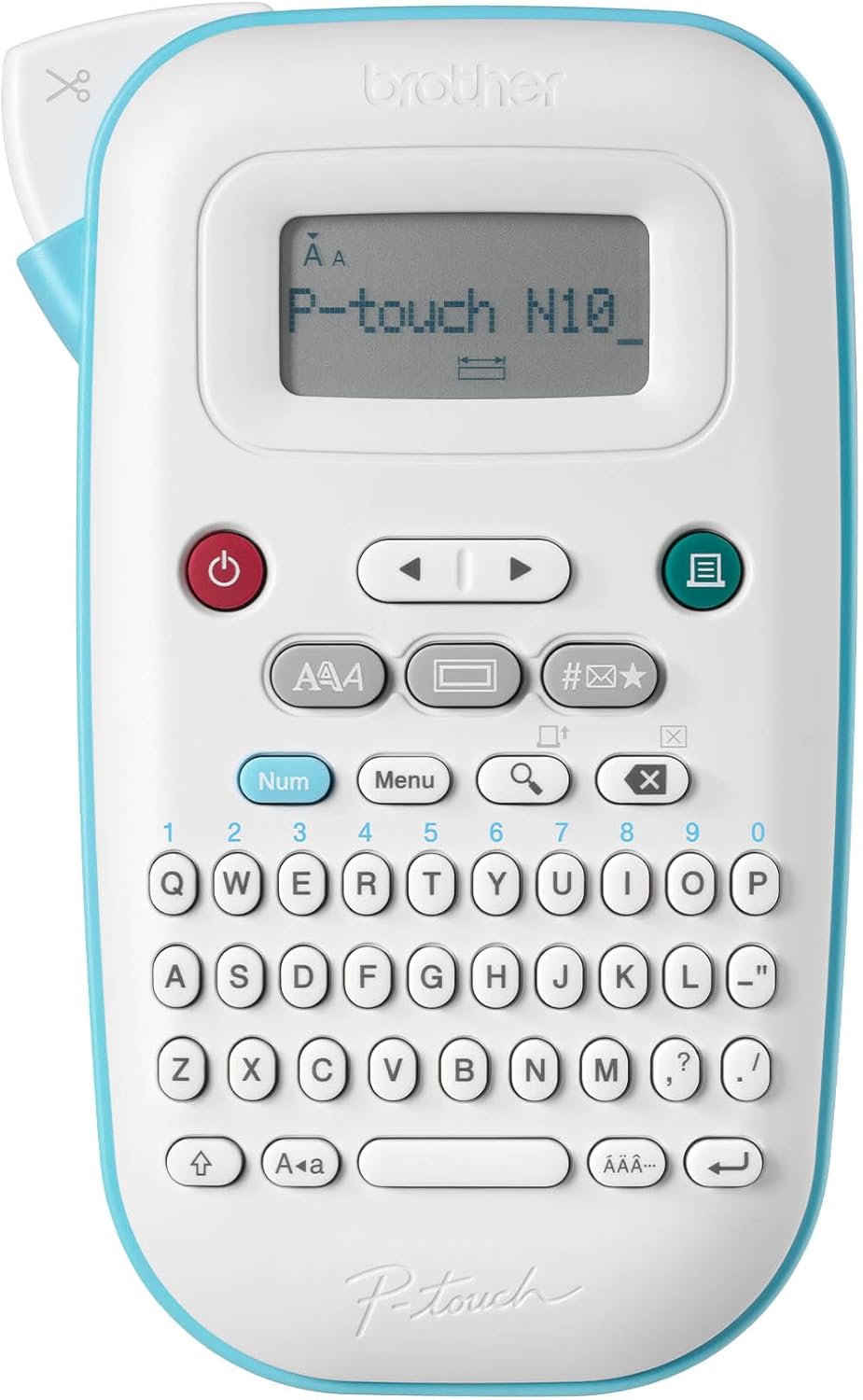
- Built-in keyboard enables quick standalone labels without phone connectivity
- Multiple fonts, styles, frames, and symbols provide flexible customization
- One-touch formatting keys simplify common household label creation tasks
- Brother TZe laminated tapes provide durable labels for everyday organization
- Compact portable design works well throughout different household storage areas
The PT-N10 keeps labeling simple, and sometimes that is exactly what you need
The Brother P-touch PT-N10 earns our number six position for Best Label Maker For Home because it takes a straightforward standalone approach to household organization. It combines a built-in keyboard and display, multiple fonts, text styles, frames, symbols, useful templates, one-touch formatting controls, and compatibility with Brother's established P-touch TZe tape system.
The biggest advantage is independence. You do not need a smartphone, Bluetooth connection, app account, or WiFi network just to label a storage box.
Pick up the machine, type the wording, choose the format, and print. For somebody who wants labeling to remain a basic household task rather than another connected-device workflow, that is useful.
The compact format also means the PT-N10 can move around the house. Take it to the kitchen, office, garage, storage room, or children's bedroom rather than bringing every container to one desk.
A physical keyboard is still faster for those little five-minute jobs
The built-in keyboard is where the PT-N10 makes the most sense. Standalone printing is quick and uncomplicated when you only need two or three labels and do not want to reach for another device.
Imagine reorganizing one kitchen drawer. You create separate containers for batteries, clips, spare keys, and small household tools.
That job does not need an elaborate smartphone template. Type four labels directly on the Brother, print them, apply them, and the project is finished.
The same simplicity works in a home office. A drawer labeled "USB Cables" and another labeled "Adapters" can prevent repeated searching later.
Power adapters are especially worth identifying. Small labels prevent frustrating equipment mix-ups when several black chargers and power bricks look almost identical.
A label saying "Router" or "Monitor" can save you from comparing tiny voltage specifications months later. It is a small organizational job with a surprisingly useful payoff.
The PT-N10 also provides formatting choices without requiring a phone screen. Different fonts, styles, frames, and symbols let you change how information appears depending on the container.
For normal household organization, keep formatting restrained. A clean label with readable text is usually better than filling every available space with decorative elements.
Readability matters more than decoration, especially when labels are viewed quickly from a cupboard or storage shelf. The purpose is identification.
Brother also includes templates and shortcut functions to reduce the amount of setup required. This is useful when you want a polished label but do not want to manually configure every individual element.
Templates can work particularly well for repeated categories. Use a consistent style across filing folders or storage containers so the whole system is easier to scan.
Consistency matters more than people expect. If every label has a different font, size, border, and position, the storage area can still look disorganized.
A repeated label format creates visual order without requiring complicated design work. Choose one approach for the pantry, another for the office if needed, then keep each area consistent.
The PT-N10 is particularly useful for document organization. File boxes, tax records, warranties, manuals, receipts, school records, and household paperwork become easier to retrieve when the labels are specific.
A box labeled "Documents" does not help much. "Appliance Manuals" or "2026 Tax Records" tells you immediately whether you have found the right one.
Why the Brother PT-N10 lands in sixth place
Brother's TZe tape ecosystem is one of the strongest reasons to consider this machine. Laminated TZe labels are designed for durability and are available in a variety of combinations depending on the tape type you choose.
This makes the PT-N10 useful beyond paper folders. Labels can be applied to many smooth household storage surfaces where a tougher laminated tape is preferable.
Always choose the tape according to the actual environment. Different surfaces, temperatures, moisture levels, and handling conditions can affect which label material makes sense.
Surface preparation matters as well. A durable label cannot compensate completely for being applied over grease, dust, or moisture.
Clean the surface first and let it dry. Clean surfaces help adhesive labels last longer, particularly on plastic storage bins, glass containers, and frequently handled household items.
Kitchens deserve particular attention because cooking residue can leave a thin film on containers. A label placed over that film may start lifting much sooner than expected.
Garages have the opposite problem. Dust can settle heavily on storage boxes and tool organizers.
Wipe the intended label area before application. That extra thirty seconds can make a significant difference.
The PT-N10 is useful for pantry organization too, although app-based competitors can make large matching label sets easier to design. The Brother favors quick individual labels rather than sophisticated batch design.
If you need twenty identical pantry labels with carefully matched spacing and decorative graphics, editing on a smartphone can be easier. A larger screen gives you a better view of the finished layout.
If you need one label saying "Coffee," the Brother approach is faster. There is no app workflow standing between you and the printed result.
This distinction is important in our ranking. The SUPVAN models above offer more modern app-based customization, while the DYMO LetraTag provides a similarly simple handheld experience.
The PT-N10 sits lower because it offers fewer advanced connected features than several competing models. There is no need to treat that as a defect, though.
Some users actively do not want another app. For them, the absence of smartphone dependence is an advantage.
The machine also works well in children's rooms. Label toy bins, drawers, craft supplies, school materials, and shelves with clear category names.
Use words that describe where items belong. "Building Blocks" is more useful than "Toys" if there are six different toy bins beside it.
Specific categories make cleanup easier because children and adults do not need to guess which container is intended for each item.
Craft rooms benefit from the same principle. Label drawers as "Beads," "Thread," "Paint Brushes," "Ribbon," or whatever is actually inside.
A wall of numbered drawers may look neat but requires another index to understand. Direct labels are faster to use.
The PT-N10 can also organize household maintenance supplies. Label spare filters, hardware containers, electrical accessories, batteries, and replacement parts.
For seasonal storage, include enough detail to avoid opening several boxes. Detailed storage labels save time later, especially when items remain untouched for most of the year.
"Christmas Outdoor Lights" is more useful than simply "Christmas." "Winter Gloves and Scarves" is better than "Winter."
The goal is to make future retrieval easy. Think about what information you will need six months from now rather than what seems obvious while packing the box today.
The compact design helps with these room-to-room jobs. Store the PT-N10 together with spare tape so the whole labeling system is ready when needed.
Keeping supplies together sounds basic, but it matters. A label maker gets used much less often when the machine is in one drawer and replacement tapes are somewhere else.
Create one small labeling kit containing the printer and your most frequently used tapes. Then carry the entire kit to whichever room needs organizing.
Label width should also match the object. Large storage bins benefit from bigger, easier-to-read labels, while narrow drawers may require shorter wording.
Do not shrink the text excessively just to fit a long sentence. Rewrite the label instead.
"Camera Gear" is easier to read than a tiny label saying "Photography Equipment and Accessories." Both communicate roughly the same storage category.
Short wording keeps labels readable, especially when containers are stored above or below eye level.
Placement should remain consistent across similar items. Put pantry labels at approximately the same height and orientation on every container.
For storage boxes, place the label on the side that will remain visible when boxes are stacked. A label hidden against the wall has little practical value.
For cables and adapters, keep identification near the connector where it can be seen without tracing the entire cable. Just make sure the selected tape and application method are suitable for that surface.
The Brother's established consumable ecosystem is another positive. Replacement tape availability matters long term because a label maker is only useful if compatible supplies remain reasonably easy to purchase.
Before choosing any model, compare the cost of the tape you expect to use most. A cheap machine can become expensive if every organization project consumes costly proprietary material.
Avoid wasting tape with unnecessary test prints. Preview the text and formatting carefully before printing a large batch.
If the machine offers a preview function for your selected setup, use it. Small mistakes repeated across twenty labels can consume a surprising amount of material.
The PT-N10 ranks sixth because our higher-ranked models provide broader versatility. The SUPVAN G15M adds heat shrink tube capability, which makes it much more useful for cable and electronics organization.
The SUPVAN E11 combines a physical keyboard with Bluetooth app editing. That hybrid workflow provides more flexibility than the Brother's primarily standalone approach.
The T50M models also emphasize smartphone customization and waterproof label options for kitchens and bathrooms. Those features give them additional use cases around a modern home.
But the PT-N10 remains attractive precisely because it avoids complexity. It is a dedicated household labeling tool rather than a smartphone accessory.
That can make it especially appealing for families. Anyone can pick it up and create a straightforward label without installing software on their personal device.
Simple standalone operation remains genuinely useful, even when more technically advanced alternatives exist.
We therefore give the Brother P-touch PT-N10 our number six rank out of seven. Its built-in keyboard, straightforward display, fonts, styles, frames, symbols, one-touch formatting, useful templates, compact portable design, and compatibility with durable Brother TZe laminated tapes make it a dependable household organization tool.
For someone searching for the Best Label Maker For Home and wanting a traditional standalone machine for storage bins, office files, pantry containers, children's supplies, craft drawers, cables, and household organization without relying on a smartphone, the PT-N10 remains a positive sixth-place choice. Keep spare tape nearby, clean surfaces before application, use specific wording, and keep label formats consistent so the machine becomes part of an organization system rather than something used once and forgotten.

- Bluetooth app provides extensive customization for household organization labels
- Waterproof label options suit kitchens, bathrooms, and storage containers
- Inkless thermal printing removes ongoing ink and toner expenses
- Compact rechargeable body makes room-to-room labeling projects much easier
- App templates, icons, and fonts support personalized organization systems
The E10 keeps home labeling compact and simple, but it depends heavily on your phone
The SUPVAN E10 earns our number seven position for Best Label Maker For Home because it delivers the essential features of a modern mini label printer in an extremely compact format. It combines Bluetooth smartphone label creation, inkless thermal printing, rechargeable portability, waterproof label options, and an app with fonts, icons, frames, and templates for organizing containers throughout the home.
The E10 is designed more like a tiny wireless printer than a traditional handheld label maker. There is no large physical keyboard taking up space on the front, so the machine itself can remain small enough to fit easily into a drawer or organization box.
Your smartphone handles most of the actual label design. That is convenient if you already prefer typing and editing on a touchscreen, but it is also the main reason this model sits below some of the more versatile products in our ranking.
For straightforward household organization, though, the basic idea works well. Connect the phone, design the label, print it, and move on to the next container.
The app is particularly useful when you want twenty labels to actually match
The E10 connects through Bluetooth and uses SUPVAN's mobile app for editing. App based design makes consistent labeling easier, especially when an entire pantry, craft room, office cabinet, or storage closet needs to be organized at once.
Imagine a pantry with clear containers for flour, sugar, rice, pasta, oats, coffee, tea, lentils, cereal, and baking ingredients. Creating every label separately without a consistent format can make the finished shelves look uneven.
Instead, create one simple template. Keep the font, text size, alignment, and border consistent, then change only the ingredient name.
The result is easier to scan because the labels follow the same visual structure. Future containers can use the same saved style.
The app also gives you access to decorative elements and icons. Icons can help identify household categories, particularly in children's rooms or shared family storage.
A toy bin can have both a simple image and text. Younger children get the visual clue, while adults still have a clear written category.
Do not overdo the design options. A label with several fonts, multiple icons, a border, and tiny text can become harder to understand than a plain label.
Household organization benefits from repetition. Pick one clean style for a room and keep using it.
The thermal printing system is another practical advantage. Thermal printing requires no conventional ink, which is useful for a machine that may sit unused for several weeks between organization projects.
There is no ink cartridge waiting to dry out. The printing process instead relies on compatible thermal label material.
That does not mean the printer has no ongoing costs. Label rolls are consumables, and their price matters if you intend to label hundreds of items.
Before choosing any label maker, check replacement label availability. A low-cost machine is less attractive if the label sizes you need become difficult or expensive to obtain.
Keep one spare roll of your most frequently used material. Spare labels prevent unfinished organization projects, particularly when you are labeling an entire kitchen or storage room in one session.
The compact body makes the E10 particularly convenient for those large projects. You do not need to bring thirty containers to an office desk where the printer is installed.
Take the printer into the room instead. Print each label as the container reaches its final storage position.
This also reduces mistakes. If the organization plan changes halfway through, you can change the labels immediately rather than throwing away a stack that was printed in advance.
Why the SUPVAN E10 takes seventh place in our ranking
The waterproof label options make the E10 more suitable for kitchens and bathrooms than a paper-only labeling system. Moisture resistant labels handle household conditions better when containers are wiped down regularly or stored around sinks.
Waterproof does not mean application technique stops mattering. Adhesive still needs a clean surface.
Kitchen containers can collect a thin layer of grease even when they do not look particularly dirty. Applying a label directly over that residue can reduce adhesion.
Clean the surface first and let it dry completely. Press the label down evenly, especially around the edges.
Bathrooms create a different problem. Humidity and condensation challenge adhesive labels, so apply labels when the surface is clean and dry rather than immediately after a shower.
The same preparation matters in a garage. Plastic storage bins often have enough dust on them to prevent good adhesive contact.
Wipe the intended area before applying the label. It takes very little time and gives the adhesive a much better surface.
The E10 can work well for pantry organization because its labels can identify ingredients clearly. Use short wording and a readable font size.
"Bread Flour" is useful. Long descriptions usually make labels worse because the text has to become smaller to fit.
For storage boxes, avoid vague categories such as "Misc" or "Stuff." Those words technically identify the box but provide almost no useful information.
"Camera Accessories" is better. "USB Cables" is better.
Good organization labels answer one simple question: is the thing I am looking for inside this container?
The home office gives the E10 plenty of other uses. Label file boxes, charging cables, power adapters, storage drawers, external drives, notebooks, and equipment cases.
Identifying similar electronics prevents confusion later. Two identical external drives may contain completely different backups, while several black power adapters can look almost interchangeable.
A small "Photos Backup" label on one drive and "Work Archive" on another removes that uncertainty. Labeling a power adapter with the device name can prevent accidental mix-ups months later.
Network cables can also be identified. If several Ethernet cables run from a router or switch, label both ends where practical.
That makes troubleshooting much easier. Instead of tracing a cable behind furniture or through a wall, the identification is already there.
This is where the E10 starts losing ground to our number one SUPVAN G15M. The G15M supports heat shrink tubing, giving it a more specialized cable-labeling solution.
The E10 is better understood as a general adhesive label printer. It can label cables, but cable work is not its most distinctive capability.
The rechargeable design is useful for household portability. You do not need a permanent power connection just to print labels in another room.
Charge it before a large project. A wireless label printer becomes considerably less convenient when the battery dies after the first few storage boxes.
Store the charging cable with the printer and keep compatible label rolls in the same place. One small organization box can hold the entire labeling system.
That sounds obvious, but household tools often become inconvenient because their accessories gradually get separated. The printer ends up in an office drawer while the charging cable is somewhere else entirely.
The app dependency is the biggest compromise compared with standalone machines. The E10 does not offer the immediate physical keyboard experience of the DYMO LetraTag or Brother P-touch models in our list.
For one quick label, a standalone keyboard can be faster. Pick up the machine, type "Batteries," print, and finish.
With the E10, the smartphone is part of the workflow. That gives you a better editing screen but also adds another device to the process.
Some households will prefer that. Typing on a phone is familiar, and the larger screen makes templates and graphical elements easier to manage.
Other users may not want to connect their phone every time somebody needs a label. This matters particularly in a family where several people share the machine.
The SUPVAN E11 ranked above it addresses this problem more effectively because it combines app features with a physical keyboard. You can choose the interface according to the job.
The T50M models also provide a stronger proposition for wider household labels and container-focused organization. The E10 is the simpler compact option, which explains its lower position.
Still, simple can be useful. If you mainly need labels for pantry jars, drawers, school supplies, office containers, and storage bins, you may not need the additional hardware.
Craft rooms are another good fit. Label small drawers containing beads, thread, paper supplies, paint accessories, fasteners, or tools.
Use direct category names rather than numbers. Specific wording makes storage easier to navigate without keeping a separate reference sheet.
Children's rooms can benefit from the app's icons. Combine an image with a short word to make toy and supply categories easy to recognize.
The labeling system should support cleanup. If every toy has an obvious destination, putting things away requires fewer decisions.
Closets can use labels for seasonal clothing, bedding, travel accessories, and spare household items. Place the labels where they remain visible when containers are stacked.
A beautifully printed label on the hidden side of a box does not help. Label placement should match storage orientation.
For shelves above eye level, use larger text. The label needs to remain readable from the normal viewing position rather than only when the container is removed.
For small drawers, shorten the wording instead of shrinking the font excessively. "Sewing Tools" is easier to scan than a tiny line of detailed text.
Another common mistake is labeling before the organization system is finished. You may print "Phone Chargers" and then discover that the same drawer also needs to contain tablet and watch chargers.
Organize first, then label. Final categories should determine the wording, not the other way around.
This reduces wasted labels and prevents categories from becoming inaccurate immediately. It also makes the finished system more useful months later.
The E10's seventh-place ranking therefore reflects versatility rather than poor basic performance. Every model above it offers something extra, whether that is heat shrink printing, a physical keyboard, wider label capability, or a more flexible hybrid workflow.
The E10 remains appealing because it strips the idea back down to a compact Bluetooth thermal printer. There is less hardware to store, and smartphone editing provides plenty of customization for normal household use.
Its strongest advantage is straightforward portability. Keep it charged in a drawer and take it wherever the next organization project happens.
We therefore give the SUPVAN E10 our number seven rank out of seven. Its Bluetooth app control, inkless thermal printing, rechargeable compact design, waterproof label options, customizable templates, icons, fonts, and portable form create a useful entry-level system for everyday household labeling.
For someone searching for the Best Label Maker For Home and mainly wanting a small app-controlled printer for pantry jars, drawers, office supplies, children's storage, craft materials, cables, and general household containers, the SUPVAN E10 remains a positive seventh-place choice. Keep the printer and supplies together, clean surfaces before applying labels, use short readable wording, and save consistent templates so even a simple mini label maker can create a much easier home organization system.