


- Adjustable viewing angles for comfortable visitor check-in interactions
- Strong aluminum body designed for high traffic environments
- Compatible with most tablets between 7 and 13 inches
- Secure mounting system suitable for reception desks
- Clean cable management for professional kiosk installations

A kiosk tablet stand that actually feels built for real businesses
Walk into any modern office lobby, coworking space, or clinic and you will likely see a tablet sitting on the front desk for visitor registration. The problem is that many setups look improvised. Tablets lean against cheap stands or sit flat on the counter which creates an awkward check in experience.
The Bouncepad Eddy solves that problem by turning a tablet into a proper reception kiosk. It is built from aluminum and designed specifically for tablet based check in systems. For businesses searching for the Best Kiosk Tablet Stands for Visitor Check-In, this model stands out immediately.
The stand supports tablets from 7 inches up to 13 inches. That includes common devices like iPads, Android tablets, and other business tablets used for visitor management systems. This wide compatibility means companies can reuse existing devices instead of buying new hardware.
The design focuses on stability and professional presentation
One thing that separates a real kiosk stand from a generic tablet holder is stability. Visitor check in stations experience constant use throughout the day. People tap the screen, rotate the tablet, or lean on the counter while signing in.
The Eddy stand addresses that with a solid aluminum construction. The weight and structure keep the device stable even when used frequently. This matters because a shaky tablet kiosk immediately makes the system feel unreliable.
Another practical detail is the adjustable viewing angle. A receptionist might use the tablet in the morning, while guests interact with it during check in. A tablet kiosk stand designed for shared visitor check in workflows needs to accommodate both perspectives.
Adjustability helps prevent awkward screen angles. Guests can easily read instructions and complete forms without bending down or tilting their head. It sounds simple, but it improves the overall check in experience significantly.
The stand also keeps the device elevated and visible. Instead of blending into the desk surface, the tablet becomes a clear interaction point for visitors entering the building.
Why tablet kiosks are replacing traditional reception processes
Many companies are replacing manual visitor logs with digital check in systems. Paper sign in sheets create privacy concerns because previous entries remain visible. Digital visitor management software solves this by storing check in records securely.
A proper kiosk setup also speeds up the process. Visitors enter their name, reason for visit, and host contact within seconds. The system automatically notifies the employee that their guest has arrived.
This is where a professional tablet stand for visitor check in systems becomes important. The hardware must remain stable, accessible, and visually clear for guests approaching the reception desk.
The Bouncepad Eddy helps create that experience. The aluminum construction gives it the appearance of permanent office equipment rather than a temporary gadget. Many companies want their reception area to reflect professionalism and organization.
Clean cable routing is another practical feature. Messy charging cables hanging from the tablet can quickly make a kiosk look unprofessional. A proper stand keeps the workspace tidy.
Why this product earns the number one ranking
Among the Best Kiosk Tablet Stands for Visitor Check-In, the Bouncepad Eddy earns the top position for several reasons. It balances simplicity, durability, and professional design better than most alternatives. The stand focuses on doing one job well without unnecessary complexity.
The compatibility with tablets from 7 to 13 inches also gives businesses flexibility. Organizations can deploy the stand with existing tablets or upgrade later without replacing the hardware.
Its aluminum construction and adjustable angle design make it suitable for real business environments where devices receive constant daily use. That reliability matters for reception desks that process dozens or hundreds of visitors.
The result is a kiosk stand that feels purpose built for modern offices. Instead of improvising with generic tablet holders, companies get a dedicated reception solution.
For organizations implementing digital visitor systems, this combination of stability, compatibility, and clean presentation is exactly why the Bouncepad Eddy earns its rank as the top choice.

- Adjustable tilt angles improve usability for visitor check in
- Strong aluminum construction built for business environments
- Compatible with tablets between 7 and 13 inches
- Weighted base provides stability on busy reception desks
- Clean cable routing keeps kiosk installations organized
A polished tablet kiosk stand that keeps reception desks organized
Businesses implementing digital check in systems quickly realize that hardware presentation matters. A tablet simply lying flat on the reception desk often creates confusion for visitors. People hesitate because they are unsure whether the tablet is meant for them to use.
The Bouncepad Eddy desktop kiosk stand fixes that immediately. The tablet is elevated, angled toward the visitor, and clearly positioned as a self service check in device. For companies searching for the Best Kiosk Tablet Stands for Visitor Check-In, this model offers a very clean and reliable solution.
It supports tablets between 7 and 13 inches, which covers most modern iPads and Android tablets used in visitor management systems. That flexibility is useful because companies rarely want to buy new hardware just to deploy a check in kiosk. The stand adapts easily to devices they already own.
The adjustable viewing angle improves real world check in workflows
Reception desks serve different users throughout the day. Employees may adjust the tablet while configuring visitor software in the morning. Guests then interact with the same device when signing in.
This is why adjustability matters. The Bouncepad Eddy includes a tilting mechanism that allows the screen to be angled toward the user. A tablet kiosk stand designed for visitor check in interaction needs to accommodate both staff and guests comfortably.
When the screen sits at a natural viewing angle, visitors can easily read instructions and fill out forms. This small improvement reduces hesitation during the check in process. In busy environments like clinics or coworking spaces, smoother interaction speeds up reception workflows.
Another practical detail is the weighted base. High traffic reception areas see constant tapping and interaction with the screen. A lightweight tablet stand can slide around the desk, which creates a frustrating user experience.
The Eddy’s aluminum construction adds enough weight to keep the device stable. Visitors can tap and sign forms without the stand shifting or wobbling.
Why dedicated tablet stands improve digital reception systems
Digital visitor management systems are now common in offices, hotels, and healthcare facilities. Instead of writing names on paper logs, guests check in digitally using tablets. The software automatically records visitor data and notifies employees.
However the physical setup around the tablet determines whether the system feels intuitive. If the device is poorly positioned, guests may not notice it or feel unsure about interacting with it. A professional tablet stand for reception desk kiosks solves this problem immediately.
The stand visually signals that the tablet is meant for interaction. Visitors approaching the reception desk naturally reach for it because it is clearly presented as the check in station. This improves adoption of the system.
Cable management also plays a role in maintaining a professional look. Charging cables hanging loosely from a tablet can make a reception desk appear cluttered. The Bouncepad Eddy keeps the setup neat and organized.
Clean installations help businesses maintain a professional appearance for guests entering the building.
Why this kiosk stand ranks second in the list
The Bouncepad Eddy earns a strong position among the Best Kiosk Tablet Stands for Visitor Check-In because of its durable construction and simple design. The aluminum body and adjustable viewing angles make it reliable for everyday use in reception areas.
It ranks second mainly because the higher ranked version offers slightly more mounting flexibility and kiosk configuration options. Some businesses may prefer those extra installation choices depending on their reception layout.
Even with that minor difference, this version remains an excellent kiosk stand. It provides stability, compatibility with common tablets, and a polished appearance that suits professional environments.
Companies implementing visitor check in software need hardware that works reliably every day. The Bouncepad Eddy delivers that reliability without unnecessary complexity.
For offices, clinics, coworking spaces, and hotels building a tablet based reception system, this stand remains one of the most dependable options available.

- Anti theft locking enclosure protects tablets in public areas
- Adjustable viewing angle for visitor self service interaction
- Compatible with most tablets between 7 and 13 inches
- Stable countertop base suitable for reception desks
- Integrated cable routing for clean kiosk installations
A kiosk tablet stand that focuses on security and public use
Many companies installing tablet based reception systems quickly encounter a practical issue. Tablets placed on the front desk are accessible to visitors, contractors, and delivery drivers throughout the day. Without protection the device can easily be removed or tampered with.
The CTA Digital PAD ASK countertop tablet stand addresses that exact concern. It combines a tablet mount with a lockable enclosure designed for public environments. For organizations researching the Best Kiosk Tablet Stands for Visitor Check-In, security often becomes a deciding factor.
This model works with tablets between 7 inches and 13 inches. That range includes most iPads and Android tablets used in visitor management software. Businesses can deploy the stand without needing a specific tablet model.
The anti theft enclosure makes sense for busy reception areas
Visitor check in kiosks often sit in locations that employees cannot monitor every second. Reception desks may be temporarily unattended. Delivery drivers or guests may interact with the device without staff supervision.
This is where a locking enclosure becomes useful. The tablet sits inside a protective housing secured with a lock. A tablet kiosk stand with integrated anti theft protection prevents casual removal of the device.
In real world environments this feature reduces risk significantly. Clinics, coworking spaces, and offices may see dozens of guests each day. Even if theft is unlikely, protecting business equipment is still important.
The stand also provides a stable base that keeps the tablet positioned correctly for users. Visitors can tap, scroll, and sign digital forms without the stand sliding across the desk. Stability improves the overall experience during check in.
Another practical detail is cable routing. Tablets used for reception kiosks remain plugged into power most of the time. Organized cable management helps maintain a clean desk setup.
Why kiosk tablet stands improve visitor check in systems
Many offices now use digital visitor management platforms instead of paper sign in sheets. Guests enter their name, host, and reason for visiting directly on a tablet. The system automatically notifies the employee that their guest has arrived.
However the effectiveness of these systems depends on how the tablet is presented. If the device is lying flat on a desk, visitors often hesitate to use it. A proper stand clearly signals that the tablet is part of the check in process.
This is why a professional tablet kiosk stand for reception desks plays an important role. The device becomes visible, accessible, and easy to interact with.
Security also becomes more important as businesses adopt digital kiosks. Tablets are valuable devices, especially newer models used in corporate environments. Lockable stands protect that investment.
For offices with frequent guest traffic, combining visibility and protection makes the kiosk system much more reliable.
Why this tablet stand ranks third in the list
The CTA Digital PAD ASK earns a high ranking because of its built in security features. The locking enclosure adds an extra layer of protection that many businesses appreciate when installing public kiosks.
It ranks third mainly because some higher ranked stands offer a more refined design or smoother adjustability. Those models may provide a slightly more polished appearance for premium reception spaces.
Even so this stand performs very well where security matters most. Its sturdy construction and anti theft housing make it practical for busy environments where devices remain accessible to visitors.
Businesses that prioritize equipment protection often prefer this type of kiosk mount. The combination of compatibility, stability, and security provides a dependable check in station.
For organizations exploring the Best Kiosk Tablet Stands for Visitor Check-In, the CTA Digital PAD ASK remains a strong option that balances usability with essential security features.

- Lockable anti theft enclosure protects tablets in public kiosks
- Compatible with most tablets between 7 and 13 inches
- Stable countertop base designed for reception desks
- Adjustable viewing angle improves visitor interaction
- Integrated cable management keeps kiosk installations tidy
A kiosk stand built for public reception desks
Tablet based visitor systems have become common in offices, coworking spaces, and clinics. Instead of paper sign in sheets, guests now check in using a tablet mounted at the reception desk. The quality of that mount matters more than most businesses expect.
The CTA Digital PAD ASK Universal Tablet Kiosk Stand focuses on exactly that use case. It combines a countertop stand with a protective enclosure designed for public environments. For companies researching the Best Kiosk Tablet Stands for Visitor Check-In, that combination immediately solves several real world problems.
This stand supports tablets between roughly 7 and 13 inches, covering most iPads and Android devices used in visitor management software. The universal compatibility means organizations can reuse tablets they already own. That helps keep hardware costs lower when deploying digital reception systems.
The anti theft enclosure protects tablets in busy environments
Reception kiosks are usually placed in areas accessible to visitors throughout the day. Delivery drivers, clients, and contractors all interact with the device. That level of access makes equipment protection an important consideration.
The PAD ASK stand includes a lockable enclosure that holds the tablet securely in place. A tablet kiosk stand with anti theft locking protection prevents casual removal or tampering. For businesses placing tablets in public areas, this feature becomes essential.
In practice this means staff do not need to constantly supervise the device. The tablet stays secured while visitors sign in or fill out digital forms. Even in busy lobbies the kiosk remains stable and protected.
The stand also features a sturdy base designed for countertop placement. Visitors can tap, scroll, and interact with the screen without the stand sliding across the desk. Stability improves the user experience during check in.
Cable management also plays an important role. Tablets used for reception kiosks usually remain connected to power all day. Integrated cable routing keeps charging cables organized and prevents the reception desk from looking cluttered.
Why proper tablet stands improve visitor check in systems
Digital visitor management systems are designed to simplify reception workflows. Guests enter their information on a tablet and the system automatically records the visit. Many platforms also send notifications to employees when their visitor arrives.
However the physical presentation of the tablet determines whether guests feel comfortable using it. If the device is lying flat on a desk, visitors may hesitate or assume it belongs to the receptionist. A professional tablet kiosk stand for visitor check in removes that uncertainty.
Elevating the tablet signals clearly that it is meant for guest interaction. Visitors approaching the reception desk immediately recognize the device as the check in station. That improves the flow of traffic in busy offices.
Security features also become important when tablets remain accessible to the public. Lockable mounts reduce the risk of theft and help protect company equipment. This is especially useful in coworking spaces, hotels, or healthcare facilities where visitor traffic is constant.
Combining visibility, security, and stability creates a much smoother digital reception experience.
Why this stand ranks fourth in the list
The CTA Digital PAD ASK Universal Tablet Kiosk Stand performs well in several key areas. Its locking enclosure, wide tablet compatibility, and sturdy base make it a reliable choice for reception desks. These qualities help it compete strongly among the Best Kiosk Tablet Stands for Visitor Check-In.
It ranks fourth primarily because some higher ranked models offer more refined design features or smoother adjustability. Certain premium stands also include additional mounting flexibility for different reception layouts.
Even with those differences, this stand remains a dependable option for businesses installing digital visitor kiosks. The protective enclosure and stable base make it particularly useful in environments where security and durability matter.
Many organizations prioritize reliability when deploying reception hardware. The PAD ASK stand delivers exactly that by focusing on protection and everyday usability.
For offices implementing tablet based visitor management systems, it remains a practical and trustworthy solution that keeps reception desks organized and secure.
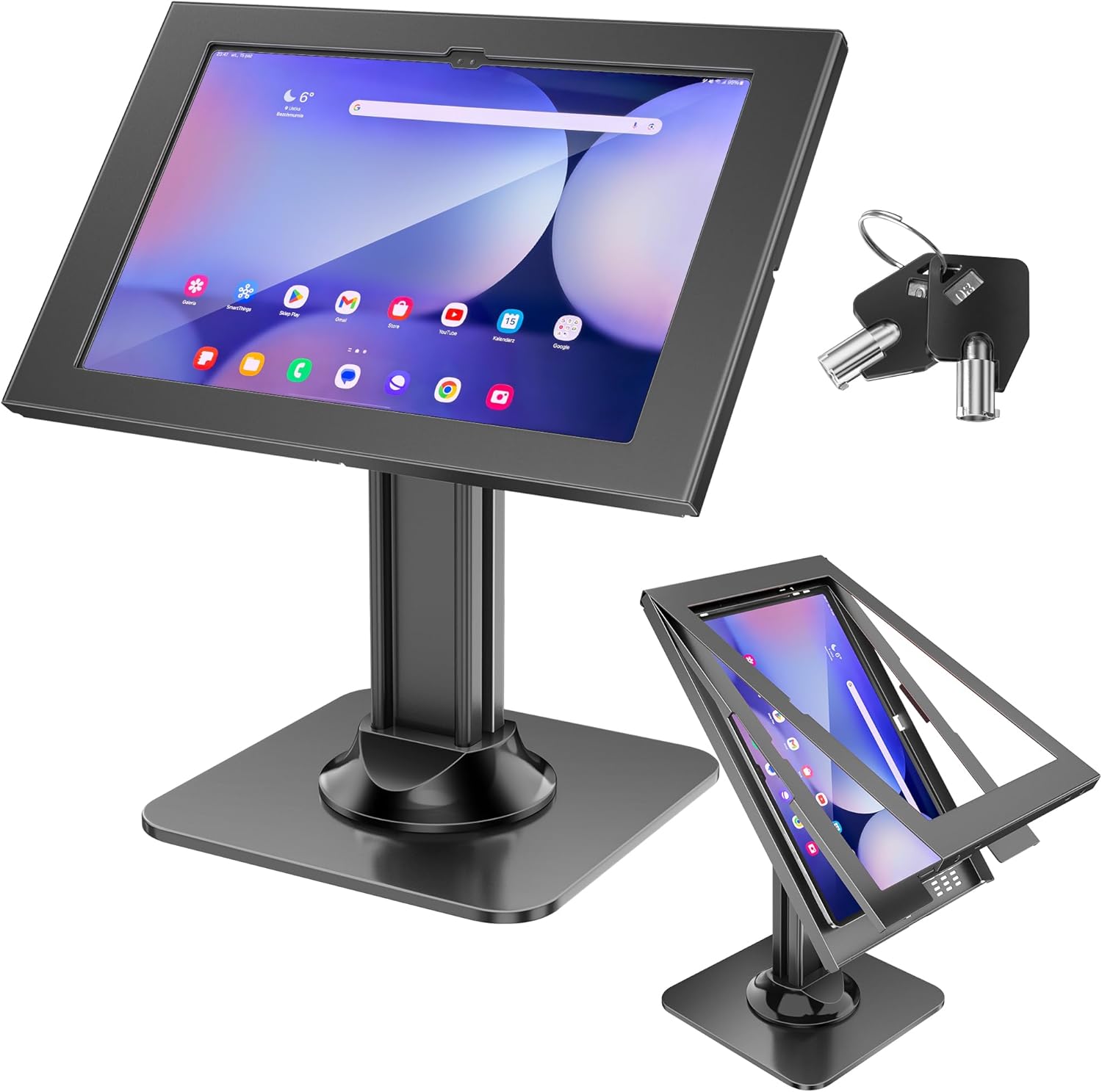
- Lockable enclosure protects tablets in public reception areas
- Heavy duty aluminum stand designed for business environments
- Compatible with most tablets between 7 and 13 inches
- Adjustable viewing angle for comfortable visitor interaction
- Stable countertop base suitable for busy reception desks
A kiosk tablet stand that focuses on durability and security
Businesses installing digital reception kiosks often face the same challenge. Tablets are valuable devices and they sit in public areas where visitors interact with them throughout the day. A simple tablet holder rarely provides the protection or stability needed for a professional visitor check in station.
The AboveTEK TitanLock tablet kiosk stand is designed specifically for that scenario. It combines a sturdy aluminum stand with a lockable enclosure that secures the tablet in place. For organizations researching the Best Kiosk Tablet Stands for Visitor Check-In, this type of security focused design becomes extremely useful.
The stand supports tablets between roughly 7 and 13 inches. That range covers most iPads and Android tablets commonly used with visitor management software. Businesses can deploy the stand using existing hardware instead of investing in new devices.
The anti theft enclosure solves a real problem for public kiosks
Reception kiosks are typically placed in areas where employees cannot monitor them constantly. Guests walk up to the desk, interact with the screen, and leave again. That constant interaction increases the risk of accidental damage or even theft.
The TitanLock stand includes a lockable enclosure that secures the tablet inside the mount. A tablet kiosk stand with integrated anti theft protection prevents the device from being removed easily. This added layer of protection gives businesses confidence when placing tablets in public areas.
In real office environments this matters more than expected. A busy coworking space or medical office may see dozens of visitors every day. Even if theft is unlikely, protecting equipment still reduces operational risk.
The enclosure also prevents visitors from tampering with buttons or ports on the tablet. That helps maintain a consistent kiosk experience for every guest. When the device remains securely mounted, the check in process stays smooth.
The stand itself is made from aluminum which adds durability and weight. Visitors can tap the screen, scroll through forms, and interact with the kiosk without the stand sliding around the desk.
Why tablet kiosk stands improve digital visitor management
Many businesses are replacing traditional paper visitor logs with digital systems. Instead of signing a clipboard, guests check in using a tablet. The system records their details and automatically alerts the employee they are visiting.
However the success of this setup depends on how the tablet is presented. A device placed flat on the desk can confuse visitors. A professional kiosk tablet stand for reception desks clearly signals that the device is meant for guest interaction.
The angled screen makes instructions easier to read. Visitors can quickly enter their name, company, and meeting host without assistance from reception staff. That speeds up the entire check in process.
Another advantage is presentation. Reception areas often serve as the first impression of a business. A well mounted tablet kiosk looks intentional and organized rather than improvised.
Clean cable routing also contributes to that professional appearance. Tablets used as kiosks typically remain plugged into power all day, and organized cables help maintain a tidy reception desk.
Why this product ranks fifth in the list
The AboveTEK TitanLock tablet kiosk stand performs well in areas that matter for business use. Its lockable enclosure, durable aluminum construction, and universal tablet compatibility make it a dependable choice for reception kiosks. These features help it earn a place among the Best Kiosk Tablet Stands for Visitor Check-In.
It ranks fifth primarily because some higher ranked models offer slightly more refined design or broader mounting flexibility. Certain stands also provide smoother angle adjustments or a more premium visual finish.
Even so the TitanLock stand still delivers strong reliability for everyday use. Its security focused design is particularly useful for environments with frequent guest traffic.
Businesses that prioritize equipment protection often prefer this type of kiosk mount. The locking enclosure provides reassurance that the tablet remains secure throughout the workday.
For organizations implementing visitor management kiosks, the AboveTEK TitanLock remains a practical and trustworthy option that balances durability, security, and everyday usability.

- Lockable anti theft enclosure secures tablets in public environments
- 360 degree rotating base improves guest interaction flexibility
- Heavy duty metal construction designed for commercial kiosks
- Compatible with most tablets between 7 and 13 inches
- Stable weighted base prevents movement during check in
A kiosk tablet stand designed for busy reception desks
Businesses adopting digital visitor check in systems often focus heavily on software. But the physical hardware setup can determine whether the experience feels smooth or awkward for guests. Tablets placed loosely on desks rarely create the professional first impression companies want.
The AboveTEK TitanRotate kiosk stand addresses that issue by turning a tablet into a dedicated check in station. It combines a heavy duty metal base with a lockable enclosure designed for commercial use. For companies researching the Best Kiosk Tablet Stands for Visitor Check-In, this type of purpose built stand can make a noticeable difference.
The stand supports tablets between roughly 7 inches and 13 inches. That range includes most iPads and Android tablets used with visitor management software. Businesses can install the stand without committing to a specific device model.
The rotating base makes guest interaction easier
One practical feature of this stand is the rotating base. Reception staff may occasionally need to interact with the screen while helping a guest complete their check in. A fixed tablet mount can make those moments awkward.
The TitanRotate design allows the screen to swivel smoothly between the receptionist and the visitor. A tablet kiosk stand with 360 degree rotating display makes shared interaction much easier. The device can quickly face whichever direction is needed.
This becomes especially useful in offices where reception staff guide visitors through the sign in process. Instead of walking around the desk or repositioning the tablet manually, the screen rotates toward the guest. That small change improves efficiency during busy check in periods.
The base also includes enough weight to keep the stand stable. Visitors tapping the screen or filling out forms will not cause the kiosk to slide across the desk. Stability is critical for maintaining a professional feel.
Another advantage is the adjustable viewing angle. Tablets used for check in kiosks need to remain readable for people standing in front of the reception desk. Proper screen positioning helps guests complete forms comfortably.
Security features help protect public kiosk devices
Reception tablets often remain accessible to visitors throughout the day. Guests approach the kiosk independently, interact with the screen, and leave again. That constant access means equipment protection should always be considered.
The TitanRotate stand includes a lockable enclosure that holds the tablet securely inside the mount. A secure tablet kiosk stand for visitor check in systems prevents casual removal of the device. Businesses can leave the kiosk accessible without worrying about the tablet disappearing.
This type of protection becomes particularly useful in coworking spaces, clinics, and retail environments. Locations with steady foot traffic benefit from hardware that stays locked in place. The enclosure also prevents visitors from accessing tablet buttons or ports.
Cable routing is another small but useful feature. Tablets typically remain connected to power when used as reception kiosks. Organized cable routing helps maintain a clean and professional reception desk appearance.
These details contribute to a kiosk system that feels reliable and intentionally designed.
Why this product ranks sixth in the list
The AboveTEK TitanRotate stand performs well in areas that matter for public tablet installations. Its rotating display, lockable enclosure, and durable metal construction make it a practical solution for reception desks. These strengths help it earn a position among the Best Kiosk Tablet Stands for Visitor Check-In.
It ranks sixth mainly because some higher ranked stands offer slightly more refined aesthetics or simpler mounting systems. In premium office environments, design and installation flexibility can influence the final choice.
Even so the TitanRotate stand remains a dependable option for businesses deploying visitor kiosks. The rotating functionality adds convenience when staff and guests both interact with the screen.
Organizations that prioritize durability and device security will still find strong value in this stand. Its heavy duty design handles the constant interaction that reception kiosks experience every day.
For companies implementing digital visitor management systems, the TitanRotate stand provides a secure and functional setup that keeps the check in process organized and efficient.

- 360 degree rotating base allows easy guest interaction
- Durable aluminum and steel construction for commercial environments
- Compatible with most tablets between 7 and 13 inches
- Adjustable viewing angle improves check in usability
- Stable weighted base designed for reception desks
A simple rotating kiosk stand that helps visitors interact with reception tablets
Businesses adopting digital reception systems quickly discover something practical. Tablets need to be positioned in a way that encourages visitors to interact with them immediately. If the device sits flat on a desk or awkwardly propped up, people hesitate before using it.
The AboveTEK TitanDesk rotating tablet stand focuses on solving that basic issue. It raises the tablet to a visible height and positions the screen toward guests arriving at the reception desk. For organizations searching for the Best Kiosk Tablet Stands for Visitor Check-In, that simple improvement can significantly streamline the visitor flow.
The stand supports tablets between approximately 7 inches and 13 inches. That covers most iPads and Android tablets used with visitor management software. Businesses can deploy the stand without needing a specific device model.
The rotating base makes shared interaction easier
One of the most noticeable features of this stand is the rotating base. Reception staff often assist visitors during the check in process, especially when someone is unfamiliar with the system. A fixed tablet mount makes this interaction awkward.
The TitanDesk design allows the screen to rotate smoothly between the receptionist and the guest. A tablet kiosk stand with smooth 360 degree rotation helps both sides interact with the screen comfortably. Staff can quickly turn the tablet toward themselves and then back to the visitor.
In a busy office environment that flexibility can save time. Instead of reaching across the counter or walking around the desk, the screen simply swivels. Small design choices like this make reception workflows smoother.
The stand also includes an adjustable viewing angle. Visitors approaching the reception desk can read instructions clearly without leaning forward or crouching. Comfortable screen angles improve the usability of visitor check in software.
Another practical detail is the weighted base. Guests tapping the screen repeatedly during the sign in process will not cause the stand to move. Stability keeps the kiosk experience consistent.
Why tablet kiosks are replacing traditional reception logs
Paper visitor logs were once the standard method for recording guests. These systems required visitors to manually write their name, company, and arrival time. Besides being slow, they also exposed previous entries to everyone who walked past the reception desk.
Modern offices now use tablet based visitor management systems instead. Guests check in digitally, and the system records the information automatically. A professional kiosk tablet stand for visitor check in systems helps present that technology clearly to visitors.
When a tablet is mounted properly, guests immediately recognize it as the check in station. They can enter their information without waiting for assistance from reception staff. This speeds up entry during busy periods.
Digital check in systems also integrate with employee notifications. When a visitor signs in, the host receives an automatic message or email. The entire process becomes faster and more organized.
A well designed kiosk stand supports that workflow by keeping the tablet accessible and stable for every visitor.
Why this stand ranks seventh in the list
The AboveTEK TitanDesk rotating stand performs well in basic kiosk applications. Its rotating base, adjustable viewing angle, and durable metal construction make it a practical tool for reception desks. These features help it remain competitive among the Best Kiosk Tablet Stands for Visitor Check-In.
It ranks seventh mainly because it lacks certain advanced features found in higher ranked models. Some competing stands include locking enclosures, enhanced cable management, or more refined commercial designs.
Those additional features can matter for organizations that require higher security or a more polished reception aesthetic. In environments where tablet protection is a priority, lockable stands may be preferred.
Even so the TitanDesk stand still performs its primary role reliably. It provides a stable and flexible mount that improves the usability of reception tablets.
For offices that simply need a rotating tablet stand for guest interaction, it remains a dependable option that helps create a clearer and more organized visitor check in station.