- Combines desk cooling, H11 air filtration, and ambient lighting.
- Quiet operation suits focused work, calls, and nighttime use.
- Multiple airflow settings provide precise control over personal cooling.
- H11 filter helps capture airborne particles around your workspace.
- Adjustable RGB lighting adds useful ambient illumination around desks.
This is more than a quiet fan sitting beside your monitor
The JISULIFE Table Fan Pro3 takes our number one position in the best desk fan quiet comparison because it combines three functions that actually make sense around a personal workspace. You get desktop airflow, an H11 air purifier, and adjustable RGB lighting in one relatively compact unit rather than putting three separate devices around the desk.
The quiet operation is the part that matters most for this ranking. A desk fan sits much closer to you than a pedestal or room fan, so even a moderate motor hum can become distracting during concentrated work, online meetings, reading, or studying.
That is why low-noise airflow matters at a desk. You want enough air movement to feel cooler without replacing the sound of a warm room with the constant mechanical noise of a fan sitting two feet from your keyboard.
The Pro3 gives you multiple airflow settings, which is important because maximum speed is rarely necessary all day. A lower setting can provide a gentle stream of air while producing less noise, then the fan can be increased when the room becomes warmer.
The purifier is actually useful when the fan sits this close to you
The integrated H11 air filtration gives the Pro3 a different purpose from a conventional desk fan. Instead of only circulating room air, the filtration system is designed to capture airborne particles passing through the purifier section.
That can be useful in a small personal workspace where dust tends to collect around monitors, keyboards, books, and shelves. The purifier is positioned close to the person using the desk, so it works as a localized air-cleaning feature rather than pretending to replace a large whole-room purifier.
That distinction is important. This is still a compact desktop purifier, and the amount of room air it can process should not be confused with a much larger purifier designed around a high CADR for an entire living room or office.
For a desk, though, combining airflow and filtration is convenient. Someone working for eight hours does not need to find separate positions and power connections for a fan and another small air-cleaning device.
Filter maintenance matters if you actually want the purifier function to remain useful. As airborne particles accumulate, the filter gradually becomes loaded and airflow through the filtration section can decrease.
Check the filter periodically and replace it according to the manufacturer's guidance and actual operating conditions. A dusty environment may require more frequent attention than a clean bedroom office.
Do not try to solve a dirty filter by simply running the fan faster. Regular filter replacement maintains proper airflow and keeps the purification system operating as intended.
Placement matters too. A common mistake with desk fans is pushing them directly against a wall, stack of books, monitor, or other equipment that restricts the intake.
Give the Pro3 some open space around its air intake and outlet. Restricted airflow can reduce cooling performance and may create additional turbulence and noise, which defeats part of the reason for buying a quiet desk fan.
Direction is just as important as raw fan speed. A moderate stream aimed correctly at your upper body can feel more effective than maximum airflow pointed somewhere above your shoulder.
This matters during long computer sessions. Correct positioning lets you use lower speeds, which generally means less noise while still getting useful personal cooling.
Do not place loose papers immediately in front of the airflow either. A desktop fan can turn receipts, notes, and lightweight documents into an irritating workspace problem even when the airflow itself feels comfortable.
Why we believe the Pro3 deserves the number one position
The RGB light is the third part of the 3-in-1 design. It is not essential to cooling performance, but ambient illumination can be useful around a desk at night when you do not want the main room lighting at full brightness.
The important part is having control over it. During focused daytime work, the lighting can remain subtle or unnecessary, while evening use can benefit from a softer ambient glow around the workstation.
For video calls, keep bright colored lighting away from direct reflections on your face or monitor. Ambient lighting works best when it stays subtle, rather than becoming another visual distraction during work.
The quiet fan design is particularly relevant for microphones. A desktop microphone can pick up fan turbulence and motor noise that sounds much louder to the people on a call than it does to the person sitting in the room.
Keep the fan out of the microphone's direct airflow path. If possible, position it slightly to the side so the air reaches you without blowing directly across the microphone capsule.
This can make a noticeable difference during Teams, Zoom, or other video meetings. Wind noise hitting a microphone can sound rough and distracting even when the fan motor itself is quiet.
The same idea applies to recording. If you make voiceovers, podcasts, lessons, or videos at the desk, use the lowest fan setting that still keeps you comfortable and keep the airflow away from the microphone.
Nighttime use benefits from similar adjustments. Lower fan speeds are usually better for sleep because they provide continuous air movement while minimizing changes in sound level.
A desk fan also works best as a personal cooling device rather than an air conditioner replacement. It moves air across the skin, which can improve evaporative and convective heat loss, but it does not actually lower the room temperature in the way refrigerated air conditioning does.
This is worth understanding on very hot days. If the room itself becomes excessively warm, stronger ventilation or air conditioning may still be required even if the fan feels comfortable at close range.
Cleaning the fan grille is another simple maintenance job that people forget. Dust gradually collects around intake openings and blades, which can restrict airflow and sometimes increase operating noise.
Switch the unit off before cleaning and follow the manufacturer's instructions for accessing washable or serviceable areas. Keeping airflow paths clean improves performance without needing to increase fan speed unnecessarily.
The 3-in-1 design also saves desk space compared with running three individual accessories. That matters around smaller desks where a laptop, monitor, keyboard, speakers, charging station, notebooks, and coffee cup may already occupy most of the available surface.
There is a tradeoff to combining functions, though. If someone only wants the smallest possible fan and has no interest in filtration or lighting, a simpler model can be more compact and potentially less expensive.
The Pro3 makes more sense for someone who will actually use those additional functions. A home-office worker can run gentle airflow during the day, use the filtration system around the workstation, and switch to softer ambient lighting in the evening.
Its feature set is also useful in bedrooms and study spaces. The same device can provide quiet personal airflow while reading, working, gaming, studying, or sleeping without adding several separate pieces of equipment.
So why do we believe the JISULIFE Table Fan Pro3 deserves the number one ranking out of seven? It addresses the core requirement of a quiet desk fan while adding practical features that remain relevant to the same immediate workspace.
The multiple airflow settings let users balance cooling against noise instead of running the fan at maximum speed all the time. The H11 filtration adds localized particle capture, while the integrated lighting provides another function without requiring more equipment on the desk.
There are simpler fans if all you need is inexpensive airflow. But for a home office, bedroom desk, study area, or workstation where quiet personal cooling is the priority, the Pro3 provides a more complete package.
That combination of low-noise operation, controllable airflow, H11 filtration, compact placement, and integrated ambient lighting is why it takes our top position. Use an appropriate speed, leave the intake unobstructed, maintain the filter, and position it away from microphones, and the Pro3 becomes a particularly practical fan for long hours at a desk.
- Quiet operation makes it suitable for focused desk work.
- Powerful air circulation reaches farther than typical personal fans.
- Oscillating airflow distributes cooling across a wider working area.
- Multiple speed settings provide better control over noise and airflow.
- Compact portable design fits desks, bedrooms, and home offices.
This feels more like an air circulator than a tiny personal fan
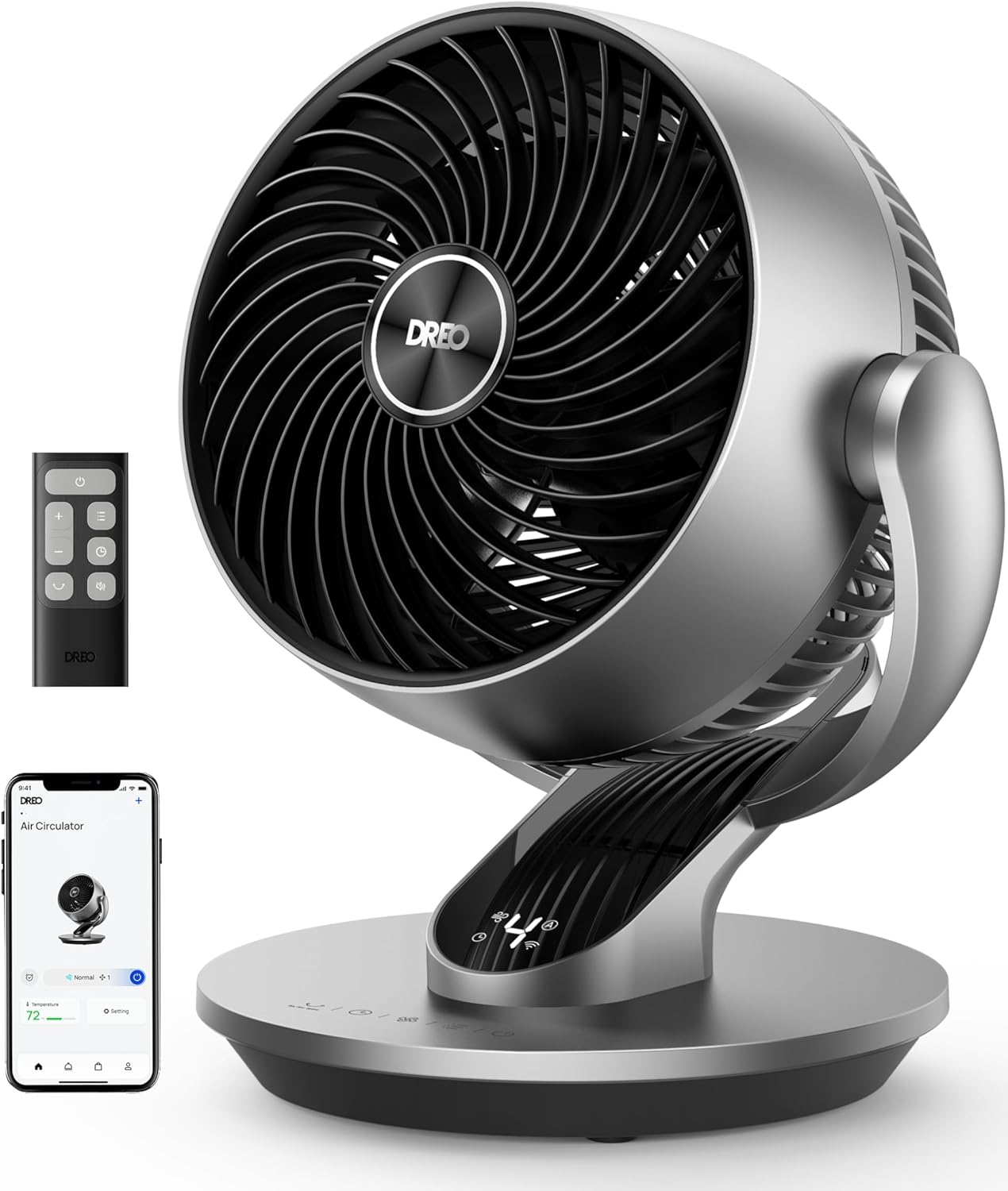
The Dreo Air Circulator takes the number two position in our best desk fan quiet comparison because it balances low-noise operation with much stronger air movement than you normally expect from a compact desktop fan. It is designed for personal cooling, but the circulation-focused airflow and oscillation also allow it to move air through a wider section of the room.
That difference matters if the fan sits several feet away rather than directly beside your keyboard. A weak desk fan can feel fine at close range and almost disappear once you move it to the other side of the desk.
The Dreo is designed to push airflow farther. Stronger circulation gives you more placement freedom, so the fan does not need to occupy the small area immediately beside your laptop just to be useful.
For a home office, that can solve a surprisingly annoying problem. You can move the fan away from loose documents, microphones, and charging cables while still directing useful airflow toward the working area.
Quiet operation matters most when the fan is running for eight hours
A fan does not have to be completely silent to work well at a desk. What matters is whether the motor and airflow noise remain unobtrusive enough that you stop paying attention to them during normal work.
Lower fan speeds are particularly useful here. You can maintain gentle air movement while reading, writing, studying, or working on a computer without using maximum airflow all day.
This is where multiple speeds improve everyday comfort. The lowest setting can handle mild warmth and quieter tasks, while higher speeds remain available when the room temperature rises.
Video calls are another situation where noise matters. A fan sitting near a USB microphone can create two different problems: mechanical fan noise and wind turbulence across the microphone itself.
The second problem is easy to overlook. Even a quiet motor can sound bad to people on a Teams or Zoom call if moving air is blowing directly across the microphone capsule.
Position the fan slightly to one side rather than directly behind the microphone. Keep airflow away from the microphone while aiming the circulation toward your upper body.
That arrangement can let you use the fan throughout meetings without creating the rough wind noise that microphones sometimes exaggerate. If you record podcasts, lessons, or voiceovers, use the lowest comfortable speed and increase the distance from the microphone where possible.
Oscillation is useful when more than one person is in the room. Instead of directing continuous airflow at one face, the fan can distribute air across a wider horizontal area.
It also helps if you dislike having air blowing directly at you for hours. Oscillation provides periodic cooling rather than a constant stream hitting the same part of the body.
For one person working at a desk, fixed airflow may still be more effective. Point the fan toward your upper body and use a lower speed, rather than running maximum power while the oscillation sends much of the airflow away from you.
Placement makes a noticeable difference to noise too. Do not block the rear air intake with books, a monitor, curtains, or a wall immediately behind the fan.
A fan needs access to room air to operate properly. Restricting the intake can reduce airflow and create additional turbulence, which may encourage you to increase the speed unnecessarily.
Why the Dreo narrowly misses our number one position
The circulation-focused design is one of the Dreo's biggest strengths. A normal personal fan primarily creates a small stream of air, while an air circulator is intended to move air farther and encourage broader movement around the room.
This can work particularly well with air conditioning. Instead of lowering the thermostat further because one corner of the office feels warm, a circulator can help distribute already-cooled air more evenly.
The same principle can help near a window during cooler weather. Positioning the fan intelligently can encourage fresh air to move farther into the room rather than remaining concentrated around the opening.
There is an important limitation, though. A fan does not lower room temperature in the same way an air conditioner does.
It makes people feel cooler by increasing air movement across the skin, helping convective and evaporative heat transfer. If the room itself becomes extremely hot, stronger cooling or ventilation may still be necessary.
Desk positioning should also account for paper. Do not aim high-speed airflow directly across receipts, sticky notes, lightweight documents, or loose meeting papers unless you want to spend time collecting them from the floor.
A lower speed with better positioning is usually the cleaner solution. You get useful personal airflow without disturbing everything else sitting on the desk.
Dust buildup deserves attention as well. Fan grilles and blades gradually collect airborne dust, which can restrict airflow and make a fan noisier over time.
Inspect and clean accessible components according to the manufacturer's instructions. Clean airflow paths help maintain performance without relying on higher fan speeds to compensate for restricted air movement.
Always disconnect power before opening or cleaning areas near the blades. A fan may look harmless while stationary, but the motor is specifically designed to rotate the blades quickly once powered.
The compact design gives the Dreo useful placement options. It can work on a desk, nightstand, shelf, kitchen counter, or other stable surface without requiring the floor space of a pedestal fan.
That portability also helps during the workday. Someone working from a home office in the morning can move the same fan into the bedroom or living area later rather than maintaining several larger fans around the house.
Nighttime use is another area where quiet performance becomes valuable. Low-speed airflow works well for sleeping when you want air movement without a large change in background noise every few seconds.
Oscillation can also prevent continuous airflow from hitting the same area throughout the night. Some users will prefer fixed positioning, though, so it is worth experimenting with both rather than assuming oscillation is always more comfortable.
The reason this Dreo receives rank number two is not a major weakness in its fan performance. In fact, if the comparison were based purely on quiet airflow and room circulation, it would be extremely competitive.
Our number one JISULIFE Pro3 simply provides a broader desktop package. It combines quiet personal airflow with an H11 air filtration system and integrated ambient lighting, giving it more functionality specifically around a desk or bedside workspace.
The Dreo is more focused. Its priority is quiet, effective air movement, and that can actually be an advantage for someone who already owns an air purifier and has no interest in RGB lighting.
There is less reason to pay for secondary functions if the only problem you are trying to solve is keeping cool while working. The Dreo concentrates more directly on airflow, circulation, oscillation, and quiet operation.
That is why we believe this Dreo Air Circulator deserves the number two ranking out of seven. It narrowly misses first place because the JISULIFE offers more desk-focused functionality, but the Dreo remains an excellent choice for anyone who values stronger airflow and wider circulation over additional features.
For a home office, bedroom, study area, or regular workstation, the combination works well. Keep the intake clear, use the lowest speed that provides enough cooling, position it away from microphones and loose paper, and this Dreo can provide comfortable airflow without becoming another distracting source of noise beside your desk.
- TurboCool airflow provides stronger cooling around personal workspaces.
- Quiet operation makes it practical during focused desk work.
- Omni-directional oscillation spreads airflow across a wider surrounding area.
- Evaporative cooling adds another option beyond ordinary fan airflow.
- Multiple operating settings allow better control over cooling intensity.
This goes beyond basic desk airflow when the room starts feeling genuinely warm
The Dreo TurboCool takes the number three position in our best desk fan quiet comparison because it offers more than the usual small fan pointed directly at one person. It combines strong personal airflow with oscillation and evaporative cooling, giving users another way to improve comfort around a desk, bedroom, study area, or home office.
The TurboCool design is particularly interesting for people who find ordinary low-powered desk fans too weak. A small personal fan can work when it sits two feet from your face, but that becomes restrictive when your desk is already crowded with monitors, notebooks, speakers, chargers, and other equipment.
Stronger circulation gives you more freedom with placement. You do not need maximum proximity just to feel useful air movement while working.
Quiet operation remains important because this is a fan intended to operate around living and working spaces. A powerful fan that constantly competes with calls, music, or concentration would be difficult to recommend for this particular category.
The evaporative cooling function changes how you should actually use it
One of the main differences between this TurboCool and a conventional desk fan is evaporative cooling. A standard fan moves room-temperature air, while an evaporative system uses water evaporation to help reduce the temperature of the air moving through the unit under suitable environmental conditions.
That distinction matters because evaporative cooling depends on humidity. Water evaporates more readily in dry air, so this type of cooling tends to be more effective in lower-humidity environments than in rooms where the air is already carrying a lot of moisture.
In a dry home office, that can provide a more noticeable cooling effect than fan circulation alone. You may be able to sit farther from the unit and still feel comfortable without immediately lowering the thermostat for the entire home.
In a humid room, expectations need to be different. If the air is already close to saturation, additional water cannot evaporate as readily, so the cooling effect can be reduced.
This is one of the most common mistakes with evaporative cooling products. They should not automatically be treated as replacements for refrigerated air conditioning, because the underlying cooling process is completely different.
A fan itself does not substantially lower the temperature of an enclosed room. Instead, moving air helps your body lose heat through convection and evaporation from the skin, which is why you can feel cooler even though a room thermometer barely changes.
The evaporative function adds another layer to that process. Still, ventilation and local humidity influence how effective it can be, so keeping some fresh-air exchange can be useful when conditions allow.
The oscillation system is another practical feature. Instead of maintaining one narrow stream of air, the TurboCool can distribute airflow through a broader working area.
That is useful when two people share an office. Rather than pointing a fixed fan at one desk and leaving the second person with almost no airflow, oscillation can spread cooling between different positions.
One person may prefer fixed airflow, though. If you are working alone and want the quietest useful setting, precise positioning can reduce required fan speed because the airflow stays focused where you actually need it.
Put the unit where its intake remains open. Pushing the rear intake directly against a wall, books, curtains, or office equipment restricts the amount of air available to the fan.
Restricted intake can reduce performance and create additional turbulence. Then the natural response is to increase the fan speed, which can create more noise without solving the original placement problem.
Desk clutter matters for the outlet side too. Do not aim powerful airflow directly across loose receipts, sticky notes, lightweight paperwork, or an open notebook if you want those things to remain where you put them.
Why the TurboCool earns third place instead of moving into our top two
Noise should be managed through fan speed as much as through product design. Almost every fan produces more audible airflow as speed increases because a greater volume of air is moving through the grille and across the room.
For ordinary computer work, use the lowest speed that keeps you comfortable. Lower speeds usually suit focused work better, while higher settings can be reserved for warmer periods when cooling becomes more important than near-silent operation.
This approach also helps during video conferences. Even if the fan motor is relatively quiet, moving air can create rough wind noise when it passes directly across a microphone.
Keep the TurboCool slightly to the side of the microphone rather than directly behind it. Aim the air toward your body while keeping the strongest airflow away from the microphone capsule.
This becomes even more important when recording voiceovers, podcasts, lessons, or videos. A microphone can pick up airflow that sounds much louder in headphones than it does while sitting normally at the desk.
Oscillation may help here because the airflow does not remain pointed toward the microphone continuously. But careful fan placement is still a better solution than relying on oscillation alone.
Water management is another part of owning an evaporative fan. The reservoir needs regular attention, particularly if water remains inside for extended periods.
Follow the manufacturer's instructions for filling, emptying, and cleaning the water system. Stagnant water and damp internal components should not simply be ignored between seasons.
If the evaporative function is not going to be used for an extended period, clean and dry the appropriate components according to the maintenance guidance. This helps prevent unwanted buildup and keeps the system ready for the next period of hot weather.
Dust maintenance matters as well. Air-moving equipment gradually collects particles around grilles, filters, and intake surfaces, which can reduce airflow over time.
Cleaning those areas can help the fan maintain its intended performance without increasing speed to compensate for restricted airflow. Always disconnect power before cleaning around moving components.
The TurboCool also has a broader use case than a tiny personal USB fan. It can work beside a desk during the day and then move into a bedroom or living space later when broader circulation is needed.
That versatility comes with a tradeoff. This is more substantial than a tiny desk fan, particularly because the evaporative cooling system requires additional components that a basic fan does not need.
Someone with a very small desk may prefer a simpler compact fan that occupies less working space. If the desk already has two monitors, a laptop, speakers, and other equipment, every extra inch can matter.
The evaporative function also adds maintenance compared with a conventional fan. A basic air circulator has no water reservoir to fill, empty, or clean.
So why does the Dreo TurboCool receive our number three ranking out of seven? The JISULIFE Pro3 at number one is particularly well suited to a desktop environment because it combines quiet airflow with H11 filtration and integrated lighting in a compact multifunction design.
Our second-ranked Dreo air circulator provides a simpler approach focused heavily on quiet, powerful air circulation. For somebody who only wants airflow and does not need evaporative cooling, the simpler design can be easier to maintain.
The TurboCool is more specialized. Its evaporative cooling function gives it an advantage when the environment is dry enough to benefit from that technology, but it also introduces water maintenance and makes performance more dependent on humidity.
Those factors keep it from our first two positions, but they do not diminish its cooling potential. For a warm, relatively dry workspace, the combination of powerful airflow, oscillation, quiet lower-speed operation, and evaporative cooling can be genuinely useful.
That is why we believe the Dreo TurboCool deserves the number three position out of seven. It is not the simplest quiet desk fan in this comparison, but for someone who wants stronger personal cooling than ordinary air circulation alone can provide, it offers a compelling set of features while remaining suitable for work, study, and bedroom use.
- Quiet 32 dB low setting suits focused desk work.
- Ten fan speeds provide precise personal airflow adjustment.
- OmniWave multi-axis oscillation distributes air beyond basic side-to-side movement.
- Delivers airflow rated up to 1,331 feet per minute.
- Sleep, Breeze, and Cyclic modes provide different airflow patterns.
Thirty two decibels on low is where the MOVIO 6 gets interesting
The Vornado MOVIO 6 takes the number four position in our best desk fan quiet comparison because it combines genuinely useful low-speed quietness with much stronger circulation than its compact size suggests. Vornado rates the fan at 32 dB on Low, while its airflow can reach up to 1,331 feet per minute and 469 CFM at the other end of its operating range.
Those numbers explain why the MOVIO 6 works differently from a tiny personal USB fan. You can run it gently while concentrating at a desk, then increase the airflow considerably when the room becomes warmer or you need air movement beyond the immediate area around your keyboard.
The 32 dB low setting is particularly relevant during work. Quiet low-speed airflow reduces distraction during reading, writing, studying, video meetings, or long periods of computer use.
There are ten fan speeds rather than just low, medium, and high. That finer adjustment matters because the quietest useful speed changes depending on distance, room temperature, and where the fan sits on your desk.
OmniWave is much more flexible than ordinary side-to-side oscillation
The MOVIO 6 uses Vornado's OmniWave multi-axis oscillation system. Instead of limiting movement to a conventional horizontal sweep, the fan can move airflow across multiple axes to distribute it through a small room or working area.
That is useful on a desk because direct airflow is not always comfortable for eight hours. A fixed fan aimed continuously at your face can become irritating even when the air temperature itself feels better.
OmniWave spreads that airflow more dynamically. Multi-axis movement gives broader air coverage, which can work well when two people share a workspace or when you want circulation around the desk rather than one concentrated stream.
There are situations where fixed airflow is better, though. If you are the only person at the desk and the room is mildly warm, direct the fan toward your upper body and select a lower speed.
That can actually be quieter than using a higher setting with wide oscillation. Better positioning often reduces the amount of airflow you need in the first place.
The MOVIO 6 also provides Small Room Circulation, Breeze, Sleep, and Cyclic operating modes. These are more useful than simply adding extra buttons because each changes how airflow behaves over time.
Breeze Mode varies the fan speed up to the maximum level you have selected. This prevents the airflow from remaining completely constant and gives users another option when steady direct air becomes uncomfortable during long working sessions.
Sleep Mode is more deliberate. The fan reduces its speed every 30 minutes over a two-hour period and then powers off unless a separate timer has been set.
That can be useful if the same fan moves from the office desk to a nightstand. Gradually reducing airflow suits nighttime use when you want stronger cooling initially but do not necessarily need the same fan speed several hours later.
Cyclic Mode works differently again, increasing airflow toward the selected maximum and then reducing it at a consistent interval. For someone who dislikes constant airflow, that provides another way of keeping air moving without leaving the fan at one fixed intensity.
The 12-hour timer is practical for both work and sleep. You can set the fan to stop automatically rather than leaving it operating indefinitely after you have left the room.
Why the MOVIO 6 finishes fourth despite being impressively quiet
The MOVIO 6 uses an energy-efficient DC motor, which fits the kind of application this fan is designed for. A desk fan may operate for most of an eight-hour workday, so efficient low-speed operation matters more than it would on a fan that only gets switched on occasionally.
Touch-sensitive controls provide access to the ten speeds and different operating modes. There is also a control lock, which can prevent settings from being changed accidentally after you have found the combination you want.
The compact size is another advantage. Small-room circulation does not require a huge fan, and the MOVIO 6 can sit on a desk or nearby surface without occupying the floor space of a pedestal model.
Placement still affects performance. Leave open space around the air intake rather than pushing the back of the fan directly against a wall, monitor, stack of books, or curtain.
A restricted intake makes it harder for the fan to move air efficiently. You may end up increasing the speed to compensate, creating more audible airflow when repositioning the fan would have solved the problem.
The same rule applies to the outlet. Do not put loose receipts, sticky notes, or lightweight documents directly in front of a high-speed air circulator unless you want them moving around the desk.
For video meetings, keep the airflow away from your microphone. A fan motor can be quiet while the moving air itself creates substantial wind noise when it crosses a microphone capsule.
Place the MOVIO 6 slightly off-axis from the microphone and direct the airflow toward your body. Microphone placement matters during video calls just as much as the fan's published noise level.
This becomes even more important for voice recording. Podcasters, streamers, online teachers, and anyone recording narration should use the lowest comfortable speed and keep the microphone outside the direct airflow path.
Cleaning is relatively straightforward because Vornado designed the grille and blade to be removable. That matters over time because dust gradually collects on fan blades and intake surfaces.
Dust buildup can restrict airflow and may contribute to additional operating noise. Regular cleaning helps preserve performance without increasing fan speed simply to compensate for dirty airflow surfaces.
Always disconnect the fan before accessing the blade or grille for cleaning. Follow the manufacturer's maintenance instructions rather than attempting to clean moving components while the unit is powered.
The MOVIO 6 also comes with a five-year satisfaction guarantee. For a small fan intended for repeated daily use, five-year manufacturer coverage adds useful reassurance.
There is one important thing to understand about the 469 CFM specification. Strong airflow does not mean the fan actually refrigerates the room.
Like other conventional fans, it moves air and can make people feel cooler through increased convective and evaporative heat loss. It can also help circulate conditioned air that is already present, but it does not replace air conditioning when the room temperature itself becomes excessive.
So why does the Vornado MOVIO 6 receive our number four ranking out of seven? The three products above it bring advantages that extend beyond straightforward quiet air circulation.
The JISULIFE Pro3 at number one combines quiet personal airflow with H11 filtration and integrated lighting, making it particularly versatile around a workstation. The higher-ranked Dreo models also bring strong circulation and, in one case, evaporative cooling for users who need more aggressive personal cooling.
The MOVIO 6 is more focused. Its strength is controlled quiet circulation, with 10 speeds, a 32 dB low setting, OmniWave oscillation, several airflow modes, and a compact body designed for smaller spaces.
That narrower focus is why it lands fourth rather than first, but it can also be exactly what some buyers want. If you already have an air purifier, do not need evaporative cooling, and simply want a quiet desk fan with unusually flexible airflow control, the extra functions of the products above may not matter.
For a home office, bedroom desk, study area, or small workspace, the MOVIO 6 is a strong option. Keep the intake clear, use the lowest speed that provides enough cooling, clean the grille and blade periodically, and position it away from microphones, and it should provide effective personal airflow without demanding much attention while you work.
- Quiet operation suits offices, bedrooms, and focused workspaces.
- Powerful circulation moves air farther than basic personal fans.
- Automatic oscillation distributes airflow across a wider working area.
- Multiple fan speeds provide flexible control over cooling intensity.
- Adjustable airflow direction helps target different desk positions.
This is a practical choice when you want quiet airflow without extra complications
The Dreo WingBoost takes the number five position in our best desk fan quiet comparison because it focuses on the basics that matter around a workstation. It combines relatively quiet operation, powerful air circulation, multiple speed settings, oscillation, and adjustable airflow direction in a compact format that can work on a desk or nearby table.
That sounds simple, but simple is useful here. A desk fan spends hours running close to the person using it, so airflow quality and operating noise matter more than adding features that may rarely get used.
The circulation-focused design also means you do not necessarily have to place the fan directly beside your keyboard. Stronger airflow gives more placement flexibility, which helps when desk space is already occupied by monitors, notebooks, speakers, chargers, and other equipment.
For a home office, moving the fan slightly farther away can actually improve the working setup. There is less chance of blowing receipts and notes around, while the fan can still send useful airflow toward your chair.
The oscillation is useful, but fixed airflow can actually be quieter
Oscillation is one of the main reasons to choose this Dreo over a very basic fixed desk fan. Instead of directing all of its airflow toward one narrow point, the fan can sweep air across a broader area.
This works well in a shared office. Two people sitting at nearby desks can receive periodic airflow without needing two separate fans aimed in different directions.
Oscillation can also make prolonged cooling feel less aggressive. Air does not hit one spot continuously, which some users find more comfortable during a full working day.
For one person, however, fixed positioning can make more sense. Aim the fan accurately at your upper body and you may be able to reduce the speed while maintaining the same perceived cooling.
That matters because fan noise generally increases as airflow increases. Even if the motor remains quiet, moving a larger quantity of air through a grille produces audible turbulence.
Using the lowest effective speed is therefore one of the easiest ways to keep a desk fan quiet. Do not automatically select the maximum setting simply because it is available.
During mild weather, a low setting may be enough to keep air moving around your face and upper body. When the afternoon becomes warmer, increase the speed rather than running the fan at full output from the beginning of the day.
The adjustable airflow direction helps here too. Correct aiming reduces unnecessary fan speed, and that can improve both comfort and noise around the workstation.
Placement should account for the air intake as well. Avoid pushing the back of the fan directly against a wall, monitor, stack of books, or curtain.
The fan needs open space to draw in air efficiently. Restricting the intake can reduce circulation and may create additional turbulence, making the fan seem less effective than it actually is.
Loose paperwork deserves attention on the outlet side. A powerful desk circulator positioned directly beside invoices, receipts, sticky notes, or lightweight documents can create more frustration than comfort.
Move loose paper away from the airflow path or position the fan farther back. The stronger circulation means it does not need to sit directly beside those documents to provide useful cooling.
Why this Dreo lands in fifth place despite getting the fundamentals right
Video calls are one situation where quiet fan performance becomes particularly important. A microphone may pick up fan noise differently from the way your ears perceive it while sitting at the desk.
The motor might barely bother you, yet direct airflow across the microphone capsule can create rough wind noise for everyone else on the call. Keep the microphone outside direct airflow whenever possible.
Position the fan slightly to one side of the computer rather than directly behind the microphone. You can still aim the air toward your body while keeping the strongest stream away from the microphone itself.
This becomes even more important for voice recording, podcasting, streaming, or online teaching. Use a lower fan speed while recording and increase the distance between the fan and microphone if background noise becomes noticeable.
The circulation design can also complement air conditioning. If cool air collects around one part of a room, a compact circulator can help distribute that conditioned air toward the desk rather than requiring a lower thermostat setting just to cool one workspace.
Placement near an open window can help with ventilation in suitable weather too. The goal is not always to point the fan directly at your face. Sometimes moving room air more effectively improves comfort without needing the highest speed.
A fan itself does not operate like an air conditioner, though. It mainly makes people feel cooler by increasing air movement across the skin, supporting convective and evaporative heat transfer.
That distinction matters during genuinely hot conditions. If the room temperature itself becomes excessive, a desk fan should not be treated as a replacement for appropriate ventilation or refrigerated cooling.
Cleaning is another part of maintaining quiet performance. Dust gradually accumulates around the intake grille, blade area, and other surfaces where large volumes of room air pass through.
As buildup increases, airflow can become restricted. The natural response is often to increase the speed, but cleaning the airflow path may restore performance without adding more noise.
Disconnect the fan before cleaning and follow the manufacturer's instructions for any removable components. Do not insert objects through the grille while the unit is connected to power.
The compact design makes this Dreo useful beyond the office. It can move from a desk to a bedside table, kitchen counter, shelf, or other stable surface without requiring the permanent floor space of a larger pedestal fan.
That portability is useful in a home workspace. Someone can use the fan during an eight-hour workday, then move it into the bedroom later rather than buying separate fans for every room.
Quiet lower-speed operation is particularly valuable at night. Constant loud airflow can become distracting in a bedroom, while a gentle setting provides circulation without dominating the room's background sound.
So why does the Dreo WingBoost receive the number five position out of seven? The products above it offer stronger combinations of quietness, airflow control, or additional functionality.
The JISULIFE Pro3 at number one combines quiet airflow with H11 filtration and ambient lighting, making it unusually well suited to a personal workstation. Our higher-ranked Dreo models bring particularly strong circulation, while the TurboCool adds evaporative cooling for users who need another level of personal cooling.
The Vornado MOVIO 6 above this model also provides unusually detailed airflow control with ten fan speeds, a quiet low setting, multiple operating modes, and multi-axis oscillation. Those controls give users more ways to fine-tune airflow around a desk.
This Dreo is more straightforward. It concentrates on quiet effective circulation, oscillation, adjustable direction, and multiple speed settings without trying to turn the fan into a multifunction appliance.
That simplicity is also its advantage. Someone who already owns an air purifier, does not need evaporative cooling, and simply wants a compact fan for everyday office use may prefer a machine that focuses on airflow.
That is why we believe this Dreo deserves rank number five. It misses the higher positions because competing models offer more advanced circulation control or additional desk-focused features, but it still covers the fundamentals very well.
For a home office, bedroom, study area, or small workspace, it remains a practical quiet desk fan. Give the intake enough open space, aim the airflow carefully, keep it away from microphones and loose paperwork, and use the lowest speed that keeps you comfortable for the best balance between cooling and noise.
- Quiet operation suits focused work and nighttime desk use.
- Compact design fits smaller desks without consuming much space.
- Automatic oscillation distributes airflow across a wider working area.
- Multiple speed settings provide flexible control over personal cooling.
- Air circulator design pushes airflow farther than basic mini fans.
The compact size is the main reason this Dreo works well on a crowded desk
The Dreo WingBoost small oscillating fan takes the number six position in our best desk fan quiet comparison because it focuses on compact personal cooling without giving up useful air circulation. It combines a small desktop footprint with multiple speeds, oscillation, adjustable airflow, and a circulation-focused design intended to move air farther than a very basic mini fan.
That compact format matters around a real workstation. A desk may already contain a laptop, monitor, keyboard, phone charger, notebooks, speakers, and a coffee cup, so a large fan can become another object competing for working space.
The Dreo can sit nearby without requiring the footprint of a pedestal fan. Compact cooling makes desk placement easier, particularly in bedrooms, dorm rooms, home offices, and smaller study areas.
Its circulation-focused airflow also means you do not necessarily need the fan immediately beside your face. Moving it slightly farther away can free up useful desk space while still providing noticeable air movement around your chair.
Oscillation helps when you do not want air hitting one spot all day
Automatic oscillation is one of the most useful features for long working sessions. A fixed fan can provide strong personal cooling, but continuous airflow aimed at the same part of your face or body can become uncomfortable after several hours.
Oscillation spreads the airflow across a broader area instead. The moving airflow feels less concentrated, and it can also provide cooling for two people working relatively close together.
For one person, fixed airflow may still be more efficient. If you position the fan carefully and aim it toward your upper body, you may be able to use a lower speed and still feel comfortable.
That lower setting is important when quietness is the priority. Fan noise is not only produced by the motor, because the movement of air through the grille and across nearby objects also creates audible sound.
Higher speeds naturally move more air and usually produce more airflow noise. For reading, studying, writing, or general computer work, start at the lowest speed and increase it only when the room becomes warmer.
This gives you a better balance between airflow and noise. Maximum speed is useful when you need it, but there is little reason to run a fan at full output throughout an entire workday if a lower setting already keeps you comfortable.
Placement can affect perceived noise too. Do not push the rear intake directly against a wall, monitor, curtain, or stack of books.
The fan needs open space to pull air through the intake. Restricting that airflow can reduce circulation and create additional turbulence, which may make the fan less effective while encouraging you to select a higher speed.
Keep the outlet clear as well. Loose receipts, sticky notes, lightweight documents, and other desk materials can become annoying when positioned directly in front of a circulating fan.
Move those items away from the main airflow path. Good fan placement solves several problems at once, including noise, cooling efficiency, and paper movement around the desk.
The adjustable airflow direction is useful when the fan sits below or above your normal seating position. Instead of increasing speed because the air is missing you, change the angle so the airflow reaches the area where it actually provides cooling.
This sounds obvious, but poor positioning is one of the easiest ways to make a desk fan seem underpowered. A correctly aimed low setting can sometimes feel more effective than a badly positioned fan running considerably faster.
Why this Dreo finishes sixth despite being a useful quiet desk fan
Video calls are one place where quiet operation becomes especially important. A fan sitting close to a microphone can create background noise even when the person at the desk barely notices it.
Direct airflow is often the bigger problem. Air passing across a microphone capsule can create low-frequency wind noise that sounds rough and distracting to other people on a Teams or Zoom call.
Place the fan slightly to one side of the microphone. Keep direct airflow away from microphones while aiming the fan toward your body instead.
The same advice applies to recording podcasts, voiceovers, online classes, or streaming. Use the lowest comfortable fan speed and increase the distance from the microphone whenever possible.
The small size also makes this Dreo practical for nighttime use. It can move from an office desk to a nightstand without taking up the floor space of a larger room fan.
At night, lower speeds are usually the sensible choice. Gentle airflow can improve comfort without introducing unnecessary sound into a quiet bedroom.
Oscillation may help sleepers who dislike constant airflow hitting one area. Others may prefer a fixed low setting, so the better option depends on where the fan is positioned relative to the bed.
Like any conventional desk fan, this model does not actually refrigerate the room. A fan moves air rather than producing cold air, so the main cooling effect comes from increased convection and evaporation at the skin.
That is why a fan can make you feel substantially more comfortable while the thermometer in the room barely changes. It can also help distribute cool air produced by an air conditioner more effectively around a workspace.
In very hot conditions, however, a small desk fan should not be treated as a substitute for appropriate room cooling or ventilation. Personal airflow helps, but it cannot overcome every indoor temperature condition.
Cleaning matters if you want the fan to remain quiet and effective. Dust gradually collects around the grille, intake, and blade surfaces as the fan processes room air.
That buildup can restrict airflow over time. Clean air passages help maintain performance, reducing the temptation to increase fan speed simply because a dusty fan is moving less air than it did originally.
Disconnect the unit before cleaning and follow the manufacturer's instructions for accessing any serviceable components. Avoid inserting objects through the grille while the fan is connected to power.
The compact construction also makes storage relatively easy. If the fan is only needed during warmer months, it can be moved off the desk without requiring the storage space of a large pedestal or tower fan.
So why does this Dreo receive our number six ranking out of seven? The products above it provide stronger combinations of quietness, airflow customization, circulation range, or additional functionality.
The JISULIFE Pro3 at number one combines quiet airflow with H11 filtration and ambient lighting. That gives it more usefulness around a workstation than a fan focused almost entirely on air movement.
The higher-ranked Dreo models provide stronger circulation or additional cooling functionality, while the Vornado MOVIO 6 offers detailed speed control and more advanced multi-axis oscillation. Those features provide greater airflow flexibility for users who want precise control.
This smaller Dreo is more basic by comparison. It is aimed at someone who wants compact, quiet personal cooling and oscillation without needing air purification, evaporative cooling, or a long list of operating modes.
Its smaller format can also mean less room for the kind of airflow performance offered by larger circulators. If you want to move air across a bigger office rather than primarily cool the area around your desk, one of the higher-ranked models makes more sense.
But that is not necessarily what everyone needs. For a small home office, dorm desk, bedroom, study area, or compact workstation, the smaller footprint is a genuine advantage.
That is why we believe the Dreo WingBoost small oscillating fan deserves the number six position. It loses points compared with the more feature-rich and powerful models above it, but it still provides the important combination of quiet operation, adjustable personal airflow, oscillation, and compact desk-friendly dimensions.
Keep the intake unobstructed, aim the airflow carefully, use lower speeds when possible, and position it away from microphones and loose paperwork. Used that way, this Dreo remains a practical quiet desk fan for people who value simplicity and space-saving design over extra features.
- QuietSet controls balance lower noise with adjustable cooling power.
- Multiple speed settings provide flexible airflow for different situations.
- Oscillation distributes cooling across a wider desk or room area.
- Compact tabletop design fits offices, bedrooms, and study spaces.
- Simple electronic controls make everyday fan adjustments straightforward.
The QuietSet approach makes sense when noise matters more than maximum airflow
The Honeywell QuietSet takes the number seven position in our best desk fan quiet comparison, but it still has a very clear purpose. This is a compact oscillating table fan designed around adjustable personal airflow and quieter everyday operation rather than maximum air circulation or a long list of secondary features.
That approach makes sense for a desk. A fan positioned close to your keyboard or monitor does not need enormous room-filling power if the airflow reaches you comfortably from a relatively short distance.
The QuietSet system lets you adjust the fan according to the situation. Lower settings prioritize quieter personal airflow, while stronger settings are available when the room becomes warmer and cooling becomes more important than minimum noise.
This is particularly useful during a normal working day because cooling requirements change. A low setting might be enough during the morning, while direct sunlight or warmer afternoon temperatures can make a higher speed more comfortable later.
Oscillation is useful when direct airflow starts getting uncomfortable
The oscillating function spreads air across a broader area instead of keeping it pointed at one location. That can be more comfortable when the fan runs for several hours beside a workstation.
Continuous airflow directly toward the face can eventually feel excessive, even when the room itself remains warm. Oscillation gives you periods of airflow rather than keeping the same stream directed at your skin constantly.
It also works better when two people share a nearby working area. Oscillation distributes airflow between multiple positions, so one person does not receive all of the cooling while the other gets almost none.
If you are working alone, fixed airflow can sometimes be the better option. Aim the fan accurately toward your upper body and select the lowest speed that keeps you comfortable.
This can reduce overall noise because you are not wasting airflow on areas where nobody is sitting. Better positioning often makes a lower fan setting feel surprisingly effective.
Fan noise comes from more than the motor. Moving air through the grille creates turbulence, and higher speeds generally produce more audible airflow even if the electric motor itself remains relatively quiet.
That is why the lowest effective speed usually works best during reading, writing, studying, or concentrated computer work. Increase the fan only when additional cooling is actually necessary.
Placement makes a difference too. Keep the rear intake away from walls, books, curtains, monitors, and other objects that could restrict incoming air.
A fan cannot circulate air efficiently if its intake is partially blocked. Restricted airflow can reduce performance and encourage you to select a higher speed, which then creates more noise without fixing the original problem.
The outlet needs some clear space as well. Loose paperwork, receipts, sticky notes, and lightweight documents should not sit directly in front of the fan if you plan to use stronger settings.
A simple adjustment can solve this. Move the fan slightly farther away and direct it toward your upper body rather than across the entire desktop.
Why the QuietSet finishes seventh in this particular group
The compact tabletop design is one of the Honeywell's strengths. It can sit beside a monitor, on a side table, or on a bedroom nightstand without requiring the floor space of a pedestal or tower fan.
That portability is useful in a home office. One compact fan can serve several spaces, moving from a work desk during the day to a bedroom or reading area later.
Quiet operation is particularly valuable at night. A lower fan setting can maintain gentle air movement without introducing the stronger airflow noise associated with running a fan at maximum speed.
Oscillation can also help during sleep because the airflow does not remain directed toward one area of the body for the entire night. Some people will prefer a fixed low setting, though, so experimenting with positioning is worthwhile.
Video conferencing introduces another issue. A fan may sound relatively quiet to the person sitting beside it but still produce noticeable noise through a sensitive microphone.
Direct wind across the microphone is usually the bigger problem. Keep airflow away from your microphone by positioning the fan slightly to one side of your computer or headset setup.
This is especially important for people recording podcasts, online lessons, voiceovers, or streaming content. Use a lower fan speed during recording and keep the microphone outside the main airflow path.
Like other conventional fans, the Honeywell does not actually refrigerate the room. It moves air, which can help the body feel cooler by increasing convective and evaporative heat transfer at the skin.
That means a desk fan can improve comfort substantially while the measured room temperature changes very little. It can also help circulate cool air that is already being produced by an air conditioner.
In very hot indoor conditions, however, a desk fan is not air conditioning. Appropriate ventilation or refrigerated cooling may still be needed if the room itself reaches uncomfortable or unsafe temperatures.
Cleaning also affects long-term performance. Dust gradually collects on the grille, blade area, and intake surfaces as room air repeatedly passes through the fan.
That buildup can restrict airflow and sometimes increase noise. Keeping accessible airflow surfaces clean helps the fan continue moving air efficiently without requiring unnecessarily high speed settings.
Disconnect the fan before cleaning and follow the manufacturer's maintenance instructions. Do not attempt to reach through the grille or clean near moving components while the unit is powered.
The Honeywell's main limitation in this comparison is that several products above it provide more advanced airflow control or substantially broader functionality. The QuietSet concept is useful, but the overall design is more conventional.
The JISULIFE Pro3 at number one combines quiet airflow with H11 filtration and ambient lighting. That makes it a more complete desktop appliance for users who actually want those additional functions.
The higher-ranked Dreo models place greater emphasis on powerful circulation, oscillation, or additional cooling options. The Vornado MOVIO 6 also provides extensive speed adjustment and multi-axis airflow control.
Compared with those models, the Honeywell is a simpler desk fan. It focuses primarily on adjustable quiet airflow and oscillation rather than advanced circulation modes, air purification, or evaporative cooling.
That simplicity is the main reason it takes our number seven position. Buyers specifically looking for stronger whole-room circulation or a multifunction desk appliance have more capable options higher in this list.
But simpler is not automatically worse for every user. If you need a compact fan beside a computer and mostly care about adjustable airflow, oscillation, and keeping noise reasonable, there may be little value in paying for functions you will never use.
The QuietSet controls make it easy to reduce airflow when silence matters and increase it when the room becomes warmer. That flexibility remains useful for everyday work, particularly in bedrooms, small offices, study spaces, and personal workstations.
That is why we believe the Honeywell QuietSet deserves the number seven ranking out of seven. It lacks the more advanced features and circulation capabilities of the products above it, but it finishes positively as a straightforward quiet table fan that handles the basic job well.
Keep the intake unobstructed, use the lowest comfortable speed, clean dust from the airflow surfaces periodically, and position it away from microphones and loose paperwork. For someone who wants simple personal cooling without unnecessary complexity, the Honeywell QuietSet remains a practical option.