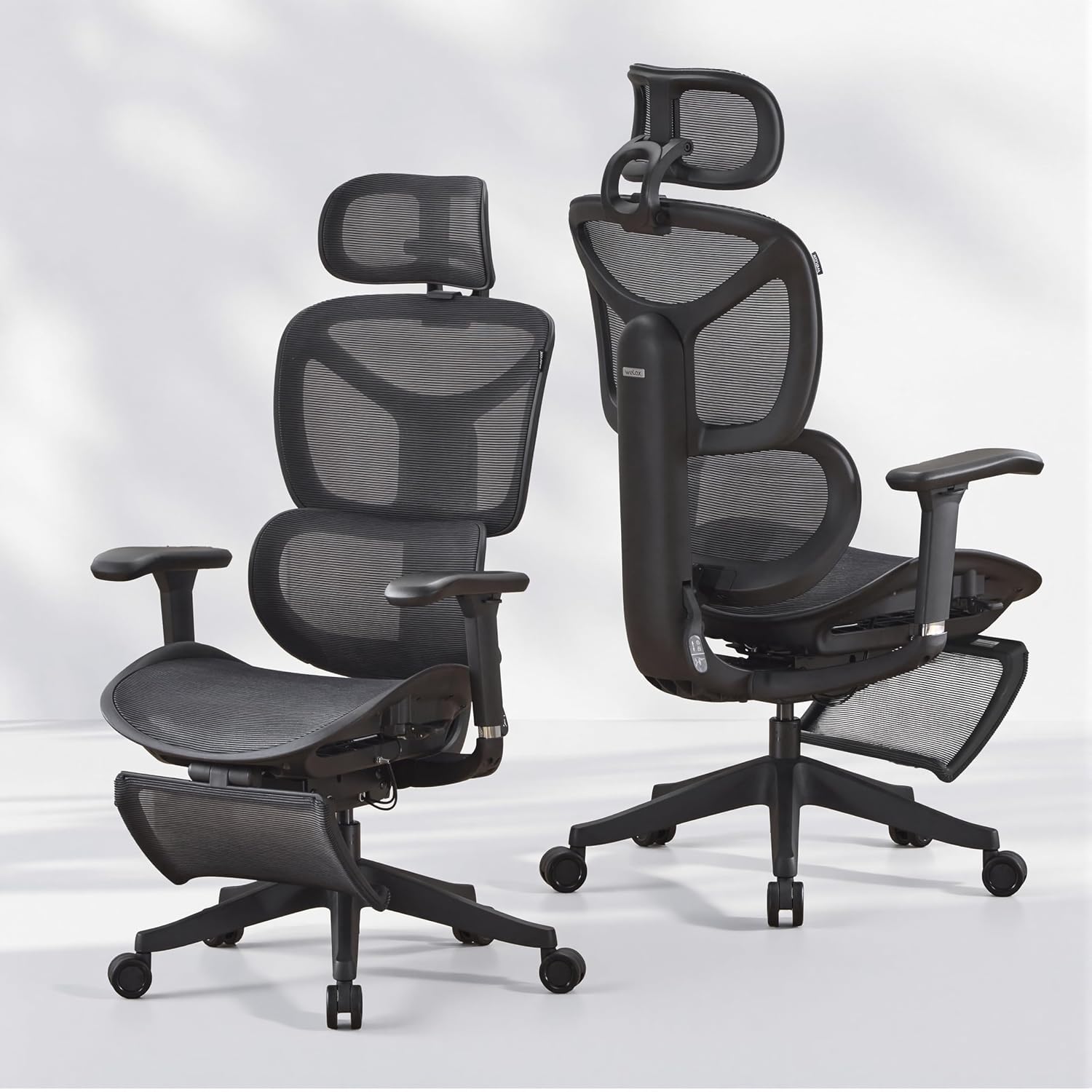
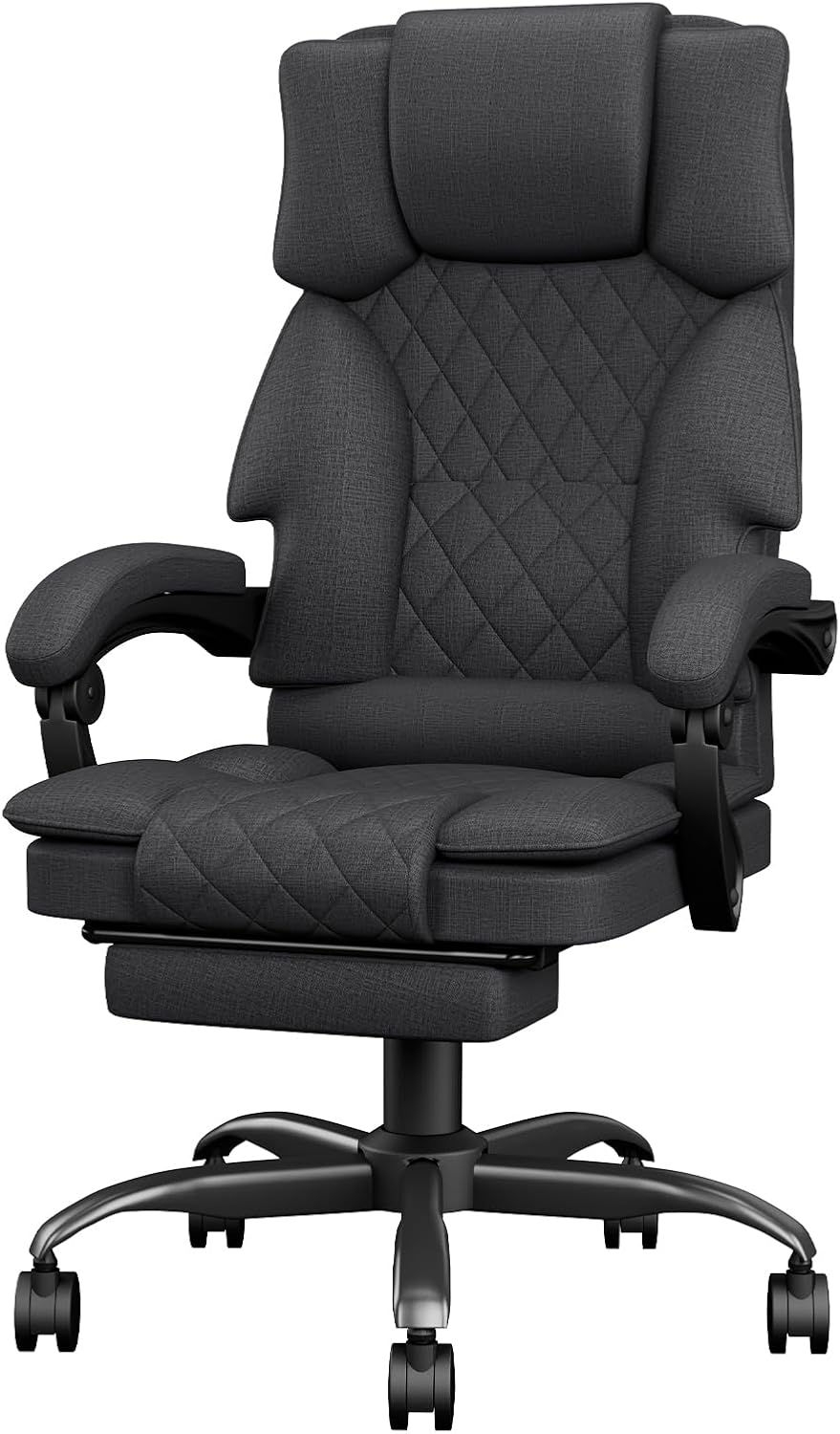
- 18-inch extendable footrest includes two adjustable angle positions.
- Dynamic lumbar support adjusts depth, height, and rotation.
- 5D flip-up armrests provide extensive positioning and desk clearance.
- Breathable mesh construction improves airflow during longer sitting sessions.
- BIFMA-certified design supports users weighing up to 300 pounds.
The footrest feels properly integrated instead of added as an afterthought
The X100 takes the number one position in our best desk chairs with footrest comparison because the footrest is only one part of a much broader ergonomic design. You also get dynamic lumbar support, 5D flip-up armrests, an adjustable headrest, breathable mesh, a three-stage reclining mechanism, and a 300-pound stated weight capacity.
The footrest itself extends to 18 inches and provides two angle positions. That is useful because a footrest becomes much more practical when it can support different relaxed sitting positions rather than simply sliding out at one fixed angle.
For normal typing, I would keep it retracted. The footrest makes more sense during breaks, reading, watching something, taking a long call, or leaning back after a concentrated work session.
This distinction matters. Working for hours with the legs stretched forward can move the body away from a good keyboard and desk position, so the footrest should not automatically stay extended simply because the chair includes one.
The X100 uses a three-stage reclining mechanism, which pairs naturally with the extendable leg support. Recline when the work changes from active typing to something less demanding, then pull the footrest back in when returning to the keyboard.
That creates a chair with two fairly different modes. It transitions between work and relaxation without requiring a separate ottoman sitting permanently underneath the desk.
The lumbar and arm adjustments matter more during an eight-hour workday
The X100's dynamic lumbar system is more sophisticated than a fixed padded bump in the backrest. The lumbar section provides roughly plus or minus 1.6 inches of depth adjustment, around 2 inches of vertical adjustment, and approximately 15 degrees of rotational movement.
It also uses spring-loaded tracking intended to follow changes in sitting position. That is useful because lumbar support that feels correct while sitting upright may press differently against the body after the backrest reclines.
Lumbar position should match your lower back, not simply be pushed as far forward as possible. Too much pressure can be just as distracting as too little support.
Start with a moderate setting. Sit fully back in the chair, adjust the height until the support meets the natural inward curve of the lower back, then change the depth gradually.
This takes a few minutes but matters more than immediately judging the chair from its factory settings. An ergonomic chair with several adjustment points can actually feel worse when those controls are badly configured.
The 5D armrests deserve similar attention. They can adjust through height, width, forward and backward position, rotation, and a flip-up movement.
The armrests provide unusually broad adjustment, which helps when moving between keyboard work, mouse use, gaming, and more relaxed sitting positions.
For desk work, set them so the forearms can rest lightly without forcing the shoulders upward. If the armrests are too high, the shoulders can remain elevated for hours without the user immediately noticing why the setup feels uncomfortable.
If they are too low, they may provide almost no useful support. Width matters as well because armrests positioned too far apart can encourage the elbows to move away from the body.
The flip-up function solves another practical problem. If the arms prevent the chair from sliding underneath the desk, they can be moved out of the way rather than leaving the entire chair sticking farther into the room.
Flip-up arms help with smaller workspaces, especially in bedrooms and home offices where the chair needs to tuck under the desk when the working day ends.
The seat-height range is approximately 18.3 to 23 inches. That gives a useful adjustment span, but the correct setting still depends on the user's leg length and desk height.
Set the seat so the feet can rest securely and the knees remain in a comfortable position when the footrest is retracted. Do not raise the chair simply to reach a desk that is too high without considering what that does to leg support.
If the desk forces the chair higher than is comfortable, a separate floor footrest can sometimes still be useful during active working posture. The built-in extendable footrest is designed more around reclined support than replacing the floor underneath the feet during ordinary upright typing.
The headrest is also adjustable and uses breathable material. Head support becomes more useful while reclining, when the upper body moves backward and the neck benefits from having somewhere to rest.
During concentrated keyboard work, some users barely touch the headrest at all. That is normal. An adjustable headrest does not need to remain pressed against the head continuously to be useful.
The mesh construction is another sensible choice for long sessions. Unlike thick upholstered padding, mesh allows more air to move around the back and seat.
That can make a noticeable difference in warmer rooms or during long gaming and work sessions. ELABEST describes its Dual-Stripe AirMesh as providing improved airflow and elasticity compared with conventional mesh.
Breathable mesh reduces trapped body heat, which is particularly relevant if the chair is being used for eight hours or more rather than occasional desk work.
Mesh does feel different from a heavily cushioned executive chair. Someone specifically wanting a soft, deep foam seat may prefer another style, while users who prioritize ventilation and distributed support may prefer the X100 approach.
Why we believe the X100 deserves the number one ranking
The chair is rated for up to 300 pounds and uses a Grade 4 gas lift. Its construction is also listed as BIFMA certified, which is worth noting when comparing it with inexpensive footrest chairs that focus heavily on appearance but provide little information about their structural hardware.
The overall dimensions are approximately 26 inches deep, 24 inches wide, and 41 inches high in the listed configuration. The chair itself weighs around 49 pounds, so this is a substantial full-size desk chair rather than a lightweight task seat.
Measure the desk area before ordering, particularly if the workspace is narrow. Remember that reclining and extending an 18-inch footrest requires considerably more front-to-back clearance than the chair occupies while sitting upright.
This is an easy mistake with reclining office chairs. The chair fits neatly beneath the desk, but then the footrest cannot be used because a wall, bed, storage unit, or other furniture sits directly behind or in front of the seating position.
Check the floor space in the actual reclined position. Leave room for the casters as well, because rolling backward while the footrest is extended changes the space required.
The 300-pound capacity should also be treated as a limit rather than a target. Weight capacity does not determine body fit, because shoulder width, thigh length, torso height, and preferred sitting posture can differ substantially between two people of similar weight.
This is particularly important when a chair is marketed toward big and tall users. Check the seat dimensions and adjustment ranges rather than assuming the category label guarantees a perfect fit.
The footrest deserves the same realistic approach. An 18-inch extendable support can be excellent for short reclining sessions, but taller users should consider where it contacts their legs rather than expecting it to function like a full-length recliner.
For some people it will support the lower legs comfortably. For others, particularly very tall users, it may function more as a calf support than something extending all the way underneath the feet.
Use the footrest for position changes rather than treating one reclined posture as the new position to hold for the entire day. Changing position periodically is one of the practical benefits of having both ergonomic adjustments and a retractable leg support.
A real-world example is a long work-from-home day. You might spend the morning sitting upright for writing and spreadsheets, retract the footrest completely, and position the arms around the keyboard.
During a thirty-minute meeting where little typing is required, recline the backrest and extend the footrest. The legs get a different position and the headrest becomes more relevant.
Then return to the upright configuration for active work. That is a better use of the chair's adjustability than finding one supposedly perfect posture and refusing to move for eight hours.
The X100 encourages several useful sitting positions, and that is one reason we prefer it over simpler chairs where the footrest is the only interesting feature.
The tool-free assembly claim is another nice detail. ELABEST states that assembly can be completed in around 15 minutes, although actual setup time naturally depends on the person assembling it.
Do not rush the assembly simply to hit that number. Make sure components are properly seated and follow the supplied instructions, particularly around the base, gas lift, backrest, and moving mechanisms.
After assembly, spend time adjusting the chair before deciding whether it feels right. Start with seat height, then lumbar position, armrests, headrest, and finally the reclining tension or locking positions.
Adjustment order makes setup much easier, because changing seat height after carefully positioning everything else can alter how the lumbar and armrests meet the body.
For active desk work, the monitor and keyboard also need to cooperate with the chair. A good ergonomic chair cannot compensate completely for a monitor sitting far too low or a keyboard positioned so high that the shoulders remain raised.
Move the chair close enough to the desk that the elbows do not need to reach forward. Adjust the monitor after the chair rather than changing the chair into an uncomfortable position just to match an existing screen height.
The casters are designed for quiet rolling, which is useful in a home office where somebody may be working early or late. Floor compatibility still matters, and a suitable chair mat may be useful depending on the flooring surface.
The five-year warranty adds useful reassurance, especially because this chair contains considerably more moving components than a basic fixed office chair.
More adjustment mechanisms mean more joints, pivots, sliders, and moving pieces. That complexity is worthwhile when the adjustments are useful, but warranty coverage becomes more relevant than it would be on a very simple chair.
The main downside is that this may be more chair than some people need. If you never recline, dislike headrests, and would never extend the footrest, a simpler ergonomic task chair could make more sense.
The X100 is strongest when those features actually match the way the chair will be used. Someone alternating between concentrated work, calls, gaming, reading, and relaxed screen time can take advantage of considerably more of its adjustment range.
The footrest is only part of the package, and that is exactly why the chair takes our top position. It is not relying on a retractable leg support to disguise an otherwise basic chair.
You get an 18-inch two-position footrest, three-stage reclining, dynamic adjustable lumbar support, 5D flip-up armrests, an adjustable breathable headrest, mesh seating, a seat-height range of approximately 18.3 to 23 inches, and a 300-pound stated capacity.
Those features work together. Reclining makes the footrest useful, the headrest supports the relaxed position, the lumbar system adjusts around the back, and the armrests can move when the user's posture changes.
That is why we believe the X100 deserves the number one ranking out of seven for Best Desk Chairs With Footrest. It offers the adjustability we want from a serious desk chair while making the retractable footrest genuinely useful for changing positions during a long day.
Measure the workspace first, set the lumbar support gradually, keep the footrest retracted during focused upright work, and use the reclining functions when the task allows a more relaxed posture. Set up properly, the X100 delivers an unusually flexible seating experience for home office work, gaming, meetings, and the short recovery breaks that happen between them.
- Adaptive backrest follows movement for more consistent body support.
- Retractable footrest supports relaxed sitting between focused work sessions.
- Adjustable headrest helps accommodate different seated heights and positions.
- Flip-up armrests create extra clearance around smaller office desks.
- Breathable mesh construction improves airflow during extended sitting periods.
The adaptive backrest is the part that makes this chair more than a footrest model
This ergonomic mesh office chair takes the number two position in our best desk chairs with footrest comparison because its design is not built around the footrest alone. It combines a retractable leg support with an adaptive backrest, adjustable headrest, flip-up armrests, mesh construction, and a tilt function that lets the chair move between focused work and more relaxed sitting.
That combination matters. Plenty of office chairs include a footrest, but sometimes the rest of the chair is fairly basic, which means the feature becomes useful for twenty minutes while the chair itself still needs to handle another seven hours of desk work.
Here, the adaptive backrest is more important during those longer periods. The back support responds to sitting position, which can make the chair easier to use when you regularly shift between upright typing and a more relaxed posture.
The retractable footrest then becomes something you bring out when the task changes. During a video meeting, reading session, or short break, extend it and let the legs move away from the normal desk position.
When it is time to type again, retract it. That sounds obvious, but it is one of the better ways to use a desk chair with footrest rather than trying to work all day with the legs stretched forward.
The footrest works best when you treat it as another seating position
A built-in footrest does not automatically make a chair ergonomic. The useful part is having another supported position available without needing a separate ottoman underneath the desk.
During concentrated keyboard and mouse work, your body normally needs to remain relatively close to the desk. Retracting the footrest keeps you closer to the keyboard and reduces the temptation to lean forward from a reclined position just to reach the controls.
Then there are tasks where that upright position is unnecessary. Maybe you are reviewing a long document, listening during a meeting, watching a training video, or taking ten minutes away from active input.
That is where the footrest becomes more useful. Extend it, use the chair's tilt function, and support the legs while the upper body moves into a less task-focused position.
This also avoids having a separate footstool permanently occupying floor space. In a bedroom office or smaller home workspace, that can be a meaningful advantage.
The footrest disappears when not needed, leaving more clearance for moving the chair around the desk.
The mesh construction makes sense for longer sessions too. Mesh allows considerably more airflow around the body than a thick upholstered backrest, which can help in warmer rooms or during long work and gaming sessions.
That does not mean mesh automatically feels better for everyone. Some people prefer the softer initial feel of foam and upholstery, while others prefer the firmer distributed support and ventilation of mesh.
The important thing is that the mesh remains supportive rather than sagging deeply. A chair seat that stretches too much can change the sitting position and reduce the effectiveness of the backrest.
Breathable seating is useful for long sessions, particularly when the chair is being used for work during the day and gaming or entertainment later.
The adjustable headrest is another feature that becomes more valuable when the chair tilts backward. During normal typing, the head may barely touch it, and that is completely fine.
When reclining, the relationship changes. The head and upper neck move backward with the torso, so having an adjustable support becomes more useful.
Set the headrest around the lower rear portion of the head rather than forcing it directly into the neck. The exact position will depend on body height and how far the chair is reclined.
Headrest adjustment matters most while reclining, which fits naturally with the retractable footrest and tilt function.
The flip-up armrests solve a different problem. Armrests that fit nicely during work can prevent a chair from sliding underneath a desk when the day is finished.
Flip them upward and the chair can move closer to the desk surface, assuming the seat and backrest dimensions also fit underneath. That is particularly helpful in multipurpose rooms where floor space matters after working hours.
The armrests should still be positioned carefully when they are down. The goal is to support the forearms without forcing the shoulders upward.
Your shoulders should remain naturally relaxed, rather than being pushed toward the ears because the armrests sit too high.
If the armrests are lower than the desk, do not automatically raise the entire chair just to make them level. Seat height needs to work with the legs and feet as well.
Start with the chair height. Sit fully back, establish a comfortable leg position, then adjust the desk setup and arm support around that.
Why this chair finishes second instead of taking our top position
The adaptive backrest is the feature that gives this chair a strong argument for long working sessions. A fixed backrest provides support in one shape, while an adaptive system is intended to respond more naturally as the user changes position.
This can be useful because people do not actually remain perfectly still for eight hours. They lean slightly forward, return to neutral, shift sideways, recline, and reposition themselves throughout the day.
Dynamic support suits normal body movement, especially when the chair is being used for several different tasks rather than one fixed working posture.
Do not interpret adaptive support as permission to ignore setup, though. The chair still needs to be positioned properly relative to the desk, monitor, keyboard, and floor.
If the monitor is too low, the chair cannot prevent you from repeatedly looking downward. If the keyboard is too far away, an expensive backrest cannot stop you from reaching forward.
The best starting point is the chair itself. Adjust the seat height, sit fully into the backrest, then position the monitor and input devices around the seated posture.
Adjust the workstation around the chair, rather than distorting your sitting position to accommodate a badly placed monitor or keyboard.
Desk clearance deserves attention before ordering too. A reclining office chair with an extendable footrest needs more space than its normal upright dimensions suggest.
Measure the area behind the chair and underneath the desk. If the room is extremely tight, you may discover that the chair technically fits but cannot recline enough to make the footrest useful.
This is a common problem in bedroom offices. The desk sits against one wall, the bed is directly behind the chair, and there is barely enough room for normal movement.
Reclining requires additional floor clearance, so measure the chair in the context of how you intend to use it, not simply whether the base fits between two pieces of furniture.
The footrest itself should also be treated as a relaxation feature rather than something that has to remain extended. Keeping the legs elevated all day can pull the body away from the normal working relationship with the desk.
For typing, spreadsheets, drawing, or detailed mouse work, a more upright posture generally makes more practical sense. The footrest can then come out during activities that do not require constant interaction with the desk.
This creates a useful routine during a long working day. Work upright for a period, change position during a call or reading session, then return to the main working posture afterward.
Changing position is better than staying fixed, and the chair gives you more ways to make those changes without leaving the desk entirely.
The casters and swivel base add normal office-chair mobility. Make sure the wheels are suitable for the floor surface and consider an appropriate chair mat if the flooring requires protection.
Assembly deserves a little care as well. Do not tighten everything randomly before checking the instructions, particularly around the backrest, armrests, gas lift, and footrest mechanism.
After assembly, test the footrest before sitting heavily against it. Extend and retract it several times and make sure the mechanism moves normally.
Check every adjustment after assembly, including seat height, tilt, headrest, arms, and the retractable leg support.
The chair also needs periodic inspection because it contains several moving components. A chair with a footrest, adjustable headrest, flip-up arms, casters, swivel mechanism, and reclining back naturally has more joints than a basic fixed task chair.
If something begins to feel loose, inspect it according to the manufacturer's maintenance guidance rather than continuing to use it until the movement becomes severe.
So why does this model finish second? Our number one ELABEST X100 gives us more detailed adjustment in several areas, including its 5D flip-up armrests, highly adjustable lumbar system, 18-inch two-position footrest, and a particularly complete ergonomic package.
The X100 provides more fine adjustment, which gives it the edge for users trying to tune the chair closely around their body and workstation.
This second-ranked model takes a slightly simpler approach. Its adaptive backrest, mesh construction, adjustable headrest, flip-up arms, tilt function, and retractable footrest still cover the features that matter most for a mixed work and relaxation setup.
That simplicity may actually appeal to someone who does not want to spend a long time adjusting several separate lumbar and armrest controls. The chair is intended to adapt more naturally while still providing the core manual adjustments needed around the head and arms.
It is particularly well suited to a home office where the same chair is used for work, study, meetings, gaming, and entertainment. Those activities rarely use exactly the same sitting position.
The chair handles both work and rest well, which is what we want from this category. A footrest chair should not become uncomfortable the moment the footrest is pushed back underneath the seat.
For active work, retract the leg support and sit closer to the desk. For a break, extend it and use the tilt function.
For gaming, the position can change depending on whether the session requires active keyboard and mouse input or a more relaxed controller setup. During meetings, reclining slightly may be comfortable when little typing is required.
This flexibility is why the chair ranks so highly. It does not force the footrest into every situation, but it makes the feature available when the task changes.
The adaptive design supports different sitting modes, while the breathable mesh keeps the chair more suitable for extended daily use.
The main things to check before buying are the actual chair dimensions, adjustment ranges, supported weight, and available space around the desk. Those specifications determine fit much more reliably than a generic ergonomic label.
Also think about whether you prefer mesh or thick cushioning. Neither material is automatically better for every person, and that preference becomes important when the chair is being used for several hours each day.
We believe this ergonomic mesh model deserves the number two ranking out of seven because it combines an adaptive backrest with the features people actually want from a desk chair with footrest. The retractable leg support, adjustable headrest, flip-up arms, breathable mesh, and reclining function work together rather than feeling like unrelated additions.
It misses the number one position because the ELABEST X100 offers a more extensive adjustment package and gives users more control over lumbar, arm, and footrest positioning. But for someone who wants a slightly simpler adaptive ergonomic chair that can move naturally between focused work and relaxed sitting, this second-ranked model remains an excellent option.
Measure the available reclining space, adjust the chair before changing the rest of the workstation, keep the footrest retracted during focused desk work, and use it when the task allows a more relaxed position. Set up properly, this chair provides a flexible work-and-rest setup that makes its second-place ranking easy to justify.
- Extendable footrest supports relaxed reclining between active work sessions.
- 6D adjustable armrests provide extensive positioning for different tasks.
- Dynamic lumbar support follows changes in seated body position.
- Seat depth adjusts from approximately 16.7 to 18.9 inches.
- Reclining positions include approximately 105, 116, and 130 degrees.
The S9 Pro gets the important part right: the footrest works with the recline
The WELAX S9 Pro takes the number three position in our best desk chairs with footrest comparison because the footrest is supported by a much more complete ergonomic system. This is not simply a standard office chair with a small leg rest attached underneath the seat.
The S9 design combines an extendable footrest with adjustable seat depth, dynamic lumbar support, a multi-position reclining backrest, adjustable head support, and highly configurable armrests. Those features matter because the chair needs to remain useful when the footrest is retracted, which is how it will probably spend most of an active working day.
The reclining positions are especially relevant. The S9 family provides approximately 105, 116, and 130-degree positions, giving the user several ways to move between focused work and a more relaxed posture.
The 130-degree position suits the footrest best. That is where extending the legs starts making practical sense because the upper body has already moved away from the normal keyboard-working position.
At around 105 degrees, the chair remains much closer to an upright work posture. The 116-degree position provides a middle ground that can work nicely during meetings or reading when constant keyboard input is not required.
The seat depth and 6D armrests make this much easier to fit properly
Seat depth is one of those specifications people often ignore when buying an office chair. The S9 provides approximately 16.7 to 18.9 inches of seat-depth adjustment, which gives users more control over how much of the thighs are supported.
This matters because a seat that is too deep can press into the area behind the knees. A seat that is too shallow may leave too much of the thighs unsupported.
Adjustable seat depth improves individual fit, especially when the same chair design needs to accommodate users with different leg lengths.
Start by sitting fully against the backrest rather than perching near the front edge. Adjust the seat depth so the thighs are supported while leaving comfortable clearance behind the knees.
Do this before spending much time adjusting the lumbar support. Changing the seat depth alters where the body sits relative to the backrest, so setting the lumbar first can mean adjusting it all over again afterward.
The lumbar system is designed to provide dynamic support as the body changes position. That becomes useful on a chair with multiple reclining angles because the relationship between the lower back and backrest changes when you lean backward.
Dynamic lumbar support follows position changes, rather than requiring the user to sit rigidly in one exact posture for the support to remain useful.
This is practical during a long office day. You might sit upright while writing for an hour, recline slightly during a meeting, then lean farther back while reading a document.
The back support needs to remain useful through those changes. Otherwise the chair feels ergonomic only in one carefully arranged position and much less supportive everywhere else.
The 6D armrests add another layer of adjustment. Depending on the exact S9 Pro configuration, the arms can move through height, forward and backward positioning, angle, and other directional adjustments intended to accommodate different desk activities.
Armrest adjustment matters during keyboard work because the forearms should receive light support without the shoulders being pushed upward.
Armrests that are too high can leave the shoulders elevated for hours. Too low and the user may lean sideways or receive almost no useful support from them.
Forward and backward movement is useful as well. Bring the arms closer to the working position when using a keyboard and move them when reclining or changing how the chair is being used.
This is one of the reasons a multi-adjustable armrest system works well on a chair with a footrest. The upper-body support can change along with the lower-body position rather than remaining fixed.
The chair can change with the task, which is more useful than finding one position and trying to remain there throughout an entire day.
The adjustable headrest becomes most relevant when reclining. During focused upright work, the head may not touch it very much at all.
Lean back toward the 116 or 130-degree positions and the headrest has a clearer purpose. It provides somewhere for the head and neck to rest while the footrest supports the legs.
Do not force the headrest forward against the neck during typing just because it is there. Adjust it around the way you actually use the chair.
Head support becomes valuable during recline, which is why it pairs naturally with the footrest rather than needing to remain in constant contact with the head.
The breathable mesh construction is another useful feature for long sessions. Mesh allows air to circulate around the back and seat more easily than thick upholstery.
That can matter during a full working day, particularly in a warmer room. Heat buildup is not something people always think about when comparing ergonomic chairs, but after several hours it becomes noticeable.
The S9 design also uses a Class 4 gas lift and a substantial multi-wheel base. The product family is rated around 300 pounds in its standard configuration, although buyers should always confirm the exact capacity shown for the specific Amazon variant being ordered.
Why the S9 Pro takes third place instead of moving into our top two
The footrest should be treated as a secondary sitting option rather than the default working position. For focused typing and mouse use, retract it and move the chair close enough to the desk that the elbows do not need to reach forward.
When the task changes, bring it out. The footrest works best during relaxed tasks such as video meetings, reading, watching training material, gaming with a controller, or taking a short break.
This solves a real home-office problem. Without a built-in footrest, someone wanting to recline may put their feet on another chair, a storage box, the desk frame, or whatever happens to be nearby.
An integrated support gives the legs a defined place while still disappearing underneath the chair when the user returns to work. It also means a separate ottoman does not need to remain under the desk permanently.
The 130-degree recline is particularly useful here. Reclining the backrest while extending the footrest creates a much more coherent relaxed position than simply stretching the legs forward while keeping the torso upright.
Recline and leg support should work together. That is one of the reasons this WELAX ranks highly in a category specifically focused on desk chairs with footrests.
The 105-degree position is better suited to focused work. It keeps the body closer to the desk while still providing some backrest movement rather than forcing a completely rigid upright position.
The 116-degree setting sits between the two. It can be useful during a meeting where the user needs to remain attentive but is not constantly reaching for the keyboard.
Changing positions throughout the day is one of the better ways to use all of this adjustability. Do not assume the most relaxed setting is automatically the most ergonomic simply because it feels comfortable for ten minutes.
Comfort changes with the activity, and the best position for reading is not necessarily the best position for typing accurately for two hours.
Desk height also matters. Set the chair height so the legs are comfortable and then look at where the keyboard sits relative to the elbows.
If the desk is too high, raising the chair excessively may leave the feet unsupported during normal upright work. A separate floor footrest can still be useful in that specific situation because the built-in retractable support is primarily designed around reclined seating.
The monitor should be adjusted after the chair. Do not lower yourself into a poor sitting position simply because the screen happens to be too low.
Build the workstation around your seated position, starting with chair height and seat depth, then adjusting the monitor, keyboard, and mouse around that.
Available floor space needs checking before buying too. The chair itself is roughly 28 inches wide and 28 inches deep, with overall height varying according to adjustment.
Once the backrest reclines and the footrest extends, the working footprint becomes larger. A chair that fits comfortably while upright may run into a bed, wall, cabinet, or another piece of furniture when used in its relaxed configuration.
Measure the space behind the chair as well as underneath the desk. This is particularly important in smaller bedroom offices.
Reclining chairs need extra clearance, and that space requirement is easy to overlook when looking only at the standard product dimensions.
The seat-height range on the S9 family sits around 19 to 22 inches, depending on configuration. That is a useful range, but body dimensions still matter more than a generic claim that a chair fits everyone.
The recommended user-height range for the standard S9 is roughly 61 to 73 inches. Again, verify the exact specifications of the variant being purchased because S9 and S9 Pro configurations can differ.
A chair's weight rating also does not tell you whether the seat depth, headrest, or lumbar position will suit a particular body. Two users at the same weight can have very different leg and torso proportions.
Body fit matters more than the marketing category, especially when buying a chair intended for several hours of daily use.
The one-touch adjustment concept is another feature we like. Seat height, seat depth, and reclining functions are designed to be controlled without requiring the user to search underneath the chair for several unrelated levers.
This matters more than it sounds. If changing position requires an awkward adjustment process, people tend to set the chair once and stop using its adjustable features.
Easy controls encourage the chair to actually be adjusted when the task changes. That makes the reclining positions and seat-depth mechanism more useful in daily practice.
Easy adjustment encourages more position changes, which is exactly what a highly adjustable office chair should accomplish.
The chair also uses smooth PU casters designed for quieter rolling. That is helpful in a home office where someone may be working early in the morning or late at night.
Floor type still needs consideration. Hard floors may benefit from appropriate caster materials or a protective chair mat, while thick carpet can affect how freely any office chair rolls.
Assembly should be done carefully rather than quickly. The S9 contains more moving components than a simple task chair, including its recline mechanism, adjustable seat, arms, headrest, casters, and footrest.
After assembly, test each function separately. Check the footrest before leaning back fully, then verify the recline positions, arm adjustments, seat depth, headrest, and height mechanism.
Periodic inspection makes sense too. More moving parts mean more joints and fasteners that can potentially loosen after extended use.
If something develops unusual movement, inspect it rather than continuing to use the chair indefinitely. That is basic maintenance for any heavily adjustable office chair.
So why does the WELAX S9 Pro finish third? Our number one ELABEST X100 gives us an especially strong combination of 5D flip-up arms, detailed lumbar adjustment, an 18-inch two-position footrest, and a well-integrated ergonomic design.
Our second-ranked model also provides a compelling adaptive backrest and footrest combination. Those two products give us slightly stronger overall propositions specifically for this seven-chair comparison.
The WELAX is very close, though. The S9 Pro offers unusually deep adjustability, particularly through its seat-depth control, multi-position recline, dynamic lumbar system, headrest, and highly adjustable arms.
Its biggest strength is that the chair makes sense both with and without the footrest extended. That sounds obvious, but it separates a good ergonomic office chair with a footrest from a basic reclining chair designed mostly around relaxation.
For focused work, retract the footrest, move into the 105-degree position, set the seat depth properly, and adjust the arms around the keyboard. For meetings or reading, move toward 116 degrees.
When the work slows down, use the 130-degree position and extend the leg support. The same chair changes character without requiring another piece of furniture underneath the desk.
That versatility earns the third-place ranking. It can handle focused office work, meetings, gaming, reading, and short periods of reclining without treating any one of those uses as the only reason the chair exists.
We believe the WELAX S9 Pro deserves the number three ranking out of seven because it combines an extendable footrest with approximately 105, 116, and 130-degree recline positions, adjustable seat depth, dynamic lumbar support, a configurable headrest, and multi-directional armrests.
It falls just behind our first two because those models provide slightly stronger overall combinations for this particular ranking. But anyone who values seat-depth adjustment and wants a chair that can move smoothly between upright work and a properly supported reclined position should keep the S9 Pro high on the shortlist.
Set the seat depth before fine-tuning the lumbar support, keep the footrest retracted during concentrated keyboard work, and make sure there is enough room behind the chair for the 130-degree recline. Used properly, the S9 Pro provides excellent work-to-rest flexibility and is a strong third-place choice for a serious home-office setup.
- Infinite-angle backrest locks anywhere between 90 and 135 degrees.
- Retractable footrest provides leg support during relaxed sitting periods.
- Twenty independent spring packs distribute pressure across the seat.
- Deep 20.08-inch seat provides extra room for larger users.
- Premium PU leather surface resists spills and wipes clean easily.
The 90 to 135 degree recline gives this chair a different kind of flexibility
The amseatec LY-5067 takes the number four position in our best desk chairs with footrest comparison because it approaches comfort differently from the mesh ergonomic chairs above it. This is a large upholstered executive chair with a retractable footrest, high back, lumbar support, and an infinite-angle reclining mechanism that can lock anywhere between 90 and 135 degrees.
That last detail is useful. Many reclining office chairs give you two or three predetermined positions, while the LY-5067 lets you stop the backrest at the angle that actually suits the task.
You might work near 90 degrees, move to roughly 110 degrees while reading, then recline closer to 130 degrees with the footrest extended during a break. The recline and footrest work together, which is exactly what we want to see in this category.
The chair is also built around a much softer seating concept than the mesh models higher in our ranking. Under the PU leather, amseatec uses high-rebound foam combined with 20 individual spring packs rather than relying on one simple block of cushioning.
The spring seat is the feature you will probably notice before the footrest
Twenty independent spring packs underneath an office chair seat is an interesting design choice. Each spring section can respond to load independently, helping distribute pressure across the seating area instead of asking the foam alone to support the user's weight.
That matters during longer work sessions. The spring system adds deeper seat support, particularly for someone who prefers the feel of an upholstered executive chair rather than the tensioned surface of a mesh seat.
The seat depth is approximately 20.08 inches. That is fairly deep, which helps explain why this chair is marketed toward big and tall users.
A deep seat can provide excellent thigh support for someone with longer legs. For a shorter user, though, too much depth can make it difficult to sit fully against the backrest without the front edge of the seat pressing near the backs of the knees.
This is why seat dimensions matter more than category labels. A big chair does not fit every body, even when the weight capacity is more than sufficient.
The chair is rated for approximately 300 pounds in the current product specifications. Its overall dimensions are roughly 21.26 inches deep, 27.56 inches wide, and 47.24 inches high, while the chair itself weighs around 40 pounds.
Before buying, compare those dimensions with both your body and the available workspace. A large executive chair takes more room underneath and behind a desk than a compact task chair.
The PU leather upholstery is another major difference compared with the mesh chairs in our first three positions. It gives the LY-5067 a more traditional executive-chair appearance and creates a softer enclosed sitting surface.
The PU leather is easy to wipe clean, which is useful in a home office where coffee, snacks, pet hair, and normal daily mess eventually reach the chair.
The surface is described as water resistant and easy to maintain. A damp cloth can handle ordinary cleaning rather than requiring the more awkward cleaning process associated with deeply textured fabric.
There is a tradeoff. PU leather does not provide the same airflow as an open mesh seat and backrest.
In a warm room, a heavily upholstered chair can retain more heat around the body during a long session. Someone who runs hot may prefer mesh, while somebody who dislikes the firmer feel of mesh may strongly prefer this cushioning.
Upholstery favors softness over maximum airflow, so the right choice depends on the environment and personal seating preference.
The high back includes integrated lumbar support and upper-body support rather than a highly adjustable standalone lumbar mechanism. Sit fully back in the chair so the contours can actually meet the body where intended.
If you spend the whole day perched on the front edge, neither the lumbar section nor high back can provide much benefit. The chair is designed around using the full seating surface.
The retractable footrest is hidden underneath the seat when not required. Pull it out when moving into a more reclined position, then retract it before returning to concentrated keyboard work.
The hidden footrest keeps the floor clearer than a separate ottoman permanently sitting underneath the desk. This can be particularly useful in a home office that also serves as a bedroom or shared living space.
During normal typing, keeping the footrest retracted usually makes more sense. It allows the chair to move closer to the desk and keeps the lower body in a more practical position for active keyboard and mouse use.
During a long call, tutorial, reading session, or break, extend it. Recline the backrest and allow the legs to move into a different supported position.
Why the amseatec finishes fourth despite being one of the better reclining options
The infinite-angle reclining mechanism is one of the chair's strongest features. Instead of being limited to three preset stops, the backrest can lock at a preferred angle throughout its approximately 90 to 135-degree range.
This gives the user more control over the transition between working and resting. You can choose the actual recline angle rather than deciding which factory preset feels least wrong.
For concentrated work, stay near the upright end of the range. The keyboard and mouse are easier to reach when the torso remains closer to the desk.
Move toward 105 or 110 degrees for reading or a meeting where constant typing is unnecessary. This small change can feel quite different from remaining perfectly upright for several hours.
Closer to 130 or 135 degrees, the footrest starts becoming much more useful. The upper body is already reclined, so extending the legs creates a more coherent resting position.
Use deeper recline for actual breaks, rather than attempting to type accurately while leaning far away from the desk.
This is where desk chairs with footrests are often misunderstood. A built-in footrest is not necessarily there to support the feet throughout an eight-hour working posture.
It gives you another seating configuration. Use it when the activity changes, then put it away when you need to return to active desk work.
Imagine a work-from-home day with several video meetings. You might spend the morning upright writing emails and working in spreadsheets with the footrest hidden.
A forty-minute presentation begins where you mostly need to listen. Recline the chair, pull out the footrest, and change position while still remaining at the workstation.
When the meeting ends, retract everything and move back toward the desk. The chair supports useful position changes without requiring you to leave the workspace or find somewhere else to put your feet.
That can also work for gaming. Keyboard and mouse gaming normally benefits from the more upright configuration, while controller gaming can work naturally with a deeper recline and extended leg support.
The five-caster base provides normal 360-degree office mobility. Check the flooring underneath the chair and use a suitable chair mat if the surface needs protection.
The chair also requires assembly. The product includes instructions and installation tools, with typical assembly estimates around 30 minutes depending on experience.
Do not rush the assembly process, particularly around the reclining mechanism, base, gas lift, and footrest components. A chair carrying body weight needs its structural connections assembled correctly.
Once finished, test the recline without immediately leaning all the way back. Check that the backrest locks correctly at several points across its range.
Extend and retract the footrest several times as well. Make sure it moves smoothly and sits correctly before using it to support the legs.
The 300-pound capacity should be respected as a stated maximum, not treated as an invitation to exceed it. Weight ratings and body fit are also different things.
Check seat size as well as capacity, particularly with this model's relatively deep 20.08-inch seat. A chair can easily support someone's weight while still being too deep or too wide for comfortable positioning.
Desk clearance matters too. This is not a small mesh task chair, and the arm structure does not provide the same flip-up flexibility found on some models higher in our list.
Measure the desk opening before ordering. Check whether the arms can move underneath the desktop at your preferred seat height.
Then measure behind the chair. A 135-degree recline requires substantially more room than the normal upright footprint suggests.
Reclining requires additional floor space, and the footrest adds another dimension in front of the seat. A chair that fits perfectly while upright can become awkward in a tightly packed room once both features are deployed.
The fixed upholstered construction also provides fewer fine ergonomic adjustments than the top three chairs in our comparison. You do not get the same level of multi-directional armrest adjustment, seat-depth tuning, or sophisticated dynamic lumbar control found on some of those models.
That is the main reason this amseatec sits in fourth rather than challenging for first. It focuses more heavily on cushioned executive comfort and reclining flexibility.
Our top-ranked ELABEST X100 offers a much broader ergonomic adjustment package, including 5D flip-up armrests, detailed lumbar adjustment, breathable mesh, and an integrated 18-inch footrest.
The second and third-ranked chairs also provide stronger adaptive or highly adjustable ergonomic systems. The amseatec offers less fine body tuning, even though its reclining system is arguably one of the most flexible in this group.
For some buyers, that tradeoff may be completely acceptable. Not everyone likes mesh, and not everyone wants to adjust six different parts of a chair before sitting down.
If your preference is a large cushioned leather-style executive chair, the LY-5067 has a clearer appeal. The spring-supported seat, deep cushion, high back, and retractable footrest create a noticeably different seating experience from a technical mesh ergonomic chair.
The 20 independent spring packs are especially interesting for people concerned about foam flattening over time. The springs share the load with the high-rebound cushioning rather than relying entirely on foam compression.
The seat is built around sustained cushioning, which is a meaningful feature when the chair may be occupied for many hours each day.
Keep expectations realistic, though. No chair removes the need to move periodically.
Stand up, walk around, and change position during a long day rather than assuming a recliner-style office chair can make continuous sitting ideal. The footrest itself can help create another position, but it is not a substitute for movement.
Cleaning is easier than with many fabric chairs. Wipe spills promptly and follow the manufacturer's care instructions rather than using harsh chemicals that may damage the PU surface.
A soft damp cloth is generally a much better starting point than abrasive cleaners. Keep the moving footrest and reclining hardware free from accumulated debris as well.
Basic maintenance helps preserve the chair, especially when it is used daily for both work and relaxation.
The LY-5067 also comes with after-sales support and warranty coverage, which is worth checking against the exact Amazon Canada offer when purchasing. Warranty terms can vary by seller and region.
We believe the amseatec LY-5067 deserves the number four ranking out of seven because it offers a strong combination of a retractable footrest, infinite-angle 90 to 135-degree reclining, a deep 20.08-inch seat, integrated lumbar support, and 20 independent spring packs underneath its cushioned PU leather surface.
It does not provide the same fine ergonomic adjustment as the three chairs above it, and the upholstered design will retain more heat than open mesh. Those are meaningful compromises for someone specifically prioritizing highly adjustable workstation ergonomics.
But for users who prefer a softer executive-chair feel and want a footrest that pairs with a genuinely flexible reclining mechanism, the LY-5067 remains a strong fourth-place choice. Keep the footrest hidden during focused work, use the deeper recline during breaks, and make sure the large chair has enough room around the desk to use its full adjustment range.
- Retractable footrest supports legs during reclined relaxation periods.
- Wide padded seat provides extra room for larger users.
- Ergonomic high back includes dedicated lower lumbar support.
- Heavy-duty construction supports users weighing up to 350 pounds.
- Adjustable height and reclining function accommodate different sitting positions.
The wide seat and footrest make this Submi feel more like a relaxed executive chair
The Submi takes the number five position in our best desk chairs with footrest comparison because it focuses heavily on spacious seating and relaxed support. The design combines a wide padded seat, high ergonomic backrest, lumbar support, adjustable height, reclining functionality, and a retractable footrest in one fairly substantial chair.
The listed weight capacity reaches 350 pounds, which is useful for a chair marketed toward big and tall users. More important than the number alone, though, is the wider seating format because body dimensions determine chair fit just as much as weight does.
The retractable footrest gives the chair a second kind of sitting position. It works best when the backrest reclines, letting the legs move forward while the upper body moves away from the normal upright desk position.
For concentrated typing, I would leave the footrest underneath the seat. Pulling it out during active keyboard work can move the body too far away from the desk, which often leads to reaching forward with the shoulders.
During a long meeting, reading session, video, or break, the situation changes. Recline the backrest, extend the leg support, and the Submi becomes much more useful as a chair for resting without leaving the workstation.
The footrest is useful, but the wide cushioned seat does more work during the day
A footrest may be the feature that gets attention in the product photographs, but most people will spend far more time sitting on the seat cushion. Submi uses a broad padded seating design intended to provide more room than a narrow conventional task chair.
This can be especially useful for people who dislike having the sides of a seat pressing against the thighs. A wider seat allows more positioning freedom, although buyers should still compare the actual seat dimensions with their body rather than assuming wider is automatically better.
An oversized seat can be uncomfortable for a smaller person if the depth prevents the back from reaching the backrest naturally. You should be able to sit fully backward while maintaining some comfortable clearance behind the knees.
This is an important point with big and tall office chairs. Maximum load capacity tells you what the chair is designed to support structurally, but it does not tell you whether the seat depth, armrest spacing, or lumbar position will fit a specific user.
Body fit matters more than capacity alone. Check the listed dimensions before buying, especially if you are shorter or prefer a more compact task-chair seating position.
The padded construction gives this Submi a noticeably different character from the mesh ergonomic chairs near the top of our ranking. It prioritizes cushioning and a softer executive-chair feel rather than maximum airflow.
That can be pleasant during long seated sessions, particularly for somebody who dislikes the firmer tensioned feeling of mesh. The tradeoff is that thick upholstery and foam generally hold more warmth around the body.
Room temperature therefore matters. Cushioned chairs can retain more body heat, so someone working in a warm room for eight hours may prefer the ventilation of an open mesh design.
The high backrest provides support across more of the torso than a small task chair. Lumbar support is built into the overall ergonomic design, helping the lower back maintain contact with the chair rather than leaving an unsupported gap.
To make that useful, sit fully back. Perching near the front edge prevents the lumbar section from reaching the body and removes much of the benefit of having a high ergonomic backrest.
The reclining function then gives the backrest another purpose. Instead of remaining fixed at one working angle all day, the chair can move into a more relaxed position when the task allows it.
Reclining helps create a real position change, especially when combined with the extendable footrest. That is much more useful than simply raising the legs while keeping the upper body rigidly upright.
Imagine a normal home-office day. During the morning you are answering emails, editing documents, and working with spreadsheets, so the chair remains upright with the footrest hidden.
Later, there is a forty-minute presentation where you mostly need to listen. Recline slightly, extend the footrest, and let the chair support a different position until active work begins again.
This is the practical reason I like footrests on adjustable office chairs. They provide another supported sitting mode rather than trying to turn one posture into something you hold continuously.
The footrest should support breaks and recline, not force the legs forward during every kind of desk activity.
Height adjustment is another basic but important feature. The correct seat height should let the legs sit comfortably while keeping the keyboard within easy reach.
Do not raise the chair excessively just because the desk is high. If the feet no longer reach the floor comfortably during upright work, the workstation may need a separate floor footrest or another adjustment.
The built-in retractable footrest is not necessarily a replacement for that. It is positioned for reclined leg support rather than normal upright foot placement directly below the knees.
Why the Submi finishes fifth despite offering plenty of relaxed comfort
The 350-pound stated capacity is a strong specification for a home-office chair in this category. Submi uses a heavy-duty structure intended to accommodate larger users while still providing swivel and rolling movement around the desk.
That does not mean you should treat 350 pounds as a number to exceed. Weight limits should always be respected, especially on a product with moving recline, height, caster, and footrest mechanisms.
The five-wheel base distributes the chair's load across the floor while allowing 360-degree movement. Make sure the caster type is appropriate for the flooring underneath it.
Hardwood and other finished surfaces may benefit from a suitable chair mat depending on the caster material. Thick carpet can create the opposite problem by making rolling more difficult.
Floor clearance also matters because this is a chair with a footrest. The leg support needs somewhere to extend, and the chair itself needs room to move backward before a deeper recline becomes comfortable.
Measure the reclined footprint before ordering. Looking only at the upright chair dimensions can underestimate how much space the complete setup needs.
This becomes particularly important in a bedroom office. A desk may be positioned close to a bed, cabinet, or wall, leaving enough room to sit but not enough room to recline with the legs extended.
The same applies underneath the desk. Check that the chair can roll close enough to the keyboard without the armrests or seat structure hitting the desktop.
When setting up the workstation, start with seat height. Sit fully back and find a comfortable leg position before adjusting everything else around the chair.
Then position the monitor. The monitor should suit your seated position, rather than forcing you to lower or raise the chair into an uncomfortable configuration just to see the screen correctly.
Bring the keyboard and mouse close enough that the elbows can remain near the body. Reaching forward continuously can undermine the benefit of having a supportive backrest because the torso no longer stays against it.
The recline should also be used according to the activity. Upright or moderately reclined positions make more sense for concentrated work, while deeper recline is better suited to reading, watching, listening, or resting.
If you use the chair for gaming, the same principle applies. Keyboard and mouse gaming generally works better closer to the desk, while controller gaming can take advantage of the footrest and a more relaxed backrest position.
Different tasks need different chair positions, and this Submi gives you enough flexibility to make those changes throughout the day.
The chair is also useful for someone who wants a softer alternative to mesh. The padded seat and executive styling can feel more familiar if you are moving from a traditional leather or fabric office chair.
But this is also where it loses ground against the top-ranked models. The chairs above it provide more sophisticated ergonomic adjustment rather than relying primarily on cushioning, backrest shape, and general recline.
Our number one ELABEST X100, for example, offers 5D flip-up armrests, extensive lumbar adjustment, breathable mesh, and a two-position 18-inch footrest. The higher-ranked adaptive and S9-style chairs also give users more control over how the seat and back support are configured.
The Submi offers less fine ergonomic tuning, which is the main reason it lands in fifth rather than challenging for the top three.
That does not necessarily make it less comfortable. It means the comfort is delivered differently.
Some users want a technical ergonomic chair with many adjustment controls. Others would rather have a wide padded seat, supportive back, simple height control, reclining function, and a footrest that can be pulled out when needed.
The Submi is much closer to the second type. It is an executive-style chair first, with ergonomic shaping and reclining features built around that cushioned format.
Its strength is spacious cushioned seating, especially for users who find narrow task chairs restrictive.
The footrest also eliminates the need for a separate ottoman. That saves floor space when the support is not being used because it retracts underneath the seat.
Do not place excessive downward force on the extended footrest while entering or leaving the chair. It is intended to support the legs while seated, not to function as a step.
That is a useful habit with any retractable office-chair footrest. Sit first, extend it, then place the legs onto the support.
Use the footrest only as intended, which also reduces unnecessary stress on its sliding mechanism.
Assembly should be approached carefully. A chair with a heavy-duty base, gas lift, backrest, arms, casters, reclining mechanism, and retractable leg support has several structural connections that need to be installed correctly.
Follow the supplied instructions and tighten hardware evenly. After assembly, test seat height, swivel movement, recline, casters, and footrest operation before settling into a long session.
Check the fasteners periodically during ownership too. Daily movement and repeated reclining can gradually affect hardware on any adjustable office chair.
Periodic checks are sensible maintenance, particularly if the chair is being used for work and gaming every day.
The wide-seat format also makes the Submi potentially useful for people who occasionally sit cross-legged. Whether that works comfortably depends on individual body dimensions and the exact available seat width.
Do not buy based on that assumption alone. Compare the actual dimensions against the space you personally need.
Cleaning requirements depend on the exact upholstery variant. Follow the manufacturer's care guidance and deal with spills promptly rather than letting moisture or dirt work deeper into the material.
A vacuum or soft brush can help remove dust and debris around seams and underneath the seat. Keep the sliding footrest rails clear as well.
Simple maintenance helps moving parts last longer, especially on a chair with more mechanisms than a conventional fixed task seat.
So why does this chair earn number five? It provides the essential features we want for this category: a proper retractable footrest, a spacious seat, high-back support, adjustable height, recline, swivel movement, and a substantial 350-pound stated capacity.
It also makes sense as a combined office and gaming chair. The upright configuration works for desk tasks, while the reclining setup gives the footrest a real purpose during breaks and less intensive activities.
The main compromise is adjustability. It does not give us the same degree of lumbar, armrest, seat-depth, and posture tuning as the strongest ergonomic chairs higher in our list.
That tradeoff explains the fifth-place ranking, rather than a problem with the basic concept of the chair.
For a buyer who values a wide padded seat and straightforward reclining comfort more than having a large collection of adjustment controls, that tradeoff may actually be preferable.
We believe the Submi deserves the number five ranking out of seven because it combines heavy-duty 350-pound support, a wide cushioned seat, high ergonomic backrest, reclining functionality, and a retractable footrest in a chair that can move easily between work and relaxation.
It falls behind the top four because those models provide stronger ergonomic adjustment or more refined reclining systems. But the Submi remains a positive option for larger users and anyone who prefers a spacious executive-chair feel over a firmer technical mesh design.
Measure the seat and workspace carefully, keep the footrest retracted during concentrated desk work, and use the reclining setup when the task allows a more relaxed position. Used that way, the Submi provides comfortable work-to-rest flexibility without requiring a separate leg rest underneath the desk.
- Retractable footrest provides additional leg support while reclining.
- Adjustable reclining backrest supports both work and relaxation positions.
- Ergonomic lumbar support helps maintain lower-back contact while seated.
- Padded seat provides cushioning for extended desk sessions.
- Adjustable headrest supports the neck during more relaxed positions.
The CYKOV gives you the footrest and recline without overcomplicating the chair
The CYKOV Ergonomic Office Chair with Footrest takes the number six position in our best desk chairs with footrest comparison because it covers the features most people expect from this category without turning the chair into an extremely complicated ergonomic system. You get a retractable footrest, reclining backrest, supportive high-back design, lumbar support, head support, adjustable height, and a padded seat intended for longer desk sessions.
The retractable footrest is the feature that changes how the chair can be used throughout the day. Keep it stored underneath the seat during normal keyboard and mouse work, then extend it when the task changes and you want to lean back.
The footrest works best with recline, rather than being treated as something that should remain extended for eight hours. When the upper body moves backward, supporting the legs becomes much more natural and useful.
That can work well during video meetings, reading, watching training material, gaming with a controller, or taking a short break between tasks. Once focused work starts again, retract the footrest and move closer to the desk.
The useful part is being able to change position during a long desk day
One mistake people make with ergonomic office chairs is searching for one perfect position and then trying to remain there all day. A better approach is normally to configure a good working position and then change posture periodically as the activity changes.
The CYKOV's reclining design helps with that. Reclining creates another supported sitting position, which can reduce the temptation to slide forward in the seat or lean awkwardly away from the desk when you want to relax.
Imagine spending the morning working in spreadsheets. The footrest stays hidden, the backrest remains relatively upright, and the chair sits close enough to the desk that the elbows do not need to reach forward.
Then a forty-minute online presentation starts. There is very little typing involved, so you can recline the backrest, extend the footrest, and support the legs while still watching the screen.
When the presentation finishes, return the chair to its working configuration. That is a much more practical use of a footrest than trying to type while the legs remain stretched in front of the body.
Task changes should drive chair adjustments. Typing, reading, gaming, meetings, and resting do not require exactly the same posture.
The padded seat also gives this CYKOV a different feel from a full mesh ergonomic chair. Cushioning can provide a softer initial seating experience, which some users strongly prefer over the firmer suspended feeling of mesh.
Padding needs to distribute pressure evenly, though. Sitting on the front edge for hours defeats much of the purpose because the backrest and lumbar area can no longer support the torso correctly.
Sit fully back and let the lower back meet the lumbar section. Lumbar support only works when you use it, and that requires the pelvis to remain reasonably close to the rear of the seat.
The headrest follows a similar rule. During focused upright work, your head may not need to remain pressed against it continuously.
Once the chair reclines, the headrest becomes more relevant. The upper body has moved backward, so supporting the head and neck can make the relaxed position more comfortable.
Adjust it so it supports the intended area without pushing the head unnaturally forward. A headrest that constantly forces the chin downward is not correctly positioned for that user.
Head support matters more during recline, which makes it particularly relevant on a chair that also includes a retractable leg rest.
Seat height should be adjusted before spending much time on the other settings. During normal upright work, the feet should have a stable support position and the legs should not be left dangling simply because the desk happens to be high.
If raising the chair to match a tall desk leaves the feet unsupported, a separate floor footrest may still be useful. The built-in retractable footrest is primarily designed for extending the legs during reclined sitting rather than replacing the floor during normal working posture.
This distinction is easy to miss. A reclining footrest and floor footrest serve different purposes, even though both support the lower body.
Keyboard position matters too. Bring the chair close enough that the upper arms can remain reasonably near the torso while typing.
If you have to lean forward every time you reach the keyboard, the backrest stops doing much useful work. The same problem appears when the mouse sits too far to one side.
Adjust the workstation around the seated position where possible. Monitor height, keyboard placement, mouse location, and chair height all affect whether the ergonomic features can actually be used.
Why the CYKOV finishes sixth instead of moving higher
The CYKOV has a solid collection of comfort features, but the products higher in our ranking provide more sophisticated adjustment. That becomes important when several people with different body proportions are comparing chairs in the same category.
Our number one ELABEST X100, for example, combines its footrest with 5D flip-up armrests and considerably more detailed lumbar adjustment. Other models above the CYKOV provide adaptive back systems, adjustable seat depth, multi-directional arms, or more flexible reclining mechanisms.
The CYKOV provides fewer fine adjustments, which is the main reason it sits at number six rather than challenging the top three.
That does not mean more adjustment is automatically better for every buyer. Some people do not want a chair with several separate controls that need to be configured individually.
A more straightforward chair can make sense when the main priorities are cushioning, reclining, lumbar support, a headrest, and an extendable leg support. The CYKOV concentrates more heavily on those fundamentals.
This is especially relevant for a mixed home-office setup. The same chair might be used for remote work during the day, gaming in the evening, and general computer use in between.
The work-to-rest transition is easy to understand. Upright with the footrest hidden for focused tasks, then reclined with the footrest extended for less intensive activities.
Available space needs to be checked before buying. A reclining chair requires considerably more room than its upright footprint suggests.
The chair may fit perfectly between the desk and wall while sitting upright but become impossible to recline properly once the footrest is extended. Measure behind and in front of the seating position, not just underneath the desk.
This is particularly important in bedrooms and smaller apartments. A bed, storage unit, cabinet, or wall can prevent the chair from using the feature that justified buying it in the first place.
Measure the full reclining space first, especially if the desk area already feels tight.
Armrest clearance also matters. Check whether the chair can move close enough underneath the desk at the seat height you intend to use.
If the arms sit higher than the underside of the desktop, the chair may stop farther away from the keyboard. That can encourage forward reaching during active work.
The footrest itself should be treated carefully. Extend it after sitting down rather than using the support as a step while entering or leaving the chair.
A retractable footrest supports legs, not body weight in the way the main seat and base are designed to do. Avoid unnecessary downward force on the extended mechanism.
The swivel base and casters provide the mobility expected from a computer chair. Floor type still matters, particularly if the chair will be used every day on finished hardwood or another surface that can mark over time.
Consider an appropriate chair mat where necessary. On carpet, check that the casters can roll freely enough for the way the workstation is arranged.
Assembly is another stage where taking a little extra time makes sense. The chair includes multiple moving parts, including the reclining back, gas lift, caster base, arm structure, and footrest mechanism.
Follow the supplied instructions rather than assembling parts based only on appearance. Correct assembly matters on a reclining chair because the backrest and base repeatedly carry shifting loads as the user changes position.
After assembly, test each mechanism individually. Raise and lower the seat, rotate the chair, roll it across the floor, recline gradually, then extend and retract the footrest.
If something feels unusually loose, investigate it before beginning daily use. Fasteners can also be checked periodically after the chair has been used for a while.
The upholstery should receive basic maintenance too. Remove dust and debris around seams and underneath the seat, particularly near the sliding footrest mechanism.
Keeping moving areas clean helps operation, because hair and debris can accumulate around office-chair hardware surprisingly quickly.
Long sitting sessions still require movement away from the chair. A footrest, headrest, and lumbar support do not eliminate the value of standing up and walking periodically.
That is another reason I prefer thinking of the footrest as one additional posture. It gives you a way to change position while remaining at the desk, but it should not become the only position used for hours.
The CYKOV also makes sense for gaming when the control method changes. Keyboard and mouse use generally works better in a more upright configuration, while a controller allows the user to recline farther from the desk.
Controller gaming suits the footrest particularly well, because the hands no longer need to remain directly over the desktop.
For watching movies or long videos on the computer, the same setup works. Extend the legs, recline the back, and use the headrest instead of sitting rigidly upright for content that requires no keyboard input.
The biggest question is whether that type of use matters to you. If the chair will be used exclusively for intensive typing, a dedicated ergonomic task chair without a footrest may provide more adjustment where it counts.
If the workstation also functions as an entertainment and gaming space, the CYKOV's reclining format becomes much easier to justify. The footrest then has regular opportunities to be useful.
This chair favors versatility over specialization. It is trying to cover work, gaming, meetings, and relaxation rather than behaving purely like a technical ergonomic task chair.
That explains the ranking. The five chairs above it give us stronger individual reasons to place them higher, whether through more detailed ergonomic adjustment, stronger seat design, more advanced lumbar support, or more flexible reclining systems.
But sixth place does not make the CYKOV a poor choice. Its feature set still fits the primary keyword very well because the chair provides a genuine retractable footrest alongside the support needed for everyday desk use.
We believe the CYKOV deserves the number six ranking out of seven because it combines a padded ergonomic seat, high supportive backrest, lumbar support, adjustable head support, reclining functionality, and a retractable footrest in a straightforward office-chair design.
It ranks below the more adjustable models because it offers less fine control over how the chair fits different bodies. For someone who prioritizes simple reclining comfort over having many separate adjustment mechanisms, that may not be a major disadvantage.
Measure the available space before ordering, establish a good upright working position first, and extend the footrest only when the task allows you to move away from the desk. Used that way, the CYKOV provides useful work-and-relax flexibility and remains a positive sixth-place option for a home office, gaming room, or mixed-use computer setup.
- Auto-tracking lumbar support uses a 14-degree adaptive tilt.
- 4D flip-up armrests adjust height, position, and rotation.
- 135-degree recline pairs with a retractable padded footrest.
- Adjustable seat depth provides approximately one inch of travel.
- 3D headrest provides adjustable support for head and neck.
The auto-tracking lumbar support is more interesting than the footrest itself
The KORSER LSHX-0702 takes the number seven position in our best desk chairs with footrest comparison, but the specification is actually fairly ambitious for a chair at the bottom of this list. It combines breathable mesh, dynamic lumbar support, 4D flip-up armrests, a 3D headrest, adjustable seat depth, 135-degree reclining, and a retractable padded footrest.
The lumbar system is the feature I would look at first. KORSER uses a wide support section with approximately 14 degrees of adaptive movement, designed to follow changes in the lower back as the user shifts position.
The lumbar support moves with you rather than requiring one fixed manual setting. That can be useful during a long work session where nobody actually remains in precisely the same posture for several hours.
The chair is also designed for users roughly 5 feet to 6 feet 3 inches tall and supports up to 300 pounds. Those figures provide a useful starting point, although body proportions still matter more than a broad height recommendation when deciding whether a chair will fit properly.
The 135-degree recline gives the footrest a proper reason to be there
The retractable footrest sits underneath the seat during ordinary desk work. Pull it forward when reclining and the padded surface provides support underneath the lower legs while the backrest moves toward its maximum 135-degree angle.
This is how I would use it. Keep the footrest stored while typing, then bring it out for a meeting, reading session, gaming with a controller, watching a video, or taking a short break.
Trying to type for hours with the legs extended usually creates another problem. The body moves farther from the desk, then the shoulders and arms start reaching forward to get back to the keyboard.
At that point the footrest is not really improving the workstation. It is making one part of the body comfortable while moving another part away from a useful working position.
The 135-degree recline makes more sense because the upper and lower body can change position together. Recline the torso, extend the legs, and use the headrest rather than keeping the back upright while only the feet move forward.
Recline and foot support work together, and this KORSER gives enough backrest travel to make that relaxed position meaningfully different from its normal working setup.
The footrest itself uses a PU padded surface rather than leaving the legs directly against a hard plastic support. That is a small detail, but it becomes noticeable during a longer reclined session.
The 4D armrests are another strong part of the specification. They provide height adjustment, forward and backward movement, horizontal rotation, and a 90-degree flip-up function.
That last movement is particularly useful in a home office. Flip-up arms help the chair tuck away when the desk opening would otherwise be blocked by the armrests.
During work, bring the arms back down and adjust them around the keyboard position. The forearms should receive light support without the shoulders being pushed upward.
If the armrests are too high, the shoulders can remain elevated for hours. If they are too low or too far apart, they provide very little useful support.
Forward and backward adjustment becomes useful when switching between desk work and reclining. The ideal elbow position while typing is not necessarily the position you want while leaning back with the footrest extended.
Arm support can change with the task, which is exactly what a multi-purpose work and gaming chair needs.
The 3D headrest works on the same principle. It uses a dual-axis design that allows height and angle adjustment so the support can be positioned around the head and neck rather than remaining fixed.
Do not force the headrest against the back of the head during focused typing if that position feels unnatural. It becomes much more relevant once the backrest is reclined.
Seat depth can also be adjusted by approximately one inch. That may not sound dramatic, but even a relatively small change can help position the front edge of the seat more appropriately behind the knees.
Seat depth affects thigh support directly. Too much depth can press into the area behind the knees, while too little can leave more of the thighs unsupported.
Sit fully against the backrest before adjusting it. Slide the seat until the thighs feel supported while leaving comfortable clearance behind the knees.
This is particularly important because the standard specification lists a seat depth around 20.9 inches. That is reasonably generous, so shorter users may find the sliding adjustment more useful than taller users.
The mesh construction helps with longer sitting sessions too. Open mesh allows more airflow around the back and seat than heavily padded PU leather or thick fabric upholstery.
Mesh can reduce trapped body heat, especially in a warm home office or during long gaming sessions. The tradeoff is that it does not provide the same soft, cushioned feeling as a heavily padded executive chair.
Why the KORSER finishes seventh despite having plenty of adjustments
The KORSER uses a 27.5-inch heavy-duty star base and smooth PU casters. The standard LSHX-0702 specification also lists a Class 3 electroplated gas lift and a maximum recommended load of 300 pounds.
Its overall footprint is roughly 28.34 inches deep by 28.34 inches wide, with height around 49.4 inches depending on adjustment. The chair itself weighs approximately 44.5 pounds.
Those dimensions are worth measuring against the room before ordering. A reclining chair needs additional clearance beyond the space occupied by the base when everything is upright.
Move the backrest toward 135 degrees and extend the footrest and suddenly the chair occupies considerably more front-to-back space. This can become a problem in bedroom offices where a bed, wall, or cabinet sits directly behind the working position.
Check the desk opening as well. The flip-up arms help here, but the seat and base still need enough clearance to move into the correct keyboard position.
The 300-pound capacity should be respected as a maximum specification rather than something to exceed. Also remember that weight capacity does not guarantee physical fit.
Height and body proportions still matter, particularly around seat depth, shoulder position, lumbar height, and where the footrest meets the legs.
The listed 5-foot to 6-foot-3 user range is fairly broad. Someone near either end of that range should spend more time checking the dimensions rather than assuming the chair will automatically fit because their height appears in the recommendation.
For setup, start with seat height and seat depth. Those determine where the body sits relative to nearly every other adjustable part.
Then look at the lumbar support, armrests, headrest, and finally the recline. Adjust the chair before the workstation, then position the monitor, keyboard, and mouse around the resulting seated posture where possible.
If the monitor is too low, raise the monitor rather than slouching downward. If the keyboard is too far away, move it closer instead of spending the day leaning forward and losing contact with the lumbar support.
The auto-tracking lumbar system is designed to follow movement through its roughly 14-degree adaptive range. It cannot do that effectively if the user spends most of the day perched at the very front of the seat.
Sit back and allow the support to contact the lower back. Then move normally rather than trying to maintain one rigid posture.
The chair is designed around position changes, which is a useful concept for somebody alternating between work, meetings, gaming, and short breaks.
A practical day might start with the chair upright, footrest hidden, arms positioned around the keyboard, and headrest adjusted out of the way. That is the focused working configuration.
During a video meeting, recline slightly and let the dynamic lumbar support follow the change. During a longer break, move farther toward 135 degrees, extend the footrest, and allow the headrest to support the relaxed position.
Then reset for work. The mechanisms are useful because they allow those changes without replacing the chair or adding another piece of furniture underneath the desk.
The low-noise PU casters are another useful home-office detail. Quiet casters matter in shared spaces, particularly when somebody works early in the morning or late at night.
Flooring still needs consideration. Keep the wheels free from hair and debris and use an appropriate chair mat if the floor surface requires protection.
The footrest rails should be kept clean too. Dust and debris underneath a desk eventually find their way into moving chair components.
Do not use the extended footrest as a step when sitting down or standing up. It is intended to support the legs while seated rather than carry the user's full body weight.
Extend the footrest after sitting down, then retract it before getting up if that makes leaving the chair easier and reduces unnecessary stress on the mechanism.
Assembly deserves some care because this chair contains quite a few moving components. The base, casters, gas lift, backrest, arms, headrest, seat mechanism, and footrest all need to work together.
Once assembled, test each function separately before leaning fully into the maximum recline. Check the screws again after the chair has seen some initial use.
This KORSER ranks seventh mainly because the six chairs above it give us slightly stronger overall reasons to place them higher. Some provide more substantial footrest designs, more detailed lumbar control, more premium mechanisms, or a seating design that we consider a little more compelling for this particular comparison.
Seventh place does not mean poorly equipped. In fact, the KORSER has one of the more interesting feature lists in the lower part of this ranking.
The 14-degree auto-tracking lumbar support is genuinely useful. The 4D flip-up arms provide considerably more flexibility than basic fixed armrests, and the 3D headrest adds another level of adjustment.
The one-inch seat-depth slide is also something many inexpensive footrest chairs omit entirely. Add the 135-degree recline and padded retractable footrest and there is a lot here for someone building a mixed work and gaming setup.
Where it makes particular sense is for a user who wants mesh rather than thick upholstery. The breathable design suits long desk sessions while the footrest gives the chair a more relaxed second mode when work slows down.
It can also be a good choice for smaller workspaces because the armrests flip upward. That makes it easier to push the chair toward or underneath the desk after use.
For gaming, keep it more upright for keyboard and mouse control. If you switch to a controller, recline and extend the footrest because the hands no longer need to remain directly over the desk.
For reading or watching content, use the deeper recline. For typing, bring everything back toward the working position.
Different tasks deserve different chair settings, and the KORSER provides enough adjustment to make those changes practical rather than theoretical.
We believe the KORSER LSHX-0702 deserves the number seven ranking out of seven because the competition above it is strong, not because this chair lacks useful features. Its dynamic 14-degree lumbar support, 4D flip-up arms, 3D headrest, adjustable seat depth, breathable mesh, 135-degree recline, padded footrest, and 300-pound capacity form a surprisingly complete package.
It does not take the top positions because our higher-ranked chairs provide stronger overall combinations of footrest design, body adjustment, cushioning or premium ergonomic control. But if you prefer mesh, want substantial arm and headrest adjustment, and like the idea of automatic lumbar movement, this KORSER remains a positive option.
Set the seat depth first, keep the footrest retracted for focused desk work, and make sure the room has enough clearance for the full 135-degree recline. Used that way, the KORSER offers flexible work and relaxation support and finishes our seven-chair list with far more adjustability than its ranking might initially suggest.