

Quick Buying Guide: A best battery backup and surge protector choice starts with identifying which devices need uninterrupted power and their combined wattage. Select a UPS with sufficient output capacity and estimated runtime, then distinguish battery-backed outlets from surge-only sockets. Computers may benefit from pure sine-wave output and USB shutdown support. Check replaceable battery availability, joule rating, alarm controls, spacing for large plugs, and warranty terms. Do not connect laser printers or high-draw heaters unless the manufacturer allows it, and periodically test battery health.
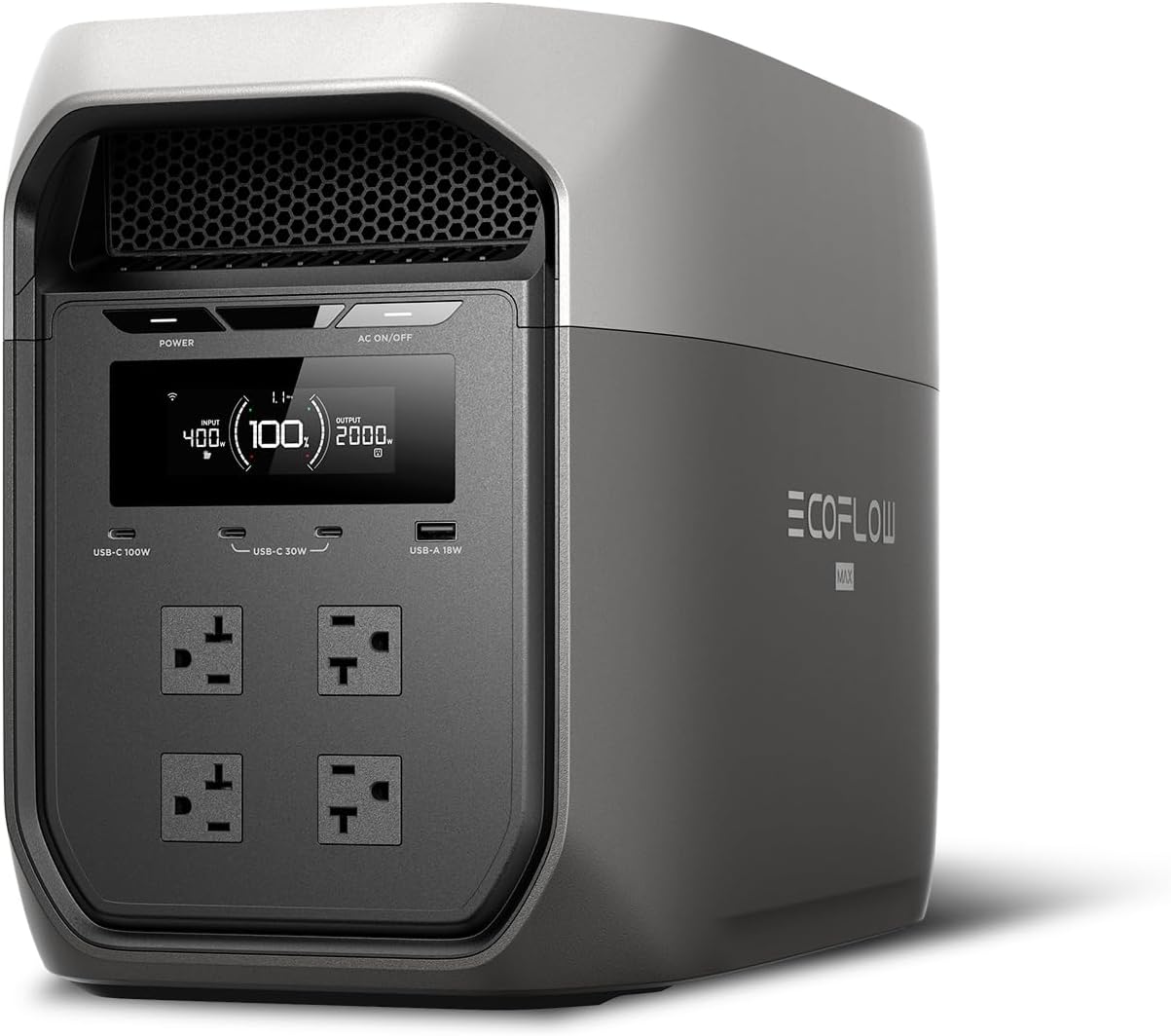
- Large 2048Wh battery provides substantial emergency backup runtime
- Delivers 2400W continuous AC power for demanding household equipment
- X-Boost supports compatible high-demand appliances requiring up to 3400W
- Less than 10ms transfer time protects computers during outages
- LiFePO4 battery chemistry is designed for long-term frequent use

This is much more backup power than a conventional desktop UPS
The EcoFlow DELTA 3 Max earns our number one position for Best Battery Backup And Surge Protector because it operates on a completely different scale from the little UPS boxes normally placed underneath a computer desk. You get a large 2048Wh LiFePO4 battery system combined with 2400W of rated AC output, a 4800W surge capability, and X-Boost support for compatible appliances requiring up to 3400W.
That 2048Wh capacity is the number that really changes how this product can be used. A conventional UPS may give a desktop computer enough time to save work and shut down, while the DELTA 3 Max is designed to keep substantially larger loads operating for meaningful periods.
Think about a power outage during a workday. The modem, router, computer monitors, laptop chargers, NAS, lighting, and other essential electronics can remain powered from one central battery rather than shutting down the moment utility power disappears.
The same capacity becomes useful around the home. A refrigerator, television, communication equipment, CPAP machine, lighting, and other essential appliances can potentially be supported, although actual runtime depends completely on how many watts those devices consume.
Runtime should always be calculated from actual load. A 100W device can run vastly longer than a 1500W appliance from the same 2048Wh battery, and inverter losses mean you should not assume every theoretical watt-hour reaches the connected equipment.
This is an important buying mistake with large battery backup systems. People look at capacity without checking what their appliances actually draw, then expect every device in the house to operate for the same amount of time.
The DELTA 3 Max provides 2400W of normal AC output. That is enough capacity for equipment well beyond computers and networking hardware, including many household appliances and power-hungry devices.
X-Boost 3.0 extends compatibility with certain loads up to 3400W. That additional appliance headroom is genuinely useful when an outage involves more than keeping a laptop alive.
Still, X-Boost should not be confused with a 3400W continuous rated inverter. The normal rated AC output is 2400W, and equipment with unusual voltage requirements or highly sensitive power characteristics should always be checked for compatibility first.
The less than 10ms transfer time is what makes it relevant as real backup power
For Best Battery Backup And Surge Protector applications, raw battery capacity is only part of the story. The DELTA 3 Max provides a UPS function with a transfer time of less than 10 milliseconds.
That means when utility power fails, connected equipment can transition to battery extremely quickly. EcoFlow specifically positions this for sensitive equipment including computers, NAS systems, servers, and other electronics where an abrupt shutdown can cause lost work or interrupted operation.
Imagine working on a large project when the lights suddenly go out. Without backup power, the desktop shuts off immediately, network storage disappears, the router reboots, and unsaved work may be lost.
With the DELTA 3 Max configured correctly for backup use, the battery can take over quickly enough that supported electronics continue operating. You may notice the room lights disappear while the workstation beside you remains alive.
That is a much more useful experience than having a battery you need to manually plug into after the outage has already happened. Automatic transfer is critical for sensitive electronics because the interruption itself is often the problem.
The inverter produces pure sine wave AC output as well. This is important for computers, audio equipment, networking hardware, appliances, and other electronics designed around normal utility-style AC power.
EcoFlow says the inverter samples AC voltage and current every 33 microseconds using a DSP system. The practical purpose is stable output rather than simply producing electricity from a battery.
There is also a 4800W surge rating. Motors and compressors can briefly require much more power during startup than they consume once running normally.
A refrigerator is a good example. Its steady running consumption may look modest, but the compressor can create a much larger temporary demand when it starts.
Surge capacity helps handle those short startup loads. You still need to check the requirements of the specific appliance rather than assuming every motorized device will work.
Charging performance is another reason this system works well for emergency preparation. The Amazon listing states that the battery can recharge from zero to 80 percent in approximately 1.13 hours using EcoFlow's X-Stream charging system.
EcoFlow's current specifications describe a similar 68-minute zero to 80 percent charging target through wall or generator charging. That is useful when the electricity returns temporarily during a longer outage.
Instead of requiring most of a day to replenish the battery, you can recover a substantial portion of capacity relatively quickly. Fast recharging matters during repeated outages because the available charging window may be unpredictable.
There are multiple charging approaches too. The DELTA 3 Max can recharge from wall power, compatible solar input, a generator, or an alternator charging arrangement with appropriate EcoFlow equipment.
The solar input supports up to 500W. That will not recharge a 2048Wh battery instantly, but it gives you another source of energy when grid electricity is unavailable for an extended period.
Solar performance depends heavily on sunlight, panel orientation, temperature, shading, and panel rating. A nominal 500W solar array does not produce exactly 500W every minute of the day.
Solar should be treated as variable generation, not a guaranteed fixed charging rate. During good conditions it can substantially extend emergency autonomy, while poor weather may reduce input considerably.
The battery itself uses LiFePO4 chemistry, also called LFP. This chemistry is widely used in modern portable power stations because of its cycle durability and thermal characteristics.
EcoFlow describes the full-tab LFP cells as designed for around 10 years of daily use under its stated conditions. The system also includes a battery management system that monitors operation continuously.
The internal CTC structure is designed to improve physical durability and help protect the battery assembly during transport. That matters because this is technically portable equipment, even though it carries a very substantial battery.
The DELTA 3 Max weighs approximately 20.3 kg. It is portable but definitely not lightweight, so this is more something you carry from the house to an RV or vehicle when necessary rather than something you casually move around all day.
The dimensions are approximately 494 by 239 by 305 mm. That is compact considering the 2kWh battery capacity, but you still need a sensible permanent location if it will serve as home backup equipment.
Why the DELTA 3 Max deserves our number one ranking
One reason we put this first is that it covers several different backup scenarios with the same hardware. It can protect a workstation from brief interruptions, run essential home electronics during longer blackouts, provide portable power during travel, and recharge from solar when the grid remains unavailable.
There are four standard AC outlets rated for a combined 2400W output, with up to 20A per port within the system's overall limits. You also get USB connections for directly powering phones, tablets, laptops, and other DC electronics.
The USB-C arrangement includes one port capable of up to 100W. A 100W USB-C output can directly charge many laptops without consuming an AC outlet or requiring the laptop's normal wall adapter.
Two additional USB-C outputs provide up to 30W, while a USB-A connection provides up to 18W. There is also a 12.6V cigarette-lighter output rated up to 126W.
That selection matters during a blackout because AC outlets become valuable. If a phone, tablet, or USB-C laptop can connect directly to the power station, there is no reason to occupy an AC receptacle with another adapter.
The EcoFlow app adds WiFi and Bluetooth management. You can monitor battery status, power consumption, charging behaviour, and other system information without repeatedly walking over to the unit.
Real-time power monitoring helps manage limited battery capacity. If the remaining runtime suddenly drops after somebody plugs in a high-draw appliance, you can see what is happening and decide whether that load is worth keeping on.
This is important during an extended outage. Battery backup becomes a budgeting exercise once you do not know when grid electricity will return.
A refrigerator may deserve priority. Decorative lighting probably does not.
EcoFlow's OASIS 3.0 software also provides scheduling and energy-management functions. Storm Guard Mode can prepare the system for severe-weather events, while scheduled charging and discharging can be useful for more advanced home energy routines.
Noise is surprisingly restrained for a system with this much output. EcoFlow rates operation at as low as 25 dB when the load is around 600W.
Quiet operation matters for indoor backup use. A battery power station can remain inside without the noise, exhaust, fuel storage, and carbon monoxide concerns associated with running a combustion generator.
That does not mean ventilation should be ignored. Follow the manufacturer's clearance and operating-temperature requirements, and do not bury the unit inside a closed cabinet where heat cannot escape properly.
The operating temperature range for discharge is approximately 14°F to 113°F. Charging is specified from around 32°F to 113°F.
Temperature affects batteries. Do not assume a power station stored in an extremely cold garage will behave exactly like one kept inside a conditioned home.
Another practical mistake is plugging every appliance into the unit simply because there are available sockets. Add up the wattage first.
The 2400W rating applies to the combined AC load. Four outlets do not mean four separate 2400W supplies.
If a 1500W appliance is already operating, there is considerably less normal inverter capacity available for everything else. Large heating appliances can consume battery capacity particularly quickly.
An electric heater is a good example. It may technically run, but using 1500W continuously can drain a 2kWh-class battery much faster than powering a refrigerator, router, laptop, and several lights.
This is why emergency planning should separate essential loads from convenience loads. Write down what actually needs to remain powered before an outage occurs.
For a home office, that might be the modem, router, computer, one monitor, NAS, and phone charging. Keeping critical loads small dramatically extends runtime.
For household backup, refrigeration, communication, medical equipment, and basic lighting may take priority. Actual priorities depend on the household.
It is also important to understand that this is not the same thing as a whole-house permanently installed UPS. It is a portable power station with UPS capability for connected loads.
If you want to energize fixed household circuits, use only compatible EcoFlow equipment and properly installed electrical hardware intended for that purpose. Never improvise a connection from a portable power station into household wiring.
Backfeeding household circuits is dangerous and can create serious electrical hazards. Portable backup equipment should be used exactly according to its approved connection methods.
The same caution applies to surge protection terminology. The DELTA 3 Max provides battery management, inverter protection, overload safeguards, and backup power functionality, but shoppers specifically needing a certified standalone surge protective device for a particular installation should verify the required surge specifications and certification rather than assuming every battery power station replaces every type of surge protector.
For electronics backup, though, the combination of pure sine wave inverter output, fast transfer, battery management, and large energy storage makes this much more capable than a basic power strip. It can actually keep equipment operating when utility power disappears.
That is the big distinction in this Best Battery Backup And Surge Protector comparison. The DELTA 3 Max provides hours-scale energy storage potential for moderate loads rather than only enough battery to shut down a desktop safely.
The 2048Wh battery is particularly useful for networking equipment. A modem and router may consume relatively little power, so keeping the internet infrastructure running can require only a small portion of the available capacity.
Of course, the internet itself must still be functioning. A powered router cannot restore service if the ISP infrastructure outside the home is down.
The same logic applies to a NAS. Keeping the storage server powered protects against abrupt shutdowns, but external cloud access still depends on the network connection.
The less than 10ms UPS transfer is therefore one of the most important specifications for office users. It protects continuity rather than merely supplying electricity afterward.
If you run a desktop workstation, test the backup setup before relying on it. Connect the intended loads, disconnect utility power in a controlled manner according to the instructions, and verify that everything remains operating as expected.
Testing also gives you a realistic runtime estimate. Manufacturer capacity figures cannot know whether your workstation consumes 120W or 700W.
Look at the EcoFlow app while your normal equipment is running. Record the combined wattage and estimated runtime.
Then decide whether anything unnecessary should be removed from the backup circuit. Knowing the real load before an outage matters.
The battery should also be maintained rather than forgotten for several years. Check its state periodically, keep firmware current, and follow EcoFlow's storage recommendations if the unit will remain unused for extended periods.
Do not store it completely discharged. Lithium battery systems benefit from being kept within the manufacturer's recommended storage state and temperature range.
The five-year warranty is another positive. EcoFlow lists a three-year standard warranty with an additional two years available through product registration in the EcoFlow app.
That is useful for equipment intended to remain part of an emergency preparedness setup for years. A long warranty supports the premium positioning of a large LFP power station.
There are still disadvantages. The DELTA 3 Max is substantially larger and more expensive than a conventional desktop UPS or surge strip.
If all you need is five minutes of backup for a modem and small computer, buying a 2048Wh portable power station is excessive. A smaller UPS can accomplish that job for much less money and take up far less space.
The DELTA 3 Max makes sense when backup requirements extend beyond one computer. Refrigeration, networking, work equipment, mobile devices, RV use, emergency lighting, and longer outages are where the larger battery becomes valuable.
This is backup power for more than a desk. That is why we evaluate it differently from a conventional 600VA or 1500VA UPS.
Another limitation is the 500W maximum solar input. That is useful, but users expecting extremely rapid solar recovery from a large array should understand that the input itself has a defined ceiling.
The newer DELTA 3 Max Plus offers higher output and additional expansion options, but that is a different product. For this specific DELTA 3 Max, the 2048Wh capacity and 2400W inverter already cover a wide range of household backup requirements.
The 20.3 kg weight also means carrying it up and down stairs repeatedly is not ideal. Choose a sensible storage location before the next outage rather than keeping it somewhere difficult to access.
Emergency equipment should be easy to reach. A power station buried behind boxes in a garage is much less useful when the electricity fails at night.
Keep the required charging cables and accessories with the unit. If solar panels or alternator charging are part of your emergency plan, test those charging methods before you actually need them.
That is another common preparedness mistake. People buy backup equipment, leave it unopened, then discover during an outage that they do not understand the connections or that a required cable is somewhere else.
Run a controlled test every so often. Confirm that the battery is healthy, firmware is current, connected loads behave properly, and your expected runtime still makes sense.
Backup equipment is most useful when already tested. The middle of a blackout is not the ideal time to learn how every setting works.
We give the EcoFlow DELTA 3 Max our number one rank because it covers both short interruptions and substantially longer power failures with one system. The combination of a large battery, fast transfer, high AC output, pure sine wave inverter, multiple output types, rapid re

- Large 1,024Wh LiFePO4 battery provides substantial outage backup capacity
- Delivers 1,800W continuous AC power with 3,600W surge capability
- Fast 10ms UPS switching keeps essential electronics running during outages
- Recharges from zero to 80 percent in about 45 minutes
- Supports up to eleven devices through versatile AC, USB, and DC outputs
This is much more than a small UPS sitting underneath a computer desk
The BLUETTI Elite 100 V2 earns our number two position for Best Battery Backup And Surge Protector because it provides a much larger reserve of usable energy than a conventional desktop UPS. The core specification is a substantial 1,024Wh LiFePO4 battery paired with 1,800W of continuous AC output, which makes it useful for computers and networking equipment but also refrigerators, lights, CPAP equipment, televisions, and other essentials during a power outage.
The 1,800W continuous output is important because battery capacity alone does not tell you what equipment can actually run. A large battery with a weak inverter may last a long time with small electronics but refuse to start a high-draw appliance.
BLUETTI also specifies up to 3,600W of surge capability, plus a 2,700W Power Lifting mode intended for certain resistive loads. That extra short-term headroom is useful because appliances with motors and compressors can demand considerably more power during startup than they consume once running.
The 10ms UPS switching time is the feature that matters most for this particular comparison. When utility power disappears, the Elite 100 V2 can switch to battery power in roughly 10 milliseconds, helping keep connected equipment operating through an outage.
That can solve a very ordinary problem in a home office. You are working on a desktop computer, the power flickers for half a second, and without battery backup the computer shuts down even though electricity immediately returns.
With the Elite 100 V2 operating as a UPS, that brief interruption can be bridged by the battery. The same idea applies to routers, modems, network storage, monitors, security equipment, and other electronics that become annoying when every short outage forces a reboot.
There is an important distinction, though. A portable power station with UPS functionality is not automatically the same thing as a dedicated surge suppression strip or enterprise online UPS.
If you are protecting unusually sensitive or expensive equipment, check the manufacturer's electrical protection specifications and the requirements of the connected device. Battery backup and surge suppression are related but different functions, and buyers should not assume that a large battery capacity automatically means the highest possible surge protection rating.
The 1,024Wh battery changes what you can realistically keep running
BLUETTI uses LiFePO4 battery chemistry in the Elite 100 V2. The company rates the battery for more than 4,000 cycles and describes that as enough for roughly ten years of daily use under its stated conditions.
That is a major advantage for equipment that may spend years plugged in and waiting for an outage. LiFePO4 chemistry is designed for long cycle life, so this is not just a battery you expect to use a handful of times and replace quickly.
The 1,024Wh capacity also makes runtime calculations more interesting than with a small computer UPS. A 60W laptop is listed by BLUETTI at around 11.8 hours, while a 100W projector is estimated at roughly 7.5 hours under the company's example conditions.
Actual runtime will always be lower than simply dividing 1,024Wh by the appliance wattage. The inverter, electronics, temperature, battery state, and conversion losses all consume some energy.
Still, the capacity gives you enough room to make choices during an outage. A modem and router consuming relatively little power can potentially remain online far longer than a 1,500W heating appliance.
This is where load management becomes important. Save the battery for equipment that actually matters rather than connecting every appliance simply because there are available outlets.
During a long outage, you might prioritize the internet connection, laptop, several lights, phone charging, and refrigeration. Running a high-wattage electric heater from the same battery can drain available energy much faster.
The Elite 100 V2 can power up to 11 devices simultaneously through its combination of AC, USB, and DC connections. That gives you flexibility without requiring a pile of adapters and chargers around the unit.
For a home office, a practical setup could include a desktop or laptop, monitor, modem, router, and phone charger. During a blackout, those devices can remain together on one backup system rather than being scattered across several tiny UPS units.
Four AC outlets make the system particularly flexible for conventional household equipment. USB outputs are more efficient for compatible phones, tablets, and laptops because you can avoid unnecessary AC adapters where appropriate.
There is also high-power USB-C charging available for modern laptops and mobile equipment. That matters because a growing number of work computers no longer need a traditional AC power brick when a suitable USB-C Power Delivery connection is available.
The system's display gives you information about battery state, input, and output. During an outage, watching the actual load is much more useful than guessing how long the battery might last.
If runtime suddenly looks much shorter than expected, check what is connected. A heater, kettle, coffee maker, or other high-draw appliance can completely change the remaining-time estimate.
Wattage determines how quickly the stored energy disappears. A 100W load and a 1,000W load are very different jobs even though both are comfortably below the inverter's 1,800W continuous rating.
Why the Elite 100 V2 takes second place rather than first
Charging speed is another major strength. BLUETTI states that TurboBoost charging can take the Elite 100 V2 from zero to 80 percent in about 45 minutes, with a complete AC recharge taking around 70 minutes under the specified conditions.
That is useful during unstable utility power. If electricity returns for an hour between outages, fast charging can restore a meaningful amount of backup capacity before the next interruption.
It also makes the unit easier to use away from home. You do not need to leave it connected overnight every time the battery has been substantially discharged.
Solar charging is supported as well, with BLUETTI specifying up to 1,000W of compatible solar input under the required voltage conditions. This creates a useful secondary charging method during extended outages or off-grid use.
Solar performance depends heavily on weather, panel orientation, available sunlight, panel rating, and temperature. A panel labelled 400W will not necessarily deliver exactly 400W continuously throughout the day.
For emergency planning, treat solar as a way to replenish energy rather than assuming it guarantees unlimited power. Stored battery energy still needs to be managed carefully when cloudy weather continues for several days.
The Elite 100 V2 weighs about 25.3 pounds. That is substantially heavier than a normal surge protector or compact desktop UPS, but surprisingly portable considering the 1,024Wh capacity and 1,800W inverter.
The integrated handle makes it realistic to move between a home office, living room, vehicle, campsite, or emergency storage location. You probably will not want to carry it around unnecessarily, but one person can relocate it without special equipment.
Its portable design also means the battery backup is not permanently tied to one desk. During normal work it might protect computer equipment, then during a longer blackout it can be moved to support refrigeration or another essential appliance.
That flexibility is a major advantage over a traditional UPS. A conventional computer UPS is excellent at one specific job, while this BLUETTI can serve as both backup power and a general portable power station.
The downside is that flexibility comes with cost, physical size, and complexity. If you only need five minutes of runtime to save a document and shut down one desktop PC, a smaller dedicated UPS may be more economical.
The Elite 100 V2 makes more sense when you want extended backup. It is for the person who wants the router to remain online, the laptop to keep working, phones to stay charged, and perhaps a refrigerator or other essential device to have emergency power available.
Another useful feature is app connectivity through WiFi and Bluetooth. The BLUETTI app can monitor charging, battery status, power consumption, and output controls without requiring you to stand directly in front of the unit.
This is practical when the battery sits underneath a desk or somewhere out of the way. Real-time load monitoring helps with outage planning because you can see how much power connected equipment is actually drawing.
Do not overload the inverter simply because several outlets remain empty. The number of sockets and the maximum total output are two different things.
Four devices drawing 500W each would exceed the normal 1,800W continuous AC rating even though they physically fit into four outlets. Always add the expected loads together.
Startup surge needs attention too. Refrigerators, pumps, and motor-driven equipment can briefly pull substantially more current when starting.
The 3,600W surge rating provides useful headroom, but you still need to check appliance startup requirements. Do not assume every device with a running wattage below 1,800W will automatically start correctly.
The same caution applies to power strips. Avoid building a complicated chain of extension cords, adapters, and power bars just to connect more equipment.
Use properly rated cables and keep high-draw appliances within the manufacturer's connection requirements. Heat at plugs and connectors is a warning sign that should never be ignored.
For permanent home-office UPS use, ventilation also matters. Do not bury the Elite 100 V2 inside a closed cabinet because it looks cleaner there.
The cooling system needs unobstructed airflow, particularly when charging quickly or supplying a substantial AC load. Leave appropriate clearance around the ventilation areas.
Temperature matters for batteries too. Avoid storing the unit in extreme heat or freezing conditions outside the manufacturer's recommended range.
If the battery is being kept primarily for emergencies, check its charge periodically. Emergency equipment is only useful if it is ready when the outage actually occurs.
A useful routine is to test the backup setup occasionally. Disconnect utility power in a controlled way and confirm that the equipment you expect to remain running actually does.
Testing reveals problems before a real outage. You may discover that a desktop draws more power than expected or that an appliance has a startup surge you had not considered.
For sensitive computer equipment, the 10ms transfer time is a particularly strong reason to consider this model. BLUETTI specifically positions the Elite 100 V2 as capable of supporting computers, routers, refrigerators, and other equipment during utility interruptions.
Still, specialized servers, medical equipment, laboratory devices, or systems requiring true zero-transfer online power should be matched against their own manufacturer requirements. A 10ms UPS is fast, but it is not the same architecture as a double-conversion online UPS.
This distinction is important when searching for the Best Battery Backup And Surge Protector. The Elite 100 V2 is unusually capable as a battery backup, but it is fundamentally a portable power station with UPS functionality rather than a conventional surge strip with a small battery attached.
Its advantage is enormous usable backup capacity. Its compromise is that buyers who need a specifically documented surge suppression rating or specialized power-conditioning architecture may prefer a dedicated UPS designed around those requirements.
That is also part of why it finishes second rather than first in our ranking. The first-place option provides a larger 2,048Wh battery and significantly greater output headroom, making it better suited to broader whole-home backup duties.
The BLUETTI is smaller, though, and that can actually be an advantage. At 25.3 pounds, it is easier to move and easier to fit beneath a desk or beside a home-office workstation.
A 1,024Wh battery is also enough for many realistic backup scenarios without paying for capacity that may rarely be used. Routers, computers, monitors, phones, lights, and smaller appliances are much easier loads than trying to power an entire home.
The Elite 100 V2 hits a useful middle capacity. It is large enough to provide meaningful runtime but compact enough that portability remains real rather than theoretical.
The LiFePO4 battery is another reason we rate it highly. More than 4,000 rated cycles means the battery is designed to tolerate repeated charging and discharging rather than being treated as a disposable emergency pack.
BLUETTI also provides a five-year warranty for the Elite 100 V2. That is reassuring for equipment containing a large battery pack, inverter, charging system, wireless connectivity, and multiple output circuits.
For daily UPS use, the battery may spend much of its life waiting at a high state of charge. Follow BLUETTI's storage and battery-care guidance rather than applying generic battery advice from unrelated chemistries.
LiFePO4 is well suited to frequent cycling, but proper temperature, ventilation, firmware updates, and charging practices still matter.
The BLUETTI app can also help with firmware management and system monitoring. Keeping the power station updated is sensible because modern portable power stations contain substantial electronic control systems rather than functioning as simple battery boxes.
For emergency preparedness, think about what you actually intend to power before the outage happens. Write down the wattage of the important devices and decide which ones get priority.
A modem, router, laptop, and LED lighting setup may consume surprisingly little compared with a kettle, hair dryer, microwave, or portable heater. Saving high-draw appliances for short periods can preserve hours of backup runtime.
Capacity planning makes the 1,024Wh battery much more useful. The goal is not to prove that the inverter can run everything at once.
During a short outage, you may use the system normally. During an extended blackout, load management becomes much more important.
Keep the refrigerator powered periodically, maintain communications, charge phones, and preserve enough reserve for nighttime lighting or essential equipment. That is where a large portable battery starts to become genuinely useful rather than merely convenient.
Fast AC recharging also changes the strategy when utility power is intermittent. A 45-minute charge to 80 percent can take advantage of a short restoration window before power disappears again.
Solar input provides another option when the grid remains unavailable. Multiple charging methods improve emergency resilience, particularly during outages lasting more than a few hours.
The Elite 100 V2 is also useful outside emergency backup. Camping, RV travel, photography, remote work, and temporary job sites can all use the same battery and inverter.
That gives the purchase more everyday value than a conventional UPS that spends almost its entire life underneath one desk. You can actually use the stored energy elsewhere and then return the unit to backup duty afterward.
We give the BLUETTI Elite 100 V2 our number two rank out of seven because its 1,024Wh LiFePO4 battery, 1,800W continuous output, 2,700W Power Lifting capability, 3,600W surge rating, 10ms UPS transfer, more than 4,000 rated battery cycles, fast 45-minute charging to 80 percent, support for up to 11 devices, WiFi and Bluetooth app control, solar charging capability, 25.3-pound portable design, and five-year warranty create an unusually complete backup power system.
For someone searching for the Best Battery Backup And Surge Protector, the Elite 100 V2 is a strong second-place choice when extended runtime and portable emergency power matter more than owning a compact traditional UPS. It loses first place mainly because our top-ranked system provides substantially more battery capacity and output headroom, but the BLUETTI's lighter design, fast 10ms backup switching, long-life LFP battery, rapid recharging, and 1,800W output make it a very practical choice for computers, networking gear, appliances, and essential equipment during outages.

- Provides 1500VA and 900W battery backup capacity for essential electronics
- Ten outlets divide battery backup and surge protection intelligently
- Automatic Voltage Regulation corrects fluctuations without consuming battery power
- LCD screen displays runtime, load, battery, and utility information
- Replaceable battery design extends useful service life significantly
This is the traditional UPS choice when protecting a serious computer setup
The APC BX1500M earns our number three position for Best Battery Backup And Surge Protector because it is much closer to the classic definition of a UPS than the large portable power stations ranked above it. You get 1500VA and 900W of backup power, proper surge protection, Automatic Voltage Regulation, an LCD status display, dataline protection, and ten AC outlets in a compact tower designed to stay beside a computer or networking setup.
The 900W output matters because wattage determines how much connected equipment the UPS can actually support. A desktop computer, one or two monitors, modem, router, and network equipment can fit comfortably within that limit when their combined draw is reasonable.
Do not confuse 1500VA with 1500 watts. The BX1500M is rated for a maximum active output of 900W, so that is the figure you should use when adding up the real electrical load of connected equipment.
The ten outlets are divided into two groups. Five provide both battery backup and surge protection, while the other five provide surge protection without using the battery during an outage.
That arrangement is useful in a real home office. Your desktop, main monitor, router, modem, and perhaps a NAS can use the battery-backed outlets, while equipment that does not need emergency runtime can stay on the surge-only side.
A printer is a good example of something that generally does not deserve precious battery capacity. Laser printers in particular can have substantial power demands, so keeping them away from the battery-backed sockets leaves more capacity available for the computer and network equipment that actually need time to shut down properly.
This is one of the practical differences between a UPS and simply plugging everything into one large battery station. The BX1500M is organized around protecting electronics continuously, not just providing portable stored energy when the electricity goes out.
The AVR feature solves the power problems that happen before a blackout
Automatic Voltage Regulation is one of the strongest reasons to consider the BX1500M. The UPS can correct certain low and high utility voltage conditions without immediately switching to battery power.
This matters because not every electrical problem is a complete outage. You can have brownouts, voltage dips, and unstable mains power that cause computers or networking equipment to behave unpredictably even though the lights never completely go out.
AVR corrects voltage without draining the battery, which is important because the battery remains available for the moment utility power actually disappears. Constantly cycling the battery for every small voltage variation would create unnecessary wear.
Imagine working on a large Photoshop file or a spreadsheet that has not been saved for twenty minutes. The building experiences a brief voltage dip, a normal desktop power supply shuts down, and suddenly the work is gone.
The BX1500M is designed to sit between that equipment and the wall outlet so short electrical disturbances do not automatically become computer crashes. This is exactly the sort of problem a proper battery backup is supposed to prevent.
The LCD panel is useful because you can see what the UPS is doing instead of relying on one vague status light. It provides information about utility conditions, battery status, load, and estimated runtime.
Runtime information becomes useful during a real outage. If the display shows only a few minutes remaining, you know it is time to save everything and shut down rather than continuing to work and hoping power returns.
Battery runtime depends heavily on connected load. A router and modem may run for considerably longer than a gaming desktop drawing several hundred watts.
This is why testing the system after installation is worthwhile. Connect the equipment you actually intend to protect, check the displayed load, then simulate a controlled outage and see how the system behaves.
Do not wait until a thunderstorm to discover that the computer, two monitors, speakers, external drives, and other equipment together push the UPS beyond the load you expected. Planning the protected load prevents unpleasant surprises.
The BX1500M also includes network dataline protection. This gives you another route for protecting connected equipment from electrical disturbances that may travel through network cabling rather than entering only through an AC outlet.
That feature can be useful for desktop computers, switches, and networking hardware. Surge protection is most effective when the different electrical paths into sensitive equipment are considered rather than focusing exclusively on the power cable.
Why the BX1500M earns third place instead of the top position
The biggest advantage of the APC is that it is purpose-built for UPS duty. The biggest disadvantage is that its battery capacity is much smaller than the portable power stations ranked first and second.
A large EcoFlow or BLUETTI can keep equipment running for hours under modest loads. The BX1500M is designed more around bridging outages and enabling safe shutdowns rather than operating a large household load through a long blackout.
That is not necessarily a weakness. For a desktop computer, the job of a UPS is often to survive the first few seconds, keep the machine stable, and provide enough time to save work and shut down properly.
If power returns after thirty seconds, you may not need to shut down at all. The UPS simply handled the interruption and your computer continued as though little happened.
For a long outage, runtime becomes more limited. Heavy desktop systems can consume battery capacity quickly, especially when a powerful GPU and multiple monitors are active.
Reduce the load when an outage begins. Stop gaming, rendering, or other intensive workloads, save the important files, and close applications before the battery gets low.
This is where the BX1500M feels different from our first and second ranked portable power stations. Those larger units are better when the goal is to continue working for a long period rather than simply survive the transition.
The APC remains stronger in another area, though. It is a dedicated line interactive UPS that stays connected all the time and is specifically designed around automatic backup, surge suppression, voltage regulation, and computer shutdown workflows.
The unit's PowerChute software can communicate with a connected Windows computer and help perform controlled shutdown behavior. That is valuable when an outage occurs while nobody is sitting at the desk.
Automatic shutdown can protect unsaved data and file systems when battery capacity reaches a critical level. This is especially useful for always-on computers and small servers.
Mac users can use the operating system's native energy management functionality rather than the Windows PowerChute software. Either way, connecting the UPS to the computer provides more control than simply treating it as an anonymous battery box.
The BX1500M uses a replaceable lead acid battery. That battery chemistry is heavier and less energy dense than the LiFePO4 batteries used in newer portable power stations.
The upside is serviceability. When the battery eventually loses capacity, APC designed the unit so the battery can be replaced rather than requiring the entire UPS to be discarded.
The replaceable battery extends the useful life of the hardware considerably. APC specifies replacement battery model APCRBC124 for this UPS.
Battery condition should be checked periodically because rechargeable batteries age even when outages are rare. A UPS that has been sitting under a desk for several years may no longer provide the runtime it did when new.
Run the self-test function and pay attention to battery replacement warnings. Ignoring those warnings defeats the purpose of owning backup power in the first place.
The unit weighs roughly 24 pounds, largely because of the sealed lead acid battery inside. It is still reasonably compact at about 9.84 inches high, 3.94 inches wide, and 15.04 inches deep.
This narrow tower shape is useful under a desk. It takes much less floor space than a large 1kWh or 2kWh portable power station.
The compact shape suits permanent workstation protection. It is not intended to be moved from room to room whenever an appliance needs emergency power.
The BX1500M also carries a surge energy rating of 789 joules. That gives connected electronics protection against transient electrical surges in addition to the battery backup function.
Surge ratings should not be interpreted as permanent protection against every possible electrical event. Surge components wear as they absorb repeated disturbances, and no consumer surge protector guarantees protection from a direct lightning strike.
Proper building grounding remains important. During areas with frequent severe electrical storms, whole-home surge protection can complement point-of-use equipment like the APC.
Layered electrical protection is more sensible than expecting one small device beside a computer to handle every possible power event in the building.
The five surge-only outlets are helpful for exactly this reason. Equipment can receive surge protection without unnecessarily consuming battery runtime during an outage.
The six-foot power cord also gives you reasonable placement flexibility. The right-angle wall plug helps keep the installation relatively neat when furniture sits close to the outlet.
Avoid connecting the UPS through an ordinary extension cord or another surge protector unless APC specifically approves that arrangement. The safest setup is generally to connect the UPS directly to a properly grounded wall outlet.
Do not plug the UPS into itself either. It sounds strange, but looped power configurations and overloaded power strips are real mistakes people make when equipment setups become complicated.
Keep the electrical path simple and properly rated. High-current computer equipment deserves a clean installation rather than a stack of adapters hidden behind a desk.
Another mistake is plugging large motor loads into a computer UPS. Space heaters, vacuum cleaners, and other high-wattage appliances can exceed the intended output very quickly.
The BX1500M is much better suited to electronics such as computers, displays, routers, network switches, game consoles, and similar equipment. If the load approaches 900W continuously, you also leave very little headroom.
A reasonable setup should leave some margin. If your workstation draws 850W under normal use, moving to a larger UPS may be smarter than operating close to the BX1500M's ceiling all the time.
More load also means less battery runtime. Protecting only essential devices can dramatically improve the time available during an outage.
A home network is a good example. A modem, router, and small network switch may use relatively little power, allowing a UPS like this to keep internet access alive much longer than it could support a powerful gaming computer.
This can be valuable during brief neighborhood outages when the ISP infrastructure remains operational. Your WiFi can continue working even though the rest of the room is dark.
For remote workers, combining the computer and network equipment on the same UPS prevents an annoying situation where the laptop remains powered but the router shuts off. The correct configuration depends on your total load and required runtime.
The LCD should be used as a planning tool here. Check the actual load rather than guessing, then decide which devices deserve one of the five battery-backed outlets.
The APC also uses audible alarms to report changing utility and battery conditions. These warnings can be loud, but during a power event that is partly the point.
If the UPS begins warning about overload, low battery, or a fault, do not simply silence it permanently without understanding why. The alarm is telling you something about the protection system.
The BX1500M is ENERGY STAR certified as well. Efficiency matters because a UPS stays connected to utility power continuously, often for years.
Even small efficiency differences accumulate when equipment operates twenty-four hours a day. A UPS should protect the load without wasting excessive energy simply by being present.
Where the APC loses to our top two is runtime and versatility. A 1,024Wh BLUETTI or 2,048Wh EcoFlow provides much more stored energy and can support a wider variety of household equipment.
The portable power stations can also travel, recharge from solar, and run appliances well beyond the computer desk. The BX1500M cannot compete with that broader emergency-power role.
But if the question is specifically protecting a desktop computer, gaming system, NAS, modem, router, or home office, the APC begins to look extremely sensible. Its dedicated UPS architecture, AVR, surge protection, dataline protection, replaceable battery, LCD, and shutdown software are all focused on that exact job.
That is why third place is appropriate. It is the more traditional UPS solution, and for many users it may actually be the most practical choice despite having far less battery capacity than the two products above it.
We give the APC BX1500M our number three rank out of seven because its 1500VA capacity, 900W output, five battery-backed surge-protected outlets, five additional surge-only outlets, 789-joule surge rating, Automatic Voltage Regulation, network dataline protection, LCD status interface, PowerChute shutdown support, replaceable APCRBC124 battery, ENERGY STAR certification, and compact tower format provide an unusually complete computer and networking protection package.
For someone searching for the Best Battery Backup And Surge Protector, the BX1500M is a strong third-place choice when protecting computers and sensitive electronics matters more than running household appliances for hours. It ranks behind our first two products because its stored battery energy and output versatility are much lower, but for a permanent desktop, gaming, networking, or home-office installation, the APC's dedicated UPS design, AVR, surge protection, and replaceable battery make it one of the most sensible options in this comparison.

- Delivers 1500VA and 1000W of dependable battery backup power
- Pure sine wave output supports modern active PFC computer power supplies
- Twelve outlets provide separate battery backup and surge protection groups
- Automatic Voltage Regulation corrects fluctuations without consuming battery capacity
- Color LCD displays battery, load, runtime, and electrical status information
The pure sine wave output is the reason this UPS stands out
The CyberPower CP1500PFCLCD earns our number four position for Best Battery Backup And Surge Protector because it combines 1500VA and 1000W of output capacity with pure sine wave battery power, Automatic Voltage Regulation, 12 AC outlets, and substantial surge protection. This is the kind of UPS that makes sense beneath a gaming PC, workstation, home office desk, network cabinet, or entertainment system where sudden shutdowns can create real problems.
The 1000W output rating is particularly useful for modern desktop computers. High performance systems can draw several hundred watts under load, especially when a powerful graphics card, monitor, external storage, networking hardware, and other peripherals are involved.
Do not confuse the 1500VA rating with 1500 watts. The actual maximum output is 1000W, so that is the number to use when calculating how much equipment you can safely connect to battery backup.
Pure sine wave output matters with modern electronics. Many current computer power supplies use active power factor correction, and a clean sine wave is generally the preferred type of backup power for that hardware.
That becomes useful during an outage when the UPS suddenly takes over from utility power. Instead of feeding the computer a rough simulated waveform, the CP1500PFCLCD produces a sine wave intended to closely resemble normal utility power.
For a high end workstation, this can mean a smoother transition when the grid disappears. The computer keeps running, the monitor stays on, and you have time to save files or finish whatever needs to happen before shutting down.
The 12 outlets make it easier to separate essential equipment from everything else
The CP1500PFCLCD provides 12 NEMA outlets in total. Six receive both battery backup and surge protection, while six are surge protected without drawing from the battery during an outage.
That outlet split helps preserve useful runtime. Your desktop, primary monitor, router, modem, and storage device can use battery backed outlets while speakers, printers, lamps, or less important accessories stay on surge protection only.
This is important because every device connected to the battery side reduces runtime. A UPS is most useful when the battery is reserved for equipment that actually needs to remain operational during a blackout.
A laser printer is a good example of something that should usually stay away from the battery backed side. Its power demand can be surprisingly high during printing and can dramatically reduce available runtime or overload the UPS.
The unit is rated for about 10 minutes of runtime at half load and roughly 2.5 minutes at full load. Actual runtime changes with battery age, temperature, charge level, and connected equipment, so those numbers should be treated as useful reference points rather than exact guarantees.
Ten minutes can be plenty of time for a home office. It gives you a chance to save work, finish a file transfer, close applications properly, and perform an orderly shutdown instead of letting the computer lose power instantly.
The typical transfer time is around 4ms. That is fast enough for the sort of computers, networking equipment, and home entertainment hardware this UPS is designed to protect.
Automatic Voltage Regulation is another major advantage. AVR can correct certain low voltage conditions without switching to battery power, which helps preserve battery capacity for actual outages.
This matters in buildings where voltage occasionally dips when large appliances start or local utility conditions fluctuate. AVR handles smaller electrical problems without wasting battery cycles.
The UPS also provides 1445 joules of surge suppression. That gives connected equipment an additional layer of protection against sudden voltage spikes and transient electrical events.
Surge protection should still be understood realistically. No consumer UPS can guarantee survival against every possible electrical event, particularly a direct lightning strike.
Good building grounding and whole home surge protection can complement a point of use UPS. The CyberPower then becomes another layer directly beside the sensitive equipment.
Why the CP1500PFCLCD finishes fourth in our ranking
The multifunction LCD is one of the better usability features. It displays information about battery condition, input power, output load, runtime, and alerts without forcing you to connect software just to understand what the UPS is doing.
The color display makes load management easier. If you connect another monitor or device and suddenly see the UPS approaching its limit, you know immediately that the setup needs adjustment.
The screen can also tilt, which is surprisingly helpful when the UPS sits underneath a desk. You do not need to crawl onto the floor just to check the remaining runtime during an outage.
CyberPower also includes USB charging ports, with one USB-A and one USB-C connection. These can keep phones and smaller devices powered during an outage without occupying another AC outlet.
Network line protection is included as well. Ethernet cabling can potentially carry damaging electrical transients, so protecting the data line gives networked computers another layer of protection.
The UPS uses sealed lead acid batteries rather than LiFePO4 cells. That makes it heavier and gives it far less stored energy than the large portable power stations ranked first and second.
This is the main reason it does not place higher. The runtime is designed for safe shutdown rather than long outages.
If you want to run a refrigerator, television, modem, computer, and several other appliances for hours, a 1kWh or 2kWh portable power station is the more suitable tool. The CyberPower is designed for a different job.
Its job is to sit beside sensitive electronics every day, regulate incoming voltage, suppress surges, and instantly supply battery power when utility electricity disappears. For that purpose, it is extremely well matched.
The battery is user replaceable too. CyberPower specifies replacement battery cartridges for this model, which means the UPS does not automatically become electronic waste once the original batteries age.
Replaceable batteries extend the usable service life. Lead acid batteries gradually lose capacity, so replacement becomes an expected maintenance item after enough years of use.
Run periodic self tests and pay attention to battery warnings. A UPS that has not been tested for several years may provide far less runtime than expected when an outage finally happens.
The PowerPanel software provides additional monitoring and shutdown functionality. This can be especially useful for unattended computers or systems where an orderly shutdown needs to happen automatically once battery capacity gets low.
Imagine a workstation performing a long overnight render. Utility power fails while nobody is in the room.
Without shutdown software, the machine can keep running until the UPS battery is exhausted and then shut off abruptly. With properly configured UPS communication, the computer can shut down before reaching that point.
Automatic shutdown protects data and running processes, particularly on desktops, workstations, and small servers that may remain on when nobody is nearby.
Network equipment is another good use case. A modem, router, switch, and access point may consume far less power than a desktop computer, so the same UPS can often keep internet connectivity alive considerably longer.
That can be useful during short neighborhood outages. Your phone still has WiFi, cloud services remain reachable, and security equipment can continue communicating if the internet provider's infrastructure remains powered.
Do not load the UPS simply because an outlet is available. Twelve sockets do not mean twelve high wattage devices can operate simultaneously on battery.
Add together the wattage of the equipment connected to the battery backed side. Leave sensible headroom below the 1000W ceiling rather than designing a setup that constantly operates near maximum capacity.
High draw appliances should generally stay away from this type of UPS. Space heaters, microwaves, kettles, vacuum cleaners, and large motor loads can exceed its intended use very quickly.
Use the CP1500PFCLCD for electronics. Computers, monitors, routers, switches, NAS systems, televisions, consoles, and audio equipment are much more appropriate loads.
Ventilation matters too. The UPS should not be buried behind boxes or installed inside a sealed cabinet where heat cannot escape.
Battery temperature affects long term battery health. Keeping the unit in a reasonably cool, ventilated location can help preserve battery performance.
The system comes with a three year warranty that includes battery coverage during that period, plus a connected equipment guarantee from CyberPower. This adds some reassurance for a product designed to sit between expensive electronics and the electrical grid.
We rank the CP1500PFCLCD below the APC BX1500M mainly because the APC offers a very mature traditional UPS package and remains extremely competitive for general home office use. The differences are not huge, though, and the CyberPower actually has the advantage of a 1000W output rating compared with many 1500VA alternatives rated around 900W.
The pure sine wave output is another major reason this unit remains high on the list. Users with modern active PFC computer power supplies may specifically prefer this model for that reason.
Fourth place reflects runtime rather than weak protection. The portable power stations above it provide vastly more stored energy, while our traditional UPS choices compete very closely on computer focused features.
We give the CyberPower CP1500PFCLCD our number four rank out of seven because its 1500VA capacity, 1000W output, pure sine wave battery power, 12 outlets, six battery backed sockets, six surge only outlets, 1445 joule surge suppression rating, Automatic Voltage Regulation, 4ms typical transfer time, LCD interface, USB-A and USB-C charging, network protection, replaceable battery, and PowerPanel management software create a very complete UPS for computers and sensitive electronics.
For someone searching for the Best Battery Backup And Surge Protector, the CP1500PFCLCD is an excellent fourth place choice for gaming PCs, workstations, networking hardware, NAS systems, and home office equipment. It ranks below the larger battery systems because it is built for minutes rather than hours of backup runtime, but if the goal is dependable surge protection, clean sine wave battery power, voltage regulation, and enough time to safely ride through short outages or shut equipment down properly, this CyberPower remains a very strong option.

- Provides 1000VA and 600W of dependable battery backup power
- Pure sine wave output supports sensitive modern electronic equipment
- Ten outlets separate battery backup from surge-only protection
- Automatic Voltage Regulation corrects fluctuations without draining battery
- LCD monitoring displays load, battery status, and remaining runtime
This is the APC I would choose when clean backup power matters more than huge capacity
The APC BR1000MS earns our number five position for Best Battery Backup And Surge Protector because it focuses on protecting computers and sensitive electronics rather than providing hours of emergency power for an entire room. You get 1000VA and 600W of battery-backed output, pure sine wave power, Automatic Voltage Regulation, ten outlets, an LCD display, and dedicated surge protection in one fairly compact tower.
The 600W output figure is the one to pay attention to when deciding what equipment can actually run from the battery. The 1000VA rating is useful for sizing, but connected equipment should stay within both ratings and preferably leave some operating headroom.
For a normal home office, that could mean a desktop PC, one monitor, modem, router, and perhaps a small NAS. If the combined draw stays well below 600W, the BR1000MS gives those devices time to ride through a short outage or shut down properly.
Pure sine wave output is a major advantage here. Modern computers often use active PFC power supplies, and pure sine wave battery output provides a cleaner form of AC power than the stepped approximation used by many cheaper UPS models.
That matters when utility power disappears and the UPS switches to battery. The connected computer continues receiving a waveform that is closer to normal mains electricity, which improves compatibility with sensitive power supplies and higher-end electronics.
Imagine you are editing a large project on a workstation and the utility power drops for ten seconds. Without battery backup, the computer immediately shuts down and whatever was not saved may disappear.
The BR1000MS is designed to bridge that interruption. The transfer time is typically around 8 to 10 milliseconds, which is fast enough for the computers and electronics this model is built to protect.
The ten-outlet layout makes much more sense once you separate essential equipment
The BR1000MS provides ten AC outlets in total. Six receive both battery backup and surge protection, while four are surge protected without using the battery during an outage.
That separation helps preserve battery runtime. Your desktop, primary monitor, router, modem, and network storage can use the battery-backed sockets, while equipment that does not need emergency power can stay on surge protection only.
A printer is a good example. There is very little reason to spend battery capacity keeping a printer alive while the house has no electricity.
Large laser printers can also pull substantial power during operation. Keeping them on the surge-only side avoids wasting battery energy and reduces the risk of overloading the UPS.
The same logic applies to speakers, desk lamps, secondary displays, and other accessories. Decide what absolutely needs to remain alive during a blackout and give those devices priority.
Battery runtime depends heavily on connected load. APC examples for the BR1000MS show that a light load around 100W can receive much longer backup time than a workstation drawing several hundred watts.
That means a modem and router can remain powered much longer than a gaming PC operating at full load. During a longer outage, reducing the connected load can buy valuable extra minutes.
The LCD display helps with this because it shows useful information about load, battery status, utility conditions, and estimated runtime. You do not have to guess whether the UPS is nearly overloaded.
This becomes useful the first time you add another monitor or external device. Instead of waiting for an overload alarm, you can see how much capacity is already being used.
The LCD makes load planning much easier, especially for users who gradually add more equipment to the same workstation over time.
The BR1000MS also includes USB charging ports, including USB-A and USB-C. These let you charge compatible phones and smaller devices without consuming one of the AC outlets.
That can be useful during an outage. If the computer has already been shut down, the UPS can continue supporting networking equipment while also keeping a phone charged for communication.
Network dataline protection is included as well. Electrical disturbances can potentially travel through Ethernet cabling, so protecting that path gives connected equipment another layer of defense.
Surge protection should consider more than the power cord. A computer connected to both AC power and network cabling has more than one possible path for electrical transients.
Why the BR1000MS finishes fifth despite being a very competent UPS
Automatic Voltage Regulation is one of the strongest features. AVR can correct certain low and high utility voltage conditions without switching the UPS to battery.
This matters because not every power problem is a complete blackout. Buildings can experience brownouts, voltage sag, or overvoltage conditions while the lights remain on.
AVR corrects those conditions without consuming battery cycles, leaving the battery available for the outage that may happen later. That can also reduce unnecessary battery wear over the life of the unit.
You may occasionally hear the UPS click when AVR engages. That relay sound can be normal as the unit switches between voltage regulation states or battery operation.
If clicking becomes extremely frequent, though, it can indicate unstable incoming utility voltage. That is worth investigating rather than simply ignoring the sound forever.
The BR1000MS uses sealed lead acid battery technology. This is traditional UPS hardware rather than the much larger LiFePO4 battery packs used in portable power stations.
The advantage is that the battery is designed to be replaceable. When battery capacity eventually declines, you can service the UPS rather than immediately replacing the entire device.
That matters because batteries are consumable components. Even a UPS that rarely experiences outages will eventually lose some runtime as the battery ages.
Perform the built-in self tests and pay attention to replacement warnings. A UPS that has spent six years under a desk without testing may not deliver the runtime you expect when the power finally fails.
Lead acid chemistry also explains part of the unit's weight. The BR1000MS weighs roughly 22.5 pounds, so it is compact enough for a workstation but not something you would want to carry around every day.
This is intended to stay beside one equipment setup. It is very different from the EcoFlow and BLUETTI portable power stations ranked above it, which are designed to move between home backup, camping, vehicles, and other locations.
That fixed-role design is also the main reason the APC sits at number five. The higher-ranked portable batteries provide vastly more stored energy and can run equipment for hours rather than minutes.
The BR1000MS is not trying to do that job. It is designed to keep electronics alive through short interruptions and give you enough time to shut down safely during longer ones.
For a desktop PC, that can be exactly what you need. There is little point buying a huge 1kWh battery if your only goal is preventing a computer from instantly turning off during a three-second blackout.
The BR1000MS is much more purpose-built for workstation protection. It stays connected continuously, monitors utility power, regulates voltage, suppresses surges, and switches automatically when mains power fails.
The PowerChute software can also communicate with compatible Windows computers. This allows the system to perform an orderly shutdown if the battery becomes low during an unattended outage.
That feature is particularly useful for home servers, NAS-adjacent systems, and desktops that remain running overnight. The UPS can protect the computer even when nobody is sitting nearby to react to the alarm.
Safe shutdown matters because abrupt power loss can corrupt open files or interrupt storage operations. It can also ruin hours of unsaved work.
Automatic shutdown turns backup power into actual data protection, rather than simply delaying the moment the computer loses power.
The surge protection side should also be understood realistically. A UPS can protect against many common transient spikes and power disturbances, but no consumer device should be treated as absolute protection from a direct lightning strike.
Good electrical grounding matters. In areas with frequent severe storms, whole-home surge protection can complement the UPS and provide another protective layer before the disturbance reaches the desk.
Using both approaches makes more sense than expecting one small box beside the computer to absorb every electrical event that can occur in the building.
Do not plug very high-draw appliances into the battery side. Heaters, kettles, vacuum cleaners, microwave ovens, and other heavy loads are not what this 600W UPS is designed to support.
Keep the backup load focused on electronics. PCs, monitors, routers, modems, switches, consoles, televisions, and storage equipment are much more appropriate.
Even then, total wattage needs checking. A powerful gaming PC with a large GPU can approach the BR1000MS limit under heavy load before the monitor and other equipment are counted.
If the complete workstation regularly draws close to 600W, move to a larger UPS. Operating with meaningful headroom is better than designing a system that sits near its maximum output whenever the computer becomes busy.
Headroom also improves runtime. A lightly loaded battery backup will naturally remain operational longer than one running close to full capacity.
This becomes especially useful for networking equipment. A modem, router, and switch may only consume a fraction of the power used by a desktop system.
Keeping the network online can be surprisingly valuable. During a local outage, the internet provider may still be operating even though your home's electrical service is down.
Your phones and laptops can then continue using WiFi instead of immediately falling back to cellular data. Home security and smart-home systems may also remain connected.
The ten outlets offer enough flexibility to protect a substantial setup, but the physical number of outlets should never be mistaken for electrical capacity. Ten sockets do not mean ten 100W devices can all run from a 600W UPS.
Add the loads together. If you do not know the actual draw, use a power meter or check the UPS load display while the equipment is operating normally.
Measuring the real load is better than guessing. Power supply ratings printed on computer components represent maximum capability, not necessarily what the system consumes every second.
Ventilation matters as well. Do not bury the BR1000MS beneath blankets, boxes, or inside a sealed cabinet.
Rechargeable batteries and power electronics produce heat, and excessive temperature can shorten battery life. Leave reasonable airflow around the unit.
A cool, dry location under or beside the desk is generally more sensible than placing it near a radiator or direct sunlight. Battery backup equipment is designed to sit quietly for years, so the environment matters.
Test the UPS before trusting it. After setup, simulate a controlled outage with noncritical work open and confirm that everything on the battery side stays powered.
Check the runtime estimate and verify that the computer recognizes the UPS management connection. It is far better to discover an installation problem during a test than during a real storm.
You may also discover that you connected the wrong devices to the battery-backed outlets. Rearrange them while there is no emergency.
The BR1000MS is narrower than many large power stations, so it fits easily beneath most desks. Its approximately 14.5-inch depth means you should still leave enough room for cables and airflow behind it.
The vertical mini-tower shape keeps the footprint reasonably small. That is useful in offices where floor space around the workstation is already crowded with computers and cables.
Permanent placement is where this APC works best. Once configured properly, you mostly forget about it until utility power misbehaves.
That low-maintenance nature is part of the appeal of a traditional UPS. It does not require someone to remember to move a battery station into place when bad weather approaches.
It is already connected. The outage happens, the battery takes over, and the protected equipment keeps running.
Where it loses to our third and fourth place UPS models is output headroom. The APC BX1500M and CyberPower CP1500PFCLCD offer 900W and 1000W respectively, which makes them better suited to heavier desktop and gaming systems.
The BR1000MS tops out at 600W, so high-end workstations need more careful load planning. That lower capacity is the main practical reason it sits at fifth rather than challenging those larger UPS units.
The CyberPower also provides 12 outlets and a higher 1445-joule surge suppression figure, while the 1500VA APC gives more battery-backed capacity for larger systems. Those differences matter when several expensive devices share one workstation.
For a moderate home office, though, the BR1000MS is arguably easier to size correctly. You get the features that matter without buying more UPS than the equipment actually needs.
The pure sine wave output is particularly valuable at this price and capacity level. Many cheaper battery backups use simulated sine wave output instead.
That clean output keeps the BR1000MS relevant even though its maximum wattage is lower than the units directly above it in our ranking.
The combination of AVR and pure sine wave battery output is also useful for sensitive electronics beyond computers. Home theater equipment, networking systems, game consoles, and some audio hardware can benefit from stable power conditions.
Just keep the runtime goal realistic. This is a UPS, not a whole-home energy storage system.
If the outage lasts several hours, the right strategy is usually to shut the major equipment down and preserve the remaining battery for lower-power essentials where appropriate. The BR1000MS is there to give you that controlled choice.
We give the APC BR1000MS our number five rank out of seven because its 1000VA capacity, 600W output, pure sine wave battery power, ten outlets, six battery-backed surge-protected sockets, four surge-only outlets, Automatic Voltage Regulation, LCD interface, roughly 8 to 10ms transfer time, USB-A and USB-C charging, network dataline protection, replaceable battery, and software-assisted shutdown capability provide a very complete protection package for moderate computer and home-office setups.
For someone searching for the Best Battery Backup And Surge Protector, the BR1000MS is a strong fifth-place choice when clean sine wave power, reliable surge protection, voltage regulation, and safe computer shutdown matter more than extended multi-hour battery runtime. It ranks below our larger UPS and portable battery options because the 600W ceiling and smaller stored battery capacity limit heavier loads, but for everyday PCs, networking equipment, entertainment systems, and home-office electronics, it remains a dependable and thoughtfully designed backup solution.
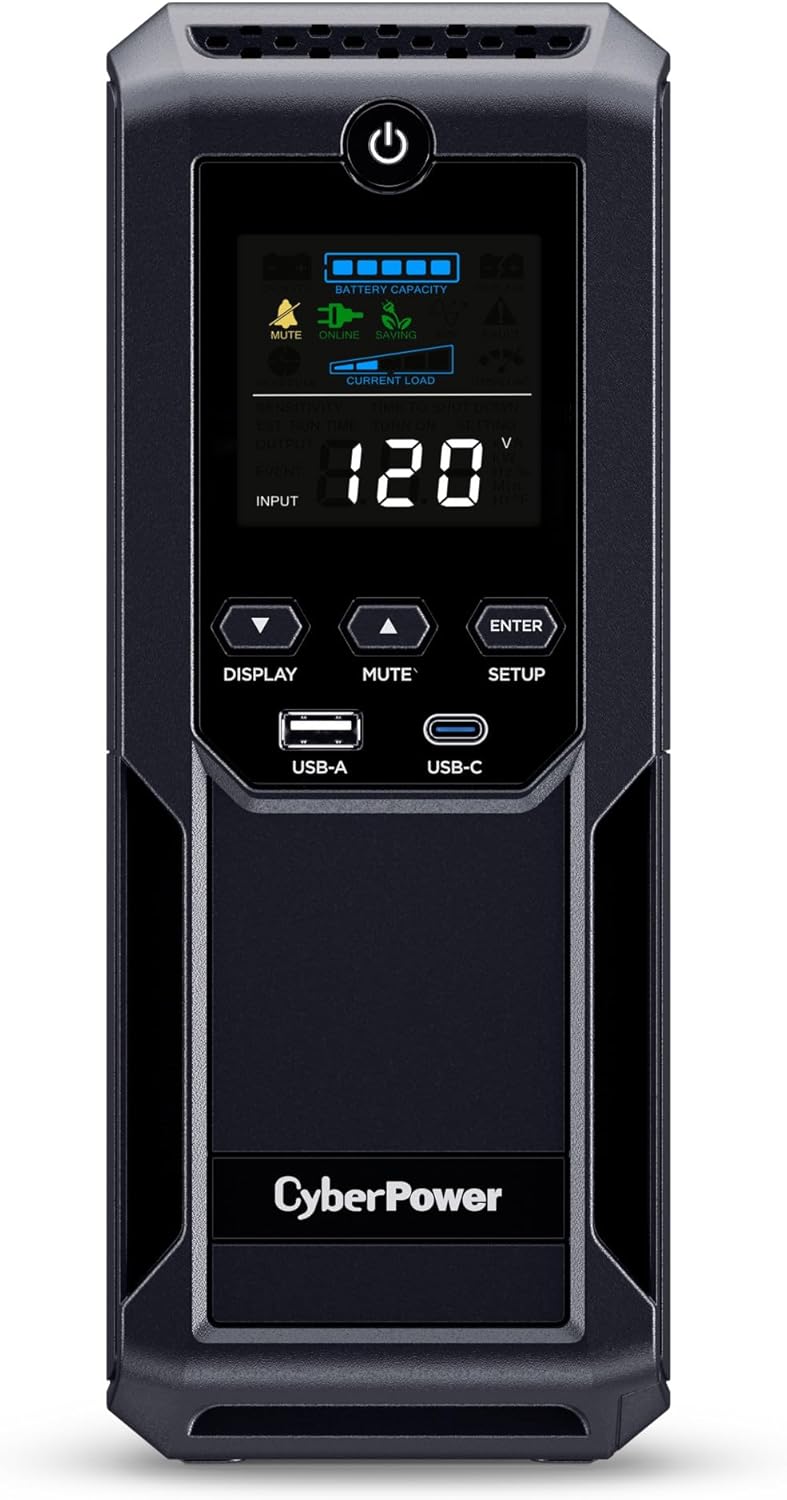
- Delivers 1500VA and 900W battery backup for essential electronics
- Twelve outlets separate battery-backed devices from surge-only equipment
- Automatic Voltage Regulation corrects fluctuations without consuming battery power
- 1500-joule surge protection helps defend sensitive connected electronics
- Color LCD provides detailed battery, load, and power information
This gives you a lot of traditional UPS protection for one workstation
The CyberPower CP1500AVRLCD3 earns our number six position for Best Battery Backup And Surge Protector because it combines a useful 1500VA capacity and 900W output with Automatic Voltage Regulation, 1500-joule surge suppression, 12 outlets, and a color LCD. It is built for computers, workstations, networking hardware, and home entertainment equipment rather than long-duration whole-home backup.
That distinction matters. A conventional UPS like this is primarily there to stop a brief outage, voltage dip, or power fluctuation from instantly shutting down sensitive electronics.
The 900W rating is the number to watch when deciding what can actually run from battery. Do not interpret the 1500VA label as meaning you can connect 1500 watts of equipment.
A sensible setup might include a desktop computer, monitor, modem, router, and network switch. Add their actual operating wattage together and leave some capacity available rather than running the UPS permanently near its 900W maximum.
The outlet arrangement is particularly practical. Six of the 12 NEMA outlets provide battery backup plus surge protection, while the remaining six provide surge protection without using battery capacity when utility power disappears.
This lets you decide what really needs to stay running. A computer and network equipment belong on the battery side, while speakers, a printer, or other nonessential accessories can use surge-only outlets.
That matters because every unnecessary battery-backed load reduces runtime. During an outage, you want stored energy going toward equipment that needs enough time to continue briefly or shut down correctly.
The AVR handles the smaller power problems that people often overlook
Automatic Voltage Regulation is one of the most useful features on the CP1500AVRLCD3. AVR corrects minor voltage fluctuations without switching to battery, so the UPS can deal with certain low-voltage conditions while preserving battery capacity.
Not every electrical problem looks like a complete blackout. Utility voltage can sag when local demand changes, large equipment starts, or the incoming supply becomes unstable.
Without voltage regulation, sensitive equipment may restart or behave unpredictably even though the electricity never completely disappears. AVR gives the UPS another job besides simply waiting for a blackout.
This also helps battery longevity because the battery does not need to cycle for every correctable voltage variation. It remains available for the moment utility power genuinely falls outside what the UPS can handle.
The transfer time is typically around 4 milliseconds. That short transition is designed to let ordinary computers, networking devices, and home entertainment electronics continue operating when the UPS switches from utility power to battery.
Imagine working on a desktop when the power disappears for three seconds. Without a UPS, the computer shuts off, the router restarts, open applications close abruptly, and unsaved work can disappear.
A four-millisecond transfer can make that interruption uneventful. The UPS takes over, the computer remains powered, and if utility electricity returns quickly you may not need to shut anything down.
If the outage continues, runtime becomes the important number. CyberPower specifies around 12 minutes at half load and approximately three minutes at full load.
Those figures make the intended purpose pretty clear. This is not designed to keep a 900W workstation running through a two-hour outage.
It is designed to give you time. Save the project, finish an important file operation if practical, then shut the computer down cleanly before the battery reaches a critical level.
Reducing load can extend useful backup time. If an outage looks like it will continue, stop gaming, rendering, or other high-power workloads and close equipment that does not need to remain active.
Networking hardware creates a very different workload. A modem, router, switch, and WiFi access point may consume much less power than a desktop PC, so the same UPS can potentially keep communications running considerably longer.
That can be useful during neighborhood outages where the ISP infrastructure remains operational. Your household WiFi may continue functioning even while most other electrical equipment is off.
The color LCD helps you understand what is happening. It provides immediate information about battery and utility conditions, which is much more useful than trying to interpret one blinking status light.
Seeing the load helps prevent accidental overloading. If adding another monitor or piece of equipment pushes the UPS close to its limit, you can reorganize the protected devices before an outage tests the setup for you.
CyberPower also provides one USB-A and one USB-C charging connection. These are convenient for phones and tablets, particularly when AC outlets are already occupied by the main workstation equipment.
The USB-C connection is rated at 15W, so it should be treated primarily as convenient device charging rather than a high-power laptop USB-C supply. A demanding USB-C notebook may still need its regular AC adapter.
Why solid protection still puts the CP1500AVRLCD3 in sixth place
The CP1500AVRLCD3 provides 1500 joules of surge suppression. That gives connected electronics meaningful point-of-use surge protection alongside the battery backup functionality.
Surge protection is useful for transient voltage spikes caused by switching events and other disturbances on the electrical supply. It should not be interpreted as a guarantee that electronics will survive every possible electrical event.
A direct lightning strike is a very different situation from a normal transient surge. Proper building grounding and whole-home surge protection can complement a UPS when stronger layered protection is required.
The CyberPower also includes Ethernet and coaxial dataline protection. That matters because electrical disturbances do not necessarily enter equipment exclusively through the AC power cord.
A networked computer may have both power and Ethernet connected. Protecting the data path gives you another layer around the equipment you are trying to keep safe.
The battery is user replaceable as well. That is important because sealed lead-acid batteries gradually lose capacity as they age, even if major outages are relatively rare.
You should not throw away the entire UPS simply because the battery eventually stops providing acceptable runtime. Replacing the battery can extend the useful life of the main electronics considerably.
CyberPower specifies an eight-hour typical recharge time after battery depletion. That is much slower than the rapid charging available from some modern LiFePO4 portable power stations.
This matters when outages happen repeatedly in a short period. If the battery has been heavily discharged, it needs time connected to stable utility power before full backup capacity is available again.
Battery condition should be tested periodically. A UPS can sit quietly under a desk for years, which makes it easy to assume everything is fine until an actual blackout occurs.
Use the self-test functionality and pay attention to battery warnings. If expected runtime has fallen dramatically, replacing the battery before storm season is much better than discovering the problem during an outage.
The UPS uses simulated sine wave output when operating from battery. This is one of the important reasons it ranks below the pure sine wave CyberPower CP1500PFCLCD in our comparison.
Many ordinary computer systems work correctly with simulated sine wave UPS units. However, buyers with particularly sensitive equipment or certain active PFC power supplies may prefer a pure sine wave model for better compatibility.
Pure sine wave is the safer premium choice for demanding electronics. That does not make simulated sine wave inherently unusable, but it is a meaningful specification when two similarly sized UPS systems are being compared.
The CP1500AVRLCD3 is therefore better suited to mainstream desktops, networking hardware, workstations, and home entertainment equipment where the connected devices are compatible with its battery waveform.
Check the equipment manufacturer's UPS requirements if you are protecting unusually sensitive hardware. Servers, specialized audio equipment, medical devices, and laboratory equipment may have requirements beyond what a general-purpose home UPS is designed to provide.
The 12 outlets make it tempting to connect everything around the desk. Resist that.
A laser printer, heater, vacuum cleaner, kettle, or other high-draw device can consume a large portion of the UPS output very quickly. Some loads also have substantial startup current.
Keep battery outlets focused on sensitive electronics. Desktop computers, monitors, routers, modems, switches, storage systems, and similar equipment are much more appropriate.
The six surge-only outlets are useful for peripherals that still deserve surge protection but do not need emergency runtime. That arrangement is one of the best parts of this design.
The PowerPanel Personal software adds another layer of usefulness. Connect the UPS to a compatible computer through USB and the software can monitor power conditions and help manage shutdown behavior.
This is particularly useful when a computer stays on while nobody is nearby. If a long outage occurs overnight, the battery can eventually reach the point where an orderly shutdown is necessary.
Automated shutdown protects files and storage operations. It prevents the UPS from simply running until the battery is empty and then abruptly cutting power to the computer.
That matters for workstations processing long tasks, small servers, and computers handling active file transfers. A graceful shutdown is much better than sudden loss of power during a write operation.
The CP1500AVRLCD3 weighs about 10.8 kilograms and uses a mini-tower design. At roughly 35 cm deep, 10 cm wide, and 25.9 cm high, it can fit beside or beneath a workstation without consuming the space of a large portable power station.
It is still heavy for its size because lead-acid batteries are dense. This is equipment you position once and generally leave there.
The compact tower format works well under a desk. Just leave enough ventilation around it and avoid covering the cooling areas with boxes, cables, or other equipment.
Heat matters to battery longevity. A UPS placed beside a radiator or inside a hot closed cabinet can experience more battery stress than one kept in a normal ventilated office environment.
The input uses a standard NEMA 5-15P plug with a six-foot cord. The UPS should be connected to an appropriately grounded wall outlet according to the manufacturer's installation requirements.
Avoid building complicated chains of surge strips and extension cords around the UPS. Power protection works best when the installation is simple, correctly grounded, and within the electrical ratings of every component.
Do a controlled test after installation. Save your work, simulate a power failure, and verify that every device you expect to remain operational actually stays on.
Look at the LCD and check the load. Listen for alarms and confirm that the computer recognizes the UPS through the management connection if you plan to use automated shutdown.
This simple test can reveal that a device was accidentally connected to a surge-only outlet or that the workstation consumes much more power than expected.
It is also worth testing again after major hardware upgrades. Installing a more powerful graphics card can substantially change the peak power consumption of a desktop computer.
A UPS should be sized for the current workstation, not the computer you owned three upgrades ago.
The CP1500AVRLCD3 carries a three-year warranty that includes the battery. CyberPower also lists a $500,000 Connected Equipment Guarantee for the model, subject to the company's applicable terms and conditions.
That warranty package is reassuring for equipment intended to spend its entire working life connected between expensive electronics and utility power.
ENERGY STAR certification is another useful detail. A UPS remains connected continuously, so standby and operating efficiency matter over several years of ownership.
Why does it rank sixth rather than higher? The products above it either provide vastly greater battery capacity, pure sine wave output, or a stronger balance of runtime and protection features.
The simulated sine wave output is the biggest compromise when compared directly with the pure sine wave CyberPower model ranked above it. Buyers with high-end active PFC workstations may reasonably prefer that more expensive option.
The portable EcoFlow and BLUETTI units also provide much more stored energy. They can keep equipment operating for hours under modest loads and can support appliances that a traditional desktop UPS was never intended to run.
But those products solve a broader backup-power problem. The CP1500AVRLCD3 remains very good at the narrower UPS job.
It continuously watches incoming utility power, regulates voltage, suppresses surges, and switches to battery within milliseconds when required. There is no need to prepare the system when a storm approaches because it is already installed and waiting.
That automatic protection is exactly what a UPS should provide. For a home office or networking cabinet, it can be more convenient than a large portable battery that serves several different purposes.
We give the CyberPower CP1500AVRLCD3 our number six rank out of seven because its 1500VA capacity, 900W output, 1500-joule surge protection, 12 outlets, six battery-backed surge-protected outlets, six surge-only outlets, Automatic Voltage Regulation, 4ms typical transfer time, 12-minute half-load runtime, color LCD, USB-A and USB-C charging, Ethernet and coaxial protection, replaceable battery, PowerPanel software, three-year warranty, and ENERGY STAR certification provide a very complete traditional UPS package.
For someone searching for the Best Battery Backup And Surge Protector, the CP1500AVRLCD3 is a positive sixth-place choice for desktops, networking equipment, home entertainment systems, and moderate workstations. It ranks below our stronger picks because simulated sine wave output and traditional lead-acid battery runtime limit its appeal for premium electronics and extended outages, but its 900W capacity, 1500-joule surge suppression, AVR, fast transfer time, generous outlet count, replaceable battery, and detailed LCD still make it a practical and dependable power-protection system.

- Provides 700VA and 420W battery backup for essential electronics
- Six outlets separate battery-backed equipment from surge-only devices
- Automatic Voltage Regulation stabilizes power without draining battery capacity
- LCD screen displays load, voltage, battery charge, and runtime
- User-replaceable battery helps extend the UPS service life
This smaller APC makes the most sense when the backup load is carefully chosen
The APC BR700G earns our number seven position for Best Battery Backup And Surge Protector because it provides the core protection features we want from a traditional UPS, just at a noticeably lower power level than the models ranked above it. You get 700VA capacity with 420W output, Automatic Voltage Regulation, six protected outlets, an LCD information panel, and a user-replaceable battery.
The 420W limit is the first specification to understand. This is not designed for a high-end gaming workstation pulling several hundred watts through the computer alone, particularly once monitors and networking equipment are added.
For a moderate office setup, though, the capacity can be quite sensible. A compact desktop, monitor, modem, router, and small network switch may fit comfortably if their combined actual power consumption remains below the UPS limit.
Choosing the correct devices is important here. Do not look at six available outlets and assume all six should be connected to demanding equipment.
The BR700G divides those sockets intelligently. Three outlets provide battery backup plus surge protection, while the remaining three provide surge protection only.
This lets you reserve battery energy for equipment that genuinely needs to survive an outage. A computer, router, and modem might use the battery-backed side, while speakers, a printer, or another accessory can stay on surge protection without consuming backup runtime.
That is a practical arrangement during a blackout. If power disappears while you are working, the important equipment stays active long enough to save files, maintain the network briefly, and shut down properly if the outage continues.
The AVR and LCD make it much more useful than a basic power strip
Automatic Voltage Regulation is one of the strongest features of the BR700G. AVR corrects certain voltage problems without using battery power, so the UPS can respond to unstable utility conditions while preserving its stored energy for an actual outage.
This matters because power problems are not always obvious. A building may experience low voltage or fluctuations without the electricity disappearing completely.
A desktop computer can still behave badly under poor incoming power. Random restarts, peripheral issues, or unstable operation can sometimes appear even though the lights in the room remain on.
The AVR system helps maintain safer voltage conditions for connected electronics. More importantly, it does that without repeatedly cycling the backup battery for every correctable fluctuation.
Imagine a home office where the air conditioner or another large appliance starts and utility voltage briefly dips. Instead of unnecessarily switching completely to battery operation, the AVR can compensate within its supported range.
Saving battery capacity for real outages matters, especially on a 700VA UPS where available runtime is more limited than on larger 1500VA models.
The front LCD is another useful feature. It displays information including input and output voltage, battery charge, connected load, and estimated remaining runtime.
That runtime estimate becomes useful very quickly during a blackout. If you see that only a few minutes remain, you know to save your work rather than continuing as though utility power will definitely return.
It also helps during initial setup. Connect the equipment you intend to protect and watch the load indication rather than guessing how much power the system consumes.
Real load measurements are better than assumptions. A computer power supply labelled 500W does not mean the computer continuously consumes 500W, and actual consumption can change substantially between idle and heavy workloads.
Testing the UPS under realistic conditions is therefore worthwhile. Run the computer normally, check the displayed load, and confirm that there is comfortable headroom below the 420W output ceiling.
If the load is already close to the maximum, move some devices to surge-only protection or choose a larger UPS. Operating continuously near the limit leaves little room for changing workloads.
The BR700G also protects data connections for telephone, Ethernet, and coaxial lines. This is useful because sensitive electronics may have more than one electrical path connected to them.
A desktop connected to both AC power and Ethernet can potentially be exposed through either path. Data-line surge protection adds another protective layer around networking and computer equipment.
The LCD includes audible alarms as well. These alerts tell you when the UPS changes state or encounters conditions that need attention.
Do not permanently ignore an alarm without checking what caused it. A low battery warning, overload, or battery replacement notification is useful information rather than background noise.
Why the BR700G finishes seventh in this comparison
The ranking mainly comes down to capacity. Every larger battery backup above the BR700G gives you more power headroom, more runtime potential, or both.
Our 1500VA UPS options can support heavier desktops and more peripherals. The large portable power stations at the top of the ranking offer an entirely different level of stored energy and can keep selected equipment operating for hours rather than minutes.
The BR700G is built for a smaller protection job. It is better suited to keeping a modest computer or networking setup alive through brief interruptions and providing enough time for an orderly shutdown.
That can still be exactly what some users need. Buying a huge battery system makes little sense if the only goal is preventing a router and desktop computer from rebooting every time the power flickers.
The BR700G also has a compact tower design. Its dimensions are approximately 7.48 inches high, 3.58 inches wide, and 12.2 inches deep, with a listed weight of roughly 15.76 pounds.
That narrow footprint is useful underneath a desk. It takes considerably less space than large backup batteries while remaining substantial enough to protect a normal office setup.
The battery is user replaceable, which is another important advantage. Rechargeable UPS batteries gradually lose capacity with age, even when the unit rarely experiences a major blackout.
When that eventually happens, you do not necessarily need to throw the entire BR700G away. Replacing the battery can restore useful backup performance and extend the life of the electronics inside the UPS.
Pay attention to automatic battery tests and replacement warnings. A UPS that has been installed for years should not simply be assumed to have the same runtime it delivered when new.
Battery testing is part of normal UPS maintenance. An old battery may appear fine while utility power is present and then provide almost no useful runtime when the electricity actually fails.
APC's PowerChute software adds another useful layer for compatible computers. The UPS can communicate with the system over USB so power events can be monitored and shutdown behavior can be managed.
This becomes especially useful when a desktop stays powered while nobody is nearby. During an extended outage, automated shutdown can prevent the computer from simply running until the battery is exhausted.
That matters for open documents and storage activity. Abruptly removing power while data is being written can cause problems that a controlled shutdown avoids.
A UPS should protect data as well as hardware. Keeping the computer powered for a few minutes is useful, but using that time intelligently is what really matters.
The BR700G also makes sense for networking equipment. Routers, modems, switches, and small smart-home hubs generally consume much less power than desktop computers.
That lower load can translate into much longer practical backup time. During a local utility outage, your internet connection may remain available if the ISP infrastructure itself still has power.
Keeping WiFi operating can be useful for communication, security cameras, smart-home systems, and laptops with their own internal batteries. In that scenario, a relatively small UPS can provide a surprisingly valuable service.
Networking gear is an excellent low-power UPS load. It uses the BR700G's limited capacity much more efficiently than a power-hungry gaming computer.
Do not connect space heaters, kettles, microwave ovens, vacuum cleaners, or other high-draw household appliances to the battery-backed outlets. The 420W limit makes this particularly important.
Printers also deserve caution. Laser printers can have substantial peak electrical demands and are generally better kept away from the battery-backed side of a small UPS.
Use the battery outlets for electronics that need continuity. Use the surge-only sockets for suitable equipment that requires protection but does not need to remain powered after an outage.
The six-outlet arrangement encourages sensible load planning. Three battery sockets may sound limiting, but it forces the important question of what actually needs backup.
Ventilation matters too. The UPS should have open space around it rather than being buried beneath boxes or installed in a tightly sealed cabinet.
Batteries and power electronics generate heat. Excess heat can contribute to shorter battery life, so a normal cool office environment is preferable to a hot enclosed corner.
After installing the BR700G, perform a controlled test. Save anything important, disconnect utility power according to safe testing practices, and confirm that the equipment on the battery-backed outlets stays operational.
Testing before an emergency is worth doing. You may discover that a device was plugged into the wrong outlet or that your actual load is higher than expected.
Check the LCD during that test. Watch the remaining runtime and decide whether the result is enough for the way you intend to use the UPS.
If you only get a few minutes under your normal computer load, that may still be sufficient for saving work and shutting down. If you expect to continue working for half an hour, you probably need a larger battery backup.
This distinction is the main reason the BR700G sits below the APC and CyberPower units ranked above it. A 420W output ceiling creates much less flexibility than 600W, 900W, or 1000W alternatives.
There is also less room for future hardware upgrades. A more powerful computer can outgrow this UPS quickly, particularly after adding a higher-end graphics card or multiple monitors.
For a modest workstation, however, that limitation may never become a problem. An office PC, monitor, router, and modem can be a very sensible match.
The smaller capacity also keeps the unit physically manageable and focused. It does not pretend to replace a generator or whole-home battery system.
Its job is much narrower. Protect electronics from common power disturbances, bridge short outages, regulate voltage, and provide enough warning and runtime for a safe response.
For that specific job, the BR700G remains competent. Seventh place reflects the stronger capacity and features of the products above it, not a lack of useful protection.
We give the APC BR700G our number seven rank out of seven because its 700VA capacity, 420W output, six outlets, three battery-backed surge-protected sockets, three surge-only sockets, Automatic Voltage Regulation, LCD monitoring, audible alarms, data-line protection, PowerChute support, automatic battery testing, compact tower format, and user-replaceable battery provide a solid traditional UPS package.
For someone searching for the Best Battery Backup And Surge Protector, the BR700G is a positive seventh-place choice for moderate computers, routers, modems, networking hardware, and basic home-office electronics. It ranks below our larger options because its 420W output and smaller battery leave less headroom for powerful workstations and long outages, but if your goal is reliable surge protection, AVR, short-term battery backup, and safe shutdown capability in a compact design, the BR700G still handles that role well.