7 Best 4-Bay NAS for Small Team Collaboration

7 Best 4-Bay NAS for Small Team Collaboration

1
Lockerstor 4 Gen3 NAS for Teams with 10GbE
Brand: Asustor
Features / Highlights
  • AMD Ryzen quad core processor delivers strong multitasking performance
  • 16GB ECC DDR5 memory improves stability for collaborative workloads
  • Four bay NAS supports RAID configurations for secure team data storage
  • Dual 5GbE and 10GbE ports enable high speed file transfers
  • Multiple NVMe slots allow ultra fast caching and storage expansion
Our Score
9.80
CHECK PRICE

This is where team collaboration actually starts to feel fast and reliable

The Asustor Lockerstor 4 Gen3 is built for teams that need more than just basic storage. It focuses on speed, stability, and handling multiple users at once. For small team collaboration, that difference becomes obvious very quickly.

It runs on an AMD Ryzen quad core processor paired with 16GB of ECC DDR5 memory. That combination allows it to handle multiple file transfers, backups, and user access without slowing down. It is designed for consistent performance under real workloads.

The combination of high speed networking and strong processing power allows multiple users to access files without bottlenecks. This is critical in a shared work environment.

How it improves collaboration for small teams

In a small team, file sharing often becomes a bottleneck. Large files take time to transfer, and multiple users accessing the same system can slow things down. This NAS solves that by providing faster network connectivity and better processing power.

The four bay design allows for RAID configurations, which protects your data while also improving performance. This ensures that important team files are both safe and accessible. It reduces the risk of downtime caused by drive failure.

The dual 5GbE and 10GbE ports allow significantly faster data transfer compared to standard NAS systems. This becomes essential when working with large files or shared projects.

Another important feature is NVMe support. You can use SSD caching or high speed storage to improve performance further. This helps when multiple users are accessing frequently used files.

For example, when a team is working on shared documents or media files, access times remain fast and consistent. This reduces delays and keeps workflows moving smoothly.

Why this deserves the number one ranking

Most NAS systems struggle when multiple users access them at the same time. Performance drops, and file transfers slow down. This system is built specifically to handle that type of workload.

It provides the right balance of speed, storage capacity, and reliability. The hardware is strong enough to support collaboration without becoming a bottleneck. This makes it more practical for teams compared to simpler systems.

The ability to handle multiple users, large files, and high speed transfers makes it ideal for team collaboration. It solves the main problems that small teams face.

There is more setup involved compared to entry level NAS devices. It also requires purchasing drives separately. However, these are expected tradeoffs for a system in this category.

We ranked this as number one because it delivers the performance and reliability needed for real collaboration. It is fast, stable, and built to handle shared workloads without slowing down. For teams looking for the best 4 bay NAS for small team collaboration, this stands out as a top choice.

2
TS-453E Pro NAS for Teams with Quad-Core
Brand: QNAP
Features / Highlights
  • Intel quad core processor delivers stable multitasking for team workflows
  • 8GB memory supports multiple users accessing files simultaneously
  • Four bay NAS system enables RAID for secure data storage
  • Dual 2.5GbE ports provide faster file transfer speeds
  • HDMI output allows direct display and local access features
Our Score
9.52
CHECK PRICE

This one gives you strong performance with more flexibility to customize

The QNAP TS-453E is designed for teams that want both performance and control over their storage system. It sits in a space where you get solid hardware along with a wide range of features. For small team collaboration, that combination can be very useful.

It uses an Intel quad core processor paired with 8GB of memory. This setup allows it to handle multiple users accessing files at the same time without slowing down too much. It is built to support shared workloads in a team environment.

The system provides consistent multitasking performance for multiple users working on shared files. This helps maintain smooth collaboration.

How it supports real team collaboration workflows

In a small team, file sharing needs to be fast and reliable. Delays in accessing files can slow down productivity. This NAS improves that by offering better processing power and faster network connectivity.

The four bay design allows for RAID configurations, which protects your data while maintaining availability. This is important when multiple people rely on the same files. It reduces the risk of downtime caused by drive failure.

The dual 2.5GbE ports allow faster file transfers compared to standard NAS systems. This becomes important when handling large files or shared projects.

The system also includes HDMI output, which allows direct access without needing a separate device. This can be useful in certain setups, such as local file management or media viewing. It adds another layer of flexibility.

QNAP’s operating system offers a wide range of apps and customization options. This allows teams to tailor the system to their specific workflow needs. However, it also requires some time to learn.

Why it ranks second instead of first

This NAS offers strong performance and flexibility, but it comes with more complexity. The setup process and interface can feel overwhelming for users without technical experience. This can slow down adoption in a team environment.

It also does not match the network speed and overall performance of the top ranked option. While it is fast, it is not built for the highest level of data transfer workloads. This becomes noticeable in more demanding scenarios.

The system prioritizes customization and flexibility over ease of use and maximum performance. That is the key tradeoff.

We ranked this at number two because it delivers reliable performance and useful features for collaboration, but it falls slightly behind in ease of use and top end speed. Still, for teams that want more control and are comfortable with setup, it remains a very capable and flexible NAS solution.

3
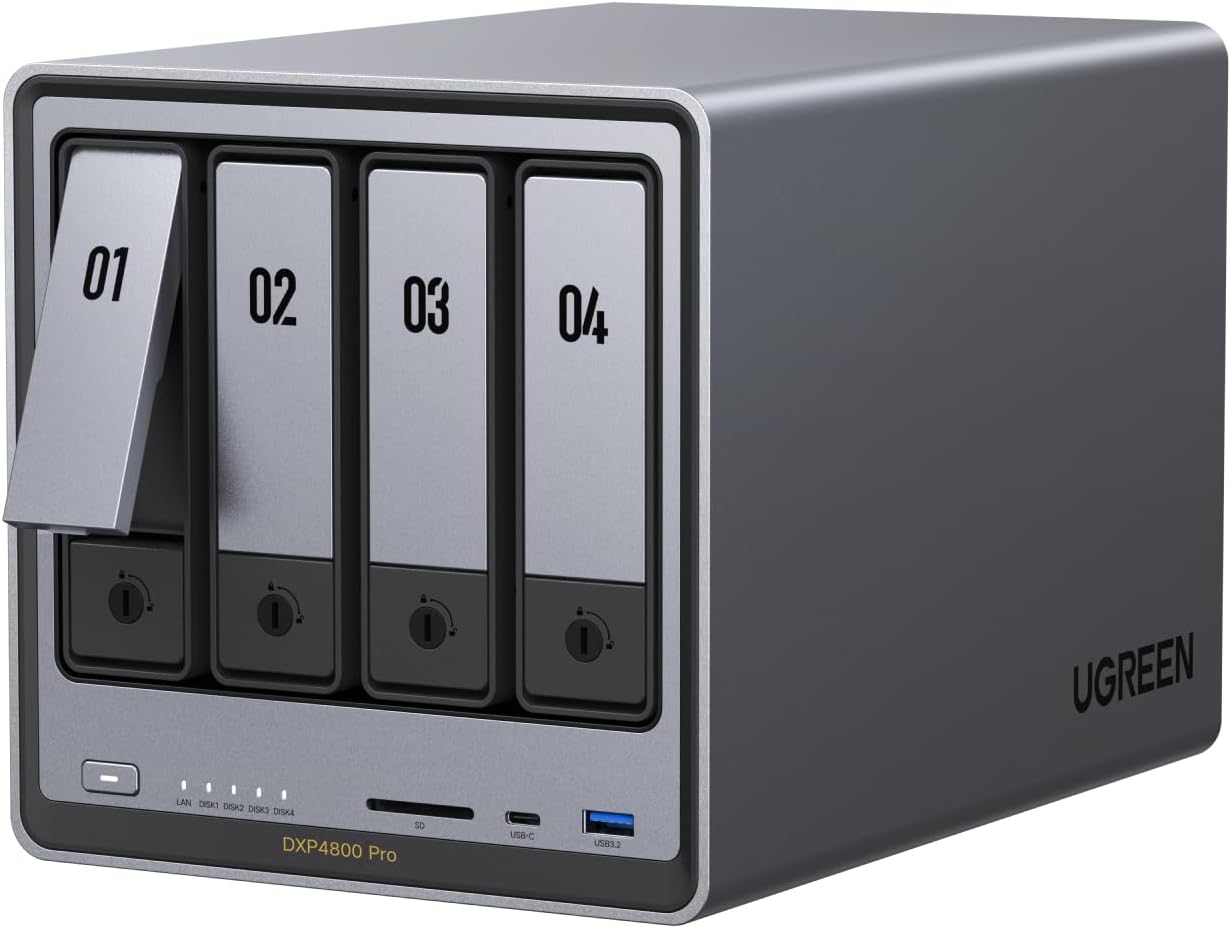
DXP4800 Pro NAS for Teams with 4-Bay
Brand: UGREEN
Features / Highlights
  • Intel processor supports stable multitasking for team environments
  • Four bay NAS system allows flexible RAID configurations for data safety
  • Dual 2.5GbE ports improve file transfer speeds across network
  • User friendly interface designed for easier setup and management
  • Supports remote access and automated backup features
Our Score
9.47
CHECK PRICE

This one balances simplicity and team performance better than expected

The UGREEN DXP4800 Pro sits in an interesting position where it tries to combine ease of use with enough performance for team collaboration. It is not the fastest system available, but it is more approachable than many advanced NAS devices. For small teams, that balance can be useful.

It runs on an Intel processor that handles file sharing, backups, and multiple users without major issues. The performance is steady, which matters more than peak speed in many office environments. It is designed to keep things running without constant adjustments.

The system delivers reliable multitasking performance while keeping the setup process relatively simple. That makes it easier for teams without technical support.

How it works in real small team collaboration scenarios

In a team environment, file sharing needs to be consistent and accessible. This NAS allows multiple users to access shared files from a central location. That reduces confusion and keeps projects organized.

The four bay design supports RAID configurations, which helps protect data while maintaining availability. This is important when several people depend on the same files. It reduces the risk of downtime.

The dual 2.5GbE ports provide faster transfer speeds compared to standard network setups. This helps when moving larger files or working on shared content.

Remote access is another key feature. Team members can access files from different locations without relying on external drives. This adds flexibility to how work is managed.

The interface is also designed to be more user friendly than some competing systems. This reduces the learning curve and helps teams get started faster.

Why it ranks third in this category

This NAS performs well, but it does not reach the same level of performance as higher ranked systems. It lacks faster networking options like 10GbE, which can make a difference for heavy workloads. This becomes noticeable when dealing with larger files or more demanding tasks.

It also sits between simplicity and performance without fully excelling in either. It is easier to use than some systems, but not the simplest. It is capable, but not the most powerful.

The system prioritizes balance but does not dominate in performance or ease of use. That is why it lands in this position.

We ranked this at number three because it offers a solid mix of usability and performance, but it does not match the top options in speed or simplicity. Still, for small teams that want a capable NAS without too much complexity, it remains a practical and well rounded choice.

4
Lockerstor 4 Gen2 NAS for Teams with 2.5GbE
Brand: Asustor
Features / Highlights
  • Intel quad core processor supports stable team multitasking workloads
  • Four bay NAS system enables flexible RAID configurations for data safety
  • Dual 2.5GbE ports improve file transfer speeds for collaboration
  • Expandable memory allows performance upgrades over time
  • Supports SSD caching for faster file access and responsiveness
Our Score
9.16
CHECK PRICE

This one feels dependable, but not as fast as newer options

The Asustor Lockerstor 4 Gen2 is built for teams that want a reliable NAS with solid performance. It offers a mix of stability and flexibility that works well in collaborative environments. However, it does not push performance as far as newer models.

It uses an Intel quad core processor that handles file sharing, backups, and multiple users without major slowdowns. This makes it suitable for everyday team workflows. It focuses on consistency rather than peak speed.

The system provides reliable multitasking performance for shared file access across multiple users. This is important for maintaining workflow stability.

How it supports small team collaboration

In a team environment, having a central storage system is essential. This NAS allows multiple users to access shared files from one location. That helps keep projects organized and reduces confusion.

The four bay design supports RAID configurations, which protect your data while keeping it accessible. This is critical when multiple team members rely on the same files. It reduces the risk of interruptions caused by hardware failure.

The dual 2.5GbE ports improve file transfer speeds compared to standard networks. This helps when teams are working with larger files or shared resources.

SSD caching support adds another layer of performance. Frequently accessed files load faster, which improves responsiveness. This is useful when teams are working on ongoing projects.

The system also supports remote access and backup tools. This allows team members to access files from different locations and keep data protected.

Why it ranks in the middle of the list

This NAS is dependable, but it does not match the performance of higher ranked options. It lacks faster networking such as 10GbE, which limits its ability to handle more demanding workloads. This becomes noticeable in data heavy environments.

It also requires manual setup and configuration, which can take time for teams without technical experience. While it offers flexibility, it adds complexity during the initial setup process.

The system prioritizes stability and flexibility over cutting edge performance and simplicity. That is the main tradeoff.

We ranked this at number four because it provides reliable performance and useful features for collaboration, but it does not stand out in speed or ease of use. Still, for teams that want a stable and upgradeable NAS, it remains a practical and capable option.

5
TBS-464 NASbook for Teams with NVMe Storage
Brand: QNAP
Features / Highlights
  • Intel quad core processor supports multitasking for team environments
  • All NVMe storage design enables faster data access speeds
  • Four slot SSD configuration allows high speed storage setup
  • Dual 2.5GbE ports improve network transfer speeds
  • Compact NASbook design suitable for modern workspaces
Our Score
8.62
CHECK PRICE

This one is fast and compact, but not built for everyone

The QNAP TBS-464 NASbook takes a different approach compared to traditional NAS systems. It focuses on speed and compact design by using NVMe storage instead of standard hard drives. For small teams, this can be useful, but it also introduces tradeoffs.

It runs on an Intel quad core processor, which supports multitasking and shared workloads. Combined with NVMe storage, it delivers faster data access compared to traditional setups. This can improve responsiveness during file sharing.

The NVMe based storage system provides faster file access and lower latency compared to traditional NAS designs. This is one of its main advantages.

How it performs in small team collaboration

For team collaboration, speed can make a noticeable difference. Faster access to files means less waiting and smoother workflows. This NAS helps improve that with its SSD based design.

The four slot configuration allows you to build a high speed storage system. However, it requires careful planning when selecting SSDs and setting up storage. This can add complexity for teams without technical experience.

The dual 2.5GbE ports improve transfer speeds compared to standard network connections. This helps when multiple users are accessing files at the same time.

The compact design also makes it easy to fit into modern workspaces. It does not take up much space compared to traditional NAS units. This can be useful in smaller offices.

However, NVMe storage comes at a higher cost compared to traditional hard drives. This increases the overall investment needed to use the system effectively.

Why it ranks lower in this category

The main reason for its ranking is practicality. While it offers fast performance, it is not as straightforward as traditional NAS systems. The setup process and storage configuration require more attention.

It also lacks the storage capacity advantage of hard drive based systems. NVMe drives are faster, but they are typically smaller and more expensive. This limits scalability for teams handling large amounts of data.

The system prioritizes speed and compact design over storage capacity and ease of use. That is the key tradeoff.

We ranked this at number five because it offers fast performance but does not align as well with the needs of most small teams. Still, for teams that prioritize speed and are comfortable with SSD based storage, it remains a capable and modern NAS option.

6
F4-425 Plus NAS for Teams with 4-Bay
Brand: TERRAMASTER
Features / Highlights
  • Intel processor designed for stable multitasking in team environments
  • Four bay NAS system supports RAID for secure shared storage
  • Dual 2.5GbE ports improve file transfer speeds across network
  • Tool-less drive installation simplifies setup and maintenance
  • Supports backup, file sharing, and remote access applications
Our Score
8.32
CHECK PRICE

This is reliable for storage, but not built for heavy collaboration speed

The TERRAMASTER F4-425 Plus focuses on delivering stable and predictable performance for team storage. It is designed to handle file sharing and backups without complications. For small teams, that reliability can be useful, but performance limits are noticeable.

It uses an Intel processor that supports basic multitasking. This allows multiple users to access files and run backups at the same time. However, it is not designed for high performance workloads.

The system provides consistent performance for shared file access but does not push high speed collaboration limits. This becomes clear in more demanding environments.

How it works in a real team collaboration setup

In a team environment, central storage is essential for organizing files. This NAS allows multiple users to access shared data from one location. That helps reduce confusion and keeps workflows consistent.

The four bay design supports RAID configurations, which protect data while maintaining availability. This is important when teams rely on shared files daily. It reduces the risk of downtime caused by drive failure.

The dual 2.5GbE ports improve transfer speeds compared to standard gigabit networks. This helps when moving files between team members.

For tasks like document sharing and backups, the system performs well. It keeps files organized and accessible. This makes it suitable for general office use.

However, when dealing with larger files or multiple active users, performance can slow down. This can affect productivity in more demanding workflows.

Why it ranks near the bottom of the list

The main limitation is performance. Compared to higher ranked NAS systems, it lacks faster networking and stronger processing power. This becomes noticeable in team collaboration scenarios with larger workloads.

It also does not offer advanced features or scalability found in more powerful systems. As team needs grow, this can become a limitation. This may require upgrading sooner.

The system prioritizes reliability and ease of use over performance and scalability. That is the main tradeoff.

We ranked this at number six because it handles basic team storage tasks well but does not meet the performance needs of more demanding collaboration environments. Still, for teams that need a reliable and simple NAS for file sharing and backups, it remains a practical and dependable option.

7
DXP4800 Plus NAS for Teams with 4-Bay
Brand: UGREEN
Features / Highlights
  • Intel processor supports basic multitasking for small team workloads
  • Four bay NAS system enables RAID configurations for data protection
  • Dual 2.5GbE ports improve file transfer speeds over standard networks
  • User friendly interface simplifies setup for non technical users
  • Supports remote access and automated backup features
Our Score
8.29
CHECK PRICE

This one is easy to use, but you will feel the limitations fast

The UGREEN DXP4800 Plus is built for users who want a simple NAS system for shared storage. It focuses on making setup and file sharing easy to manage. For small teams, that can be helpful, but it comes with clear limitations.

It uses an Intel processor that handles basic tasks like file sharing and backups. This works fine for light workloads and a few users. However, it is not designed for demanding collaboration environments.

The system prioritizes ease of use and accessibility over performance and advanced capabilities. This is noticeable in daily use.

How it performs in small team collaboration

For basic collaboration, this NAS provides a central location for storing and sharing files. This helps keep data organized and accessible. It reduces the need to move files between devices.

The four bay design supports RAID configurations, which protects your data from drive failure. This is important for maintaining reliability in a team environment. It ensures that files remain available.

The dual 2.5GbE ports improve transfer speeds compared to standard gigabit connections. This helps when sharing files across multiple users.

Remote access features allow team members to access files from different locations. This adds flexibility to how work is done. It supports basic collaboration needs.

However, performance drops when handling larger files or multiple users at once. This can slow down workflows and create delays.

Why it ranks last in this category

The main issue with this NAS is performance. Compared to other options, it does not provide enough processing power or speed for demanding team collaboration. This becomes a problem as workloads increase.

It also lacks advanced features and scalability. As teams grow and storage needs expand, the system may not keep up. This can lead to needing an upgrade sooner.

The system focuses on simplicity and affordability but sacrifices performance and long term flexibility. That is the main tradeoff.

We ranked this at number seven because it works for basic file sharing but does not meet the needs of most small teams. Still, for users who want a simple and easy to manage NAS for light collaboration, it remains a functional starting option.

Back to blog