


- Integrated filament storage shelves help organize multiple 3D printing spools and frequently used materials.
- Built-in power hub provides a convenient connection point for compatible printers and workshop accessories.
- Rolling caster wheels allow easier repositioning of the printing workstation when cleaning or reorganizing.
- Dedicated upper workbench surface provides space for a compatible desktop 3D printer.
- - Multi-level workstation design combines printer support, filament organization, and accessory storage in one unit.

A Proper 3D Printing Workstation With Space for More Than One Printer
The ARTINRACK TR44 Dual 3D Printer Stand is designed for people who need more than a basic table to support their printing equipment. It combines a wide workbench, four-tier filament storage, an integrated power hub, and rolling wheels in one workstation. For anyone comparing the best 3D printer stand options, the biggest advantage is having dedicated space for printers, materials, and accessories without spreading everything across several desks.
The TR44 measures approximately 47.2 inches wide, 23.6 inches deep, and 74 inches high, making it a substantial workstation rather than a compact printer shelf. Its dual-station layout provides room for organizing multiple pieces of printing equipment, although users should measure their printers before deciding where to position them. The spacious dual printer workstation design is especially useful for people operating two FDM printers or combining printing equipment with a filament drying system.
The construction uses a combination of metal framing and wooden work surfaces, with a rust-resistant finish intended for indoor workshop environments. This arrangement provides a dedicated platform for printers while keeping supplies accessible on the surrounding shelves. A stable work surface matters because excessive movement during printing can contribute to vibration artifacts and inconsistent results.
One detail worth checking is the weight capacity. Product descriptions advertise heavy-duty construction, but published load ratings vary between retailers, so buyers should confirm the manufacturer's rating for the exact TR44 configuration. The reinforced metal frame and workbench construction are appealing features, but proper weight distribution remains important when installing several printers.
The Filament Storage and Built-In Power Hub Make Daily Printing Easier
One of the strongest features of the ARTINRACK TR44 is its four-tier filament storage rack. The manufacturer advertises space for up to 32 filament spools, depending on spool dimensions and how they are arranged. This is particularly useful for people who regularly switch between PLA, PETG, TPU, and other materials during different printing projects.
Consider a small 3D printing business producing customized organizers, replacement parts, and decorative products. Keeping filament spools scattered across boxes and shelves makes it harder to identify available colors and materials. The dedicated four-tier filament storage system allows commonly used spools to remain visible and organized near the printers.
That organization can also reduce interruptions during printing sessions. When a spool runs low, the operator can locate a replacement without searching through several storage containers. However, exposed filament storage does not control humidity, so moisture-sensitive materials should still be kept in sealed containers or appropriate dry boxes when necessary.
The integrated power hub is another practical advantage. The TR44 is advertised with six AC outlets and four USB ports, allowing compatible printers and accessories to be connected from a centralized location. The built-in AC and USB power hub can reduce the number of separate extension leads and charging adapters occupying the workspace.
Imagine operating two desktop printers while using a filament dryer and a small workshop light. Without a dedicated power arrangement, several cables may run across the floor or behind the equipment. A centralized hub can make cable routing easier, although users must still respect its electrical load rating and avoid exceeding the permitted current.
Power management is particularly important because 3D printers can draw substantial electricity while heating their beds and hotends. The combined power requirements of multiple printers should be calculated before connecting them to the integrated hub. Users should also check that the power outlets are compatible with their local electrical supply.
The workstation includes rolling caster wheels that allow it to be repositioned when necessary. Product descriptions identify six lockable swivel casters on the dual-station configuration, giving users flexibility when reorganizing their workshop. The mobile design with locking caster wheels is useful when cleaning behind equipment or moving the workstation to improve access.
For example, a hobbyist working in a garage may need to move the printer stand temporarily when using other tools or equipment. Rolling the workstation is considerably more convenient than lifting a heavy table loaded with accessories. The printers should be secured, and the stand should not be moved while printing or while hot components are exposed.
Locking the wheels before starting a print is also important. Even small amounts of movement can affect a printer's stability, especially during fast acceleration and direction changes. A level floor, properly secured casters, and careful printer positioning help create more consistent operating conditions.
The upper workbench provides a dedicated surface for printers and frequently used equipment. A wide tabletop is useful because printers require clearance around their moving components, filament paths, and electrical connections. Users should measure the complete operating footprint rather than considering only the dimensions of the printer's base.
This is a common mistake when buying a 3D printer table. A printer may fit on the surface but still require additional clearance behind it for bed movement or above it for filament feeding. Allowing sufficient printer clearance and ventilation helps prevent mechanical interference and reduces the risk of equipment overheating.
The additional shelves provide space for maintenance tools, spare nozzles, adhesive products, and other printing accessories. Keeping these supplies close to the equipment can make routine maintenance more convenient. It also helps separate frequently used tools from finished prints and unused materials.
Assembly is required, and the workstation is supplied with hardware and installation instructions. Buyers should allow enough time to assemble the frame, install the shelves, and check that all connections are tightened correctly. Because the TR44 is a relatively large workstation, assembling it in the room where it will be used may be easier than moving the completed structure through narrow doorways.
Another practical consideration is vibration. Even a heavy workstation can transmit movement between two printers operating simultaneously. If printing artifacts appear, users may need to adjust acceleration settings, reposition equipment, or add suitable vibration isolation beneath individual machines.
Ventilation should also be considered when planning the workstation layout. Printing materials can release particles and volatile compounds, and the appropriate ventilation requirements depend on the material and printer enclosure. A dedicated stand helps organize the equipment, but it does not replace suitable air filtration or ventilation.
Why We Believe the ARTINRACK TR44 Deserves First Place
We ranked the ARTINRACK TR44 Dual 3D Printer Stand first out of seven because it addresses several important workshop requirements within one integrated furniture system. The combination of a wide workbench, dedicated filament storage, centralized power connections, and mobile construction makes it particularly useful for people operating multiple printers. The combination of storage capacity and workstation flexibility is its strongest advantage over simpler printer tables.
The four-tier filament rack contributes significantly to its ranking. Having organized storage for up to 32 spools can be valuable for makers who regularly work with different colors and materials. It also reduces the need to purchase separate shelving for commonly used printing supplies.
The integrated power hub is another reason the TR44 stands out. Six AC outlets and four USB ports provide a convenient arrangement for connecting compatible equipment without relying on several independent power strips. This can make the workspace easier to organize and maintain.
Mobility also adds practical value. The locking caster wheels allow the workstation to be moved when necessary while providing a stationary position during normal operation. The heavy-duty construction and mobile workstation layout make it suitable for home workshops, educational makerspaces, and small printing studios.
There are some limitations worth acknowledging. The approximately 47-inch-wide structure requires more floor space than a compact single-printer stand, and the full workstation height may be excessive for smaller rooms. Buyers should measure their available space carefully before ordering.
The TR44 also requires assembly, which may take longer than setting up a basic printer table. Its integrated electrical hub introduces another consideration because users must verify the combined power requirements of their connected equipment. Those details matter particularly when operating multiple heated printers simultaneously.
The price may also be higher than that of a simple metal utility cart or ordinary office desk. However, those alternatives often lack dedicated filament storage, integrated power connections, and a layout designed specifically for 3D printing equipment. Buyers should compare the total cost of purchasing separate storage shelves, power accessories, and a suitable workbench before deciding which option offers better value.
Despite these considerations, the integrated dual-station printing workstation design provides a meaningful advantage for people who want an organized and expandable printing environment. The TR44 combines several practical workshop functions without requiring users to assemble a collection of unrelated furniture pieces.
Ultimately, we believe the ARTINRACK TR44 deserves first place because it offers a particularly useful combination of workspace, filament organization, mobility, and power management. It is well suited to serious hobbyists, small printing businesses, schools, and makers who operate more than one machine. For buyers who want a dedicated 3D printer workstation that keeps equipment and supplies organized in one location, the ARTINRACK TR44 is an excellent choice.

- Integrated filament storage provides a dedicated area for organizing printing materials and keeping supplies accessible.
- Dustproof storage design helps shield filament spools from airborne particles in busy workshops.
- Moisture-resistant storage concept offers additional protection for filament when combined with appropriate humidity control.
- 360-degree rolling caster design allows convenient repositioning of the workstation for cleaning and workshop organization.
- - Combined printer support and filament storage arrangement helps reduce clutter around desktop 3D printing equipment.
A Tall Printer Stand That Takes Filament Storage More Seriously
The MASHELLY OKD0002-BLK 3D Printer Stand is designed for makers who need a dedicated printing workstation with organized filament storage rather than another ordinary utility table. It combines a 29.5 by 18.9-inch footprint, a tall multi-level storage arrangement, a metal frame, and four rolling casters. For anyone comparing the best 3D printer stand options, the enclosed filament cabinet is probably the most interesting feature because it addresses a problem that many open-shelf printer stands overlook.
The workstation measures approximately 59 inches tall, allowing printing equipment and supplies to occupy different vertical sections. Its upper working area is intended for a compatible desktop printer, while the remaining storage areas provide space for filament spools, tools, and accessories. The space-saving vertical workstation design makes sense for hobbyists working in small studios, spare bedrooms, or workshops where floor space is limited.
MASHELLY advertises a heavy-duty metal frame with a maximum load capacity of 440 pounds. That sounds generous for a printer stand, although buyers should verify how the weight is distributed across the shelves rather than assuming every individual level can support the entire advertised load. A rigid frame is important because desktop 3D printers generate repeated movement during printing, particularly when their printheads or beds accelerate rapidly.
The stand also incorporates a combination of open and enclosed storage. This allows users to keep frequently used materials accessible while placing spare filament inside the cabinet. The combination of open shelving and enclosed storage is especially useful for people who maintain several filament colors but only use a few during an average printing session.
The Enclosed Cabinet and Rolling Wheels Make Daily Work More Convenient
One of the main advantages of the MASHELLY printer stand is its enclosed lower cabinet. The manufacturer describes this compartment as dustproof and moisture-resistant, making it suitable for storing spare filament and printing accessories. This is a practical improvement over leaving every spool exposed on an open workshop shelf.
Consider someone printing customized organizers, miniature models, and replacement parts throughout the week. They might use black PLA for functional components, white PETG for household accessories, and several colored filaments for decorative objects. The dedicated enclosed filament storage compartment allows unused spools to remain organized while the current materials stay accessible near the printer.
Dust protection matters because exposed filament can collect particles over time. Dust carried into the printer through the filament path may accumulate around the extruder or nozzle, contributing to maintenance problems. Keeping spare materials inside a cabinet helps reduce direct exposure to airborne workshop debris.
Moisture protection requires a more careful explanation. Although the cabinet is advertised as moisture-resistant, it should not automatically be considered airtight or humidity-controlled. Filaments such as nylon, TPU, and PETG can absorb moisture from the surrounding air, so sensitive materials may still require sealed storage containers, desiccant, or a dedicated filament dryer.
For example, wet filament can produce popping sounds, excessive stringing, inconsistent extrusion, and rough surface finishes during printing. A cabinet can help keep the workshop organized, but it cannot necessarily restore moisture-damaged filament. Proper filament drying and humidity management remain important parts of maintaining consistent print quality.
The open middle shelf is useful for materials that are currently being used. Keeping frequently accessed spools outside the cabinet reduces the need to open storage doors repeatedly during a project. It also creates a convenient location for tools such as filament cutters, scrapers, spare nozzles, and maintenance supplies.
The workstation includes four 360-degree swivel casters, allowing it to be moved in different directions. Two of these wheels are equipped with locking brakes, which help keep the stand stationary once positioned. The four-wheel mobile workstation design is particularly convenient for workshops that need occasional rearrangement or easier access for cleaning.
Imagine working in a garage where the printing station shares space with other equipment. During normal printing, the stand can remain positioned against a wall with its wheels locked. When maintenance or cleaning is required, the unit can be moved away from the wall without lifting the entire workstation.
However, the wheels should remain locked during printing. Even small movements can introduce vibration or cause the printer to shift, particularly during rapid changes in printhead direction. Users should also check that the floor is level and that the stand does not rock before beginning a long print.
The metal frame is intended to provide a stable support structure for desktop printing equipment. A rigid stand can reduce unwanted movement compared with lightweight furniture, although printer vibration also depends on machine design, operating speed, and weight distribution. A stable and properly secured printing surface helps reduce the likelihood of movement-related printing problems.
Printer compatibility is another important consideration. The 29.5 by 18.9-inch footprint may accommodate many compact desktop printers, but larger machines can require additional clearance beyond their base dimensions. Buyers should measure the complete operating footprint, including moving beds, cable connections, filament holders, and any external multi-material feeding systems.
This becomes particularly important for printers with beds that move forward and backward. A printer may physically fit on the tabletop while its moving bed extends beyond the available clearance during operation. Failing to account for this movement can cause cables or machine components to contact nearby shelves or walls.
The tall storage arrangement also requires careful positioning. At approximately 59 inches high, the workstation occupies relatively little floor area but extends upward considerably. Users should check ceiling clearance, access to the printer, and whether the upper working area remains comfortable for maintenance tasks.
Assembly is required, and matching product listings describe included instructions and installation hardware. Buyers should assemble the frame on a level surface, tighten the fasteners correctly, and confirm that the cabinet doors and shelves align before loading equipment. Taking time to check the completed structure can help prevent unwanted movement or uneven weight distribution.
Another practical detail is cable management. The MASHELLY stand is primarily a storage and support workstation rather than an integrated electrical station, so users should plan where printer power cables and accessories will connect. Keeping cables away from moving wheels and hot printer components helps maintain a safer, more organized working environment.
Why We Ranked the MASHELLY Printer Stand Number Two
We placed the MASHELLY OKD0002-BLK 3D Printer Stand second out of seven because it offers an excellent combination of storage organization, mobility, and heavy-duty construction. Its enclosed cabinet distinguishes it from many open-rack printer stands, particularly for users who want to reduce dust exposure around spare filament. The combination of protected storage and mobile convenience makes it a strong choice for home workshops and small studios.
The advertised 440-pound load capacity is another appealing feature, provided users respect the manufacturer's shelf-specific loading requirements. The metal frame and lockable wheels create a practical foundation for a compact printing workstation. The vertical layout also makes efficient use of available space.
However, the MASHELLY ranks below our first-place ARTINRACK TR44 because it offers a smaller working area and fewer integrated workstation features. The ARTINRACK provides a wider dual-printer layout, dedicated multi-tier filament storage, and a built-in power hub. Buyers operating several printers may find those additional features more convenient.
The MASHELLY also lacks a clearly advertised integrated electrical hub. Users may need a separate power strip or wall outlet arrangement for their printer, filament dryer, and other accessories. This introduces additional cable management requirements compared with a workstation that includes dedicated power connections.
Another limitation is that the enclosed cabinet does not guarantee controlled humidity. The dust-resistant cabinet and filament organization system are useful, but users working with moisture-sensitive materials should still consider proper dry storage. Treating the cabinet as a substitute for a sealed filament dryer could lead to disappointing print results.
The relatively narrow footprint may also limit compatibility with larger 3D printers. Users operating wide-format machines or printers with external filament management systems should measure their equipment carefully. A larger workstation may be more suitable when additional working space is required around the printer.
These considerations explain why the MASHELLY occupies second place rather than the top position. Nevertheless, its combination of enclosed storage, strong metal construction, and rolling mobility addresses several common workshop organization problems. The design is especially useful for makers who want a compact, dedicated station rather than a large multi-printer workbench.
Ultimately, we believe the MASHELLY OKD0002-BLK deserves second place because it delivers practical filament organization with a stable mobile workstation while maintaining a manageable footprint. It is particularly well suited to hobbyists, small studios, educational makerspaces, and users who want to keep printing supplies protected and accessible. For buyers prioritizing organized filament storage and flexible workshop placement, this MASHELLY stand remains an excellent option.

- Dedicated printer support surface provides a convenient workstation for compatible desktop 3D printing equipment.
- Integrated filament storage area helps organize printing materials and keep frequently used spools accessible.
- Sturdy workstation concept emphasizes stable equipment placement during routine 3D printing activities.
- Combined printer stand and storage design helps reduce clutter in home workshops and makerspaces.
- - Dedicated storage arrangement provides convenient access to printing accessories, maintenance tools, and spare materials.
A Practical 3D Printer Stand That Focuses on Stability and Organization
This Sturdy Collection 3D Printer Stand with Filament Storage is aimed at makers who want a dedicated place for their printer and materials instead of keeping everything on an ordinary office desk. The product listing identifies a printer stand with filament storage and an emphasis on sturdy construction. For buyers comparing the best 3D printer stand options, those are sensible priorities because printer stability and material organization can directly affect the daily printing experience.
A dedicated 3D printing workstation provides a separate area for equipment that may operate for several hours at a time. Desktop FDM printers generate repeated mechanical movement as the printhead and build plate change direction. A sturdy and properly assembled printer workstation can help limit unwanted movement, although the actual stability of this particular stand depends on its construction and installation.
The integrated filament storage concept is another practical advantage. Instead of leaving spools scattered across a desk or inside cardboard boxes, users can keep their printing materials near the machine. This makes it easier to organize frequently used PLA, PETG, and TPU filament while maintaining a cleaner working surface.
The exact dimensions and load capacity of this model have not been independently confirmed. Buyers should check those specifications before purchasing, particularly if they own a large printer or plan to store several heavy filament spools. A workstation that looks spacious in product photographs may still be unsuitable for a printer with a moving bed or an external filament feeding system.
Keeping Filament Close to the Printer Makes Everyday Work Easier
One of the main benefits of a printer stand with integrated storage is the ability to organize printing materials in the same area as the equipment. This becomes particularly useful when projects require several filament colors or different material types. The dedicated filament storage and organization area helps reduce the time spent searching for supplies between printing sessions.
Consider a hobbyist producing replacement parts, decorative models, and customized household accessories. A typical week might involve black PETG for functional components, white PLA for prototypes, and colored filament for decorative objects. Keeping those materials organized near the printer makes changing between projects more convenient.
Filament organization also helps users monitor their remaining material inventory. When spools are visible and arranged consistently, it becomes easier to identify which colors are running low. This can prevent interruptions during longer projects where running out of the correct material would delay production.
However, open filament storage should not be confused with moisture-controlled storage. Many 3D printing materials absorb moisture from the surrounding air, particularly nylon, TPU, and certain PETG formulations. Proper filament drying and humidity management remain necessary when working with moisture-sensitive materials.
For example, wet filament can produce popping sounds, excessive stringing, and inconsistent extrusion during printing. Keeping spools on an organized rack does not necessarily prevent these problems. Users may still need sealed storage containers, desiccant, or a dedicated filament dryer to maintain suitable material conditions.
The sturdy construction advertised in the product title is another important consideration. A 3D printer stand should provide a rigid support surface that remains level during repeated machine movements. Excessive wobbling can contribute to vibration-related surface defects, particularly when printing tall objects or using aggressive acceleration settings.
Imagine printing a tall decorative vase with several hundred layers. If the supporting furniture moves noticeably during rapid direction changes, the printer may experience additional vibration. A stable and level printing platform helps reduce one possible source of movement, although printer calibration and motion settings remain equally important.
Before installing a printer, users should confirm that the stand can support the combined weight of the machine and any equipment placed on the same shelf. A typical desktop FDM printer may weigh between 15 and 35 pounds, while larger enclosed machines can weigh considerably more. The stand's manufacturer-rated shelf capacity should always take priority over general assumptions about furniture strength.
Weight distribution also matters. Placing the heaviest equipment on an unsuitable shelf can increase movement or create stability problems. Users should follow the manufacturer's loading instructions and avoid concentrating excessive weight near unsupported edges.
Printer dimensions deserve equally careful attention. A machine with a 10-inch-wide build plate may require considerably more than 10 inches of tabletop clearance because the frame, moving bed, cables, and filament holder extend beyond the printing area. Measuring the complete printer operating footprint helps prevent mechanical interference after installation.
This is particularly important for bed-slinger printers, where the build plate moves forward and backward. A printer might fit comfortably on a tabletop while its bed extends beyond the available space during operation. If the stand is positioned too close to a wall, the moving components or cables may contact surrounding objects.
The storage area can also accommodate frequently used accessories when its dimensions permit. Filament cutters, scraper tools, spare nozzles, cleaning brushes, and replacement components are easier to manage when they have designated locations. Keeping these items away from the active printing surface reduces clutter around moving machinery.
Another useful practice is separating printing tools from finished models. Small completed parts can be damaged or misplaced when they are stored beside loose tools and unused filament. A dedicated workstation makes it easier to establish separate areas for materials, maintenance supplies, and completed projects.
Assembly quality is important regardless of the stand's advertised strength. Users should tighten all fasteners according to the instructions and check that the completed structure sits evenly on the floor. Correct assembly and secure frame connections help prevent unnecessary movement during long printing sessions.
Ventilation should also be considered when positioning the workstation. FDM printers can release airborne particles and volatile compounds, with emissions varying according to the material and operating temperature. A printer stand provides organization, but it does not replace appropriate ventilation, filtration, or a suitable printer enclosure.
Cable management is another detail that can affect everyday convenience. Power cables and USB connections should be routed away from moving printer components, heated surfaces, and areas where they might be pulled accidentally. Users should also avoid overloading extension leads when operating multiple printers or filament dryers.
Why We Ranked This 3D Printer Stand Number Three
We placed this Sturdy Collection 3D Printer Stand third out of seven because its advertised combination of printer support and filament storage addresses two important workshop requirements. A dedicated work surface helps separate printing equipment from ordinary household furniture, while nearby storage can improve material organization. The combination of equipment support and accessible filament storage makes this type of workstation attractive to hobbyists and small printing studios.
The emphasis on sturdy construction is another positive characteristic, although the exact materials and load ratings require verification. A well-built printer stand can provide a more suitable working environment than lightweight furniture that moves during printing. Stability is particularly important for users operating machines with rapid acceleration or relatively heavy moving components.
However, this product ranks below the ARTINRACK TR44 and MASHELLY OKD0002-BLK because its available specifications are less complete. The ARTINRACK offers documented multi-tier filament storage and an integrated power hub, while the MASHELLY provides an enclosed storage cabinet and rolling caster design. Those clearly identified features make the higher-ranked products easier to evaluate for specific workshop requirements.
Another limitation is the uncertainty surrounding this stand's exact storage capacity. Buyers should verify how many filament spools the unit can accommodate and whether the storage arrangement supports their preferred spool dimensions. A storage rack designed for standard 1kg spools may not accommodate larger industrial spools or unusually wide filament reels.
The absence of verified information about mobility and electrical accessories also affects its ranking. Users who frequently rearrange their workshop may prefer a stand with documented locking casters. Similarly, people operating multiple devices may benefit from a workstation with integrated power management.
There is also no confirmed information about whether the stand includes vibration-damping components. The overall stability of the printing workstation will depend on its frame construction, assembly quality, floor conditions, and the printer being used. Buyers should not assume that sturdy construction alone eliminates all printing vibrations.
These considerations explain why the product occupies third place rather than a higher position. Nevertheless, its focus on a dedicated printer surface and organized filament storage remains relevant for people who want a more structured printing environment. The design concept addresses everyday problems such as cluttered desks, misplaced accessories, and inconvenient material changes.
Ultimately, we believe this 3D Printer Stand with Filament Storage deserves third place because it offers a practical foundation for organized 3D printing, although its exact specifications need confirmation before purchase. It is particularly relevant to hobbyists, educational makerspaces, and small workshops that want printing equipment and materials kept together. For buyers who verify the stand's dimensions, loading limits, and compatibility with their printer, it remains a worthwhile option for creating a cleaner and more efficient workspace.

- Dedicated 3D printer support surface helps organize desktop printing equipment within a designated workstation.
- Adjustable storage design offers flexibility for arranging filament spools, tools, and printing accessories.
- Magnetic accessory organization concept provides a convenient way to keep compatible metal tools accessible.
- Combined printer stand and storage arrangement helps reduce clutter in home workshops and creative studios.
- - Flexible workstation configuration can accommodate different printing supplies and changing organizational requirements.
A Practical 3D Printer Stand With an Interesting Approach to Tool Storage
The Magnetic Flex 3D Printer Stand with Adjustable Storage is aimed at people who want a dedicated printing workstation that keeps equipment and accessories organized in one location. The product listing emphasizes printer storage, magnetic organization, and adjustable features, which are particularly relevant to hobbyists managing several printing materials and maintenance tools. For buyers comparing the best 3D printer stand options, the appeal is having a more organized workspace without relying on several separate storage units.
A dedicated printer stand provides a designated surface for equipment that may operate continuously for several hours. Desktop FDM printers generate repeated mechanical movement as their printheads and build plates change direction, making a stable supporting surface important. A sturdy and properly positioned printing workstation can help reduce unwanted movement, although actual performance depends on the stand's construction, assembly quality, and the printer being used.
The adjustable storage concept is another useful characteristic. Rather than having every compartment permanently fixed, an adjustable arrangement can potentially accommodate different combinations of filament spools, maintenance tools, and printing accessories. Buyers should confirm which components are adjustable on this particular model because the exact adjustment mechanism and available positions have not been independently verified.
The magnetic organization feature also deserves attention. Magnetic holders can be useful for keeping compatible metal tools accessible without occupying valuable tabletop space. The combination of magnetic tool organization and adjustable storage is particularly interesting for users who frequently switch between printing, cleaning, and routine machine maintenance.
One important consideration is the stand's overall dimensions. A printer workstation needs enough surface area for the machine itself, but it also requires clearance for moving components, filament feeding, and cable connections. Buyers should measure their complete printer setup before ordering rather than assuming that every desktop printer will fit.
The Adjustable Storage Could Make Everyday Printing Much More Convenient
One of the most practical benefits of a printer stand with adjustable storage is the ability to organize equipment according to how frequently it is used. Filament spools, replacement nozzles, cleaning brushes, and other accessories often end up scattered across workbenches. The flexible storage and accessory organization system can help keep these items in designated locations instead of allowing them to accumulate around the printer.
Consider a hobbyist producing customized phone stands, replacement brackets, and decorative models throughout the week. Different projects may require PLA, PETG, or TPU filament, along with tools for removing supports and cleaning finished prints. Having an organized storage area near the printer reduces the amount of time spent searching for materials between jobs.
Adjustable shelving can also be useful when equipment requirements change. A maker might initially use the storage area for filament spools but later need additional room for a filament dryer or larger accessory containers. If the stand's adjustment range accommodates those items, the workstation can remain useful as the printing setup develops.
The magnetic organization concept provides another practical advantage. Tools such as steel tweezers, certain scrapers, and compatible metal wrenches can potentially be held on a magnetic accessory surface. Keeping frequently used maintenance tools within reach makes routine printer adjustments more convenient while reducing clutter on the main workbench.
For example, removing a completed print may require a scraper, while changing a nozzle may involve several small tools. When those items are stored in random drawers, maintenance becomes unnecessarily time-consuming. A dedicated tool organization area allows users to return equipment to consistent locations after each task.
However, magnetic storage requires careful positioning. Loose tools should never be placed where they could fall into moving printer components or contact heated surfaces. Users should also confirm that any magnetic accessories are compatible with the stand's construction rather than assuming every surface will support them.
Filament organization is equally important. Keeping spools together makes it easier to identify available materials, colors, and remaining quantities. This is particularly useful for people who maintain several partially used spools and need to monitor their inventory before beginning longer printing projects.
Moisture protection is another consideration that should not be overlooked. PLA, PETG, TPU, and nylon can absorb moisture from the surrounding environment, although their sensitivity varies considerably. Proper filament storage and humidity control remain necessary even when the stand provides convenient shelving.
For example, wet filament may produce excessive stringing, inconsistent extrusion, or rough printed surfaces. An open storage shelf does not necessarily prevent moisture absorption. Sensitive materials should be kept in sealed containers with suitable desiccant or dried according to the filament manufacturer's recommendations.
The printer support surface also needs to remain stable during operation. Many desktop 3D printers weigh between approximately 15 and 35 pounds, while larger enclosed machines can be considerably heavier. Buyers should check the manufacturer's specified load capacity before placing equipment on the stand.
Weight distribution matters just as much as the total supported load. Placing a heavy printer near an unsupported edge can create unnecessary movement or instability. Correct equipment positioning and balanced weight distribution help maintain a safer working environment during extended printing sessions.
Another common mistake is measuring only the printer's base dimensions. Some printers have moving beds that extend forward and backward beyond their stationary frames. A stand may appear large enough until the printer begins operating and the moving components approach a wall or storage shelf.
Users should measure the full operating footprint, including filament holders, cable connections, and moving mechanical parts. Additional clearance may also be required for opening printer doors or accessing removable build plates. These measurements are particularly important when the workstation is positioned inside a compact home office.
Vibration is another factor worth considering. Even a well-constructed printer stand can transmit movement when the printer operates at high acceleration settings. A rigid frame and level supporting surface help reduce unwanted motion, but printer calibration and suitable vibration control remain important.
Assembly quality also influences stability. Fasteners should be tightened according to the manufacturer's instructions, and the completed stand should sit evenly on the floor. Users should inspect the structure before installing heavy equipment, especially if adjustable components have been repositioned.
Cable management deserves attention as well. Power cables, USB connections, and filament feeding tubes should be routed away from moving machinery and heated components. Keeping these connections organized reduces the chance of accidental disconnection during a long print.
Ventilation is another consideration when designing a dedicated printing area. FDM printers can release airborne particles and volatile compounds, depending on the filament and printing temperature. A well-organized workstation helps manage equipment, but it does not replace suitable ventilation or filtration.
Why We Ranked This 3D Printer Stand Number Four
We placed the Magnetic Flex 3D Printer Stand fourth out of seven because its advertised adjustable storage and magnetic organization features address practical workshop needs, but the exact construction details remain difficult to verify. The combination of printer support and accessory storage is useful for hobbyists who want a more organized printing area. The flexible workstation and tool storage concept is its strongest selling point.
The adjustable arrangement is particularly appealing because printing requirements often change over time. Users may purchase additional filament, introduce new maintenance tools, or add accessories as they become more experienced. A workstation that accommodates those changes can remain useful longer than furniture with limited storage flexibility.
Magnetic tool organization also provides a practical advantage for routine maintenance. Keeping frequently used tools visible and accessible can simplify nozzle changes, build plate cleaning, and other common tasks. However, the actual usefulness of this feature depends on the strength, placement, and compatibility of the magnetic components.
One reason this product ranks below our top three selections is the lack of independently verified technical specifications. The exact tabletop dimensions, load capacity, materials, and adjustable storage range have not been confirmed. Buyers should verify these details before purchasing, particularly when installing larger or heavier printers.
The stand also lacks a confirmed integrated power hub. Our first-ranked ARTINRACK TR44 provides documented AC outlets and USB connections, making it more convenient for users operating several electrical accessories. Without a verified equivalent feature, this model may require additional cable management equipment.
Another consideration is the uncertainty surrounding filament storage capacity. Buyers with large collections of printing materials may prefer a workstation with a clearly specified spool capacity. The available storage space and adjustment range should be checked carefully to ensure the stand can accommodate the intended equipment.
Mobility is another feature that remains unconfirmed. Users who frequently reorganize their workshop may prefer a printer stand with documented locking caster wheels. A stationary design can still be useful, but it offers less flexibility when equipment needs to be moved for cleaning or maintenance.
These considerations explain why the product occupies fourth place rather than a higher ranking. Its organizational features are promising, but the incomplete specifications make it harder to compare directly with products that provide detailed measurements and confirmed accessories. Buyers should prioritize compatibility and structural stability before making their final decision.
Nevertheless, the combination of adjustable storage and convenient tool access remains attractive for people who want to improve their printing environment. A dedicated workstation can help separate equipment from ordinary household furniture while keeping essential materials nearby.
Ultimately, we believe this Magnetic Flex 3D Printer Stand deserves fourth place because it offers a practical approach to organizing printing equipment and accessories, although its exact specifications require additional verification. It is particularly relevant to hobbyists, home workshops, and small creative studios that value accessible tools and flexible storage arrangements. For buyers who confirm the dimensions, construction quality, and compatibility with their printer, this stand remains a worthwhile option for creating a cleaner and more efficient 3D printing workspace.

- Heavy-duty iron and wood construction provides a sturdy workstation for compatible desktop 3D printers.
- Enclosed storage cabinet with two internal shelves helps organize filament spools while reducing dust exposure.
- Four 360-degree swivel casters, including two locking wheels, make repositioning and securing the workstation convenient.
- Spacious 29.5 by 18.9-inch tabletop accommodates many compact printers while keeping maintenance tools accessible.
- - Open upper storage shelf and enclosed lower cabinet provide separate areas for active filament and spare materials.
A Compact Printer Workbench That Puts Filament Storage First
The MASHELLY OKD0002-BLK-2 3D Printer Stand is designed for makers who want a dedicated printing workstation without taking over an entire room. It combines a sturdy iron frame, wooden tabletop, open storage shelf, and enclosed filament cabinet in one mobile unit. For buyers comparing the best 3D printer stand options, the biggest attraction is having printing equipment and frequently used materials organized in the same location.
The workstation measures 29.5 inches long, 18.9 inches wide, and 30 inches high, making it considerably more compact than larger multi-printer workbenches. Its rectangular tabletop provides approximately 557 square inches of surface area, which is suitable for many smaller desktop 3D printers. The compact and sturdy workstation design is particularly useful for hobbyists working in spare bedrooms, home offices, and small creative studios.
MASHELLY uses iron and wood construction, with the complete stand weighing approximately 47.5 pounds. That substantial weight helps provide a solid foundation, although actual stability depends on proper assembly, floor conditions, and how the equipment is positioned. The manufacturer also advertises a 440-pound overall bearing capacity, but buyers should confirm individual shelf limits before installing heavy machinery.
The black-and-brown finish gives the workstation a relatively understated appearance that fits into both home workshops and office environments. More importantly, the combination of open and enclosed storage provides separate areas for materials that need frequent access and supplies that are not currently being used. The combination of accessible shelving and enclosed storage is particularly helpful when several filament types and colors are kept in rotation.
The Enclosed Cabinet and Rolling Wheels Are Genuinely Useful
One of the strongest practical features of this MASHELLY printer stand is its lower storage cabinet. The cabinet includes two internal shelves and doors that help reduce direct exposure to dust and workshop debris. This is useful because filament spools often remain in storage for weeks or months between printing projects.
Consider a hobbyist producing replacement parts, decorative models, and customized accessories throughout the week. Different projects might require black PETG, white PLA, and several colored filaments, making it easy for unused spools to accumulate around the printer. The dedicated enclosed filament storage cabinet provides a convenient place to organize those materials without leaving everything exposed on the main workbench.
The cabinet is advertised as dustproof and moisture-resistant, although those descriptions require some qualification. Its doors can help reduce dust exposure, but the enclosure is not necessarily airtight or capable of maintaining a controlled humidity level. Moisture-sensitive filaments may still require sealed containers, desiccant, or a dedicated filament dryer.
This distinction matters because wet filament can cause excessive stringing, inconsistent extrusion, and rough printed surfaces. Materials such as nylon and TPU can absorb moisture relatively quickly, while PLA and PETG may also experience problems after prolonged exposure. Proper filament drying and humidity control remain important even when the spools are stored inside a cabinet.
The open upper shelf provides another useful storage area for frequently accessed supplies. Active filament spools, maintenance tools, and smaller accessories can be positioned where they are easy to retrieve. This arrangement reduces the need to open the lower cabinet every time a spool change or minor printer adjustment is required.
The workstation also includes four 360-degree swivel casters, two of which have locking brakes. These wheels allow the stand to be repositioned around a workshop without lifting the entire structure. The mobile design with locking caster wheels is especially convenient for people who regularly reorganize their printing area or need access behind equipment for cleaning.
Imagine a small workshop where a printer shares space with a cutting machine and other crafting equipment. During printing, the stand can remain positioned against a wall with the wheels locked. When maintenance is required, the workstation can be moved into a more accessible area without dismantling the entire setup.
However, the caster brakes should always be engaged before printing begins. Even small movements can affect stability, particularly when a printer operates with rapid acceleration and repeated changes in direction. A level floor and properly secured wheels help reduce unwanted movement during longer printing sessions.
MASHELLY also provides the option of installing leveling feet instead of the rolling casters. This can be useful for people who intend to keep the workstation permanently positioned in one location. The choice between mobility and stationary support allows users to configure the stand according to their workshop requirements.
The 29.5 by 18.9-inch tabletop deserves careful consideration when checking printer compatibility. A compact printer may fit comfortably, but larger machines can require additional clearance for moving beds, cables, and external filament systems. Buyers should measure the complete operating footprint rather than considering only the dimensions of the printer's base.
For example, a bed-slinger printer may extend several inches beyond its frame when the build plate moves forward and backward. If the workstation is positioned too close to a wall, those moving components could contact nearby objects. Allowing sufficient printer movement and cable clearance helps prevent mechanical interference during operation.
The stand's 30-inch height places the printer at a practical working level for many users. This can make loading filament, removing completed prints, and inspecting the build plate more convenient than keeping the printer close to the floor. However, the ideal working height depends on the printer's dimensions and the user's preferred maintenance position.
Assembly is required, and the package includes installation hardware and instructions. The process involves connecting the metal frame, installing the storage shelves, attaching the wooden tabletop, and fitting the cabinet doors. Users should tighten all fasteners correctly and confirm that the completed structure remains level before loading equipment.
One common mistake is placing too much weight on a single shelf without checking its individual capacity. Even when a workstation advertises a high overall load rating, that does not mean every shelf can support the same amount. Correct weight distribution across the workstation is important for maintaining stability and preventing unnecessary stress on the frame.
Another consideration is ventilation. FDM printers can release airborne particles and volatile compounds, depending on the material and operating temperature. A dedicated printer stand helps organize equipment, but it does not replace appropriate ventilation or filtration.
Cable management also requires attention because this model does not advertise an integrated power hub. Printer power cables, USB connections, and filament dryer cords should be routed away from moving wheels and heated components. Keeping electrical connections organized helps maintain a safer and more practical printing environment.
Why We Ranked the MASHELLY Printer Stand Number Five
We placed the MASHELLY OKD0002-BLK-2 3D Printer Stand fifth out of seven because it offers useful storage organization and solid construction, but its compact dimensions limit its versatility compared with larger workstations. The enclosed cabinet, open shelf, and mobile design address several common workshop problems. The combination of protected storage and compact construction is particularly appealing for hobbyists with limited floor space.
The enclosed cabinet is one of the strongest reasons to consider this model. It provides a more organized environment for spare filament than an ordinary open utility shelf. However, the cabinet does not provide verified active humidity control, which limits its usefulness for materials requiring carefully managed storage conditions.
The 29.5-inch tabletop is another consideration. While suitable for many compact printers, it may not provide enough room for larger machines or multiple printing devices. Buyers operating enclosed high-speed printers or external multi-material systems may prefer a wider workstation.
Compared with our first-ranked ARTINRACK TR44, the MASHELLY offers less working surface and fewer integrated features. The ARTINRACK includes a wider dual-printer layout, dedicated multi-tier filament storage, and a built-in electrical hub. Those features make it more suitable for larger printing setups and users operating several machines.
The MASHELLY also differs from our second-ranked taller MASHELLY workstation. Its 30-inch height and compact cabinet arrangement make it easier to fit into smaller rooms, but it provides less vertical storage space. The smaller work surface and storage capacity are important reasons it occupies fifth place rather than a higher ranking.
Another limitation is the assembly requirement. The cabinet doors, internal shelves, frame, and wheels must be installed correctly before the workstation can be used. Buyers seeking a completely assembled printer stand may find this additional setup inconvenient.
The rolling wheels are useful, but they also introduce another component that requires attention during printing. Users should engage the brakes and confirm that the workstation remains stable before starting long jobs. Those planning a permanent installation may find the optional leveling feet more suitable.
There is also the question of overall value. A printer stand with an enclosed cabinet generally provides more storage functionality than a basic utility cart, but buyers should consider whether they actually need that additional protection. If filament is already stored in sealed dry boxes, a larger open-frame workbench may offer more useful surface area for the same budget.
Despite these limitations, the sturdy construction and organized storage arrangement make this MASHELLY model a practical option for smaller printing environments. The iron frame, wooden tabletop, lockable wheels, and separate storage compartments provide useful everyday functionality without requiring a large dedicated workshop.
Ultimately, we believe the MASHELLY OKD0002-BLK-2 deserves fifth place because it balances compact dimensions, mobility, and filament organization while sacrificing some workspace and advanced features found on higher-ranked alternatives. It is particularly well suited to hobbyists, home offices, educational makerspaces, and small creative studios that operate a single compatible printer. For buyers who prioritize an organized printing area with accessible supplies and enclosed filament storage, this MASHELLY stand remains a worthwhile choice.
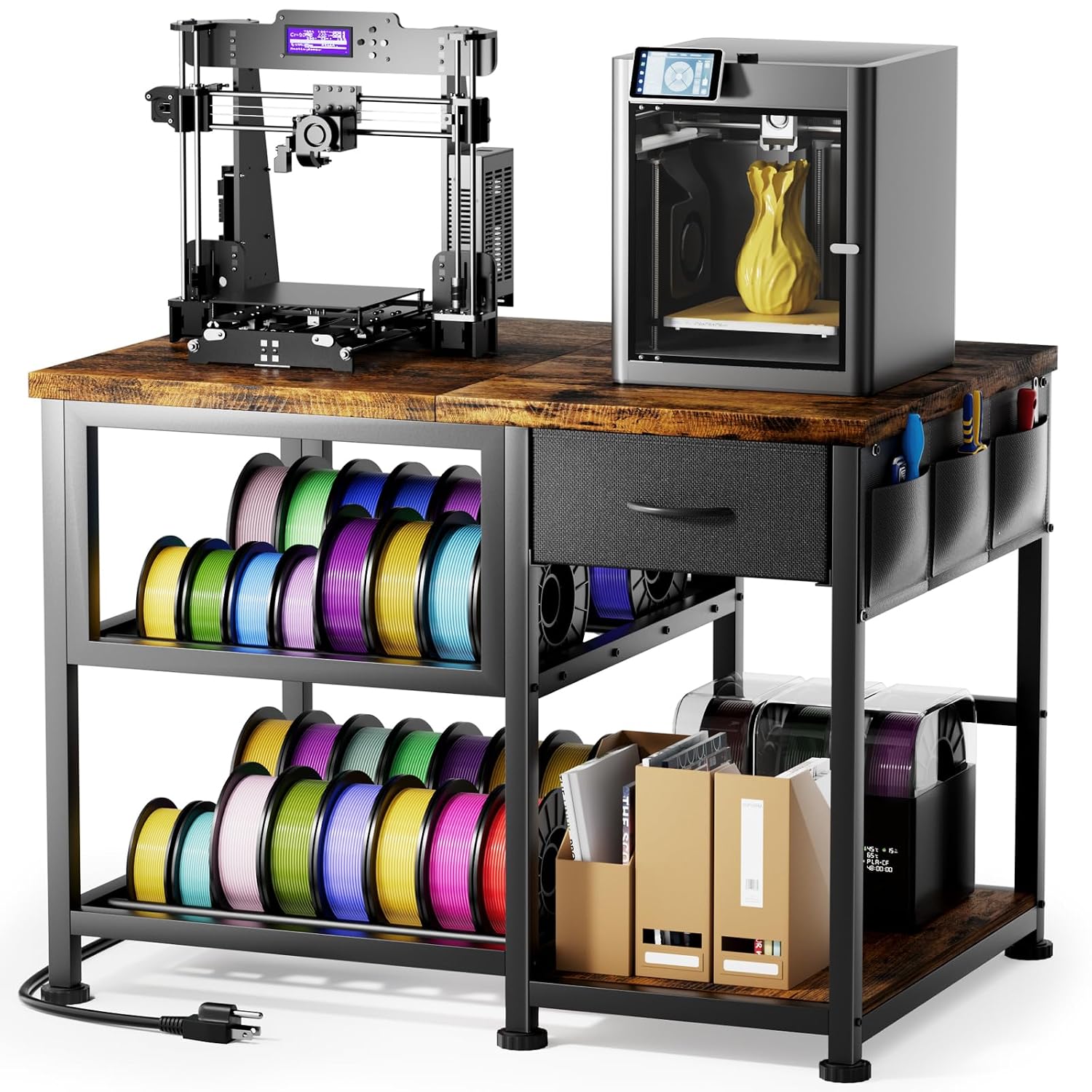
- Three-tier filament storage rack keeps multiple printing spools organized and easily accessible during projects.
- Built-in power outlet provides a convenient connection point for compatible printers and workshop accessories.
- Dedicated storage drawer and side pockets keep small maintenance tools, spare nozzles, and accessories organized.
- Wood and metal construction combines a practical printer support surface with a sturdy storage framework.
- - Space-saving workstation design brings filament organization, equipment support, and accessory storage into one location.
A Well-Organized 3D Printer Stand That Keeps Your Filament Within Reach
The GUULIBERA NS00202 3D Printer Stand is designed for people who want a dedicated printing workstation with convenient storage for filament, tools, and accessories. It combines a three-tier filament rack, a wooden work surface, metal framing, a storage drawer, and an integrated power outlet. For buyers comparing the best 3D printer stand options, its strongest feature is the amount of organization it provides without requiring several separate pieces of workshop furniture.
The NS00202 is offered in a brown three-tier configuration and weighs approximately 30.9 pounds. Its construction combines wood and metal, providing a dedicated surface for a compatible desktop printer while using the surrounding space for supplies. The integrated printer workstation and filament storage design is particularly useful for hobbyists who regularly switch between different printing materials.
The three-tier filament rack provides separate levels for organizing spools by color, material type, or frequency of use. Instead of leaving filament scattered across a desk, users can arrange their supplies where they remain visible and accessible. This is helpful for people maintaining collections of PLA, PETG, TPU, and other common printing materials.
The workstation also includes a storage drawer and side pockets for smaller accessories. These compartments provide convenient locations for filament cutters, cleaning brushes, spare nozzles, and other frequently used tools. The combination of filament shelving and accessory storage helps keep the main printing surface clear of unnecessary equipment.
One important consideration is printer compatibility. Buyers should measure their printer's complete operating footprint, including moving components, cable connections, and filament feeding equipment, before purchasing. The exact tabletop dimensions and individual shelf load ratings for this configuration should be confirmed with the seller.
The Three-Tier Rack and Power Outlet Make Daily Printing More Convenient
One of the most practical features of the GUULIBERA printer stand is its dedicated three-tier filament storage system. Each level provides a designated area for organizing printing materials, allowing users to separate frequently used spools from less common colors and specialty filaments. The three-tier filament storage rack is especially helpful when several projects require different materials throughout the week.
Consider a small printing business producing personalized desk organizers, replacement components, and decorative models. A typical day might involve black PETG for functional parts, white PLA for prototypes, and colored filament for customer orders. Keeping these materials arranged on the workstation makes it easier to identify available spools before beginning a print.
Organized filament storage can also improve inventory management. When materials are visible, users can identify partially used spools and avoid purchasing unnecessary duplicates. This becomes more important as the number of filament colors increases.
However, open filament storage does not provide controlled humidity. Materials such as nylon and TPU can absorb moisture from the surrounding environment, while PETG and PLA may also develop problems after prolonged exposure. Proper filament drying and moisture protection remain important when storing materials for extended periods.
For example, moisture-contaminated filament can produce popping sounds, excessive stringing, inconsistent extrusion, and rough printed surfaces. Keeping a spool on an organized rack does not automatically prevent these problems. Sensitive materials should be stored in sealed containers with suitable desiccant or dried according to the filament manufacturer's recommendations.
The integrated power outlet is another useful feature. Instead of relying entirely on separate extension leads, users have a convenient connection point incorporated into the workstation. The built-in power outlet and cable organization potential can help reduce clutter around printers and compatible accessories.
Imagine operating a desktop printer while using a filament dryer or another small workshop device. Without a planned electrical arrangement, cables can accumulate behind the printer or extend across the floor. A conveniently positioned outlet can simplify the layout, provided the connected equipment remains within the outlet's electrical rating.
Electrical capacity should never be overlooked. A 3D printer may draw substantially more power while heating its build plate and nozzle than it does during ordinary movement. Users should calculate the combined electrical load before connecting several devices to the workstation's power strip.
The storage drawer provides another practical benefit. Small accessories such as Allen keys, spare nozzles, replacement screws, and cleaning needles are easy to misplace when they are stored loosely on a workbench. The dedicated drawer for small maintenance tools creates a convenient location for keeping these items together.
For example, replacing a worn nozzle may require several small tools that are not used during every printing session. Keeping them in a designated drawer reduces the time spent searching through unrelated workshop supplies. It also helps prevent small metal components from being left near the printer's moving mechanisms.
The side storage pockets provide additional space for frequently accessed accessories. Depending on their dimensions, they may accommodate lightweight tools, small containers, or maintenance supplies. These compartments are useful for keeping everyday items accessible without covering the main printer support surface.
The wood and metal construction also deserves attention. Metal framing provides the structural foundation, while the wooden surface creates a practical area for supporting printing equipment. The combined wood and metal workstation construction offers a more specialized arrangement than an ordinary household side table.
However, stability depends on more than the materials alone. A printer stand must remain level and resist unwanted movement while the printer operates. Users should check that all frame connections are secure and that the completed workstation does not wobble before beginning a long print.
This is particularly important for printers operating at high acceleration settings. Rapid changes in printhead direction can transmit vibration through the supporting furniture. Excessive movement may contribute to visible surface artifacts, although printer calibration and motion settings also influence the final result.
The GUULIBERA workstation is designed to consolidate equipment and supplies into a relatively organized arrangement. This can be useful in home offices where a printer shares space with a computer, cutting equipment, or other creative tools. Keeping printing supplies in one location reduces the amount of general desk space occupied by accessories.
Printer clearance remains an important consideration. Some desktop printers have beds that move forward and backward beyond their stationary frames. Allowing enough room for moving printer components helps prevent mechanical interference with nearby walls, shelves, and cables.
Buyers should also account for external filament holders and multi-material feeding systems. A printer may fit on the tabletop while its additional accessories require substantially more room. Measuring the complete setup before assembly can prevent inconvenient changes later.
Assembly is required, and matching product descriptions indicate that installation hardware and instructions are included. Users should follow the supplied assembly sequence and tighten all fasteners correctly. The completed stand should be inspected before heavy equipment or multiple filament spools are installed.
Weight distribution is another important detail. Heavy printers should be positioned according to the manufacturer's loading instructions, and filament spools should be arranged without exceeding the capacity of individual storage levels. Balanced equipment placement and secure assembly help maintain a stable workstation during everyday use.
Ventilation should also be considered when selecting a location. FDM printers can release airborne particles and volatile compounds, depending on the filament and printing temperature. A dedicated printer stand improves organization, but it does not replace suitable ventilation, filtration, or an appropriate printer enclosure.
Why We Ranked the GUULIBERA Printer Stand Number Six
We placed the GUULIBERA NS00202 3D Printer Stand sixth out of seven because it offers useful organization and convenient accessories, but its overall configuration is less versatile than several higher-ranked workstations. The three-tier filament rack, built-in power outlet, and storage drawer provide practical everyday benefits. The combination of organized storage and integrated power access is its strongest selling point.
The filament rack is particularly useful for hobbyists who maintain several different materials. Keeping spools visible and accessible can simplify material changes and make it easier to monitor inventory. The drawer and side pockets also provide additional organization for tools that would otherwise occupy the printer's working surface.
However, the GUULIBERA ranks below our first-place ARTINRACK TR44 because it offers a more limited workstation arrangement. The ARTINRACK provides a wider dual-printer design, additional filament storage capacity, and a more extensive integrated power hub. Those features make the higher-ranked model more suitable for users operating multiple printers.
The GUULIBERA also lacks the enclosed filament cabinet found on the second-ranked MASHELLY workstation. Its open storage arrangement makes spools easy to access, but it provides less protection against airborne dust and environmental moisture. The open filament storage configuration may be less suitable for users who want to keep spare materials protected between printing sessions.
Another consideration is the limited verified information about load capacity and tabletop dimensions for this exact configuration. Buyers with larger printers should confirm that the workstation can support their equipment safely. A stand that works well for a compact printer may not be appropriate for a heavier enclosed machine.
The 30.9-pound construction is relatively manageable compared with some larger workstations, but overall weight alone does not establish rigidity. Users should evaluate the completed frame for movement and ensure the supporting surface remains level. Those operating high-speed printers may need additional vibration control depending on their equipment.
The built-in power outlet is convenient, although buyers should confirm its electrical specifications and placement before relying on it for several devices. The number of available connections may be more limited than on larger printing workstations. Users with multiple printers, filament dryers, and other powered accessories may require additional electrical planning.
Another limitation is that the open storage design does not provide active filament drying. Users working with moisture-sensitive materials will still need appropriate dry storage solutions. This adds equipment and may reduce the available space around the workstation.
These considerations explain why the GUULIBERA occupies sixth place rather than a higher position. Nevertheless, its practical filament rack and dedicated tool storage provide meaningful advantages over ordinary desks and basic utility tables. The combination of wood and metal construction also makes it suitable for home offices and creative studios where appearance matters alongside functionality.
Ultimately, we believe the GUULIBERA NS00202 deserves sixth place because it offers a convenient way to organize a desktop 3D printing setup while sacrificing some storage protection and expansion flexibility found in higher-ranked alternatives. Its three-tier filament rack, integrated power outlet, and dedicated accessory compartments make everyday printing tasks easier to manage. For hobbyists and small workshops that prioritize accessible supplies and an organized workspace, the GUULIBERA remains a practical and worthwhile choice.
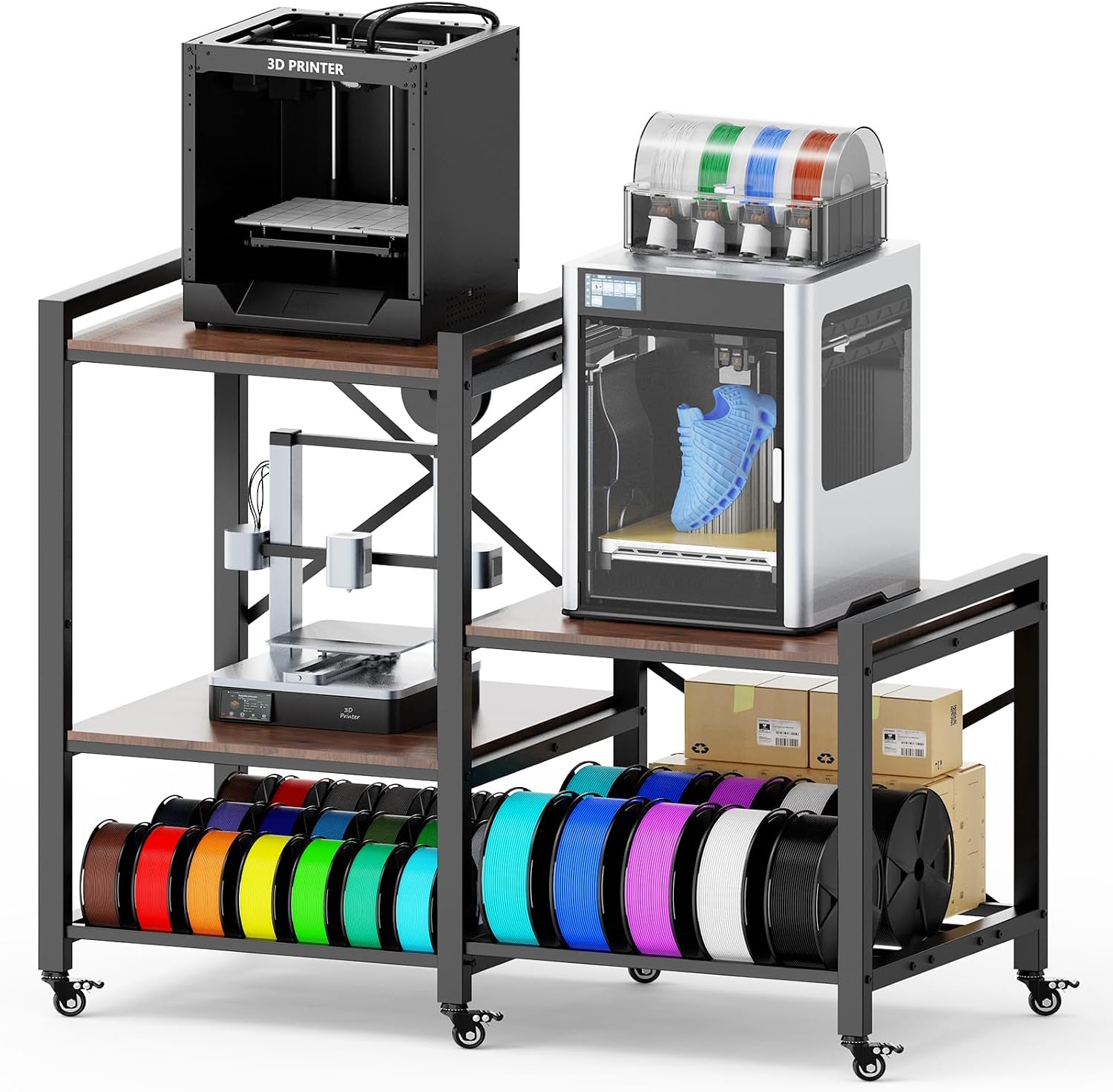
- Three-tier workstation design provides separate platforms for up to three compatible 3D printers.
- Reinforced steel frame with double X-shaped bracing helps reduce movement during printing.
- Side and lower filament racks organize multiple spools while keeping materials accessible.
- Lockable rolling casters allow convenient workstation repositioning and secure placement during operation.
- - Spacious 46.4-inch-wide design combines printer support, filament storage, and cable organization.
A Spacious Three-Tier Printer Stand That Prioritizes Equipment Storage
The Bloazzup JY-3DTable 3D Printer Stand is designed for makers who need a larger workstation capable of supporting several printers and keeping filament supplies organized. It features a three-tier arrangement, reinforced steel framing, integrated filament racks, and rolling caster wheels. For buyers comparing the best 3D printer stand options, its main advantage is the amount of equipment that can be organized within one dedicated workstation.
The stand measures approximately 46.4 inches long, 23.6 inches deep, and 39.3 inches high. Its wide layout provides separate working levels for compatible desktop printers, allowing users to organize multiple machines without placing everything on one tabletop. The spacious three-tier printer workstation design is particularly useful for small printing businesses, home workshops, and educational makerspaces.
Bloazzup advertises enough space to accommodate three compatible 3D printers simultaneously. This arrangement could be useful for someone operating different machines for prototyping, decorative printing, and functional components. However, buyers should measure their printers carefully because the available clearance varies between the individual levels.
The construction combines a black steel frame with high-density particleboard work surfaces. Reinforced structural components are intended to improve stability when supporting printing equipment and filament supplies. The reinforced steel frame and work surfaces provide a dedicated alternative to ordinary household furniture that may not be designed for continuous printing activity.
The manufacturer also advertises a total load capacity exceeding 660 pounds. This is a substantial claimed rating, although it should not be interpreted as the permitted load for every individual shelf. Buyers should confirm the manufacturer's shelf-specific weight limits and distribute equipment appropriately before installing several heavy printers.
The Reinforced Frame and Filament Racks Are Useful for Busy Workshops
One of the most interesting features of the Bloazzup printer stand is its double X-shaped structural bracing. The reinforcement is intended to reduce unwanted movement and improve the rigidity of the workstation. The reinforced double X-shaped frame construction is particularly relevant when several printers operate at the same time.
Desktop FDM printers generate repeated mechanical movement as their printheads and build plates accelerate and change direction. These movements can transmit vibration through the furniture supporting the machine. A rigid workstation can help reduce unnecessary movement, although printer calibration and acceleration settings also influence printing quality.
Consider a small workshop operating three printers throughout the day. One machine may be producing functional PETG brackets, another printing PLA prototypes, and a third manufacturing decorative objects. Having separate platforms for the equipment can make the workspace easier to manage, provided sufficient ventilation and operating clearance are maintained.
The three-tier arrangement also creates opportunities to organize equipment according to its size and frequency of use. Heavier machines should be positioned according to the manufacturer's loading instructions, while smaller printers may be suitable for other levels. Correct equipment placement and balanced weight distribution are important for maintaining stability.
One common mistake is assuming that a printer will fit simply because its base is smaller than the available shelf. Some printers have moving beds that extend beyond their stationary frames, while others require extra room for opening doors or accessing filament systems. Users should measure the complete operating footprint before installing their equipment.
The 23.6-inch depth is worth considering for larger printers. A machine may physically fit on the shelf but still require additional clearance behind it for cables or moving components. Buyers should also check the vertical distance between shelves, particularly when using tall printers or top-mounted filament holders.
Another important feature is the integrated filament storage arrangement. The stand includes side and lower racks designed to hold multiple filament spools. The dedicated filament rack and spool organization system helps keep materials accessible without requiring separate shelving.
For example, a maker producing customized products may regularly switch between black, white, red, and blue PLA while maintaining PETG and TPU for specialized orders. Keeping these spools organized near the printers reduces the time spent searching for materials. It also makes it easier to identify which colors are running low before beginning another project.
The lower filament racks can be useful for storing standard spools that are not currently installed on a printer. Keeping materials arranged by type or color also helps prevent accidental material selection. This is particularly important when a project requires specific temperature settings or mechanical properties.
However, open filament racks do not provide humidity control. Materials such as nylon and TPU can absorb moisture from the surrounding air, while PLA and PETG may also develop printing problems after extended exposure. Proper filament drying and moisture protection remain necessary when storing sensitive materials.
For example, moisture-contaminated filament may produce popping sounds, excessive stringing, inconsistent extrusion, or rough surface finishes. Keeping the spools organized does not automatically prevent these problems. Users should consider sealed storage containers, desiccant, or a dedicated filament dryer when appropriate.
The stand also includes storage areas intended to help organize cables and accessories. This can be useful when several printers require separate power connections, USB cables, and filament feeding equipment. The integrated cable and accessory storage arrangement helps reduce clutter around the machines.
Electrical planning becomes particularly important when operating multiple printers. Each machine can draw substantial power while heating its build plate and nozzle, especially during the initial heating cycle. Users should calculate the combined electrical requirements and avoid overloading outlets or extension leads.
The Bloazzup stand does not have a clearly documented integrated power hub in the matching product description. This means users may need to arrange their own electrical connections and cable routing. Power cables should remain clear of moving wheels, heated components, and areas where they could be accidentally pulled.
Mobility is another practical feature. The workstation includes rolling casters with locking mechanisms, allowing it to be repositioned when necessary. The mobile workstation with locking caster wheels is useful for workshop cleaning, equipment maintenance, and occasional rearrangement.
Imagine a shared workshop where printers need to be moved temporarily to create space for another project. A rolling workstation can make repositioning easier than lifting a heavy table. However, users should secure equipment and avoid moving the stand while printers are operating or their components remain hot.
The caster locks should be engaged before printing begins. Even small movements can affect stability when several machines are operating simultaneously. A level floor and correctly installed wheels are important for maintaining a consistent working environment.
Assembly is another consideration. Bloazzup states that the workstation uses numerous structural components and requires careful installation. Buyers should follow the assembly instructions closely and check all fasteners before placing equipment on the shelves.
The double X-shaped reinforcement may provide useful rigidity, but its effectiveness depends on correct assembly. Loose fasteners or incorrectly installed braces can reduce structural stability. Secure assembly and properly tightened frame connections help maintain the workstation's intended performance.
Ventilation should also be considered when operating several printers together. FDM printing can release airborne particles and volatile compounds, depending on the material and printing temperature. A multi-printer workstation helps organize equipment, but it does not replace appropriate ventilation or filtration.
Why We Ranked the Bloazzup Printer Stand Number Seven
We placed the Bloazzup JY-3DTable seventh out of seven because it offers substantial storage space and an interesting multi-printer layout, but its size and relatively basic accessory integration make it less universally convenient than several alternatives. The reinforced frame and three-tier arrangement are useful features for people operating multiple printers. The combination of generous workspace and filament storage remains its strongest advantage.
The advertised capacity for three printers is appealing, particularly for small printing businesses and serious hobbyists. However, the individual shelf dimensions and clearances must be checked carefully before purchasing. Some larger printers may not fit comfortably within the available space.
Another consideration is the absence of a clearly documented built-in power hub. Our first-ranked ARTINRACK TR44 includes integrated AC outlets and USB connections, which can simplify electrical organization for multiple machines. The Bloazzup requires buyers to plan those connections separately.
The open filament storage design is another limitation. Although the racks provide convenient access to multiple spools, they do not offer the enclosed storage found on higher-ranked MASHELLY workstations. The lack of enclosed filament storage protection may be inconvenient for users who want to reduce dust exposure or maintain more controlled storage conditions.
The large workstation dimensions can also be restrictive in smaller rooms. At 46.4 inches wide, the stand requires considerably more space than a compact single-printer table. Buyers working in apartments or small home offices may prefer a narrower workstation.
Assembly complexity is another reason for its ranking. The reinforced frame and multiple shelving levels involve more components than a simple printer table. Users should allow sufficient time for installation and confirm that the completed structure remains level and secure.
The advertised load capacity exceeding 660 pounds is impressive, but independently verified testing information is not available. Buyers should not assume that the entire claimed capacity can be concentrated on one shelf. The importance of verified shelf load ratings becomes greater when several heavy printers are installed.
These considerations explain why the Bloazzup occupies the final position in our comparison. It is not necessarily unsuitable for demanding printing setups, but its dimensions, assembly requirements, and lack of certain integrated features make it less convenient for a broad range of users. Buyers who prioritize compact construction or enclosed filament storage may find other models more appropriate.
Nevertheless, the stand provides several practical advantages for people who need a larger printing workstation. Its reinforced steel frame, multiple printer platforms, filament racks, and locking wheels address important organizational requirements. The design can help consolidate equipment that would otherwise occupy several separate tables.
Ultimately, we believe the Bloazzup JY-3DTable deserves seventh place because it provides a spacious and reinforced multi-printer workstation while requiring more floor space, careful assembly, and separate electrical planning than some higher-ranked alternatives. Its three-tier design and integrated filament storage remain useful for workshops operating multiple compatible machines. For buyers who have sufficient space and want to organize several printers in one dedicated area, the Bloazzup remains a capable and practical choice.