

3-in-1 charging quick guide
Verify each phone, watch and earbuds model against the exact station; check adapter requirements and included contents; compare upright, flat and folding footprints. Advertised peak phone wattage is conditional, not a measured constant.

- Qi2.2 magnetic charging delivers up to 25W output.
- Charges iPhone, Apple Watch, and AirPods simultaneously.
- TEC active cooling reduces heat during fast charging.
- Smart display shows charging power, temperature, and status.
- Adjustable phone platform provides up to 90-degree viewing flexibility.


- Qi2-certified magnetic phone charging delivers up to 25W.
- Charges phone, Apple Watch, and earbuds simultaneously.
- Official Apple Watch fast charger delivers dedicated 5W output.
- Weighted die-cast metal chassis provides excellent desk stability.
- Includes 45W adapter, global plugs, and braided cable.

- Qi2-certified magnetic phone charging delivers up to 25W.
- Charges phone, Apple Watch, and earbuds simultaneously.
- Integrated Apple Watch charger supports convenient daily charging.
- Flat charging pad design keeps bedside setups compact.
- Includes dedicated wireless areas for three everyday devices.

- Qi2.2-certified magnetic charging delivers up to 25W power.
- Charges iPhone, Apple Watch, and AirPods simultaneously.
- AirCool system operates quietly at approximately 19dB.
- Palm-sized folding body is particularly convenient for travel.
- Includes 45W USB-C adapter and five-foot charging cable.

- Qi2.2 magnetic charging delivers up to 25W power.
- Charges iPhone, Apple Watch, and AirPods simultaneously.
- Foldable convertible design works well for frequent travel.
- Adjustable magnetic stand supports portrait and landscape viewing.
- Includes 45W USB-C adapter and five-foot charging cable.

- Qi2-certified magnetic charging delivers up to 15W power.
- Charges iPhone, Apple Watch, and AirPods simultaneously.
- Foldable design packs compactly for travel and storage.
- Adjustable magnetic phone stand supports flexible viewing angles.
- Includes dedicated fast charging support for compatible Apple Watches.
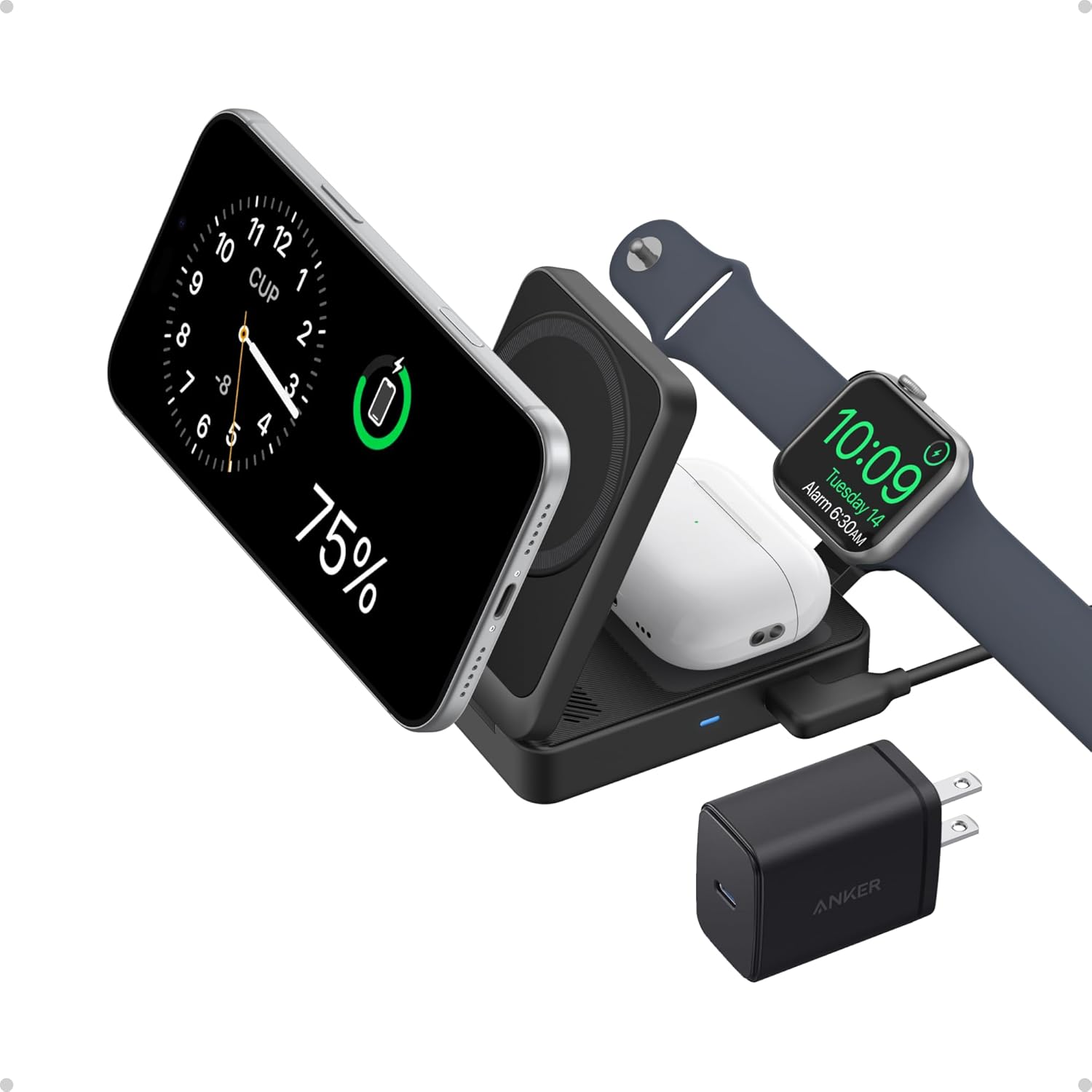
- Qi2-certified magnetic phone charging delivers up to 15W.
- Charges iPhone, Apple Watch, and AirPods simultaneously.
- Foldable design measures about deck-of-cards size when packed.
- Apple Watch fast charging supports compatible newer watch models.
- Includes 40W USB-C adapter and five-foot charging cable.
Extended buying guide
Map all three devices before choosing a station
A “3-in-1” charger is useful only if its three positions match the devices you own. Write down the exact phone, watch and earbuds case models, including their charging requirements. A phone's magnetic attachment is not the same question as its wireless charging support, and a watch position may use a brand-specific charging puck or module. Do not assume that a circular watch recess charges every smartwatch. Check the manufacturer compatibility list for the exact selected charger and each device, including any regional or model-year caveats. If a family member's phone or watch will share the station, check that combination separately rather than assuming the first supported set carries over.
Think through the normal evening routine. Is the phone upright for notifications, flat to reduce visual distraction, or folded into a travel bag? Will a large case, camera bump or grip interfere with the magnetic coil? Can the earbuds case sit squarely on its charging area without covering a cable? A lifestyle image illustrates placement, but it cannot prove electrical compatibility or steady alignment with your exact devices. If you need just one phone or accessory position, the wireless charging pad guide for office use may describe a simpler footprint than a three-device dock.
Understand advertised output, not just the largest number
A headline phone output such as 15W or 25W is generally a stated maximum under specified conditions, not a promise that every phone will draw that power continuously. Actual power can depend on device model, software, magnetic alignment, battery level, thermal state and the supplied input. Watch and earbuds positions may have separate limits, and charging all three devices together can change how a station allocates available power. Read the exact listing and manufacturer documentation for the selected variant rather than combining the maximum numbers from different versions into one imagined specification. A charger described as Qi2 should not automatically be described as Qi2.2 without exact evidence.
Ask what you need from the charger in practice. Overnight charging gives the device more time and may make peak phone output less consequential than alignment and bedside fit. Brief daytime top-ups may make documented power and adapter compatibility more important. Avoid treating a wattage label as a benchmark result: we have not measured the ranked stations. If the phone advertises a charging indicator, use it to confirm connection, but do not interpret one instantaneous display as a full-cycle performance test. The desk charging-station comparison offers alternative desktop layouts when a three-device station is not the only way to organize your setup.

Check the power adapter and cable
Many wireless stations require a particular USB-C power input or compatible wall adapter to reach their advertised operating mode. Whether an adapter comes in the box varies by exact listing, market and variant. Check the package contents and input requirements at the point of purchase; a photo containing a plug is not proof it is included. If you plan to reuse an existing adapter, verify its output profiles, total capacity and cable specifications against the charger manual. Avoid assuming that a connector that physically fits supplies enough power for the phone, watch and earbuds together.
Cable length can make a handsome bedside stand awkward. Measure from the intended location to a safe outlet or suitable power strip, allowing for the cord to bend without being trapped behind furniture. A stand with a detachable USB-C cable may be easier to pack or replace, but confirm the exact variant's connector and strain relief. Keep cables away from liquid spills and do not bury an active charger or adapter under bedding or papers. Follow the device and charger manufacturers' ventilation and safety instructions. If a station stops charging when multiple devices are attached, test a documented compatible input first rather than assuming the hardware is defective.
Choose a form factor for the room
An upright stand can keep the phone visible while occupying a smaller desk footprint; its height may conflict with a shelf, monitor or bedside light. A flat pad can fit under lower clearance but requires enough horizontal space for three device positions. Folding models can pack more easily, although hinges, cables and the adapter still take space in a bag. The right form factor is determined by the actual dimensions of the installation area, not by how compact it looks in a cropped image. Measure width, depth and height with the devices attached, then check where the cable exits.
For a bedside table, consider whether the phone screen faces you, whether indicator lights can be dimmed or turned off according to the manual, and whether the charging surface allows easy removal without pulling the whole station. At a work desk, check that the stand does not crowd the keyboard or cover a frequently used drawer. If you travel, verify whether the watch module stays attached during packing and whether regional plug needs are addressed separately. A charger that folds does not make its wall adapter disappear. The generated illustrations here show generic form factors; they do not depict the reviewed products or establish their features.

Account for cases, magnetic rings and alignment
A case changes both distance from the charging coil and the mechanical grip of a magnetic mount. Check the charger and case manufacturers' guidance for thickness, embedded magnetic rings and compatible accessories. A magnetically aligned phone can appear secure while a thick camera island stops it from sitting flat. Test landscape and portrait positions if both are important; a phone that rotates on an upright mount might overlap the watch location or hit the desk. Earbuds cases may also sit differently with protective shells. Avoid positioning coins, keys or other loose metal objects on an active charging area.
If charging is intermittent, take a methodical approach. Remove the case temporarily if the manufacturers advise it, reposition the device, confirm the right adapter, inspect the cable, and try each charging position separately. Watch modules are especially easy to confuse with generic small wireless coils; confirm compatibility rather than repeatedly shifting an incompatible watch. Heat can cause a phone to reduce charging power, so one warm evening is not proof that a stand always operates at the headline rate. Follow the equipment's troubleshooting guidance and stop using any damaged cable or station.
Compare thermal management cautiously
Wireless charging creates some heat during energy transfer, and temperature management can affect both comfort and charging behavior. A product may advertise a fan, vent, conductive surface or active cooling system, but those design labels are not measurements of temperature, noise or sustained power. The phone itself can alter charging behavior as conditions change. Leave the clearance specified by the maker, keep vents unobstructed, and avoid using a folded textile as a support surface. If a fan is relevant to a quiet bedside location, seek documented noise information or independent testing for the exact model rather than inferring silence from a photograph.
Use and storage environments matter too. A charger in direct sun, near a heater or under a stack of papers is not in the same condition as a ventilated desk. Check the operating-temperature range in the manual if the location is unusual. Dust around connectors and vents deserves periodic cleaning according to the manufacturer's instructions, with power disconnected as directed. Do not treat a generated visual or a star score as evidence of cooling performance. The most useful comparison asks what the cooling feature is meant to solve for your charging routine, then checks whether independent data exist before paying extra for the claim.

Shop the exact version and keep the layout usable
Before checkout, compare the selected color and model against the manufacturer's product page, not only a search-result title. Model families can contain generations with different phone output, watch compatibility, adapter inclusion and folding geometry. Read the seller's full package list and current return terms; stock and bundles can change. Keep a short checklist: exact device compatibility, phone output conditions, watch module, earbuds position, input adapter, cable length, footprint, foldability and light controls. If one of these is unclear, ask the seller or choose a listing whose documentation answers it rather than supplying the missing detail yourself.
When it arrives, arrange all three devices in the real location before discarding packaging. Confirm each position connects, that the cable reaches cleanly, and that removing the phone does not knock over the watch or earbuds case. Check the station with your everyday cases and charging schedule. A simpler layout that consistently fits your desk may be preferable to a feature-rich dock whose cable or footprint gets in the way. The seven original published cards above remain unchanged in this additive draft—including images, descriptions, scores and links. This buying guide helps readers interrogate those inherited claims; it is not a hands-on test or certification of their advertised charging rates.
Budget for the complete bedside or desk setup rather than the station alone. A separate compatible adapter, a longer cable, a travel pouch, or a case change can alter the effective purchase cost. Do not assume an accessory shown beside a charger is bundled. Keep packaging and documentation until you have checked all three of your own devices in their usual cases, in the room where the station will remain.
Frequently asked questions
Does 3-in-1 mean every watch will charge?
No. Check the exact charger’s watch-module compatibility list against your watch model, not just a photograph of the charging position.
Will a 25W label mean my phone always charges at 25W?
No. It is an advertised maximum under specified device, alignment, input and thermal conditions, not a continuous measured rate for every phone.
Is the wall adapter included?
Package contents vary by exact listing and market. Check the selected variant’s box list and input requirements before buying.
Will a thick phone case work with magnetic charging?
Case thickness, ring placement and camera shape can affect alignment. Follow the charger and case manufacturers’ compatibility guidance.
Is a folding model necessarily better for travel?
It may save space, but account for the cable, wall adapter, watch module and protective packing as well as the folded dimensions.
Why does one device intermittently stop charging?
Check alignment, the selected device’s compatibility, its case, cable and documented adapter input. Follow the manufacturer troubleshooting instructions and stop using damaged hardware.